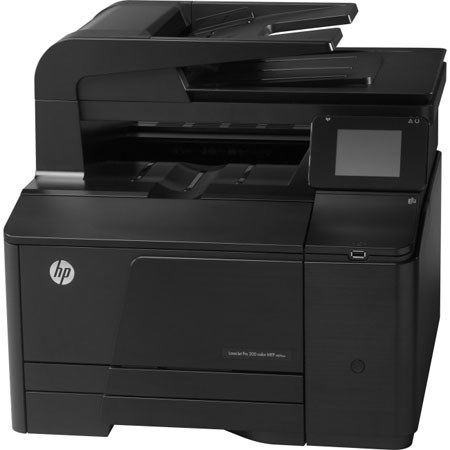
HP LaserJet Pro 200 M276nw Color Multifunction Printer, 600x600dpi, 14 ppm Print Speed - Print, Scan, Copy, Fax
SKU: IHPLJM5276NW
This item is no longer available.
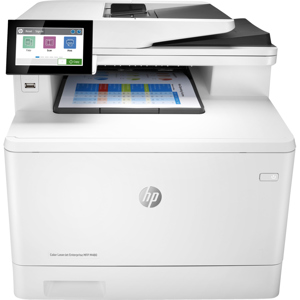
Recommended Alternatives
Share:
Overview
Compare
Learn
Specs
Protection
Reviews about this item
Review Summary
2018-11-17T19:00:00
Rated 3 out of 5
Good for a couple years, then not able to repair
We have enjoyed the use of this printer, but just after purchasing the first round of replacement toner (not inexpensive), it no longer works! The error comes up that the back door is open and paper jam. We have followed the troubleshooting steps to no avail. Trying to find somewhere local to see if anyone can have a go at it before it's trip to rubbage. Hope to find a more dependable printer next time.
Julie C.
Originally posted at
2016-03-03T19:00:00
Rated 1 out of 5
3 year life span
My Hp Laserjet Pro 200 Color Mfp M276nw printer is 3 years and 1 month old. The wireless card no longer works and the printer can only be accessed by cable. It cannot be repaired. In addition to this problem, the photo printing quality is very flat and the toner is very expensive.
OfficeMaid
Originally posted at
2015-12-27T19:00:00
Rated 1 out of 5
Bad Printer!
I have had this printer for about 2 years and this past year it has given all kinds of problems! First of all it is SLOW! Paper gets "jammed" all the time even if there is NO paper really jammed. Always is saying that the "front door" is open when it is not. Takes too long to connect to the computer to print. Says network is not connected too much. I do not recommend this printer!
1994gd
Originally posted at
2015-08-18T20:00:00
Rated 4 out of 5
Good Printer
The PROS: This printer performs expectantly well considering the very low price I paid for it. Then again it is HP. It prints well - never any toner spots on papers, no jams or misfeeds, and the color on the graphics and picures is perfect. This printer does not disappoint. I've been using it for two years, and it works as well as the day I bought it, and I print with it everyday, as long as I have toner. The CONS: I have paid more for toner than I paid for the printer. Surely HP can lower the cost of the toner cartridges at least 30% by now. It's extremely expensive to buy four toner cartridges at one time, especially for someone who lives off his SS benefits. The printer does print at 14 pp per minute, a little slow, but I knew that when I bought it. The biggest problem I have with this printer is how frequently I have to refill the paper tray. It simply doesn't hold enough paper for a printer this size. It should hold a minimum of 300 sheets. I looked on the HP website for an additional tray for this printer because that would solve a lot of problems for me, but there is none available. This printer needs a larger capacity paper tray. It needs the ability to add two additional trays of 300 sheets each with each one being able to hold letter and legal size paper. Suggestions to HP: 1. Make available a paper tray to add on that holds at least 300 sheets. 2. Lower the price of the toner. You do offer discounts, but for one who has only SS Income, it's too expensive, and I'm sometimes without a printer because I can't afford four toner cartridges at one time. 3. A printer like this should have two trays that can hold legal and letter size paper. 4. This printer would be phenomenal if it printed files that require legal and letter size paper and will auto detect which size paper to use from the two trays.
BP1923
Originally posted at
2015-05-12T20:00:00
Rated 5 out of 5
The product has great quality!!
We are extremely pleased with the color printing. But what is even more important the scans are crisp and clear!! Better than any traditional copier!
Sally53
Originally posted at
2015-04-29T20:00:00
Rated 5 out of 5
This LJ seems bulletproof
I expect this HP LaserJet Pro200 to last as long as my recently deceased LJ2. I also expect this LJ will be as 'Bullet Proof ' as that old LJ2. I do like the Touch Screen, the layout and the ease of setup and setting features.
Aerographer2nd
Originally posted at
2015-04-29T20:00:00
Rated 4 out of 5
great price to break away from expensive inkjet pr
We enjoyed the easy setup, the printer installed on our iMac 2011 model, MacBook Air, iPads and iPhones with very little effort. Wireless printing from any room in the house VIA wifi. Print quality is great even on images.A all-around great printer value, the toner will last for a very long time.
johnnypleasant
Originally posted at
2015-04-28T20:00:00
Rated 4 out of 5
ease of use
I am mostly satisfied with my new printer. I found that sometimes it doesn't copy the exact color of the original. I still don't know how to enlarge items. I wish it came with a manual on how to use it instead of trying to search out answers online.
Sharan52
Originally posted at
2015-04-28T20:00:00
Rated 4 out of 5
good multi-function device
Overall, I am very happy with this unit. Copy/print quality and speed are what I expected. The only thing I am a little disappointed in is how long it takes to scan to e-mail and send that scanned image, but for the number of scans I have to do it's something I can live with. The initial set up was not as easy as I hoped. I had to get HP tech support involved, which I don't feel should be necessary given all the "plug'n'play" devices available today.
bart58
Originally posted at
2015-04-28T20:00:00
Rated 4 out of 5
Printer is being used by sales Department
Sales department is using this for everyday use and prining color presentations for customer calls and business reviews. Was using an inkjet so laser is much improved.
PF227
Originally posted at
2015-04-28T20:00:00
Rated 1 out of 5
Really Dislike this printer!!
The product appeared to have what I needed on the outside, from the marketing and descriptions online. It is noisy, squeals all the time, slow, SLOW. The document scanner is off somehow, so copying is difficult to make sure you don't cut off the side of the document. I haven't had time to try to figure out how/if this can be adjusted, because the documentation and information is MASSIVE, and not user-friendly - lots of words, not much usable info. The paper feeder misfeeds at least half the time. The worst thing is it eats toner like crazy. Expensive toner. I wouldn't recommend this one to anyone. Sorry.
cheritutor
Originally posted at
2015-04-28T20:00:00
Rated 5 out of 5
Works great . No problems
This was a upgrade from an HP G85 Inkjet that I have had for 13+ years. Has all the same features but runs faster. Great Choice.
MstrCarp1701
Originally posted at
2015-04-28T20:00:00
Rated 5 out of 5
Easy Installation and Excellent Tech Support
This color printer prints fast with an easy installation. A HP tech support call resolves a scanning problem quickly by re-installing the full-software by a support technician. Buying HP product is worry free.
JELI
Originally posted at
2015-04-28T20:00:00
Rated 5 out of 5
Excellent printer.
I bought this printer for my daughter and son in-law who just started their own eye practice and they said it works great!
JanG
Originally posted at
2015-04-28T20:00:00
Rated 5 out of 5
Good printer
Works great! Fast delivery
Jengift27
Originally posted at
2015-04-27T20:00:00
Rated 5 out of 5
Perfect for Me
A friend and I are starting a business. We needed an All-in-One for obvious reasons. We are just starting so cost was a consideration. Needing a Professional printing capacity, Color Laser was required. A high resolution scanner and copier were also needed. Ironically, we did not think we needed the FAX. Since we have it anyway, it has been used a lot. The bottom line is that this is a HIGH Quality product that gives professional results. I was also happy that I could print directly and wirelessly from my Smart Phone. This printer is wirelessly connected to 5 PCs/laptops in the house. Anyone who brings their laptop can also be allowed to attach.
Vandy69
Originally posted at
2015-04-27T20:00:00
Rated 5 out of 5
Excellent
I've always owned HP products because no other company offers a product with the features that I need at an affordable price, plus I can always rely on its dependability to do the job. In the past I relied on an ink-jet printer, but after talking with friends who own laser printers, I came to realize that I would be able to produce photos of a much higher quality & use toners that would, in the long run be more economical due to the amount of printer use for my needs. I am and always will be an advocate for HP products.
Bonnie16
Originally posted at
2015-04-27T20:00:00
Rated 5 out of 5
LoveThis Printer
Love this printer and have purchased over 50 of them in the last few years for my company. Very disappointed that it has been discontinued without notice. There are no comparable models - you either go to the personal printer (not mfp) or the work horse (over $200 more) which is not needed for a small home office.
HomePrinter
Originally posted at
2015-04-27T20:00:00
Rated 3 out of 5
Great quality print; jams on legal paper
Overall I am pleased with the performance of this printer. The color quality and sharpness are spot on. Also, installation on my home wireless network was very quick and easy. However, I am very disappointed that the printer jams when printing on legal paper. This happens every time you print a multi-page legal document. It will begin printing the first page and it appears to try to draw in a new sheet of paper before the first is fully printed. This causes the first page to have an incomplete print and the second page to jam. Had I known there was this issue with this printer, I probably would have purchased a different one. In closing, I wish I had known about the legal paper jamming issue prior to purchasing. Were it not for the paper jamming, I would give a 5-star rating. If you will be printer on 8.5" x 11" paper, this printer will probably be a great fit for you. However, I would purchase other printers if you plan to print large quantities of documents on legal paper.
SquatchWatchGear
Originally posted at
2015-04-27T20:00:00
Rated 4 out of 5
Good printer, works well for my home office
I really like the print quality, and the clarity of pictures. However, I really wish this printer had a bypass feed for envelopes etc. I should have been looking for that feature. I just assumed all printers had a bypass feed. otherwise it's a very nice printer.
mickkay
Originally posted at
2015-04-27T20:00:00
Rated 4 out of 5
Great value
I was generally pleased with this printer. It was a little difficult to get it connected to all of our devices but eventually with some help we were successful. We eventually returned it to get more functions but were happy while we had it. the print quality was great.
RoyS
Originally posted at
2015-04-27T20:00:00
Rated 4 out of 5
Go to AIO
I've put out over twenty of these at my remote offices and each fills that need perfectly.
Happy2015a
Originally posted at
2015-04-27T20:00:00
Rated 4 out of 5
I love this printer
This little printer puts out great color and BW copies. In fact, it makes scanning so fast that I wonder how I lived without it. The only thing that sometimes bothers me is printing an envelope: You have to take out the paper tray, remove the paper and place the envelope in the tray. But in order to be light and more compact than the huge All-in-One we used to have, I understand why they couldn't build in a manual scanner.
kokanee
Originally posted at
2014-09-12T20:00:00
Rated 3 out of 5
Good but somewhat complicated
If you like a complicated product, this is the copier for you. It is a well built copier, but I have some problem with the fact that it has a 300 page manual, implying lots of features and accompanying complication. In this fast paced world I like things that are based on KISS not complication. Otherwise, the machine performs well. Oh the other new feature I don't really understand is why it is a good idea to connect it to the internet. I'll explore this feature when I have a little more time in the future. Thanks for reading and good luck.
Rich00000007
Originally posted at
2014-09-12T20:00:00
Rated 2 out of 5
Don't buy this printer for the fax or scanner
This printer is supposed to fax and scan, but what you're not told is that you must belong to a network to use those features. There is no mention of this fact on the box. HP does not have a laser printer with the capabilities I need. Definitely a waste of money.
writer14
Originally posted at
2014-08-31T20:00:00
Rated 4 out of 5
Great product for all printing needs
I have been using HP printers for more than 20 years and this one is one of the best HP has ever offered. It is very easy to use and operate. Printing documents starts immediately upon clicking the print button. The quality of the documents is beyond my expectations. The only negative I have is that duplex printing is not automatic. For a printer of this quality and sophistication, it is surprising that HP doesn't include automatic rather than manual duplex printing. I have found this to be true in many of the higher priced printers that HP offers. I once questioned a tech support agent about this and his answer was that some features have to be sacrificed for price. I found that to be a rather odd comment. I would have given this a five star rating if not for the lack of automatic duplex printing.
Benji
Originally posted at
2014-08-01T20:00:00
Rated 4 out of 5
Great Printer - Toner Level Report Inaccurate
Great printer for the price and love the wireless feature. Easy to set up. The only con that I have with the printer is that the toner level reports are very inaccurate. I was told to replace supplies and was still able to print over 200 legal size pages without any fading.
MKoly
Originally posted at
2014-07-11T20:00:00
Rated 5 out of 5
Really great color laser wireless network printer
I can now scan 10x faster than my other scanner (hp 4310 inkjet all-in-one) in much better quality, make beautiful copies in both b&w and color, print not only from my USB connected iMac but also from my MacBook Air from anywhere in the house... b/c this thing is wireless network ready. I turned on the wireless capability on the printer, and then simply went to print something on my MacBook and it gave me the new hp LaserJet Pro 200 as a choice, I selected it, and after about 10-15 seconds of setup time, the printer was fully functional on my print menu, I hit PRINT and a few seconds later the document was on my new printer. Just absolutely amazing. Easy and very quick setup... didn't even need the included DVD rom as my Macs both just saw the printer and downloaded appropriate driver software. It's big, but I like big, and it's not too big for my personal setup. It's super cool looking, super functional, makes great copies and scans, and was priced right in the same ballpark as others in it's class based on my research. The only even slightly negative issues I would share are: I feel this printer is a bit noisy based on other reviewers saying how quiet it is and my expectations being off a bit... it's not that quiet. Also, as mentioned in other reviews, the paper try is very shallow and holds far less paper than it should for a workhorse like this (it should hold 1 full ream - 500 sheets - minimum, but it holds less than 1/2 ream). That's it, the only 2 things that aren't amazing aren't that big of a deal at all. I love this printer (so much so that I bought 2... one for my office (4 employees) and one for my home office (just me). Works like a charm both places and now I can stock just one type of toner refills. Bottom line: BUY THIS PRINTER. Peace & love.
dsamuel24
Originally posted at
2014-06-24T20:00:00
Rated 5 out of 5
Print from anywhere
I love the fact I can print from anywhere. From my phone, my laptop or my desktop. The photo prints are crisp and clean.
7Dwarfs
Originally posted at
2014-06-16T20:00:00
Rated 4 out of 5
Overall excellent quality
Easy to set up for first use, easy to use touch control display, excellent quality printing. Not quite as fast as I expected, but acceptable for my normal use (home/personal, not business).
1auburnfan
Originally posted at
HP M276nw Specifications
Related Articles & Videos
About HP M276nw
Streamline office tasks with this wireless-enabled HP LaserJet Pro 200 M276nw Multifunction Printer provides touch screen access to business apps. It's print from virtually anywhere with HP ePrint. Boost productivity with versatile scan, fax and copy options. This ideal for printing color at the office and streamlining workflows; completing fax, copy and scan tasks with ease; and printing from virtually anywhere.
What's in the box:
- HP LaserJet Pro 200 M276nw Color Multifunction Printer
- Pre-installed introductory HP LaserJet Color Toner Cartridges (Black/Cyan/Magenta/Yellow) (Yield: 700 pages)
- Power Cord
- Phone Cord
- USB Cable
- HP 1 Year Warranty