
This item is no longer available.
Review Summary
2009-04-02T20:00:00
We've used this printer on a daily basis for the last year and the only thing I have to do is press the print button. When I set it up I had hoped that I could connect it to a pc via USB and via the network. It doesn't do that, but maybe that was asking too much anyway
Alan61

2009-01-04T19:00:00
Replaced another printer that broke. Very nice machine. Need it for printing and sending reports printing of purchase documents, etc. Very smooth
Suevar
2008-10-15T20:00:00
This printer is networked in a small office. We replaced an HP laserjet 1100. This was a great work horse but the P2015 is soooooo much more! To say we are happy is an understatment.
Dodgerfan

2008-02-25T19:00:00
I have always liked HP laserjet printers, but this one was a bit of a let down. The ethernet connection to the network was unstable and I had to finally switch the connection to USB (of course meaning I had to buy a hub to fit this additional item into my system). There is no display panel to let you configure things. The trays don't auto recognize from the print window, making you have to remember each time you are printing on a different tray or paper size. Not too fast and very loud when printing.
AOSmacuser

2007-11-20T19:00:00
This printer prints faster and even prints web pages as i see it. I am totally amazed how this printer can print webpages in colors that i see in my monitor!
JohnJoe

2007-11-08T19:00:00
I've got 3 of these printers in our commany now all with the same issue, the paper doesn't feed well on large print jobs. It won't pull from the paper tray and you will be forced to open/close the tray several times on one large job. Stay away from this printer!
Matt77

2007-08-06T20:00:00
Right out of the box: Fast hook up and network set up. Prints first page within 4 to 8 seconds, prints following pages right at 25 to28 pages a minute. Good standard paper tray capacity. Small foot print and low price. Good quality for the price, which is right for any small business. I use this unit as my default printer every day. Not sure why I did not upgrade from my 8 page per minute printer a year ago. I would recommend this HP printer to all my small business associates.
DocChuck

2007-08-01T20:00:00
THE SPEED AND ECONOMY IN THIS ONE PRINTER FITS MOST OF MY PRINTING NEEDS. SAVES ON PAPER COST BY PRINTING ON BOTH SIDES. SAVES ON THE COST OF INK BY THE LASER METHOD. FIRST COPY SPEED IS EXCEPTIONAL, AND 27 COPIES/MINUTE IS GREAT!
JESSE

2007-07-19T20:00:00
Installed this printer on my home network without any difficulties. Followed instructions by first installing the HP software on each of the computers that would be accessing this printer. The computers connected to the network utilize XP, Vista, Mac OS X opertating systems. All computers have successfully accessed this printer through the network and was able to print different types of documents with no issues. I was pleasantly surprised to have my Mac able to print since I was experiencing problems with an older printer not able to print over the same network. Overall, very happy with this printer and its ability to work over a network. I would recommend this printer to others operating in a mixed OS environment, Before I forget, great print quality and fast!
JeanLouis

2007-07-11T21:00:00
This printer is very fast and produces high quality printing. [...] had a great deal on the printer and were very quick to ship. The only negative I have is regarding the documentation for setting the printer up. I had a very difficult time getting the computers on my network to see and use the printer. I have one each OS of 98SE, Vista, RHEL4, Fedora 7, and two XP machines. The XP and Vista machines were not difficult, but the 98SE and Linux boxes took a lot of time to get things working. Just a little guidance from the manual would have gone a long way.
Ped7
2007-04-21T20:00:00
I have had the P2015dn for a little over a month and I love it. I print tax returns and the fonts load quickly and the print speed is great. The duplex feature works flawlessly. The quality of the print is exceptional. I had no problem setting the printer up as a network printer using the ethernet connection on the DSL modem/router.The small footprint, front sheet feeder and large paper tray are plus features. I would recommend this printer to anyone
Dan142

2007-04-18T20:00:00
I am generally delighted with this LaserJet replacement for my beloved HP4 that had to be retired after long service. The only problem with the new one is that I've had to use two different drivers to make all printing jobs work. One driver prints a page of tables and data but does not print labels and nametags in half page sizes. The other driver prints the labels and nametags, but doesn't print the data tables.
jeanr

2007-04-07T20:00:00
this is the first hp laser jet I have purchased since about 1987 that does not have a full set of built in fonts. I assume, but have not been able to find, that fonts are available. aside from that problem - very major for my use - the printer seems to be outstanding
martin

2007-03-19T20:00:00
I have no problem setting up the printer in a network situation, but there is no driver for vista, and it never fully installs using the disk included. Other than that the printer is great. The print quality is good and is quick. I wish it had a little more memory but that is minor.
waltburk

2006-12-23T19:00:00
Seems to be a nice workhorse printer for the small office. Just purchased and already finding some unique feaures that will make life easy for us down the road. Would recomend for the small to medium home office that uses their printer on a daily bases.
Ernesto

Accidents happen where life happens. Protect your favorite Adorama products and purchase a protection plan to stay covered from accidental damage, mechanical or electrical failure, and more.
If we can’t fix it, we’ll replace it at no additional cost.
Protect your product from drops, spills, and more.
Enjoy your gear without fear. We have you covered!
When regular use of your product over time results in mechanical or electrical failure.
We will never charge you a deductible after the purchase of a plan.
Our claims process is simple & easy and our customer service team is happy to help.
Adorama Protect powered by Extend is available for purchase to customers in the United States. Not available for purchase Internationally or in U.S. Territories.
Browse our FAQ
Up to 27 ppm, letter
Less than 8.5 seconds from Sleep mode (letter)
Up to 1200 by 1200 dpi; HP FastRes 1200
400 MHz
80 MB RAM
32 MB, expandable to 288 MB through one open 144-pin DIMM slot; one slot available for 8 MB Flash/64 MB DDR2 combo 144-pin DIMM
15,000 pages per month
Recommended monthly page volume: 740 to 3000 pages
50-sheet multipurpose tray 1, 250-sheet tray 2
125-sheet output bin
Automatic duplexer
Multipurpose input tray 1: 3 by 5 in to 8.5 by 14 in (76 by 127 mm to 216 by 356mm)
250-sheet trays 2 and 3: 3 by 5 in to 8.5 by 14 in (76 by 127 mm to 216 by 356 mm)
Automatic two-sided printing unit: letter, legal
Multipurpose input tray 1: 16 to 43 lbs (60 to 163 g/m2)
250-sheet trays 2 and 3: 16 to 28 lbs (60 to 105 g/m2)
Automatic two-sided printing unit: 16 to 28 lb (60 to 105 g/m2)
Paper (bond, light, heavy, plain, recycled, rough), envelopes, labels, cardstock, transparencies, heavy media
Hi-Speed USB 2.0 port, IEEE 1284-B compliant parallel port, two open EIO slots, HP Jetdirect Fast Ethernet embedded print server
Hi-Speed USB 2.0 port, HP Jetdirect Fast Ethernet embedded print server
Windows 98SE (printer driver only), Me (printer driver only), 2000, XP Home, XPProfessional, Server 2003; Mac OS X v 10.2.8, 10.3.9, 10.4.3
TCP/IP via HP Jetdirect print server
13.8 x 14.3 x 10.1 in
24.3 lb (11 kg)
Recommended: 63.5 to 77 degrees F (15 to 32.5 degrees C)
32 to 95 degrees F (0 to 35 degrees C)
Recommended: 30 to 70 percent; non-operating: 10 to 80 percent
Active: 6.4 B(A), Ready: inaudible
Bystander sound pressure Active: 50 dB(A), Ready: inaudible
110-volt models: 110 to 127 VAC (+/- 10 percent), 60 Hz (+/- 2 Hz)
220-volt models: 220 to 240 VAC (+/- 10 percent), 50 Hz (+/- 2 Hz)
Printing (active): 350 watts
Ready, Sleep: 7 watts
Off: less than 0.1 watts
Energy Star compliant
Typical Electricity Consumption (TEC): 1.816 kWh/Week
HP 1 year limited warranty


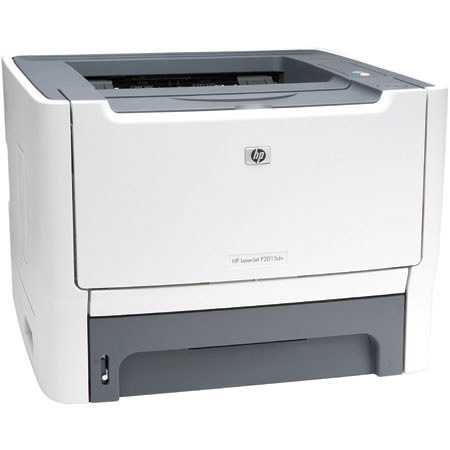
Do more, wait less Improve workteam productivity. The small but powerful HP LaserJet P2015 Printer series features print speeds of up to 27 pages per minute (ppm). Instant-on Technology delivers a quick first page in less than 8.5 seconds from Sleep mode, so you can.
Expect the printer to work efficiently and keep costs down. Integrated networking technology1 makes it easy to share the printer among workteams without compromising printer performance or document security. The printer also supports Hi-Speed USB 2.0 connectivity, which provides data transmission speeds of up to 480 mbps for fast printing and easy expansion.
Share great performance. The HP LaserJet P2015 Printer series features a 400 MHz processor and 32 MB standard memory, expandable to 288 MB. Now you can handle large, graphics-intensive files and get a quick return to the print job's application, as well as increased uptime.
Work with less interruption. Professional-quality printing is easy with tried-and-true Original HP LaserJet print cartridges. HP Smart printing technology achieves consistent and outstanding print quality, enhances reliability, and makes the system easy to use and maintain. You can receive automatic alerts when toner levels are low, and utilize convenient, online ordering with HP SureSupply.
Quality in a compact package
Make a great impression. The printer delivers true 1200 dpi output for professional-quality documents, including high-visibility reports with complex charts and graphics.
Save space. Sleek and attractive, this compact printer is designed for minimal tray protrusion and fits easily on crowded desktops.
Rely on the HP printing system. HP toner, printers, and papers work together. The toner transfer and fusing processes of the printer are designed around HP toner to optimize print quality and deliver high-speed performance. Uniform toner particles enable precise placement and control for crisp and consistent print quality.
Easy to set up, use, and manage, Spend less time reloading. The 250-sheet input tray lets you enjoy long periods of continuous printing, while a 50-sheet multipurpose tray supports a broad spectrum of special paper in addition to traditional paper sizes. An optional 250-sheet tray 3 and two-sided printing can increase your printing power even more.
Get instant access to printer status, documentation, and more. Our simple, browser-based management tools allow you to check and alter printer settings and set up automatic alerts to meet your changing needs. HP Toolbox offers a user-friendly interface that provides one location for all printer information, including documentation and self-help. The HP Embedded Web Server enables one-to-one network printer management via any standard web browser. HP Web Jetadmin lets you easily manage and proactively maintain a fleet of network peripherals. Create powerful, professional communications easily.
Join VIP PRO
Earn 2X Points + Exclusive Perks!
Request a Callback
Chat one-on-one with an expert
Sell or Trade your Gear
Get started in 3 easy steps








