



This item is no longer available.
Review Summary
2012-05-01T20:00:00
This printer was very easy to add to my network. I'm running this printer off a Gigabit Ethernet Switch, a wireless home network and a direct USB wire all at the same time. If I can do this anyone can, I'm not a computer geek. I would refer this printer to anyone that wants a printer at a good price and don't need all of the frills.
gwilli20

2012-03-14T20:00:00
This is one of the worst laser printers that I have ever had. I have had constant problems with this machine and its compatibility with Windows 7. It's a shame because when it works, it seems like a very solid machine. However, the drivers have never performed satisfactorily with the Windows 7 OS from what I have read online. HP has not produced a decent driver despite pleas all over the internet. As a result, sometimes the unit does not print at all, sometimes the unit requires a button on the machine to be depressed before the spooled copies are printed, and sometimes it prints, but the "see what's printing" popup never clears. Oh and sometimes it works quickly and efficiently.
Morealive
2011-12-20T19:00:00
This printer's driver has an issue with Win7 64bit. First, the driver that is available is a local usb driver not a network driver as it claims on the download page. During installation a step appears and asks you to connect with usb cable. Its on the NETWORK!! Anyways, if you can get the wsd port to appear this will work on the network with no issues. Printing to the port IP will not work correctly. I found if I connect it to the port remove then run the install it will connect it using the wsd port.
TJohn
2011-11-26T19:00:00
I Had this printer over a year maybe closer to two years. It has performed very well for me. I was hammering my inkjet out. It couldn't handle 10 printouts without jaming or saying its running out of ink. I can't complain when something works well and does it job.
drauth
2011-10-23T20:00:00
No problems in Windows environment, but won't print from iSeries. Had to upgrade.
ChrisDinIT
2011-08-16T20:00:00
I have owned 10 or 15 ink jet printers over my working career-starting with the 500 series. This was my first laser jet-and I like it a lot. In fact I bought one for home and one for the office. Now my whole office (all 5 engineers) share it. I have zero problems with Win 7, XP or Leopard X. The device is very fast, quiet, and inexpensive to use. One reviewer pointed out the low indicator comes on to soon, and he is correct. You can use the cartridge much longer then indicated. That is the only flaw. As for the toner or laser cartridge, you can buy from HP or go to a second source on the net, which is what I do with no problems. All in all this is a great printer!
buster57
2011-07-10T20:00:00
The printer is overall a good printer, with the easiest process for logging onto a network in a very long time. It really is Plug And Play for Network hookup. HOWEVER, it has two flaws. The first flaw involves the three versions of the CE505 Print Cartridge. Both the CE505A and the CE505D versions fit the 2035n Printer, but the CE505X does not. The CE505 series of Print Cartridges are supposed to fit both the 2035 and 2055 Series of Laser Printers, following the normal process established a very long time ago by HP, but the CE505X, which is the expanded capacity version of the CE505A, fits ONLY the 2055 Printer. The CE505D version is actually a dual package of CE505A cartriges for a discounted price, so it will replace the CE505A. The second flaw is the fact that the Toner Monitor Light comes on a few days after installation of a new toner cartridge. The Toner Cartridge will continue to be good for approximately three months following the lighting of the Toner Monitor Light (depending on how much printing you do), so don't be taken in by the lighting of the Toner Monitor Light. Leave the cartrige installed, although you will need to shake the cartridge towards the end of its useful life, and have a new cartridge on hand so you can change cartridges when the old one finally runs out of Toner.
RetiredUser
2011-03-09T19:00:00
I bought this printer because it was listed as a "Windows 7 compatible printer". Also wanted a printer that could print addresses onto business cards. Well - it works ok on my old XP-powered Dell. However, it doesn't work with 64-bit. Also notice no drivers that work with my version of Windows 7 for the printer listed on HP's site. Overall, a waste of money!
MarketPro
2011-01-11T19:00:00
After four months of very light use, it will no longer read the Cyan cartridge. I have tried three Cyan cartridges and get the same message. There is no known fix for this on HP website, but there are numerous complaints. My former HP 1600 color laser worked flawlessly for 9 years. This one is a piece of junk.
DolceVitaGal
2010-12-25T19:00:00
2 major issues: 1) will not feed envelopes (#10). Changed several printing settings as recommended by Tech Support to no avail. Have to print all my envelopes on another printer. 2) will not accept the extended life toner cartridge that works in the P2055 thus increasing the cost per copy.
JimAppraiser
2010-08-26T20:00:00
We use it a lot to print check. It has been fine. Doesn't jam, not too noisy.
TAXONOMY
2010-05-09T20:00:00
We actually purchased two HP LaserJet P2035's from a local company and one was the HP P2035n which was a great accident. We called the company and told them what happened and they said that is what was sent to them and to keep it. It was a blessing in disguise! This printer was replacing an older HP 4000 series and whoa this thing can handle it's own! We set it up on a table and is now being shared by 5 people in our department. We print close to 500 pages a week and this thing has been running strong. We print "printscreens" as part of our job and this thing is chuggin! Wow this is awesome!! I also recommend the P2035 for a stand alone connected to the PC. By the way we just ordered 3 more! Thanks HP! These are easily networkable and compatible with both server 2003 and 2007!
dkenm
2010-03-30T20:00:00
I made the mistake of ordering three of these printers for our small business. We are lucky to get between 1500 and 2000 pages out of a toner cartridge. The cost of keeping these is going to be outrageous over time. Do not buy this printer!!!
lizva1022
2010-03-29T20:00:00
Had HP 1300 for years with no problem. HP recommended this printer as a proper replacement. Got 3 and now have returned all 3. Poor paper pickup, reports jams when there are none, and goes through expensive ink at an incredible rate. Jams, Jams, and more Jams...This is not the HP standard I am used to. Definitely NOT recommended!!!
Len9041
2010-03-20T20:00:00
We really like the speed and clarity with which the printer works, but the ink cartridge 05A is expensive and provides very little printing capability. Maybe 500 sheets tops making it very expensive to use.
Blirakt
2010-02-01T19:00:00
This printer was in my office for one day then returned. I previously had the 1022 and loved it! This printer was extremely difficult to use. First, the pull out tray does not "pull out" it opens up like an old fashion mailbox, only a few inches, and you have to stand up just to see what you are loading! Honestly this is the worst feature I've ever seen. Then there is this extremely flimsy pull out extension for your checks to rest on, but the thing is so rickety you can hardly move it in or out without it getting hung up. This happened every...single...time...Then it would give me a constant paperjam light, when there was no paperjam at all. After 8 hours of this aggravation it was banished from the office... Please go back to making the 1022 - that printer was awesome!
officeworkerhere
2010-01-10T19:00:00
Purchased a new HP Pavilion Elite Computer with Windows 7 64bit. When I try to print 1 copy to the printer, it justs keeps printing and printing and printing and printing and printing until you are out of paper or toner. Tried new divers, help desk (this model is not support) etc to no fix. Stay away from this model if you are migrating to Windows 7. The printer worked fine witn Vista 32 and XP pro
MrFixIT
2009-11-22T19:00:00
I've used HP printers forever, this is the first one that has given me constant grief. There is actually NO FIX available...it does not run with Microsoft Access. Never again
fd560
2009-10-20T20:00:00
We purchased this unit this past summer and have been happy with the performance. It prints nicely, is fast, and I'm hoping that it has HP durability. However, if you think that you will save some money by using the CE505X (6500 page) cartridges instead of the standard 2300 page CE505A carts, be aware that they are not interchangeable. The printer has mechanical restrictions that makes it impossible to accept a 505X cart. We tried, and it does not work. Now I am unable to return the opened cartridge. Perhaps I missed it somewhere, but I could not find where HP specifically states that this unit will only accept the 505A cartridge. I must have been working under a flawed assumption that HP makes a standard and a high yield cartridge (yes) and they will both work in the same printer (no). This changes all of my cost per page estimates on this printer. Had I only known.... My advice is to also consider the newer P2055dn printer, as it will work with either cartridge and might be less expensive in the long run using the high yield 505X cartridges.
ConsiderThis
2009-07-22T20:00:00
Though this unit initially impressed, the toner costs have been outrageous. Not 1 toner cartridge has lasted the advertised 2300 pages. The printing costs simply aren't justified. I'd cannot recommend this unit. Which is a shame. It's the first HP Laserjet that has been a disappointment.
tbelloto
2009-05-07T20:00:00
The printer itself is great. Prints and runs well. I am only getting 1500 copies from a cartridge that as very expensive I can't afford to keep this printer the toner will break me up.
printerdave
2009-04-06T20:00:00
I've been buying HP products for over 15 years and replaced my HP2100 with the P2035n. I have three other HPs including a color laser and wireless DeskJet. I wouldn’t buy any other printer. The 2100 had 16 Megs of memory (after upgrade), but the P2035 is REALLY fast, and a great value. The only complaint I have is the noise level - sounds like a cement mixer.
prof1
2009-04-02T20:00:00
This is one nice pinter! I've only had it a few days but it works well, was easy to set up and the print quality is great. I'm using it on a mixed macintosh and windows network and it was easy to set up on both types of machine..
CamelDoctor
2009-03-14T20:00:00
This "printer" prints envelopes very poorly. The envelope comes out of the manual feed "dirty" with ink spots. The address on the envelope is also very poorly printed. Almost like the printer was shaken while being printing the envelope. I would return this printer if I could. Also appears to be a problem wit the HP LaserJet 2055dn. See its review.
cmcfall
2009-01-11T19:00:00
i need a printer for office it should be laser and not in color but should also be duplex to use in office paper.This printer is duplex.
ruli

Accidents happen where life happens. Protect your favorite Adorama products and purchase a protection plan to stay covered from accidental damage, mechanical or electrical failure, and more.

If we can’t fix it, we’ll replace it at no additional cost.

Protect your product from drops, spills, and more.

Enjoy your gear without fear. We have you covered!

When regular use of your product over time results in mechanical or electrical failure.

We will never charge you a deductible after the purchase of a plan.

Our claims process is simple & easy and our customer service team is happy to help.
Adorama Protect powered by Extend is available for purchase to customers in the United States. Not available for purchase Internationally or in U.S. Territories.
Browse our FAQ
Up to 1200 x 1200 dpi
600 dpi, HP FastRes 1200
1 (black)
Up to 30 ppm
Up to 30 ppm
As fast as 8.0 sec
Up to 25,000 pages
500 to 2500 pages
1
1 plus 50-sheet multipurpose input tray
Up to 250 sheets
Up to 300 sheets
Manual (driver support provided)
Tray 1: Letter, legal, statement, executive, index cards, envelopes (No. 10 (Com), No. 7-3/4( Monarch)); Tray 2: Letter, legal, executive
Tray 1: 3 x 5 to 8.5 x 14 in; Tray 2: 4.1 x 5.8 to 8.5 x 14 in
Paper (bond, light, heavy, plain, recycled, rough), envelopes, labels, cardstock, transparencies, heavy media
Manual duplexing, manual feed, sheetfed, straight-through paper path
16 MB
16 MB
266 MHz
Host Based, HP PCL5e
Fast Ethernet 10/100, Hi-Speed USB 2.0
HP Jetdirect en1700 IPv4/IPv6 Print Server, HP Jetdirect en3700 Fast Ethernet Print Server, HP Jetdirect ew2400 802.11g Wireless Print Server, HP Wireless Printing Upgrade Kit, HP USB Network Print Adapter
Windows 2000, Windows XP Home, Windows XP Professional: 512 MB RAM; Windows Server 2003: 512 MB RAM; 350 MB available hard disk space (all systems); 512 MB RAM (Windows Vista(R), 32/64 512 MB RAM; 350 MB available hard disk space, CD-ROM,USB
Mac OS X v 10.3.9, Mac OS X v 10.4.3 and Mac OS X v 10.5; 128 MB RAM minimum (256 MB recommended), 150 MB available hard disk space
Yes
Windows 2000; Windows XP Home; Windows XP Professional; Windows XP Professional x64; Windows Server 2003; Windows Vista; Windows Vista x64; Mac OS X v 10.3.9; Mac OS X v 10.4.3; Mac OS X v 10.5; Linux; UNIX
63.5 to 77° F
No
HP printer software on CD-ROM: installer/uninstaller, drivers (Host-based), HP Embedded Web Server, control panel simulator, help, documentation
14.4 x 26.7 x 10.6 in
14.4 x 14.5 x 10.6 in
23.6 lbs
HP 1 year warranty

Required

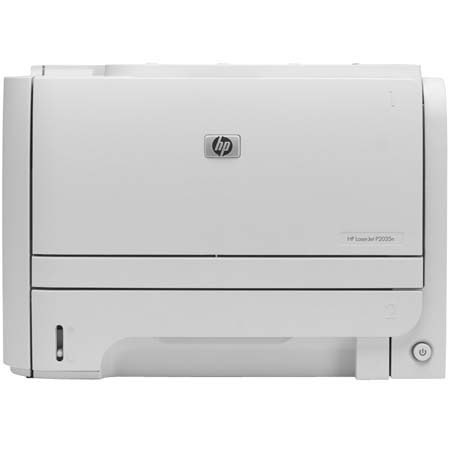
The HP LaserJet P2035N Monochrome Laser Network Printer provides speeds of up to 30 pages per minute and you can connect either via USB or share with a group via the built-in Ethernet/Fast Ethernet. It saves space in your work area with the compact design and spends less time waiting for documents; the first page prints in less than 8 seconds, from ready mode. Print complex documents with text, images and graphics, thanks to the powerful 266MHz processor and 16MB memory.
Join VIP PRO
Earn 2X Points + Exclusive Perks!
Request a Callback
Chat one-on-one with an expert
Sell or Trade your Gear
Get started in 3 easy steps