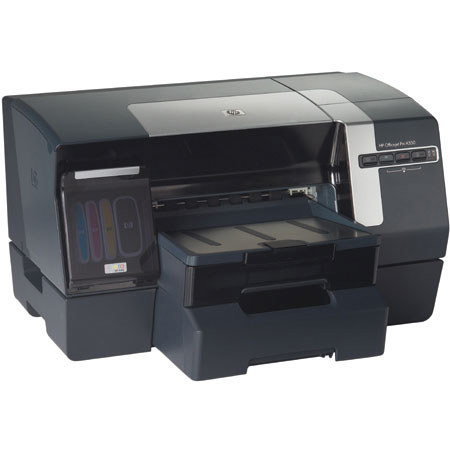
Hewlett-Packard Hewlett Packard - HP OfficeJet Pro K550DTWN Duplex 4 Color 8.5" x 14" Inkjet Printer, Built-in Wired & 802.11b/g WiFi Wireless Networking, with Additional Tray
SKU: IHPOJK550DTW
This item is no longer available.
Share:
Overview
Compare
Specs
Protection
About Hewlett-Packard C8159A
Revolutionize printing in your workplace with this powerful combination of fast Laser Quality Speeds and low-cost color.
Laser Quality Speed : The Laser Quality Speed specification helps customers make a performance comparison between the print speeds of an inkjet printer and a laser printer. HP's Laser Quality Speed measurement process is based on three important factors: Speed measurements use comparable print qualities.
(For the HP Officejet Pro K550 series printer, the default plain paper normal mode is used to generate the Laser Quality Speed specification of up to12 ppm black and up to 10 ppm color. This is up to twice as fast as comparably priced color lasers.)
Speed measurements are done over a range of document types and and content. The measurement process is designed to avoid the influence of the host PC performance and to represent the printer hardware, or print engine, performance.
Huge printing cost savings vs. laser The HP Officejet Pro K550 series color printer can save as much as $274 compared to color lasers at 500 pages per month over 1 year
Permanence: HP Vivera Inks are designed to provide businesses with exceptional quality on plain office paper as well as excellent photo printing on coated media. When printed with HP papers and HP Vivera Inks, documents can be archived for decades.
The new dye-based color inks are non-acidic, dry quickly, and deliver excellent fade resistance. In fact, the inks resist fading due to light exposure seven times longer than previous ink formulas on plain paper, and perform even better on coated paper.
HP Advanced Paper with patented ColorLok technology is designed together with HP printers and HP inks to produce water-resistant documents that dry faster & deliver deeper blacks and more vivid colors. With HP Advanced Paper, you can handle documents sooner, and colors won't streak even when exposed to water.
printer stands up to the demands of a busy office environment. With a monthly duty cycle of up to 7,500 pages and high-capacity, individual ink cartridges, you can print lots of documents without worry.
Built for high-volume printing with the second 350-sheet input tray included & automatic two-sided printing accessory (standard with HP Officejet Pro K550dtn and K550dtwn models), the printer lets you print professional documents in volume up to 600 sheets without loading paper.
Wired and wireless networking
Share your printer with as many as 5 individual users. the HP Officejet Pro K550dtwn color printer features both built-in wired & wireless networking with SecureEasySetup. SecureEasySetup enables effortless 2-step wireless network setup with Wi-Fi Protected Access (WPA) security.
HP printing and imaging systems help you create powerful, professional communications easily. Printers, supplies, accessories, & services are designed together to work together & are invented to meet your business needs.
Hewlett-Packard C8159A Features
- Get laser-quality prints speeds up to twice as fast, and printing costs up to 30 percent lower than color laser printers with the top-of-the-line Officejet Pro K550dtwn.
- Along with the color printing you've always wanted, you get wired and wireless networking, automatic double-sided printing, and an extra 350-sheet input tray.
- World's fastest business color printer for the desktop
- Print up to 37 pages per minute in black and up to 33 in color (draft mode); getlaser-quality speeds up to twice as fast as those of color laser printers: up to 12 ppm in black, 10 in color
- Save money with a cost per color page as low as 7.7 cents, which is up to 30% lower than from color laser printers; and with a printing cost per black page up to 25% lower than from monochrome laser printers (as low as 1.5 cents per page)
- Enhance productivity with the built-in wired and wireless Ethernet (802.11b) networking and 350-sheet second input tray (for total capacity of 600 sheets)
- Save paper by automatically printing on both sides of each page with the built-in duplexer
- Print large quantities at the right price with the individually replaceable, high-capacity cartridges, which produce up to 2,350 pages before you need to replace the black and 1,200 pages before you need to replace a color
- Professional-looking, long-lasting color
- Get brilliant photo quality and exceptional fade resistance with HP's Vivera inks, which ensure that documents last for decades
- Get professional-quality prints with output resolutions of up to 4800 x 1200 optimized dpi color on premium photo papers
- Produce especially vibrant photos when using HP Advanced Paper, which features patented color-locking technology that makes printed documents water resistant, allows ink to dry more quickly, and produces deeper blacks and more vivid colors
- Easy to use, easy to maintain
- Simplify operation with the one-touch print cancel button and flip-open top cover for easy troubleshooting and maintenance
- Conserve space with the compact, low-profile design
- Easily replace ink cartridges via front side slots
- Set up fast with easy software, a control panel with graphical icons on buttons and lights, and at-a-glance printer status
- Stay on top of ink replacement with HP SureSupply5: receive alerts when a cartridge is low, monitor its remaining life, and enjoy easy on-line ordering orcheck stock and prices at nearby stores
- Access printing supplies in one click: sign up at our My Printing Supplies Storeand save a list of your printers for hassle-free toner and paper reordering
- Award-winning HP service and support Award-recognized support
- Get peace of mind with the one-year limited warranty plus HP's renowned Total Care service and support, which J.D. Power and Associates has recognized as consistently providing "An Outstanding Customer Service Experience"
- Rely on printing excellence: PC Magazine has designated HP as a "Reader's Choice" for 14 years in a row
- Get answers to your product questions toll-free, 24 x 7, or via e-mail in as little time as an hour at www.HP.com/go/totalcare