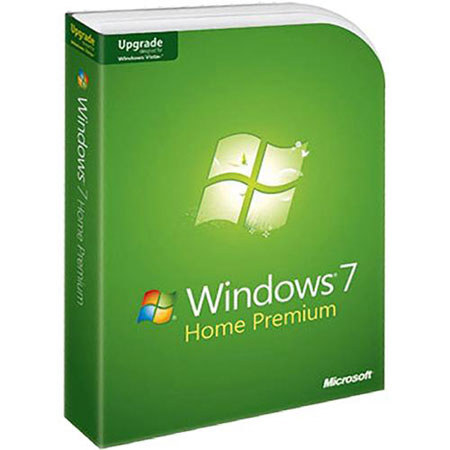
Microsoft Windows 7 Home Premium Software, Upgrade from XP or Vista
SKU: MIW7HPU
This item is no longer available.
Share:
Overview
Compare
Learn
Specs
Protection
Reviews about this item
Review Summary
2012-11-01T20:00:00
Rated 5 out of 5
Stable, smooth, and highly polished
Strong design and Microsoft don't always go together, but they do in Windows 7. Users might take a while to get used to the new taskbar and Aero Peek, but they're a pleasure to use.
lorelai
Originally posted at
2012-05-30T20:00:00
Rated 3 out of 5
A bit of improvement from Vista
Purchased the upgrade on recommendation from HP Technical Support. I do not find any performance improvements. I do like the "window swithcher" feature which is basically the old ALT TAB keystroke.
WyldKat64
Originally posted at
2012-02-29T19:00:00
Rated 4 out of 5
HP Media Center Edition Windows XP to Windows 7
Okay first off this computer is a 2005 edition. And has been rock solid. But since I had major issues with a virus and trying to install Microsoft Office Home and Business 2010 it's been a nightmare. New Microsoft office would not install no matter how hard the Microsoft tech tried. So I was forced to spend more money (on a very tight budget, but can't live w/o my computer) on upgrade Windows 7 since HP no longer had installation discs. Now understand these are not the same as system recovery CD-ROM discs. Which would have destroyed all my programs and data to date. Once I got the software the installation to me was a snap. Comes with 32-bit and 64-bit and all depends on your computer's hardware. Once the installation was computer I knew my hard disc drive would need to be upgraded. The ONLY saving grace here was the external 500gb 3.0 USB hard disc drive include backup and recovery software. Once I created a bootable CD-Rom and backup all my date to said HDD then it was only a matter of making the conversion. Which thank goodness all when as planned and worked out great in the end.
pcRazor
Originally posted at
2012-02-24T19:00:00
Rated 4 out of 5
Problems installing Windows 7
Though there was vague advice to back up programs and files, while installing W7 I mistakenly chose Custom. This wiped my programs and files from my hard disk. Many hours spent restoring files and programs. Tech support helpful, but took many hours, several calls, etc. Microsoft should install a warning on Windows 7 software that if one clicks Custom rather than picking "Upgrade" the hard disk will be wiped clean.
pdxhiker
Originally posted at
2012-02-24T19:00:00
Rated 5 out of 5
This is REALLY GREAT software, however...
I had purchased this paritcular software to upgrade the Microsoft Windows 7 Starter operating platform in a little "netbook" computer to the Microsoft Windows 7 Home Premium operating platform. This DID NOT work, as you simply CANNOT use this particular "upgrade" software to upgrade a Microsoft Windows 7 Starter operating platform. On the other hand, this particular "upgrade" software can only be used to upgrade Microsoft Windows VISTA operating platforms to the Microsoft Windows 7 Home Premium operating platform. ...Because of this, unfortunately, I had to send this particular software back to Hewlett-Packard (HP) today, 02/24/2012, because that is who I bought it from in the first place. ...I have used this particular software before, to upgrade a Microsoft Windows VISTA operating platform to the Microsoft Windows 7 Home Premium operating platform --- and, in that case, YES, it DID work just great!!!
mskarenlynn07
Originally posted at
2012-02-01T19:00:00
Rated 4 out of 5
7 is heaven!
I thought I would never get over XP, Seven is working great and I like it!
Skerry
Originally posted at
2012-01-21T19:00:00
Rated 5 out of 5
Best OS to date
Well balanced and faster
Claude79
Originally posted at
2012-01-17T19:00:00
Rated 5 out of 5
Glad I did it. Works great, howerver........
This upgrade from Win Vista went smoothly and I have had no problems with the 64bit version. I did this upgrade after a 'Recovery' issue. After running WIN 7 Upgrade Advisory there was a report of a known issue with WIN Vista's Hardware Diagnostic Tool's software. The suggestion was to uninstall the Tool, Install WIN 7 and then reinstall the Diagnostic Tool. This is impossible because WIN 7 can not accept the software from an upgade. If WIN 7 was purchased with the computer it would have the Diagnostic Tool, but it's not possible to reinstall it after an upgrade as told to me by HP Support. One can use 'F9' on reboot to use WIN 7's 3-step diagnostics. I miss HP's Diagnostic Tool because it was so thorough and checked dozens of functions including the video card.
B4Ugo
Originally posted at
2012-01-17T19:00:00
Rated 2 out of 5
should have stayed with what I had
not happy with Windows 7. it is not what it is built up to be. not an improvement over Vista. just another way to make $$$$ off the consumer. I still have issues with the operating system that I was promised would disapeer if I upgraded to 7. IMO save your money stick with what you already have!
tshot
Originally posted at
2012-01-13T19:00:00
Rated 5 out of 5
good purchase
good and usefull purchase,many new features and on line support was excellent. The agent was polite,quick and smart. In future if services are needed, i will prefer on line help.
Hope
Originally posted at
2011-11-15T19:00:00
Rated 4 out of 5
Windows 7 Home Premium Upgrade
After getting used to Windows 7, I do like the new features it has. It was simple to install.
WildeCoyote
Originally posted at
2011-08-19T20:00:00
Rated 1 out of 5
Tech Support Inconsistent on Price
Tech Support gave inconsistant prices for product varying from $89.95 to $119.95. Had to purchase Recovery disc for Vista first. Can't get a Windows screen after Recovery disc was installed. Don't want to spend that kind of money if the product is not going to work on my computer.
InsideOut1206
Originally posted at
2011-07-30T20:00:00
Rated 1 out of 5
returned product
I have returned the product. I didn't need it in the first place. Your rep.in the service center wasen't any help. All he wanted to do was sell me an upgrade. A friend of mine corrected my problem in about fime min.I cannot rate it, because I didn't use it.
mrbob
Originally posted at
2011-07-27T20:00:00
Rated 5 out of 5
Response time with Officeject Printer
The response time from the time I select print on my laptop until the Officejet printer responds is almost immediate with Windows 7 in contrast to Windows Vista which takes a noticeable number of seconds.
REH703
Originally posted at
2011-02-16T19:00:00
Rated 5 out of 5
Windows 7 Home Premium
Windows 7 is right for home and buisness. It is the most best colors of icons, pictures, and more! I can believe that Windows 8 Home/Buisness would be 20x improved to Windows 7. But since Microsoft hasn't brought Windows 8 to the market, then Windows 7 takes the lead.
HPTechDude256
Originally posted at
2010-01-28T19:00:00
Rated 5 out of 5
pinch me........am i dreaming?
Of all MS operating systems...this one had me at "power on", a low maintenance, with options that makes it enjoyable for any first time user. Windows 7 is clearly the choice for personal and business applications, good job Microsoft.
Chino
Originally posted at
2009-12-28T19:00:00
Rated 5 out of 5
WINDOWS 7; A 21st CENTURY, COST-EFFECTIVE PRODUCT
A VAST IMPROVEMENT OVER VISTA!!!... EASE OF USE AND PRODUCTIVITY ARE AWESOME...!!! DOES NOT CRASH...
UOSF49ERfan
Originally posted at
2009-12-25T19:00:00
Rated 4 out of 5
Just gettting started
Just getting started with my new business and reviewing what my options are and exactly what I need!
CindySue
Originally posted at
2009-12-14T19:00:00
Rated 5 out of 5
man of few words
Windows 7 is Faster Safer Simpler The UI is great looking Windows 7 fixs it's self. Overall better then any OS ever made. I would recomend windows 7 to anyone, young old a like.
JBrooks
Originally posted at
Microsoft WINDOWS 7 Specifications
Related Articles & Videos
About Microsoft WINDOWS 7
Microsoft Windows 7 Home Premium offers a rich, dynamic entertainment experience on your PC, making it easy to create a home network and share all of your favorite photos, videos and music. You can even watch, pause and rewind TV or record it to watch whenever and wherever you want. The Home Premium edition of Windows 7 is designed to meet the needs of the modern home.
Designed with entertainment and Internet use in mind, the OS features improved desktop navigation, improved speed, the Internet Explorer 8 web browser, Windows Media Center and HomeGroup networking. Both the 32-bit and 64-bit editions of the operating system are included on the disc, allowing you to install the edition which best suits your needs.