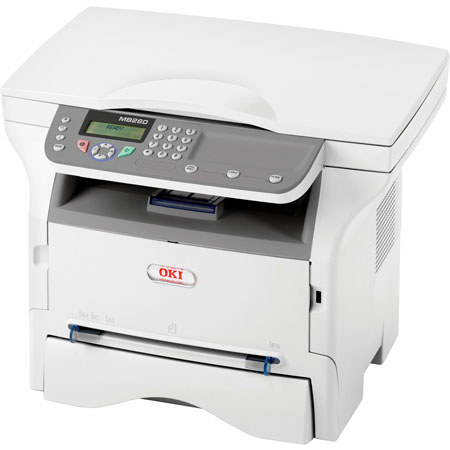
OKI Data MB260 MFP Laser Multifunction Printer, 22 ppm Print Speed, 600x600dpi Resolution, USB 2.0, 120V
SKU: OKMB260
This item is no longer available.
Share:
Overview
Compare
Accessories
Learn
Specs
Protection







About OKI Data MB260
OKI Data MB260 MFP combines mono printing and copying, color/mono scanning, analog faxing and scan-to capabilities. These affordable compact MFP let you access advanced features normally reserved for more costly equipment. With the MB260 MFP Series simple, user-friendly operation and clear, sharp print and copy output, you can produce professional-looking documents with ease.
Have a document you need to scan quickly and transport as a digital file Simply insert a USB memory stick into the USB port conveniently located on the front of all MB260 MFP and place your document on the flatbed platen or in the 50-sheet automatic document feeder (ADF). Scan it as a black & white or color PDF, save it to the memory stick and you're on your way in seconds
This industry-leading, award-winning Nuance PaperPort software will enable you to easily organize your scanned files, further enhancing your productivity. With its intuitive, thumbnail-based interface, PaperPort lets you take any scanned document, save it in a PDF format and quickly make it available for archiving or sharing.
Sharing the functions of your MFP is a key to increased productivity. The MB260 MFP does all you want and more. In addition, these MFP is designed to make changing its one-piece, cost-efficient cartridge including a high-capacity 5,500-page version quick, clean and easy.
OKI Data MB260 Features
- Professional, affordable solutions - versatile, reliable and simple to operate
- Compact design, ideal for home office or small workgroup
- Scan to/Print from USB Flash drive via convenient front port
- Full Qwerty keyboard for easy entry of file names
- Convenient mono printing and copying at up to 22 ppm
- Digital copying with zoom and multi-copy features
- 50-sheet automatic document feeder (ADF)
- Wireless LAN option for added convenience and improved efficiency