
This item is no longer available.
Review Summary
2022-09-26T20:00:00
I have had this copier since 2010. My boss insisted on buying a different brand, but I kept this one as a back up. It still works like a champ and I use it every day. Brother printers are true workhorses and the most dependable printers I have used.
SharonB54

2013-01-24T19:00:00
With the exception of one glaring and very annoying glitch, (it wrinkles envelopes horribly when address are printed on them, this product seems to perform as describe.
foxfirerodandgun
2013-01-02T19:00:00
The MFC-8480DN performs very well. It was easy to set up and use for the first time. Moreover, the replacement toner cartridge is reasonably priced regardless to the on-line purchase vendor. The printer can handle a heavy work load in that I use it primarily for printing articles from professional journals for use in my work. I haven't quite figured out yet how to prevent envelopes from wrinkling when fed through the printer to print address labels on them nor why the printer loses the time and date when the power is shut off. However, I'm sure I will. Nevertheless, I would recommend this printer to others.
LASER01
2012-12-24T19:00:00
VERY VERSATILE, YOU CAN PRINT RECIEVE AND SCAN ALL AT THE SAME TIME SO THERE IS NOT "LOST TIME" WAITING FOR EACH FUNCTION TO FINISH. ALSO, THE PRINT QUALITY IS EXCEPTIONAL. THE ONLY OCCASIONS THAT I EXPERIENCE PAPER JAMS IS WHEN I HAVE PERSONALLY FAILED TO LOAD THE PAPER CORRECTLY. I DON'T KNOW HOW MANY COPIES I'VE MADE BUT IT'S A LOT. BY THE WAY, I HAVE TWO OF THEM.
JONA
2012-12-23T19:00:00
Nothing is perfect, but less jams, less hassle than any previous machine that I've owned. The cost per print has helped the budget too!
PHauze
2012-12-23T19:00:00
Great machine for the money. Not using separate printers and scanners after buying our first 8480. We are now replacing printers and scanners in all nine of our offices with Brother all in one units.
Unabeaver
2012-12-23T19:00:00
I have a small business and this machine ideal for us. Printing is much less expensive compared to ink jets, and duplex printing saves paper. Fax and scan capacity included in one machine makes this unit a real powerhouse!
Buildingboys
2012-12-23T19:00:00
This purchase was a replacement for a Brother 8840DN that I had purchased in 2005. That machine was a workhorse. It copied, scanned, faxed and printed. I loved the fact that it used a high-capacity laser toner cartridge which lasted a little over a year based on my output. When it started having ADF problems (paper not feeding properly I purchased the 8480DN in December 2011 because I could not afford to be without a fax and scanner for more than a day. The ADF was fixed on the 8840 and it worked like a charm so I gave it to my sister to use as their primary printer. I love the 8480 for all the same reasons as the 8840, but it's also faster feeding and printing. It scans beautifully. The software that comes with the printer works great with Windows 7 and XP. Brother was ahead of it's competitors with this design.
FredTheComputerGuy
2012-12-23T19:00:00
I have enjoyed this Brother printer and especially the scanner.
Kay10
2012-12-23T19:00:00
This is the perfect all-in-one for a small business (legal). Installed in less than 5 minutes, fully compatible with the network, and when i purchased a new, Windows 7 64 bit computer, the transition was just as simple. Scan to pdf is now an indispensable aspect of litigation, as almost all Courts are electronic filing, and this machine makes scanning an almost pleasant task.
ruffian
2012-12-23T19:00:00
Well its been about a year with this printer/scanner/copier/fax. I have not used the fax yet, as I have a dedicated fax. The copies are crisp, clear and fast. The scanning has been a dream, especially with the autofeed. It's a little cumbersome to do two side scanning but with some updated software it's been great. I now have two of these machines, and, for the price, I wouldn't be without them.
Resource1
2012-12-23T19:00:00
If you have a Medium-Small office and require a Fax/Copier/Scanner this is the machine for you. We run these machines at our locations and they outperform those expensive machines. We just replaced one that was 4 years old. We use nothing but Brother products as they are the most reliable and long lasting MFC on the market.
Truckfacility
2012-12-23T19:00:00
I need a black only machine since I do mainly invoices but it also has a scanning color feature in case I need it. Has trouble with the thicker paper stock unless you choose menu 1,2,1,2. Pleased!
demeter
2012-12-23T19:00:00
its come with copy, fax, printer, relay enjoyed, nice machine, fast printing, double sided, very useful.
mdusa
2012-12-23T19:00:00
This All-in-One is extremely dependable and easy to use. It is essentially maintenance-free. Misfeeds are virtually non-existent. A great workhorse of a machine.
JJKEsq
2012-12-23T19:00:00
very good and reliable, I bought 3 of these best' best
mfc8480
2012-12-23T19:00:00
The Brother MFC-8480DN has been an outstanding copier, printer and scanner for us. We bought it 1-14-12 and used it heavily during the 2012 income tax season. We printed all of our income tax returns on it and it did a beautiful job for us. We do not use the fax portion. We already had a stand alone fax machine. I highly recommend this piece of equipment to anyone, business or personal.
HaroldCPA1
2012-12-23T19:00:00
The printer does exactly what it promises. Operating costs are low. Good at everything, excellent at some.
Zinkler
2012-12-23T19:00:00
This MFC-8480DN is hooked to a network and function beautifully. I have had little hangup that is associated with most printers. It conserves on ink too. Color would be nice, but I use mostly for printing documents, letters, etc., and the color ink would probably be a waste for thew little that I need. Thanks for this printer - Bimpy
Bimpy
2012-12-23T19:00:00
first of all its a good product, but what I don't like is when faxing it takes a long time, it dials then takes one page at at time, unable to make copies while in the fax mode, our other brother, we could make copies while in the fax mode, also when faxing, it takes "all " pages then dials then fax
jango
2012-12-23T19:00:00
1. Legal paper falls from printer when printng multi pages. 2. Feeding paper on top scanner does not always grab paper and actvates scanner on bottom. 3. I like the speed and clarity.
RTWINCH
2012-12-23T19:00:00
Prints well and is fairly quiet. Often displays "no paper" when there is paper; no help available from customer support. Very poor job on printing envelopes (mangled). Copies and scans nicely.
AttorneyL
2012-12-23T19:00:00
Not pleased at all..too expensive to replace drum.
PJMD
2012-12-23T19:00:00
After only two years, this printer makes a grinding noise when it prints and leaves lines on the page that obscure the text. I am very disappointed.
MarkS
2012-12-23T19:00:00
I use this Brother All - in One daily and it has performed very well, it is fast, and reliable. I fax and print multiple copies each day and no problems or issues. I would pruchase another when I wear this one out.
Kingfish
2012-12-23T19:00:00
I have been happy with the product overall. It does have a squeak in the feed and is noisy. Good buy for the money
Gbobbs
2012-12-23T19:00:00
Overall I have had good service from my Brother printers and whenever I've had to contact tech support my questions and problems where solved right away. It would be nice to have a better trouble shooting section in the owners manual IE: If you start getting lines on your printed pages,( Drum wearing out), what causes the printer to squeak or squeal sometimes at the start or finish of a print job ??? etc.
jackknife
2012-12-23T19:00:00
The printer is very fast and works well. It was a very good value. My only complaint is that my letterhead envelopes jam in the printer. I have to resort to my old inkjet printer for envelopes. Since I use this printer for my in-home business, the inability to print envelopes is a definite negative. Otherwise, the printer is great and meets all my other needs.
DeeKay2
2012-12-23T19:00:00
This printer does a fine job and is pretty fast for an all in one. The Fax handles a ton of paper at one time. I think it's rated for 50 sheets, but I've faxed over 75 pages without a hitch. My only complaint is that it prints a lot lighter than I like to see. It's not my primary laser printer, but as a back up it's great. However, it is used as my primary copier, fax, and scanner and does an awesome job at all three.
Dano7331
2012-12-23T19:00:00
So many good options. Double side printing and booklet type prining are very useful, save lot of papers.
Reggie
B/W Laser Technology
Toner Cartridge & Drum Unit
32ppm Black
Up to 1200 x 1200 dpi
250-Sheet Input Capacity
LT-5300 (250 sheets)
Yes (up to 50 sheets)
Yes
Parallel, Hi-Speed USB 2.0 and Ethernet
Yes/No
64MB
Yes (up to 576MB)
Windows & Mac OS
PCL6, BR-Script3
Yes
30,000 printed pages
500 to 3,500 pages
B/W Faxing
33.6K bps Super G3 Fax Modem
Approx. 2 seconds per page
Yes
Yes
No
Yes
340 locations
Yes (390 locations)
Approx. 2 sec/page
Yes
Yes
Yes
Yes
Yes
256
MH/MR/MMR/JBIG
Yes
Up to 600 page fax memory
Yes
B/W Copying
Flatbed
50-Page ADF
32cpm Black
No PC Required
25% - 400%
Yes
2in1 / 4in1
Yes
Legal-size
B/W & Color Scanning
19200 x 19200 dpi
600 x 2400 dpi
48-bit
Windows/Mac OS
Includes Scansoft PaperPort SE with OCR for Windows and Presto! PageManager for Mac
Includes Scansoft PaperPort SE with OCR for Windows and Presto! PageManager for Mac
TIFF/BMP/MAX/JPG/PDF
E-mail, Image, OCR, File, FTP,Network Folder (CIFS), USB
Printing, Scanning, PC Fax Send / Receive
ARP, RARP, BOOTP, DHCP, APIPA(Auto IP), WINS/NetBIOS name resolution, DNS Resolver, mDNS, LLMNR responder, LPR/LPD, Custom Raw Port/Port9100, IPP/IPPS, FTP Client and Server,TELNET Server, HTTP/HTTPS server, SSL/TLS, TFTP client and server, SMTP Client, APOP,POP before SMTP, SMTP-AUTH, SNMPv1/v2c/v3, ICMP, LLTD responder, WebServicesPrint, CIFS Client, SNTP
NDP, RA, DNS resolver, mDNS, LLMNR responder, LPR/LPD, Custom Raw Port/Port9100, IPP/IPPS, FTP Client and Server,TELNET Server, HTTP/HTTPS server, SSL/TLS, TFTP client and server,SMTP Client, APOP,POP before SMTP, SMTP-AUTH, SNMPv1/v2c/v3, ICMPv6, LLTD responder, WebServicesPrint, CIFS Client, SNTP
Network (Ethernet) I/F
(1) TN620 Standard Yield Toner Cartridge (3,000 Pages)
(1) DR620 Drum Unit (25,000 Pages)
Plain Paper: Xerox 4200DP 20 lb., Hammermill Laser Paper 24 lb.
Recycled Paper: Xerox Recycled Supreme
Transparency: 3M CG 3300
Labels: Avery Laser Label #5160
Plain Paper, Bond Paper, Recycled Paper, Transparencies
Letter, Legal, Executive, A4, A5, B5
Letter, Legal, Executive, A4, A5, A6, B5, B6, Envelopes, Custom Sizes (2.75-8.5" (w), 4.57-14" (l))
16-28 lbs.
16-43 lbs. (max/min)
5.8"/5.8"
8.5"/14"
17-24 lbs.
150 sheets
Yes (Monochrome)
Yes
Yes
AC 120V 50/60Hz
18W/85W/680W
Yes
50-91° F
20-80% (w/out condensation)
30 dB/56 dB
20.9" x 17.8" x 18.7"
40.3 lbs.
Brother 1 year limited warranty

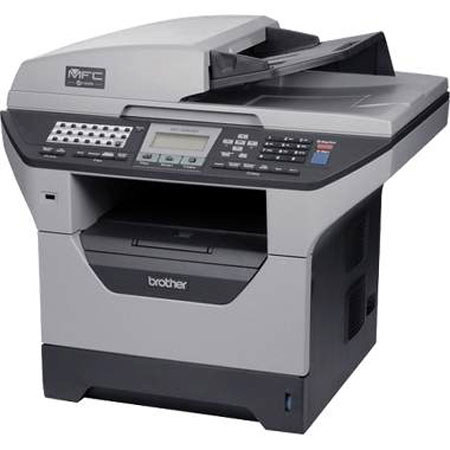
The Brother MFC-8480DN offers great value for your business. Its automatic duplex feature for two-sided printing helps save paper and an optional high yield toner cartridge is available to help lower your operating costs. Its legal-size document glass allows for ample room for scanning and copying one document at a time.
Use the 50-sheet capacity auto document feeder for copying, scanning or faxing multi-page documents. It also has a USB direct interface to print PDF or JPEG files from or scan PDF or JPEG files to your USB flash memory drive.
Join VIP PRO
Earn 2X Points + Exclusive Perks!
Request a Callback
Chat one-on-one with an expert
Sell or Trade your Gear
Get started in 3 easy steps