


This item is no longer available.
Review Summary
2013-02-21T19:00:00
Have had nothing but problems with this machine. Printing, faxing and scanning does not give me any problems, just coping; which is what I do the most. I have to copy front and back of drivers license for the state work I do. Picture quality is poor when copying the d/l. I try to save paper so when I copy the front, I feed the paper in the top tray for the copy of the back of the d/l. Almost everytime the paper gets jammed or it comes out very wrinkled. Tried everything I can, think of, so now all I can do is waste paper. Never had this problem with any of the other Brother machines I have had, only this model!!
JudyR

2012-12-25T19:00:00
We run a small business and have a small office. We have owned a variety of name brand ink jet printers over the years, but never a Brother pirnter. We print 90% more black and white documents than color. Yet the ink jet printers always seemed to want color cartridges along with the black cartrideges. Ink expenses seemed high. We decided to try a black and white laser printer for the bulk of our printing. After investigating and reading many reviews, for the various manufactures, we opted for the Brother MFC-8890DW. It was easy to set up. It has an easy to understand menu. It performed well out of the box. It has printed over 1300 pages on the toner that came with the printer. And we have the larger economy toner cartridge standing by when this one expires. Of those 1300+ pages there has been only one paper jam, and that was my fault. That was easy to remove through the back panel that comes off. We have scanned many multiple stacks of two sided documents for archiving, with only one failure due to crumpled paper. That was not the machines fault either. It faxes two sided documents with ease as well. We also have a need to use the single sheet feed document tray on a regular basis, and that works very well. The paper feeds straight and we can use it to fill in preprinted ready made State forms using a spreadsheet. It prints laser labels perfectly. I have not tried printing envelopes. We do not had a need to use the wireless capability yet either. Our 3 year old ink jet printer is a two sided printer and I started the ink jet printer on a 10 page two sided document job, then started the MCF-8890DW on the same document job, and this Brother printer out paced the ink jet 5 to 1. All in all, we were pleasantly surprised. I have read some complaints about all the cheap plastic, but we have not had a problem. Go to your office store and have a look. All the brands in the $80 to $500 range are plastic. Because this is a laser printer, it does take a small amount of time to warm up. It is not instant on, but that has not been a problem for our application.
TerryN
2012-12-25T19:00:00
This is my 5th Brother.. I give them a lot of work and they did with no problems. When my 8890 wears out, I will buy another Brother.
athefish
2012-12-25T19:00:00
Purchased my MFC-8890DW w/ dual trays over 6 months ago and it's our office's main peripheral on our LAN. We all work it all day long. Print, Fax, Scan & Copy. We're still on the original toner. It's a workhorse and, a pleasure to use. Don't know how we lived without. Can't imagine working without it again. Awesome product. Congrats to Brother. Great design. Software has so many wonderful and efficient options.
GTuccio
2012-12-25T19:00:00
This was my 1st multi all in one laser printer. I researched and compared for months what I needed to start my business. I was very impressed how fast I received my new laser printer. My real estate documents look great! No problems or jamming issues & works great with USB but, I was sold on wireless which doesn't work with VOIP & isn't Windows 8 compatible, which will have to purchase new driver in February.
murraynsa
2012-12-24T19:00:00
Two unacceptable problems, the machine distorts envelopes as they past through the print process causing envelopes to come out wrinkled. Further, the auto feed intake roller sometimes sticks in a position that causes the paper not to feed into machine.
JBinSI
2012-12-24T19:00:00
I like the 8890 except: If you have it set on duplex you can't print 1 envelope without having to press cancel job to reset. Envelopes are creased no matter if you open the back of the machine or not. You would think this could be fixed.
solid1
2012-12-24T19:00:00
In January of 2012 I was forced to purchase a new computer for my home office, due to physical problems with the circuitry. My old printer, a parallel printer had given me 19 years of service and was still going strong. The new computer, however, required a serial port connection, so I was forced into making the additional purchase of a printer. My son assisted me and we selected the BROTHER MFC-8890DW. With a bit less than one year of service I have been satisfied with the performance for the work that I do. I should note here, however, that I am not using several of the features for which this device is noteworthy. I don't use it for faxing, or any kind of telephonic usage; I don't have it set up as a wireless product. It is strictly being used as a plug in printer for black and white output. I have performed a limited amount of scanning with it, but not enough to qualify myself as being expert in this area. I've done some copying with it of both single and double sided documents. I'm most pleased with its capability for duplex printing, meaning that I can print out on both sides of a sheet of paper, thereby reducing my home office costs for paper. Printing out envelopes is possible and I do quite a few of these, but to prevent wrinkling of the envelope paper, it is necessary to release 2 spring levers in the rear of the machine. This procedure was well explained to me by a representative on the telephone, but I don't think it is adequately explained in the User's Guide. Also I had initial difficulty in identifying some of the parts (paper trays, etc.. A video demonstration might have helped me to better understand the components of this device before I started working with it. Overall, I'm satisfied with its performance.
UncleBob
2012-12-24T19:00:00
I got the 8890DW to print both sides of the paper and it does an excellent job. It is nice and quiet while it prints. I'm also very happy to have Wi-Fi capability.
RCSm
2012-12-24T19:00:00
Easy network setup. Fast speed. Good copies. Glad I bought this for my back and white needs. El Paso, Tx
GregEP
2012-12-23T19:00:00
The MFC-8890DW exceeded my expectations for copying and scanning. The machine works flawlessly. The only issue that I have is that the product instructions are not clear all the time. However, some trial and error effort for me has resolved any unknowns. I find the product great value and works superbly!
MrJBond
2012-12-23T19:00:00
EXCELLENT PRODUCT FOR HOME OFFICE I AM SO HAPPY WITH HIS PRODUCT
ghernandez
2012-12-23T19:00:00
It is the best all in one product that I have purchased so far. It has proven to be an excellent workhorse and has worked flawlessly in my office.
Wonderful
2012-12-23T19:00:00
This really does a great job for my small accounting office. The copier is great with lots of features so I don't have to use my big one every day. The scanner is fast, too. My only criticism of the machine is that the pages come out rounded so if I want to copy on the document feeder on my big copier, I have to straighten them out. With the high yield toner I don't have to replace the cartridge much.
lqthornton
2012-12-23T19:00:00
I am very satisfied with the Brother printer copier that I purchased. It is the best I have every used.
NEC47
2012-12-23T19:00:00
The mulitfunction printer works well in all aspects. The best thing that I like is duplex on everything. The duplex scanning is a big plus. The wireless printing works with all my Apple devices.
PasWilly
2012-12-23T19:00:00
Instruction for operation could/should be made simpler.
Curley
2012-12-23T19:00:00
Great printer. We have over twenty of these in our stores. Scanning and copying are great. Very flexible options to use on your desktop for scanning. The only thing I do not like about the printer is the setup for wireless networking. If you use a numerical key for the password, you should be able to bypass the monotonous process of going through all of hte capital and small letters before you get to the numerical selection. Since it has a keypad, give an option to select numbers only and use the keypad to just punch in the numbers. It's a slow and tedious process now.
Gold
2012-12-23T19:00:00
This would be the perfect all-in-one if it had a faster start time. We press the button then stand around waiting.Fast on multiple copies and quiet except for the bell when the paper tray is out to be loaded. It makes a crisp clear copy, scanner works very well
pattiw
2012-12-23T19:00:00
I love the duplex and booklet capabilities as well as the ease of scanning set up and start directly on the machine or from my computer.
HBDan
2012-12-23T19:00:00
I selected a laser instead of an inkjet because I thought the supply costs would be lower. Well, that was a bad assumption. The performance of the printer, the FAX functions, the copier and the scxanner are great. I have never seen a scanner that works this fast. You just put the document in the feeder and it rips through the process and sends the data where it is supposed to go. But this thing eats toner and it is expensive. So the unit works great but the cost of consumables is too high.
RichF
2012-12-23T19:00:00
Print function is available for Windows 8, but the product lacks the full Multifunction Center software (scanning, etc. for Windows 8.
ortnpalms
2012-12-23T19:00:00
they are pretty good machines until you upgrade your computer and they your machine will not work right until you pay them to fix there issues with going from 32 bit to 64 bit. I really think is is very poor costomer service to have to pay them to give you the patch so their machine will work right.
zappa
2012-12-02T19:00:00
Am in private practice of law as sole practitioner. For years had separate printer, fax and copier. When I recently needed a new copier it was hard to find one so I finally broke down and bought Brother Laser All-in-One. It has made my life so much easier. I like the fact that I can copy and print so simply, especially in duplex. The fax is a breeze too.
AttyDiane
2012-09-18T20:00:00
I always use the recommended paper (Xerox 4200) and toner, but the paper curls terribly after printing, making a stack of printed pages a nightmare to handle. The Brother software can not correctly print out some PDF files that were created by non Adobe companies. The Brother toner is expensive and has a 90 day warranty. I had a defective toner cartridge and I had to be on the phone with Brother Customer Service for over an hour making me perform many machine checks and cleanings and sending them a fax of the toner invoice. They finally determined that I wasn't an idiot and the toner cartridge was actually defective. I had to mail it at my cost to Brother so they could do an inspection. I am still waiting for my replacement toner. I am going to use non-Brother toner in the future. I think the other printer manufacturers like Hewlett Packard may not be as reliable but at least they have better software that can print all PDF files and can support Apple AirPrint.
HighVolumeUser
2012-08-30T20:00:00
The MFC8890 is a fantastic product! I owned two of them: one for home and one for my classroom! This monolaser printer is a great workhorse. I used both for class materials and personal stuff. Students (mine and their friends) also printed their work--drafts and final produts--from my classroom printer. I gave that one to a colleague (who acted like he won the lottery) when I retired, but I still use the other at home.
Carochan
2012-04-05T20:00:00
The product is just fine--haven't had any problems with coping! Right after we received it and we needed to scan to pdf file that we already had set-up. Called customer support to get it set-up, and the tech was not very freindly to help me to scan several copies to be emailed that we have to do on a daily basis.
icecream
2012-04-04T20:00:00
I purchased this machine to use in my room as a classroom teacher. The first machine I purchased continually jammed. I returned it to the store where it was purchase, and they gave me another brand new one. I brought it to class and same results all over again. This new machine continually jammed like the first new machine. I called customer service and went through all the instructions to "correct" the problem; nothing did. Service rep told me they would send me a "reconditioned" machine within 5 days. Days passed-no machine. I finally called back and there was no record I had ever called in the first place. Of course, now I had to go through all the "fix it instructions" again. Still no luck. Again, I was told I would receive a "reconditioned" machine within 5 days. Finally, I did and the "reconditioned" machine works beautifully. My guess is that there was something wrong in all of the earlier produced machines since they had so many "reconditioned" machines to offer. Anyway, machine works great so far in my classroom-NOW.
spunker
2012-03-29T20:00:00
I purchased this machine to replace an older Brother all-in-one. I chose this particular model because it offers duplex scanning as well as printing. Many of the documents I need to scan are printed on both sides of the paper. I can place a stack of papers in the sheet feeder and it scans front, then back and moves on to the next page. The duplex printing feature has already saved lots of paper and file storage. We use this printer on a wireless network and it has worked seemlessly. It was easy to set up and just keeps on working. Great printer for a small office.
Whymi
2012-03-09T19:00:00
I purchased the MFC-8890DW for a small law office; and, have been extremely satisfied with printing, faxing, copying and scanning.
NJattorney
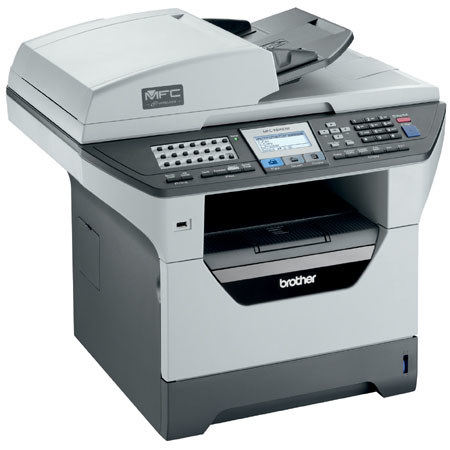
The Brother MFC-8890DW is the ultimate laser All-in-One solution for your business. It offers advanced duplex capability for two-sided printing plus automatic two-sided scanning using the auto document feeder for copying, scanning and faxing. It has an 802.11b/g wireless interface to print, scan and PC fax wirelessly without the clutter of cables.
An optional high yield toner cartridge is available to help lower your operating costs. It also has a USB direct interface to print PDF or JPEG files from or scan PDF or JPEG files to your USB flash memory drive.
Join VIP PRO
Earn 2X Points + Exclusive Perks!
Request a Callback
Chat one-on-one with an expert
Sell or Trade your Gear
Get started in 3 easy steps