



This item is no longer available.
Review Summary
2013-02-20T19:00:00
This is the second Brother printer that I purchased. I a very pleased with it. The printing is reasonably fast. I love the Scan feature; I use it all the time to archive important documents. The sheet feeder is a great feature as well. I'm able to print envelopes, although they do get a little wrinkled, but still acceptable. It doesn't make much noise like my old Konica Minolta printer. I would recommend this printer to everyone.
grecinos

2012-12-19T19:00:00
this printer replaced a Brother HN 4040 which i liked very well, but which did not fax. This machine does work quite well. The only two issues i have are that there is not a manual feed tray, just a slot for feeding one piece of paper at a time. This is hard to get to feed straight. The other thing I like less about this machine is that it goes through toner cartridges faster than the previous machine and has no High Volume cartridge options. Other than that, I am happy with it.
spellgirl
2012-12-03T19:00:00
The printer was fairly priced and has worked without failure. I am happy with the machine. I also use 20 other Brother printers of various models and have had good results with all of lthem.
Taxman
2012-11-19T19:00:00
This is a very good and reliable printer/copier. It worked right out of the box and I have had no problems with it since. One issue is that the scanned images of documents are not as clear and crisp as I would expect. I have tried to clean the glass and the scan bar but none of that has helped.
BigAug
2012-11-14T19:00:00
had this printer for several years, nothing but trouble, never was I satisfied with print quality!! Cartridges are very expense, different error messages:"slide wire needs cleaning" " paper jam when there was none", and more!
buster111
2012-10-10T20:00:00
I have had 4 or 5 other brand all-in-ones, and I was tired of them breaking down. I thought I would be smart and try a Brother because it seemed to to be the answer for my use as secretary for a non-profit group,and the salesperson seemed to like Brother products. I could not have been more wrong. The single sheet feed does not work 95% of the time. It reports a jam in the machine, and will not continue until every cartridge has been completely removed and put back in. I do many envelopes and many labels. I am sick over the way this machine works. It was more expensive than 2 other brand all-in-ones, and the cartridges are horendous! This was a huge mistake that I made by buying this printer for my group. My frustration level is off the charts, and my lack of production is noticiable because of the inability of the single feed draw to work. I will not buy one again.
CALLIE
2012-10-09T20:00:00
Print quality is very good and the software behind it works great. The replacing of toners is ridiculous, I have had other color laser pritners and the cartridges did not run out as quickly as this one. If there is less in them, reduce the price per cartridge and it would not be so bad.
BiomedAl
2012-09-14T20:00:00
I purchased your product as recommened by a sales associate at a chain office supply store. I was looking at getting away from the high cost of my HP ink cartridges and ones that wouldn't dry out if not used regularly. I bought the MFC9320CW. I don't print very many copies per month, only about a half of a ream, however since my purchaes in less than a year and a half I've replaced the yellow cartridge three times, the Black twice and the Magenta twice @ $70 or $80 bucks a pop..I'm not impressed with your clams that you can get thousands of copies out of one cartridge. it's not so...... I like the machine although very large but I was willing to put up with the hugeness for the quality & number of copies.. I'm looking for an alternative.
Lovetoflyfish
2012-08-26T20:00:00
While samples of color prints from the 9320 CW were intense and colorful, the color I get from my printer is faded and not representative of the colors on the screen. Also, the printer DRINKS toner! I am disappointed at the price of the toner cartridges and the pace at which they need to be replaced.
Goldengal
2012-08-26T20:00:00
Excellent product. I use it daily and love the results that I get from it.
Thomas1033
2012-08-25T20:00:00
This printer is by far my best purchase for copying, faxing, etc. It is very fast, easy to use, and reliable. My wife uses it for her arts and crafts copying. She says the colors on her papers come out bright and clear. However, she uses it so much, I am having to change ink much sooner. Cartridges are not cheap, and this is my only drawback. I still give it 5 stars.
LaserPrinterMFC9320CW
2012-08-25T20:00:00
the MFC-9320Cw is a clean,quiet and very reliable Multifunction printer. I aslos find it to be very economical for the larger print project when preparing a presentation for a small business group or team players. I would rate this product high.
campusgirl2012
2012-08-25T20:00:00
If it's not one thing with this printer, it's another. Should've gone with the industry standard HP. Won't make the same mistake again.
Reviewer
2012-08-25T20:00:00
I am an IT Field Tech, servicing many different brands. Up to this point I wasn't a Brother fan. While shopping for a replacement laser printer for my personal use, this unit was pointed out by the salesperson. Even though I initially wasn't looking for an All-in-One unit, after comparing it to others in the store I decided to give it a try. I've only had it a few months and so far I'm quite happy with it's preformance. I don't like having to replace equipment frequently, and many units these days are best disposable when they fail, I think this unit will provide more of the life cycle I appreciate. So ask me again in a couple years and I may add the fifth star.
TechMZ
2012-08-25T20:00:00
I have owned several all in one printers and this is the worst We hardly get any copies it Goes threw toner like water and cost more to use then any printer we have owned.
MASTER
2012-07-14T20:00:00
I really like the feature that allows you to add paper via the manual feed tray without emptying it first. Unfortunately it doesn't work correctly. On a positive note, the cartridges are easy to install and uninstall. Haven't tried the fax as yet but the scanner seems to work OK.
Trishtwo
2012-07-08T20:00:00
I bought this a year ago. Every time I got to use it, there is an issue. Either I have to reinstall the drivers, or the fax doesn't want to work, or something. I had it replaced once and the new one is the same. Junk! The toner does not last for as many pages as it states on the box. It lasts for less than half. Not good. Don't buy it!
Mouse
2012-07-01T20:00:00
I really am happy with my MFC-9320CW all in one with the exception of the document feeder. You can only use if you are going to feed a couple of sheets. If you put more than a couple pieces of paper in the feeder at one time - it grabs multiple pages and sends through. Other than that issue I am truly happy with the machine. I have had a Brother Laser Printer for over 15 years and it's still going!!!!!!!
Allinone
2012-07-01T20:00:00
I have had Ink jet printer that were 4 in one none of the m compare to this machine I had to replace Ink evry month on them I am still on the the orignal cartridge. Just got a mesage that the black is low. The print is very vived and the colors are true
Bert2
2012-05-14T20:00:00
I was looking for a color laser all-in-one to replace an HP laser 4P. So far the 9320CW has met all my expectations. I've used it for 7 months before setting it up wirelessly and the help line was very good. It prints well in color, it copies in both color and black and white, it scans, and the next thing I'll be setting up is the fax. There have been no problems since installation. The only downside is the outlay for toner....I'm waiting to see how long my new cartridges will last.
Sheryl
2012-05-03T20:00:00
Easy to set up and operate. Great for home use and would probably be great for a small business as well
Murphy
2012-05-02T20:00:00
Best prepared to replace/refill the 4 ink drums on a regular basis. I have no complaints about the printing quality, but ink usage has been disappointing. I have also had several paper jam issues, especially while feeding envelopes, which requires you to remove and replace all 4 ink drums. And that doesn't always fix the problem the first time.
JoeBiz
2012-05-02T20:00:00
The printer works well for everyday printing needs and is easy to setup. I have not really had any issues with the software which is huge if you have ever had other printers. The only drawbacks of the printer are that the quality of the printing prohibits it from being used for business purposes and the manual feeder is horrible. But for the money and the quality of the printer I would probably buy it again.
ResidentResearch
2012-05-01T20:00:00
Very easy to install. Really like the printer except wish toner cartridges did not run out so quickly. I have another printer, laser black and white only, and cartridge last forever.
HappyCamper2
2012-05-01T20:00:00
I cannot complain about this printer: easy to setup, great wi-fi networking capabilities, decent pages/minute capabilities, excellent print quality, and just about anything you can wish for in a multi-function machine. However, the issue is with the toner(s. This machine in particular has 4 or 5 toner drums that are a) expensive to purchase - all 4 or 5 drums add up to little above the price of the machine new, and b) have no life in them. At the rate these toners are being consumed here at home, I am not sure the investment was worth it.
SanAndresMan
2012-05-01T20:00:00
This is terrific. First time I've had wireless and what a transition. I've never had a problem with this and I can understand most of the owners manual. I've had it for 6 months.
Rudysmom
2012-02-04T19:00:00
This printer will put you in the poor house! The colors do not last as long as advertised and all three must be replaced at the same time even if they aren't empty (how does that make any sense?). I've owned other laser printers and the color would last 10 times longer. We are just the average sized household that occasionally prints school work and coupons yet the printer is always empty of ink. I regret this purchase everyday.
DKuntzman
2011-10-23T20:00:00
I'm a small online business owner that's owned many of printers, most of which were inkjet printers. I've owned four inkjet printers: HP, Lexmark, Epson, Canon. I was not 100% happy with any of them so I decided to finally make the move and buy a more expensive color laser jet Brother printer. Long story short, it was the best decision I've ever made. By far this Brother MFC-9320CW is the best printer I've ever owned. The only reason why I don't give it 5 stars is because the scanner driver for the printer has a few issues with scanning in PDF files within the Control Center. I'm calling Brother support to see if the issue has been fixed yet. Scanning from the flatbed, you have to scan each individual document and manual drag them each into your mail application in order to mail all the docs at once. Scanning from the feeder, this is not an issue. I own an Apple and the new operating software Lion 10.7.2 works perfect with the printer. The printer is extremely quite, very fast and the wireless setup it has within the machine works perfect with no connection issues. The picture color quality is better then any of my ink jets. The fax machine works great too. All around an amazing all-in-one printer and I highly recommended it.
MikeyLovesApple
2011-10-18T20:00:00
As a Realtor in Phoenix, AZ, I needed a device with the ability to scan documents without having to baby-sit the machine, as well as a device that could quickly print out quality color flyers and listings, and easily be networked for access from my laptop, iPad, and PC Desktop. The MFC-9320CW is just what I was looking for. This machine performs without any problems. The only downside I can see is that the machine only comes with "starter" toner cartridges that do not last long, and you have to purchase ink shortly after acquiring the printer. This seems to be the case with many all-in-one devices. Otherwise, this is a great all-in-one.
Floorfam
2011-10-13T20:00:00
The printer seems to work fine, easy set up and easy scanning features. Doesn't seem to jam frequently and the quality is ok but not the best for a laser. However this product is not cost effective as one would expect for a laser. Cons: PRINTER OUTPUT TIME - It appears to calibrate & drums seem to roll alot before it actually spits a printed page. Not as fast as I would expect or have seen of other laser printers. However this was not my biggest concern. MIS-FEEDING The top feeder for scanning appears to miss feed quite frequently, pulling multiple pages at once. TONER COST - One must expect a higher cost for any laser toner compared to Ink jet. The cost is often outweighed by the high-yield, better print quality, higher quantity and productivity expected of a Laser Printer. However this is not the case for this Model Brother MultiFunction in my experience. Note per SOL standards of color toner for this model is advertised to yield about 1400 pgs each color (C,Y,M). However, as I have learn't the SOL standard is about one paragraph in double line spacing. So 1400 pg is really about 350 pg of a standard business/office communication letter. (Also Keep in mind to print any color regardless of how primary the color, it uses a percentage of all three colors to create any one shade of color, so 1400 pg each color should be looked as 1400 pg of color all together). This amt can further be affected by the DPI/resolution you chose to print in, so the Higher print quality DPI you choose can easily turn 350 to 200 pgs and less. Also note this printer requires that you change all the color toner cartridge concurrently even if only 1 of 3 colors is finished. It will not allow you to re-use an already used cartridge regardless of how full it feels. Therefore the cost to change toner is 3 times the cost expected each time. COST OF OTHER REQUIRED PARTS This printer also requires you to change the drum units about every 15000 pg. This calculated to a ration of 1:6 times. Therefore for almost every 6 times you've changed toner you will have to change drums. Note the drum cost is a bout 1.5 times the cost of the a toner cartridge and there are 4 drums. Do the Math. PRO This this is a good laser printer for personal use if you want printing with a professional look and you don't have to warrant cost. Not for business, not even a small one.
SmallMedOffice
Digital Color LED
B/W & Color Faxing
B/W & Color Copying
B/W & Color Scanning
no
Wireless Network Security: WEP 64/128bit, WPA-PSK (TKIP/AES), WPA2-PSK (AES), LEAP(CKIP), EAP-FAST(TKIP/AES)
One-Push Wireless Setup: SecureEasySetup, AOSS or Wi-Fi Protected Setup capable routers
Standard Network Interface Network (Ethernet) and 802.11b/g Wireless I/F
Security Functions: Secure Function Lock, Setting Lock, Secure Print
Toner Cartridge & Drum Unit
17ppm Black
17ppm Color
Up to 600 x 2400 dpi
250-Sheet Input Capacity
Multi-purpose Tray Tray: Single-sheet manual bypass slot
64MB Memory
Yes (up to 576MB)
802.11b/g Wireless, Ethernet and Hi-Speed USB 2.0
USB Direct Interface/PictBridge: Yes/Yes
Windows & Mac OS
PCL6 & BR-Script 3
Secure Print Function: Yes
25,000 printed pages
Recommended Monthly Print Volume: 300 to 1,500 pages
33.6K bps Super G3 Fax Modem
Approx. 2 seconds per page
Yes
Yes
Call Waiting/ Caller ID/ No/Yes
Yes
208 locations
Yes (250 locations)(conditions)
Approx. 2.5 sec/page
Yes
Yes
Yes
Yes
Yes
256
MH/MR/MMR/JBIG/JPEG
Yes (conditions)
Up to 600 page fax memory
Auto Fax Receive Date/Time Header: Yes
Flatbed
35-Page ADF
17cpm Black
17cpm Color
No PC Required
25% - 400%
Yes
2in1 / 4in1
Yes
Letter / A4
19,200 dpi
1200 x 2400 dpi
48-bit
Windows/Mac OS
Includes Scansoft PaperPort SE with OCR for Windows and Presto! PageManager for Mac
OCR Software: Includes Scansoft PaperPort SE with OCR for Windows and Presto!® PageManager for Mac
TIFF/BMP/MAX/JPG/PDF
E-mail, Image, OCR, File, FTP, USB, Network Folder (CIFS)
Printing, Scanning, PC Fax Send / Receive
Supported Network Protocols (IPv6): NDP, RA, DNS resolver, mDNS, LLMNR responder, LPR/LPD, Custom Raw Port/Port9100, IPP/IPPS, FTP Client and Server,TELNET Server, HTTP/HTTPS server, TFTP client and server, SMTP Client, APOP, POP before SMTP, SMTP-AUTH, SNMPv1/v2c/v3, ICMPv6, LLTD responder, WebServicesPrint, CIFS Client, SNTP, SSL/TLS
(IPv4) ARP, RARP, BOOTP, DHCP, APIPA(Auto IP), WINS/NetBIOS name resolution, DNS Resolver, mDNS, LLMNR responder, LPR/LPD, Custom Raw Port/Port9100, IPP/IPPS, FTP Client and ServerTELNET Server, HTTP/HTTPS server, TFTP client and server, SMTP Client, APOP, POP before SMTP, SMTP-AUTH, SNMPv1/v2c/v3, ICMP, LLTD responder, WebServicesPrint, CIFS Client, SNTP, SSL/TLS
Plain Paper: Xerox 4200DP 20 lb., Hammermill Laser Paper 24 lb., Recycled Paper:Xerox Recycled Supreme, Transparency: 3M CG 3300, Labels: Avery Laser Label #5160
Media Type: Plain Paper, Bond Paper, Recycled Paper, Label, Envelope
Letter, Legal, Executive, A4, A5, B5
Paper Handling Size - Manual Feed: Width 3.0" to 8.66"; Length 4.57" to 16"
100 sheets
5.8"/5.8"
8.5"/14"
17-24 lbs
16-28 lbs.
Yes
LCD Display: Yes (Monochrome)
Yes
AC 120V 50/60Hz
12W/75W/480W
Yes
50-91° F
20-80% (w/out condensation)
30 dB/53 dB
29.3" x 23.3 x 22.6"
62.8 lbs.
16.9" x 19.3" x 15.7
50.5 lbs.
Brother 1 Year Limited
Digital Color All-in-One for your Office or Small Workgroup
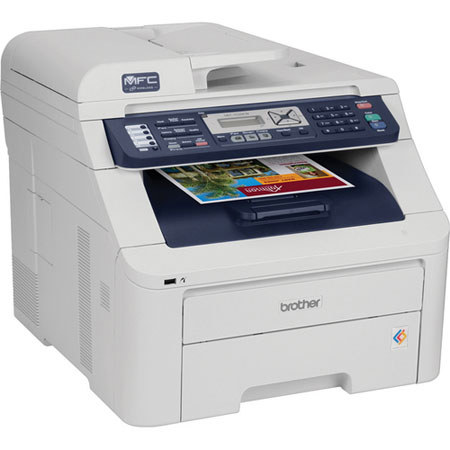
The MFC-9320CW is a compact and affordable digital color All-in-One solution which combines printing, copying, scanning and faxing into one powerful space-saving device. Delivering brilliant color output, you can produce impactful presentations, flyers, brochures and other critical business documents.
It offers flexible connectivity with Ethernet and wireless interfacesso it can be installed on a wired or wireless network for multiple users to share printing, scanning and PC faxing. Enjoy the convenience of stand-alone copying and copy reduction or enlargement from 25-400%.
With faxing, you have the flexibility of stand-alone faxing or sending faxes from your PC. It also hasa USB Direct Interface to print from or scan to your USB flash memory drive or print from your PictBridge-enabled camera, too!
Join VIP PRO
Earn 2X Points + Exclusive Perks!
Request a Callback
Chat one-on-one with an expert
Sell or Trade your Gear
Get started in 3 easy steps