2022-03-14T20:00:00
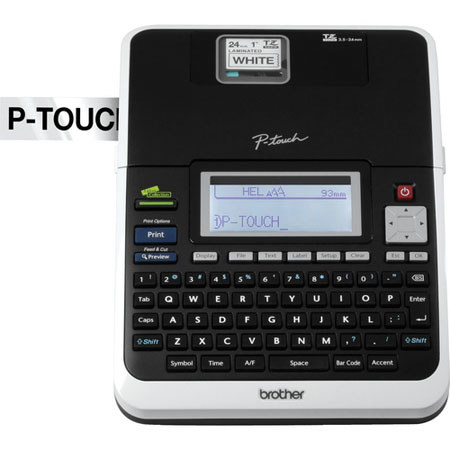
It's been a long time since I had this unit and I have never had any problem with it. It has done everything that I need
EDavison
Originally posted at

2015-05-30T20:00:00
Rated 5 out of 5
The right tool for the job
I first learned of the PT-2730 when it was strongly recommended by David Allen, author of Getting Things Done, for the job of labelling file folders clearly and efficiently. Two years later, it has been getting the job done flawlessly and easily ever since. My only gripe is a small problem changing between tape cutting modes, apparently due to software design. All in all, this is a great device!
DaveMc
Originally posted at
2015-03-31T20:00:00
Rated 5 out of 5
Excellent utility
This really did the job when I undertook to reorganize and label my garage and toolboxes. Flexible, fast and reliable.
VLAD2286
Originally posted at
2015-03-28T20:00:00
Rated 4 out of 5
Great Equipment
This unit does everything I was looking for in a label system. The price was right and the quality is perfect. The verity of tapes available is everything you can need. The computer interface works very well and simplifies the making of labels. It also adds graphics for all your needs.
HomeOffice77
Originally posted at
2015-02-04T19:00:00
The PT-2730 labeler is very easy and fun to use. I would like to see more templates to choose from, but it is quite easy to create my own. The assortment of tape widths and colors is great.
MinnesotaMidget
Originally posted at
2015-01-25T19:00:00
Rated 5 out of 5
Love this labeler
I've owned other Brother labelers, but this is my favorite. It's easy to use with lots of options. Love it!
grobb53
Originally posted at
2014-08-22T20:00:00
Rated 5 out of 5
Great label printer
Excellent long lasting labels from a very efficient and easy to use printer.
rjpdj
Originally posted at
2014-07-19T20:00:00
It does what it is suppose to do. Easy and reliable, so far. I had it only 3 months.
rhfjr
Originally posted at
2013-07-26T20:00:00
I like it. But have not found out what all it will do yet.
billL
Originally posted at
2013-07-19T20:00:00
Rated 5 out of 5
BROTHER PRODUCTS ARE GREAT!!
ANYTHING I EVER PURCHASED FROM BROTHER HAS BEEN GREAT!! I'M NOT ABLE TO USE MY PRODUCT UNTIL I CAN AFFORD TO BUY SOME MORE TAPE!! I THINK SOME OF THE TAPS ARE A LITTLE PRICEY, BESIDES THAT, I'M HAPPY WITH MY PRODUCT!!
BLESSED
Originally posted at
2013-07-16T20:00:00
I was able to add a picture of myself to a label, that was using the computer interface. It has a lot of potential, the iterface could use a little twicking. I do get a little concerned about how much tape I might use playing with it.
Beware it put batteries in it for memory reasons, read the directions for this concern.
You will be showing off coffee mugs you have put labels on.
ACheshireCat
Originally posted at
2013-06-16T20:00:00
Rated 4 out of 5
Waste of tape
We like our P-Touch and its many features including the ability to use it with or without our computer.
Wish your software was more user friendly and would work with my Linux operating system. P-Touch's most costly and annoying feature is the waste of the expensive tape when printing a single label.
CJLM
Originally posted at
2013-04-13T20:00:00
Rated 5 out of 5
Excellent Purchase
I have used PT machines for a number of years. I like this unit because it is the easiest to use that I have owned. Cartridges are easily changed and the product is consist.
MikeTheTeacher
Originally posted at
2013-03-30T20:00:00
Rated 5 out of 5
Desktop labeling: best office machine ever!
This machine is very easy to use and makes your office so much neater! Every office should have one.
Feeo7
Originally posted at
2013-02-21T19:00:00
Rated 5 out of 5
Well pleased
I have had the Brother PT-2730 since July 2012 and make occasional use of it. It is easy to use both when disconnected from my PC and when connected. I found a variety of uses from labeling tool chest drawers, parts holders, file folders, cables, electrical plugs, and various items. My experience previously had been with other Brother labelers used at work in the IT department to label network cables and various hardware items.
dcartwr
Originally posted at
2013-02-20T19:00:00
Rated 5 out of 5
Great product but......
Great product and I use it a lot. However it is an irritation that it wastes so much tape. Either the machine cuts a section off before printing or I must cut it off before applying the label. Wastes too much of the over priced tape. Should be adjustable.
But I continue to use it a lot so I doubt anything will change. I recommend it frequently with that caveat.
FromanAbe
Originally posted at
2013-02-20T19:00:00
Rated 4 out of 5
Excellent Machine
This is and ecellent printer and i really like the PC connectability . The software is also very good.
The only dislike is the wasted tape at the beginning of the tape printout. Apparently many other people have the same complaint.
One work around is to do chain printing.
Victor
Originally posted at
2013-02-12T19:00:00
Waste of label tape even when you make the labels with short border. ( waste bland piece at start up . Can not view label very well before printing. Can not save and name label what you want it to be. ( Have to use no#1, no#2 )
I believe you could make it user friendly by using some computer language and standard computer functions.
It prints a nice label
Butch21
Originally posted at
2013-02-06T19:00:00
Rated 5 out of 5
PT-2730 Labeling System
I got this before Christmas to help me get organized, and it is doing WAY more than I ever imagined! I have several different widths of the tapes, so am able to label just about anything! It is very easy to use, both stand alone and connected to my computer. If you want a nice labeling system, you can't go wrong with this one!!!
TexSuz
Originally posted at
2013-02-04T19:00:00
Replaces my older Brother P-Touch which was not Windows 8 compatible...this is excellent, has a better label selection & is more "user friendly" as far as software is concerned. Highly recommended!
teepee
Originally posted at
2013-01-29T19:00:00
Rated 5 out of 5
exactly what i need
Easy to use..Exactly what i need for my project...A1+
carlcarln
Originally posted at
2013-01-26T19:00:00
This label meker is so easy to use, we'll worth the money!
Irish
Originally posted at
2012-12-07T19:00:00
Rated 5 out of 5
Quite Handy
This is a great label maker for the IT Professional. It comes in handy for keeping things neat and tidy. Easy enough to use as a stand alone unit, but even better when hooked up to your computer.
WJames
Originally posted at
2012-12-04T19:00:00
This is the best thing ever! I love that you can connect to your pc and type out your labels with the font and size you want!!!
Cookie108
Originally posted at
2012-12-04T19:00:00
Rated 5 out of 5
Great Labeler
I've owned the labeler just a few weeks, but its been great so far.
JimHD
Originally posted at
2012-12-02T19:00:00
Rated 5 out of 5
great product
have always wanted to get a label maker, finally broke down and did. Use it at home and work also. I'm an electrician and it comes in very handy for my line of work.
signman
Originally posted at
2012-12-02T19:00:00
Rated 5 out of 5
Fantastic Labeling System
My PT-2730 has been most useful and practical for everything that needs a label. I have labelled all the remote controls that are in everyone's bedrooms as some controls have a different setting for turning on or off; then there are the usb cords for different electronics that needed labelling and identifying games as to which kid they belong to, etc. etc.
CynD
Originally posted at
2012-12-02T19:00:00
Rated 5 out of 5
It Was A Great Purchase For My Business
I really do love my Brother Labeling machine as I am very happy that I made a right decision to purchase this machine.
BGL1808
Originally posted at
2012-12-02T19:00:00
Rated 5 out of 5
EASY TO USE
Great product and straight forward software. Have used the P-Touch's for many years. Great addition.
RickyL
Originally posted at
2012-12-02T19:00:00
Great product works as well and is extremely easy to operate.
mpsi
Originally posted at