



This item is no longer available.
Review Summary
2017-02-18T19:00:00
very consumption battery, not buy it again and not recommend to anyone
Mudhar

2016-07-08T20:00:00
I loved my old PT-90 enough to buy another; 2nd has more complicated menu, poor cutting & battery life.
MrsABrown
2016-07-07T20:00:00
very happy with the product it meets all my needs easy to use
chatly204
2016-06-01T20:00:00
This is perfect for labeling around the house or in the office! It does have problem with a message saying 'low battery' popping up frequently (sometimes after every print but I just turn it off and on again (very quick) and it goes away. Iit works perfectly other than that. I love the features it offers and they keyboard style key pad is the best!
Alisha
2016-05-24T20:00:00
Had one for 2 years until "battery low" signal started coming up and machine shut off. Bought a new one and it immediately started the same "battery low" signal. Will never purchase another
Kin60
2016-05-16T20:00:00
It would be great if the print was larger. Otherwise I like it.
Magy
2016-05-12T20:00:00
I like this label maker but it is not exactly user friendly. I use it fairly often and have to check the directions each time to make sure I'm using it correctly. Also the battery life is pretty poor.
Kate2
2016-05-12T20:00:00
Works well with no problems, easy to load tape & good quality print.
SLH49
2016-03-21T20:00:00
This is my third labeler. The first was one that printed 3/8" labels, which I used onn my file folders and file envelopes. The second, a larger one, printed address labels, which really came in handy around Christmas time. It saved me time addressing all my cards, and believe me, I had quite a list! My third one replaces my first one, because unfortunately an illnes caused me to forget everything for way over a year, and when I went back to it, the batteries had corroded and I had to replace the labeler. This is one handy machine, and I will remember to remove the batteries if the labeler is not needed for a while.
Aunty
2016-03-17T20:00:00
The PT-90 is so easy to operate and the labels come out beautiful. I just love making labels now.
gramsie67
2016-03-15T20:00:00
This is the best little tool that anyone could get.
Fantastic
2016-03-06T19:00:00
Works good. Hard to peel the backing from the label
dave16
2016-02-26T19:00:00
this device prints nicely but it uses batteries too quickly I used duracel brand and the first set would only print one time and it said they were low. I used brand new ones. then I tried off brand it would not power on I went back to a different set of duracells and got it to print about 4 times before it said batteries low and stopped printing. There is no power adapter plug in i can see i think one should be available to stop using so many batteries In addition the slot that is supposed to peel the back paper off does absolutely nothing. Other then those two big issues this machine prints clearly, boldly with many options.
captainwolfe
2016-02-25T19:00:00
We had purchased a PT-90 for sporadic usage in the office. After printing only a few labels, the "low battery" indicator came on, so we swapped out the batteries for new ones. The same thing happened, so we cleaned the terminals as suggested and purchased an entirely new batch of batteries. Again, after printing only one label the "low battery" indicator came on and the machine stumbled through printing the label. At that point we contacted Brother customer service who replaced the product (and was polite and helpful by the way!. Unfortunately the exact same issue occurred. Rather than go through the hassle of yet another return, we've elected to go with another product from a completely different manufacturer.
JudyG
2016-02-18T19:00:00
I purchased this labeler primarily to label my chemicals in my photographic darkroom. I choose this particular model because it was the least expensive. It actually has more features than I need.
Silverhalide
2016-02-16T19:00:00
The labeler is neat looking and easy to handle. First time users like me should follow the instructions carefully when using it for the first time. I did that and it worked it very well. I am pleased we bought it. I suggest that good batteries be bought for it such as Energizer AAA Pile Alkaline. I called Customer Service a couple times and I was very pleased with their response. They were knowledgeable and pleasant.
Gobison
2016-02-10T19:00:00
~ I've had several labelers in the past, Some Good, Some Simple, and Some Too complicated. Fortunately this Pt-90 is Just Right for my current needs, does alittle of this and that. Thank You Brother
Lindi
2016-02-09T19:00:00
Works well, but backing is difficult to peel off label. The slot on the back that is supposed to make it easy to peel is worthless.
JeffM911
2016-01-31T19:00:00
I have no problem with the operation of the PT-90. In fact it is very easy to use. BUT, I can't get the hang of using the adhesive strip separator. Takes ME forever!!!
freder
2016-01-30T19:00:00
We use the PT-90 for labeling our DVD and Bluray collection. It's easy to use for new movies since it sits in a drawer and opens up with the last number used. We organize by number, not name. Numbering our 600 + library took some time, but was easy using this little, hand held machine. Who knows what other uses we'll find.
TnTandBear
2016-01-02T19:00:00
Bought the label maker on special and was a good purchase. It works well for my purpose. I did find that it's difficult to separate the back of the label for application.
ChucknGV
2016-01-01T19:00:00
This small label maker is just what I was looking for. It was simple to get started printing labels right away. Compact and easy to use design.
lkj1
2015-12-24T19:00:00
The first time I used it was at work, and I fell in love with it, so I purchased one for my personal use. Is awesome. I love it.
nacarita
2015-11-09T19:00:00
Bought to replace a 20 year old model that wore out. Really like the features on this one. Easy to use and a good value. Have found labeling items as we buy really saves on confusion later. Example a new flashlight and the ac & dc charger.
drae
2015-10-05T20:00:00
It is easy to use and offers a lot of options that you don't see until you read the instructions! I enjoy it very much!
Reception
2015-09-09T20:00:00
Great printing, even 2 line. Lots of accent characters, decorations and fonts, but these are difficult to locate and use. Many of the commands are far from intuitive. I'm going to have to refer to the instructions frequently. Also the display is very poor quality with low contrast, difficult to read.
StevenJ3
2015-09-04T20:00:00
I really like this product, has more choices for format, style, etc. However, my old one had a flat bottom that it would stand up, taking up less space.
LBiere
2015-08-03T20:00:00
I've used the PT-90 for a while now, does what I want
sk68
2015-07-09T20:00:00
This has been a great little machine. I am rearranging my closet and using it to make labels for boxes so I can identify what is in them on a top shelf.
GrandmaME
2015-07-02T20:00:00
Problem 1. This is the same problem that existed on my earlier model, the PT-70. The low battery indicator appears even though I have just replaced the old batteries with new batteries! Problem 2. The slot on the back where you insert the tape to strip off the backing is designed incorrectly. It is very difficult to insert the tape. There was no problem on the earlier model, the PT-70. This is a problem on this new model.!!
Dave31
Handheld
M
3/8" (9.52mm)
1/2" (12.70mm)
26.2' (7.98 m) (max.)
Direct transfer
Non-laminated
12 character, 1 x line
230dpi
7.5mm/sec
QWERTY
Manual
4 x AAA (not included)
No
1
Helsinki
Small
Large
9
173
Normal
Bold
Outline
Shadow
Italic
Italic Bold
Italic Outline
Italic Shadow
Vertical
7.0mm
2
No
Yes
No
No
Left only
Yes
No
No
Yes
Text Framing: Yes (7 options)
Fill Pattern: No
Up to 9 copies
Yes (9 labels)
No
No
No
6.1 x 4.4 x 2.2" (154.94 x 111.76 x 55.88mm)
0.6 lbs (0.27 kg)
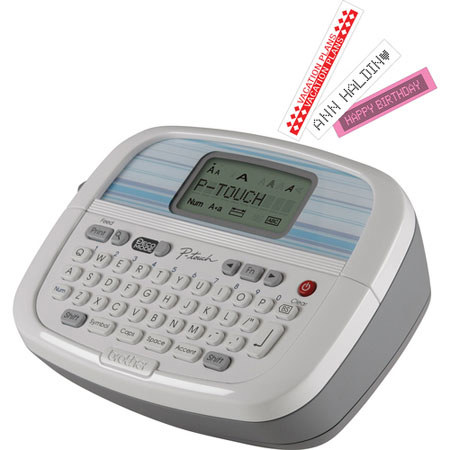
The Brother PT90 "Simply Stylish" Personal Labeler features a 12-character, 1-line LCD display, a QWERTY (typewriter-style) keyboard and is embedded with the Helsinki font. It has 3 changeable faceplates so you can personalize the look of your device. The PT90 has enough internal memory to store up to 9 of your most frequently used labels. The labeler features a dedicated "Deco Mode" key for easy access to the unit's 8 pre-set formats to give your labels an artistic look. It also has 9 type styles and prints 1/2" (12.7mm) and 3/8" (9.5mm) non-laminated type "M" labels with 1 or 2 lines of text. This labeler has 173 built-in symbols and 7 framing options. The P-Touch "Simply Stylish" line of label printers have a sleek design and will blend nicely with virtually any home office decor. The PT90 weights only 0.6 lb (0.27 kg) so you can take it anywhere.