



This item is no longer available.
Review Summary
2017-09-08T20:00:00
This is without doubt the worst piece of equipment i've ever bought to my computers.
Petter

2017-06-26T20:00:00
very bad printer. I bought this to have the possibility to print everywhere in the office. But the Wi-Fi doesn't work. They send me a new one with the same problem. Technical support told me it's my network that does not work, not the dymo ...
politekne
2017-01-19T19:00:00
Purchased two years ago as an supplementary unit for use at my remote office for the purpose of labeling customer rental items. I have had no problem with this connecting to my WIFI network as well as directly through USB.
jackie271
2016-11-13T19:00:00
I bought this printer in April 2015 and since then I have hard time in printing. It's almost impossible to print via Wireless which was the main reason I bought it. On Mac I get "The printer is not responding" (I saw in the reviews that the LabelManager is no compliant with El Captain and I guess it is not with Sierra. On windows I get "Error - printing" even (I downloaded the latest software updates). The only way I can print is to start a virtual machine with Windows, plug the printer into the USB and print with the built-in "light software". In addition to above, the amount of label that is waisted is a bit too much (of course in my opinion). If I print for example small words like "DEMO", if 1 inch is the space taken by the word, another 1 inch and 1/2 is lost before and after. I still believe that the concept is good. The software is really easy to use so is the setup however it lacks of reliability
nicolat
2016-10-09T20:00:00
This is just a failed product that is bad at everything: Bad quality, bad output, bad software, low-range Wifi, overpriced consommables.... Don't buy this if you don't want a dust collector garbage...
raphou
2016-03-14T20:00:00
I bought this printer in October of last year. I found out after I got it that it would not work with El Capitan that I was running. I decided to call support and spoke to Tracy. Very nice. I was assured that updates were coming and it would be fixed to so I held on to the printer. Suffice it to say, 5 months later and no new drivers, no support and no chance for a refund. I am stuck with a wireless paperweight. It might be a good device on an older Mac OS or Windows but neither is an option.
vascott1
2015-11-04T19:00:00
Won't connect to printer wirelessly or with USB. I have never been able to connect wirelessly with my Mac, now it won't even recognize the printer when I plug it in directly to the computer via USB.
Klangs
2015-09-28T20:00:00
Although this label writer can print something as intricate as a barcode, it can only print text horizontally. Attempts to print text down the length of a continuous label will result in a string of letters, one on top of the other down the right, center or left side. This makes the product absolutely useless for anything but barcodes and mailing labels.
michael1334
2015-02-26T19:00:00
It was easy to install the Label Manager over USB and even to switch the Wireless module. Downoladed DYMO Label was also installing OK and found the wireless LabelManager. The problem is that when I exit DYMO Label v.8 and reopen itsay after half hour, it does not recognise the printer anymore and there is no easy way how to reinstall it. It is useless. Rating below is for the software DYMO Label v.8
VladP
2014-12-01T19:00:00
In order to make the label printer work on your network using a mac, you need to delete the label printer from " Printer & Scanners " ( after you made the initial installation ) and add it again as a bonjour printer. It's going to work like a chime.
martin h.
2014-08-04T21:00:00
Used in printing asset ID bar-code stickers for my home inventory. I have a professional hand held Motorola scanner that I use to scan the stickers. The scanner works pretty good with the bar-codes on 1 inch tape, but the 3/8 inch tape, it has difficulties reading the bar code. Peeling the back off the stickers is a real challenge with large hands. Prints stickers pretty fast.
JOE M.
2014-07-22T20:00:00
Not really working wirelessly. Wont print from iPad on the network.
BigT
2014-01-14T19:00:00
Quality not satisfying. First model was returned, due to a mechanical error with the cutter. New one is not able to connect to the printer through wireless network, though it's pingable.
Borp
2013-09-06T20:00:00
Very unhappy with this Wireless (? PNP. In spite of 2 days troubleshooting etc, it still will not connect with my network. I'm convinced they have written the instructions incorrectly and they don't give you the correct information to complete the connection.
Samantha

Accidents happen where life happens. Protect your favorite Adorama products and purchase a protection plan to stay covered from accidental damage, mechanical or electrical failure, and more.

If we can’t fix it, we’ll replace it at no additional cost.

Protect your product from drops, spills, and more.

Enjoy your gear without fear. We have you covered!

When regular use of your product over time results in mechanical or electrical failure.

We will never charge you a deductible after the purchase of a plan.

Our claims process is simple & easy and our customer service team is happy to help.
Adorama Protect powered by Extend is available for purchase to customers in the United States. Not available for purchase Internationally or in U.S. Territories.
Browse our FAQ
300 dpi
Desktop
0.25" x D1 Tape
1"
Lithium Ion (Li-Ion)
Battery
Power Adapter
2.1x5.6x5.3" / 5.33x14.22x13.46 cm
11.61 oz (329.13 g)
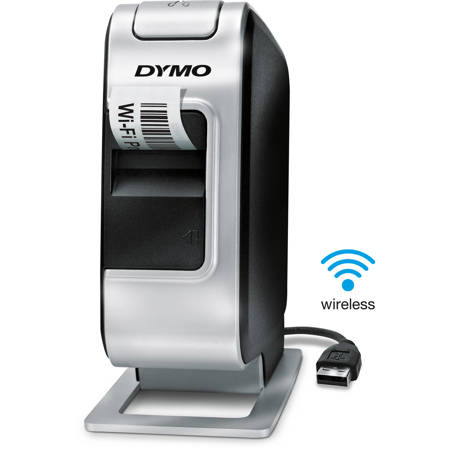
The Dymo Wireless Plug and Play Label Maker offers unlimited number of print lines and versatile uses. Use it yourself or share it with others in your wireless network (easy Wireless Setup Wizard included). Customize labels with any fonts or graphics on your computer through the PC or Mac connection. Print crystal-clear graphics, bar codes and logos at 300 dpi resolution. The LabelManager Wireless PnP delivers fast and easy printing of multiple labels with automatic label cutter.