


This item is no longer available.
Review Summary
2020-06-28T20:00:00
I got this label printer and got it set up in about 10 minutes. I've used label printers before and its important to feed the labels correctly and line up the directions. If you download the drivers first which the instructions say you should have no issues with connecting the device. I was surprised to see a lot of negative reviews then read some and it appears to be mostly user based sorry guys.
Labelprinterguy

2020-06-19T20:00:00
I've had this printer for close a year now. Like many other have said when it works it's great... but when it doesn't it's a real time waster trying to figure out the issue. No one troubleshooting approach works. And as time goes on, it seems like there are more and more of the same issues (disconnects, doesn't read paper, prints blank paper, etc etc). Not worth it considering it's rather expensive
brimor
2020-06-03T20:00:00
So 1 month down and it has decided to stop working 3 times. ONLY way to resolve is to uninstall, restart computer, reinstall and pray it takes. If not do it again
CLWLKHI
2020-06-01T20:00:00
We have had a Dymo LabelWriter 4XL for a couple of years and when it works, it's great. But anytime it decides to disconnect, to go offline, or to waste label after label, you can literally do nothing about it. Like many of the reviews on here, you waste so much time trying to uninstall, then install the software, and then boom still nothing works so you do it again and again, and just hope something works and hopefully 2 hours later you've fixed it. Our company has wasted so many hours trying to get it to connect and work that we're about ready to smash it to pieces since nothing that Dymo tells you to do works, you're literally just hoping that THIS time following the directions works. We're not incapable people, we follow the directions and know how to trouble shoot stuff, it's just not a good product. We'll be replacing this printer with a non-dymo printer as soon as we can.
dontbuyadymo
2020-05-18T20:00:00
The concept of the label printer is great. However, the machine working is hit or miss. More miss than hits. It spits out labels unnecessarily. Wasting supplies. It works sometimes, most times not. You waste more time troubleshooting, uninstalling, reinstalling software, restarting computer. It is just not worth it. Some major fixes are needed on Dymo’s end. The concept of the machine is great. Would be even better if the machine lived up to its specifications.
TKRS
2020-05-14T20:00:00
I have to spend all day to figure it out why this garbage is not working....
Dontbuyit
2020-05-13T20:00:00
over 40 failures in a single week. Causing dozens of hours of troubleshooting. This label writer has COST US OVER $20,000 IN WASTED TIME. I recommend meeting god or licking a alligators tongue over buying this printer. It is absolute garbage, I cannot fathom this product is being sold in the modern era.
Jason M.
2020-05-10T20:00:00
This label printer has given me SOO many problems. It hasn't helped streamline my business, just make things more difficult to be honest. When it works its great, but when it doesn't its so frustrating and pointless. Its constantly disconnecting from my MAC and needs so much attention. No other printer has given me this much strife before. If you're on the fence of getting this printer... DONT! Save yourself the time and gray hair.
lanabanana
2020-05-01T20:00:00
Highly upset!!! The dymo 4xl isnt compatible with Chromebook!!! I just purchased both just for shipping labels & now i either have to get a different printer or a different laptop!! Highly upset!!! It comes with a USB cord!!!! Why isnt it compatible with ANYTHING!!!!
AngelaRush
2020-04-29T20:00:00
I have had this printer for about 4 years, have never had a jam, or extra labels print out. It has gone offline a couple of times, but that is the only negative thing that has happened with this printer....
alpimon
2020-04-28T20:00:00
Excellent product using it for my Business purpose
Rob_123
2020-04-20T20:00:00
I liked it at first. But suddenly it started malfunctioning. It will print a label and then feed out 10 blank labels after that, and then you have to roll up the labels again so you don’t waste them. It also prints half labels, and constantly says its out of paper when it’s not. This thing is an absolute piece of garbage and I’m replacing it with a NON Dymo brand.
Jen18754
2020-03-05T19:00:00
Worst label printer I've ever purchased. Constantly "offline", won't print labels, awful customer service, zero tech support.
caustin10
2020-03-02T19:00:00
Since day 1 i have not been able to use my label writer. The software is not working and when it did download the printer does not work. I have waisted so many labels already its ridiculous. I have another label wriiter that works perfectly but i have now spent the last 4 day trying to get this new label writer to work.
Sano
2020-03-01T19:00:00
This label printer has been malfunctioning since the day I purchased it. It is extremely inconsistent - it will work a couple times and then stop completely or will ghost print tons of labels. It also prints partial labels at times rendering them completely useless. I have wasted countless labels with this printer due to these issues and have only used the correct size Dymo brand labels and fed them through the printer as directed. I have purchased many other Dymo brand printers in the past and am extremely disappointed in this product.
ajb206
2020-02-27T19:00:00
I was having issues from day 1 with this Printer. It shoots labels like a mad one or the drivers won't install on mac. The new update you have Mac 8.7.4 it is breathtakingly idiotic. I have been trying to add the drivers and I fail every time. I have used all sorts of remedies found online & still of no use.
Sree
2020-02-03T19:00:00
When i print around 30 it works well but then it prints at shoots out 3 labels empty. And its frustrating because i have to restart the printer around 3 times to work normal. This is an every day issue. I have the latest driver and its still presents this issue.
abraham
2019-10-20T20:00:00
I received my Dymo & in 10 minutes I was printing labels. It is so fast & smooth .
Remy
2019-10-16T20:00:00
The printer ceased to work properly less than one week post purchase. Ranging from a constantly blinking blue indicator light to "ghost" printing (and ruining) multiple reams of labels, I am beyond frustrated. DO NOT RELY UPON THE FUNCTIONALITY OF THIS PRINTER FOR AN EFFICIENT WORKFLOW. Lastly, the outdated software obliterates any goals of achieving a seamlessly integrated packaging process.
Denese
2019-10-10T20:00:00
I am literally copying someone elses review and posting again as mine since the same thing has been happening over the last year. I am actually sitting here with a fairly new dymo not even 3 months old that JUST STOPPED working out of no where. nothing changed just stopped working. I won't even talk about the amount of labels that I have wasted and time wasted on trying to make both machines work. VERY DISAPPOINTED. I ditto the below message... "When it worked it worked great but...that didn't last long. I've read some of these reviews here and it seems I am not the only one having issues. The strange part is that it just started messing up for no reason. Nothing changed. It would print one label then shoot out 3 blank ones, then if it did print another it was off with half of the label on one sticker and the other half on another sticker. I tried everything but decided to go get a brand new one and later I'd return the other. Got the new one, did a fresh install on another computer and it does the same thing. Unreal. Now I have 2 of these that do not work and have wasted an unbelievable amount of labels that are not cheap. I paid around $250 each for these plus wasted $20-$30 bucks in labels and now am being told it's past 30 days so I can't even return them. Dymo if you read these tell me you can do something for me. This is not cool at all." Contact Customer Service with questions or concerns. If you no longer wish to receive notifications like this, you can unsubscribe any time. .
Donata
2019-10-07T20:00:00
I was just visiting the website to download the driver on a new computer and saw the terrible review of this printer. Not sure what everyone's big issue is. I am super sure they just don't understand drivers and proper installation. To date, I have printed just over 19,000 labels (over a period of 24 months) with the only jam or error occuring on the very last label in the roll. Make sure to use DYMO proprietary labels. (this might be an issue as well.)
Tyler8484845
2019-10-07T20:00:00
When it worked it worked great but...that didn't last long. I've read some of these reviews here and it seems I am not the only one having issues. The strange part is that it just started messing up for no reason. Nothing changed. It would print one label then shoot out 3 blank ones, then if it did print another it was off with half of the label on one sticker and the other half on another sticker. I tried everything but decided to go get a brand new one and later I'd return the other. Got the new one, did a fresh install on another computer and it does the same thing. Unreal. Now I have 2 of these that do not work and have wasted an unbelievable amount of labels that are not cheap. I paid around $250 each for these plus wasted $20-$30 bucks in labels and now am being told it's past 30 days so I can't even return them. Dymo if you read these tell me you can do something for me. This is not cool at all.
djkeith321
2019-10-05T20:00:00
Only had a problem a few times with UPS or Fedx not being able to read the barcode. The biggest mistake the programmers made with this label printer is that there's no way to set the print size larger unless you use adobe, which has it's own bias against anything on your computer that's not ... to their liking.. let's just say. Therefore you get printed barcodes that you can't read without a mag.glass. Really, it's very irritating. Put up with or go with another brand, there's plenty that work fine without bowing down to adobe or microsoft or any of these brands that won't listen to the thousands upon thousands of customer requests..
jbwhining
2019-10-01T20:00:00
This label printer has been a constant thorn in my side - my Windows desktop simply does not recognize the printer. After uninstalling and reinstalling the "Dymo Connect" software, which appears to be the only source of a print driver, it still does not work - I'm tapping out, and going with another brand for a thermal label printer. Never again, Dymo.
TPark
2019-09-19T20:00:00
I bought this product about 4 months ago and it has been arguably the worst experience I have ever had with any piece of technology. It constantly malfunctions and doesnt perform as needed. I often times just try printing a single label and the machine will shoot out 5.5 extra labels, for no reason. I have followed every recommendation by the company including rebooting, redownloading the drivers and purchasing the branded labels. Also, I have confirmed that the settings on my computer are accurate. AVOID THIS PRODUCT AT ALL COSTS.
MiMo
2019-09-08T20:00:00
Trust me on this, don't believe their marketing. I have two iMac's both are newer models. The 4xl will not save image overlays, no matter what you do.
iMac U.
2019-08-29T20:00:00
This labelwriter, as all Dymo products, has failed me exactly at the moment I just needed a product that does what it is supposed to. I keep buying Dymo products, and they keep failing, and I keep buying them thinking this is a reputable and respectable company whose products must be under constant improvement and development. I seem to be wrong.
pcstk
2019-08-10T20:00:00
Do not buy this DYMO 4XL Printer! it stops working after a month and will not stop printing extra labels! i have lost so much money due to the design flaw that this printer has!
jake7
2019-07-09T20:00:00
I bought this for my business and it works wonderful . Very easy set up and very user friendly. It had definitely saved me time and money.
La C.
2019-07-06T20:00:00
I've performed all of the troubleshooting Dymo recommends. Others also report that it prints extra blank labels. This is due to the paper not being all the way to the left. But there is no guide for the labels, so if it is slightly misaligned then the paper will move to the right! That's simply a design flaw. We've wasted tons of postage with Stamps.com because the printer errors so often. I've rebooted. I've uninstalled and reinstalled. I downloaded the driver direct from Dymo. Nothing helps! A rating of 3 stars is pretty low if that tells you something. The reviews on Amazon aren't much better. Look into their competitors, Dymo isn't the only thermo printers!
Philbert

Accidents happen where life happens. Protect your favorite Adorama products and purchase a protection plan to stay covered from accidental damage, mechanical or electrical failure, and more.

If we can’t fix it, we’ll replace it at no additional cost.

Protect your product from drops, spills, and more.

Enjoy your gear without fear. We have you covered!

When regular use of your product over time results in mechanical or electrical failure.

We will never charge you a deductible after the purchase of a plan.

Our claims process is simple & easy and our customer service team is happy to help.
Adorama Protect powered by Extend is available for purchase to customers in the United States. Not available for purchase Internationally or in U.S. Territories.
Browse our FAQ
Direct Thermal
53 label per minute (address labels in text mode)
300dpi (11.8 dots per mm)
4.16" (105.73mm)
User-definable
Maximum media width: 4.53" (115mm)
USB 2.0 Printer Class Device
Print head life: 787,000 linear inches (124 miles) (200,000 linear meters)
1000 shipping labels per hour
Windows XP 32-bit
Windows Vista 32 or 64-bit
Mac OS v10.3.9/10.4.11/10.5.2 or later
24VDC 3.75A
CE, FCC, TUV CB, cTUVus, TUV GS and C-Tick
7 x 5.31 x 7.37" (178 x 135 x 187mm)
27.6 oz (0.782 kg)
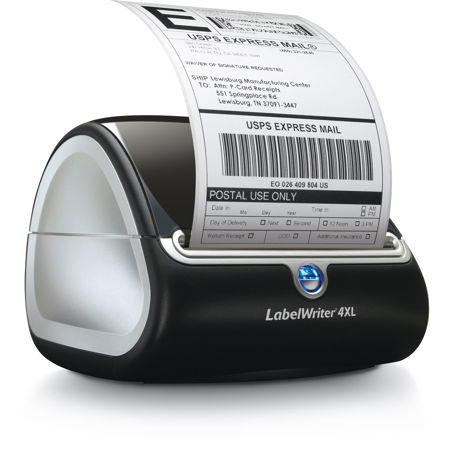
The Dymo LabelWriter 4XL is only 7 x 5.31 x 7.37" (178 x 135 x 187mm) and accommodates labels up to 4" (10.16cm) wide. The 4XL delivers labels at 300dpi, via direct thermal technology. The printer uses heat from a thermal print head to print on specially treated, heat-sensitive labels. The only supplies required are labels, no ink nor toner. The LabelWriter 4XL prints on a wide variety of labels for office and commercial requirements, including shipping and receiving, inventory control, retail and more.