2014-09-30T21:00:00
Rated 5 out of 5
Inexpensive Merlin
I'm really impressed with the product. I took the advice of anther poster and downloaded the Merlin manual and used it as a starting point to balance the camera. The product's instructions are sorely lacking - it took me awhile to determine what all of the various screw-ins were for, and I'm still not sure about some.
My first attempt involved a walk-around of my home including up and down stairs and it looked great - especially for a first-try.
CARTER S.
2014-03-10T21:00:00
Rated 3 out of 5
Not quite what I thought
This product is probably better suited for smaller DSLR cameras. I was never able to get it to balance with a full size battery grip camera and standard lens. So, 3 stars because it probably does work, just not for me.
PWP
2013-07-01T21:00:00
Rated 4 out of 5
Great but you have to tinker with it
Here's the deal. This product works great, and for the price is a steal.
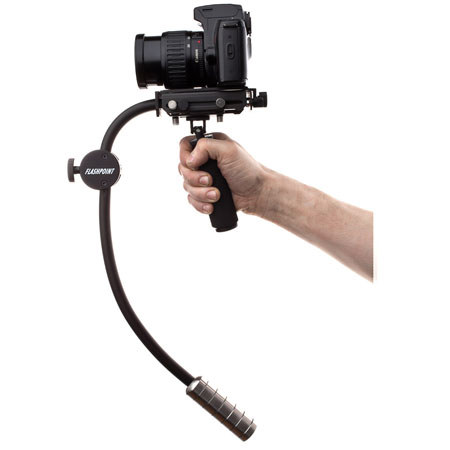
The bad... it takes A WHILE to balance correctly. The instructions have no detail about balancing and there really are no instructions about it online. Here's how I did it.
First of all, I have a friend who has a Glidecam 3000 and Stedicam Certification. I got some tips about how he balances his and have seen him in action.
Secondly, I Googled "Steadicam Merlin" which is the more expensive equivalent. There are videos that give you tips etc. about balancing it. There is a lot of talk about finding the center of gravity of the cam and lens on the platform which is super important. It doesn't have to be perfect, but it should be close.
Thirdly, I went to this website http://www.merlincookbook.com/
Be sure to check out "User Supplied Settings". My exact camera/lens combo wasn't listed, but I found a close equivalent. This gave me an idea of the amount of counterweight used, arc size, etc.
This info combined with tinkering and tweaking helped me to get a good balance.
Other tips based upon my observations:
Don't use a light camera body and heavy/long lens. The lens sticks out and will make it harder to counterbalance. Personally, I use a Canon 6d with a 17-40mm f4 L, and place the camera pretty far back on the platform. You probably shouldn't use too much of a zoom anyway. The movement tends to lend itself to wider shots.
Make sure you have all of your accessories mounted to the SteadyCine (and battery, card, etc.) before you begin balancing. Another good practice is to use a lens with internal zoom action... any lens that extends when zooming is going to cause you issues.
Use a light stand to hold the unit when you're tweaking it and or it's not in use. The top of the light stand will fit into the bottom of the handle.
Finally, when you do get it balanced, make sure to mark the position of the platform on the rig with a Sharpie and also the position of the camera on the platform. This will save you loads of time when you need to go back and re-balance later.
Hope this helps!
Graham J.
2013-04-01T21:00:00
Rated 3 out of 5
Patience is a virtue!
Be patient! This product is an inexpensive version of the Merlin and although it lacks little support in comparison, it can get the job done with practice.
jordan
2013-03-24T21:00:00
Rated 4 out of 5
Stabilizer inexpensive.. Yes please.
I purchased this stabilizer based on personal projects that I am working on. This is not a stabilizer that is an easy setup by any means, however if you are willing to understand the basic concepts of how a see saw works, then it will be easy to setup. Now the item itself came with a basic instruction manual but does not go into depth of how tedious the initial setup can be.
First off if you think that this is a plug and play item, then you are mistaken. You can watch many videos on the setup of similar products on youtube but here is the kicker which you need to understand first. Weigh your camera and follow suit with the provided weights. You want to start with similar weights on both ends ie. if your camera is 2lbs the counter weight needed will be 2lbs.
The videos on youtube can help with the other setups and can remove hours of frustration otherwise.
This is a great product and would be better if the instructions gave a better understanding on how it works.
skene
2013-01-16T19:00:00
Rated 5 out of 5
I would buy this product again and again
Great product, very compact and lightweight
and0001