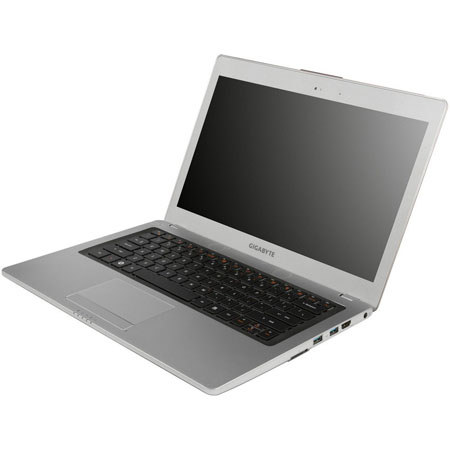
Inspired by a textile shuttle, the streamline flows around the machine with slender curves to form elegant design, which perfectly balanced the agile and smooth movements. With an angular, slender build, the notebook exudes incredible style and craftsmanship
The U2442 accomplishes an awesome engineering feat by packing a high-performance processor and GPU into a sleek and lightweight chassis that is only 1.59 kg and just 18.5mm-21mm thick. The stunning design is truly ultimate craftsmanship at its best
It boasts an automatic light sensing backlight keyboard. This excellent feature adjusts the light to external conditions and allows you to get work done even under low light conditions
The notebook has a visually appealing touchpad with textured dots that enhance the sensitivity, responsiveness and accuracy without compromising design and functionality
The U2442 is powered by a powerful 3rd Generation Intel Core Processors that supports Turbo Boost 2.0 technology. The processor delivers tremendous performance that flies through even demanding tasks with ease
Intel Rapid Start Technology allows the U2442N-CF2 to resume in 2 seconds from instant on and in just 7 seconds from sleep mode. With Intel Rapid Start Technology, you can resume to the previous session exactly as it was and applications will be in the same state with no data loss
It comes equipped with a NVIDIA GeForce GT 640M 2GB that crushes the limitations of Ultrabook graphic performance. The GPU provides a superb experience that is great for multimedia and gaming and the 3D Mark 06 score beyond 11000
It provides the great features of an Ultrabook, but still is able to pack a mSATA 128GB SSD and a huge 750GB HDD (optional) into its super slim body. The benefits of dual-storage system are providing high performance and massive storage
The built-in mSATA 128GB Solid State Drive (SSD) delivers enhanced performance for the boot speed, saving process and responds quickly to commands with its super fast write performance!
It has a dual air vent design (one for CPU and one for GPU) that efficiently eliminates heat and keeps noise to a minimum. Despite the powerful features and thin form factor, the unique venting system is able to effectively keep the notebook from overheating
It has a new 2T2R Wi-Fi wireless chipset which delivers data transfers up to 2 times faster with a transmission date rate up to 300Mbps. This makes it incredibly fast and easy to download large files with a full range of applications
USB 3.0 provides fast data transfer speeds up to 10 times faster. This not only saves you time and helps keep data synced, but gets you back to doing important things quicker than ever. Also, the integrated Intel USB 3.0 interface makes the whole process more stable and smooth
Bluetooth 4.0 is more energy efficient and stays in hibernation mode while idle without draining much power. It will then activate itself when transferring files. Sharing content between friends has never been easier
It has a high-resolution 1600X900 LED backlight screen that delivers bright and vibrant colors, smooth and stable images and true to life detail. With the crisp display, you can enjoy a high-quality visual experience
HDMI lets you turn the U2442N-CF2 into a home entertainment center by connecting to an external display. Now you can play the latest multimedia and enjoy it in stunning full HD quality on a large external screen
THX TruStudio Pro groundbreaking audio technology comes equipped on the U2442 and is designed to provide outstanding performance by effectively eliminating sound distortion, enhancing volume and reinforcing even the smallest details of the sound
U2442N-CF2 supports Intel WiDi wireless display box (purchased separately), you can display the image from U2442N-CF2 onto a TV screen or projector, making home entertainment and presentations even easier to share
GIGABYTE has thoughtfully designed the Smart Manager interface. By pressing the Smart key you can access the Smart Manager, which consolidates essential system programs into an intuitive guiding page
The innovative quick battery status check lets you see how much battery power is remaining when the notebook is off. Simply click on the right mouse button and the LED lights will light up to indicate how much battery power is remaining
Smart Recovery makes it fast and easy to restore the notebook back to factory default settings. Just click on F9 when the computer is booting up to launch Smart Recovery and you will be able to quickly restore your notebook