
This item is no longer available.
Review Summary
2009-02-19T19:00:00
Small Office 10 to 20 copies a day. Scanning is great and easy
Maria
2009-02-19T19:00:00
Very practical design and applications. Scanner requires a little excessive PC interface.
CCWX
2009-01-21T19:00:00
This is an excellent all-in-one product for the money. Don't waste your time and money on an all-in-one inkjet....I have in the past and the laser is BY FAR much better. Unless you have a big need for color, you can't go wrong with the Canon MF4150. I bought 3 of them for my business and couldn't be happier.
Biz M.
2008-09-18T21:00:00
I like all the features of this product, but the main reason I bought it was for the duplex printing (I don't want to waste paper). Unfortunately, the duplex is jamming every time. I'll be taking it back this weekend. After reading various reviews, I have found that this is fairly common, so I will be getting a different product.
Jesse
2007-05-15T21:00:00
Real good performance to price ratio. Great for small office or home use. The only thing I do not like is having to turn machine off to reset in some instances. Other than that, very good performer!!!
Dave J.
2007-01-29T19:00:00
Nice looking unit. Only thing that is not shown on the picture is that the paper casette sticks out - the door you see on the photo is always in the open position. This multifunction offers a lot of features with decent software (better than Brother), however if you need network capability I would suggest Samsung SCX-5030. It recently increased in price by 20%. For [...] is a steal for [...] it is...ok. I expect the toner cost to be 30% higher than hp4050.
Business
2006-12-01T19:00:00
Unpacked my new unit last night. Loaded 5 documents into autofeed to copy. After one hour and much frustration, it still couldn't average more than 1/5 copies without jamming in the paper tray. The machine can't tell I have letter paper loaded and other errors that don't make sense. Reset doesn't work as documented. Have to turn off machine each time. I maintain copiers for several places, I'm not a novice and I couldn't use it at all. Going back TODAY!
Margaret
Accidents happen where life happens. Protect your favorite Adorama products and purchase a protection plan to stay covered from accidental damage, mechanical or electrical failure, and more.
If we can’t fix it, we’ll replace it at no additional cost.
Protect your product from drops, spills, and more.
Enjoy your gear without fear. We have you covered!
When regular use of your product over time results in mechanical or electrical failure.
We will never charge you a deductible after the purchase of a plan.
Our claims process is simple & easy and our customer service team is happy to help.
Adorama Protect powered by Extend is available for purchase to customers in the United States. Not available for purchase Internationally or in U.S. Territories.
Browse our FAQ
Duplex Monochrome Laser.
Black Up to 21 ppm (letter)
Black 600 x 600 dpi , 1200 x 600 dpi quality
600 x 600 dpi
Up to 21 cpm (letter)
Monochrome Laser
100 sheets (face down)
50 - 200% in 1% increments
256 levels
Less than 9 seconds
35 Sheets
Platen Up to 8.5" x 11.7", ADF Up to 8.5" x 14"
Collate, Toner Saver Mode, 2 on 1
Color Contact Image Sensor (CIS)
Optical 600 x 1200 dpi
Interpolated 9600 x 9600 dpi
24-bit
Platen 8.5" x 11.7", ADF 8.5" x 14"
JPEG, PDF, TIFF, BMP
33.6 Kbps (Super G3)
Up to 256 pages
8 one-touch speed dials / 100 coded-dials
Remote RX, Dual Access, two-sided output
USB 2.0 Hi-Speed
Canon drivers for Windows, ScanSoft OmniPage SE (OCR), NewSoft Presto! PageManager
680 Watt (Max), 3 Watt (Energy Saver Mode)
15.4" (W) x 16.8" (D) x 17.7" (H)
28.2 lbs
Canon 1 Year Limited Warranty
013803067415


I would buy this product again and again
By Maria
Small Office 10 to 20 copies a day. Scanning is great and easy
Excellent value
By Biz M.
This is an excellent all-in-one product for the money. Don't waste your time and money on an all-in-one inkjet....I have in the past and the laser is BY FAR much better. Unless you have a big need for color, you can't go wrong with the Canon MF4150. I bought 3 of them for my business and couldn't be happier.
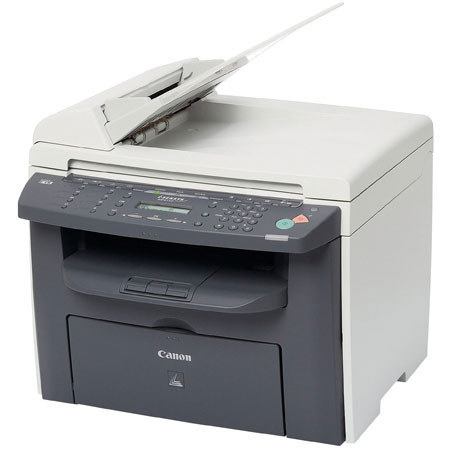
Print, Copy, Fax and Scan with the imageCLASS MF4150 Laser Multifunction from Canon. It is one convenient unit, you can rely on to perform office functions. The unit is packed with stunning features like a 35-sheet Automatic Document Feeder, 250-sheet front-loading paper cassette and Single Cartridge System. Now you no longer need to waste time with your old, slow office machines. Load the originals in the document feeder and off they go.
You can print and copy as fast as 21 pages-per-minute, and when faxing or PC faxing, documents will be transmitted through its Super G3 modem at up to 33.6 Kbps. The imageCLASS MF4150 also features Duplex Output that enables you to print, copy and receive faxes on both the sides of a paper, which leads to significant reduction of paper consumption.
Its Single Cartridge System also contributed in its compact desktop design. The system implies easy-to-replace cartridge that comprises the toner, drum and other moving parts. This makes the maintenance less hassling and eliminates the complication of purchasing and storing separate toner and drum consumables.
When scanning documents, you will achieve remarkable tone-on-tone clarity with color scanning up to an enhanced resolution of 9600 dpi. You can connect your imageCLASS MF4150 with a USB 2.0 Hi-Speed interface that augments high speed data transfer, which results in quicker completion of projects. The imageCLASS MF4150 will assist you with your business needs, and if sharing its productivity is a requirement, an optional print server is available.
Join VIP PRO
Earn 2X Points + Exclusive Perks!
Request a Callback
Chat one-on-one with an expert
Sell or Trade your Gear
Get started in 3 easy steps








