2018-09-26T20:00:00
Having problems staying connected to wifi. now a part fell off and it won't feed paper. Don't waste your money on this.
wifey
Originally posted at

2017-05-15T20:00:00
Rated 1 out of 5
I do NOT recommend
Clumsy to install, paper does not feed through smoothly, grabs too many sheets at once or jams. NEVER again.
highstrung
Originally posted at
2017-04-04T20:00:00
Rated 1 out of 5
Completely Unreliable
Spend more time trying to get it to print than actually printing. WIFI issues, just do a search and you will see the countless issues of the printer being connected but an error message saying the printer is offline. The printer simply wont work using WIFI.
Just m.
Originally posted at
2017-03-28T20:00:00
Rated 1 out of 5
Good luck scanning
We bought this printer/scanner for our home office, yet it functions better as a door stop. It took us days to set it up (because the wifi part never worked. The scanning part still doesn't work. I think we should do an Office Space compilation and throw this thing out the window.
Word to the wise, spend a little more money and get a printer/copier/scanner that works for you, not makes you do hours of work to print/scan/copy.
goldy426
Originally posted at
2017-02-03T19:00:00
Rated 1 out of 5
Horrible;Horrible Horrible
My admin ordered one of these for me. Printing is ok, nothing special. Scanning - Is challenging to say the least, but it works. Wifi connectivity is the first Horrible... Every day I have to push multiple different buttons and HOPE that it connects. Usually, I have to disconnect Wifi, turn on something else and then reconnect Wifi going back and pushing the WPS button on my router. this is not once in a while this is everyday... The Second Horrible is the printer wont turn on --- After a year, my first one died and would not turn back on... I had some extra toner and had a heck of a time getting MY IT team to install the proper drivers, so I decided it would be easiest to go out of pocket and buy a replacement... Wow Bad idea. I received a new one and after a month, same problem... Power failure. Since I was past the one month mark, Amazon could not take it back.. Two huge hunking pieces of junk filling up the landfill.... Look elsewhere. THIS is not the one for you...
WontORDERCanon
Originally posted at
2016-10-27T20:00:00
Rated 1 out of 5
Printer WIFI sucks
Had it for a few months then one day out of the blue it stopped detecting my network, even though all my other devices (tv, computer, phone) are doing just fine.
Tried everything and it still doesn't work. Google searches revealed many customers have had this same issue.
alokg73
Originally posted at
2015-12-10T19:00:00
Rated 5 out of 5
Fabulous Machine
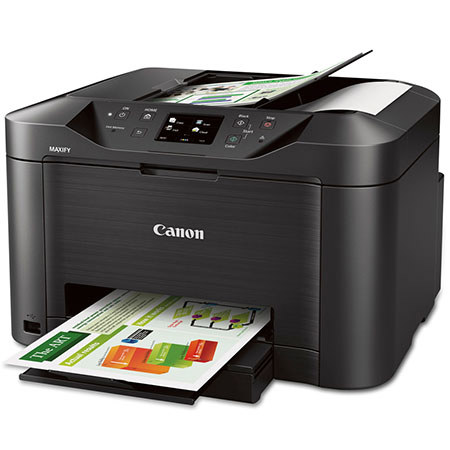
I am a lumber salesman, and I go through a lot of documents, printing, scanning and faxing. I had my Pixma for 5 years and I beat the heck out of it, I was very impressed with Canon products. When it came time to replace it, I did my research, and this Maxify MB5020 seemed to fit the bill perfectly... I read a lot of reviews and was surprised at many of the negative reviews, I was hoping that theses were folks that had issues with computers and equipment from the get go. despite very negative reviews, I went ahead and purchased The MB5020... I have had this for a couple of months now, and it gets hard daily use... I LOVE THIS PRINTER, it works great, many complained about the paper cassette sticking out, well, its flush with the out feed, sticking out is not a problem, and you can pull the cassette out just a bit and easily load different papers for specific tasks, I like that. The cassette holds a lot of paper, and is right up front, I like that too. The low ink consumption is real, I am still using the factory provided inks, wow... I read complaints about the software, sorry, the software works great, I like how I can add a scan preview, or not (I do) its easily customized... Also impressive is the WiFi and Airprint, I get details and orders etc in text all of the time, one button now prints these for me, awesome! I read complaints about the speed, well it has a quiet mode, but that will obviously effect speed, my quiet mode if off, and its blazing (quiet is a nice feature if you are working late though, just not fast)...I like the interactive touch screen, this woks very well, easy to change parameters, when necessary, and its very easy to understand and menu/navigation driven... Overall, I am more than pleased, and again my daily business work puts ALL aspects of this machine through heavy paces... And it has been delivering flawlessly, day after day, after day... For the money, I absolutely recommend this Machine, I am totally impressed, so much so, I felt compelled to counter the bad reviews, they just don't make sense. My neighbor is a very talented IT tech (my neighbor and friend for 25 years) He is always present when I get/ set-up new stuff... He loved this machine, and now he has my old Pixma, he replaced the printer head and its still going! You will not be disappointed with the Maxify MB5020
apvista
Originally posted at
2015-11-12T19:00:00
Rated 4 out of 5
Works great, but not currently compatible with OS
I had to replace my old Canon printer when I had to update my OS to Yosemite. I've had this one about 2 months and love it. I had read reviews that it was too big, and people didn't like the paper drawer cover. It fits on my undercounter shelf just fine, and the cover is no problem. It's fast and prints well. However, I just updated to El Capitan, and discovered Canon doesn't have a driver for it yet! I hope they remedy that very soon, but am making do with printing documents from my phone (mobile is a very nice feature.)
Anonymous
Originally posted at
2015-11-08T19:00:00
Rated 2 out of 5
FAX Feeder causes lines after 2 months
Wow. Used fax for 2 months and now I get lines.
I've cleaned it 4-5 times. Still get the line.
DonR
Originally posted at
2015-04-08T20:00:00
Rated 5 out of 5
Great addition to the home office
I've been using the same canon printer FOREVER (the MP470 and recently made the switch to this model. I absolutely love it. It's a great size for the functionality it includes (it's not overly large like most printers that handle scanning, faxing, copying, etc) and it's wireless. The one thing I hated most in the world about my old printer was the fact that I had to wire in via USB. This printer solves all of those issues - plus it's fast and stores a large amount of paper so it's ready when you need it. I definitely recommend this for office, and home offices, alike.
Selena N.
Originally posted at