2017-11-23T09:03:40
Rated 5 out of 5
Reliable great printer
Very fast for what we need it, use it for limited faxes and light daily printing. Do not use the color on it as not needed.
James E.
2017-11-08T19:00:00
Rated 2 out of 5
Faster than expected but not reliable
Worked OK for 2 months, then started to have problems. Black ink didn't last long, now the black doesn't work at all. Yes, it has a new Canon Black Ink cartridge. Went through several cleaning cycles but no luck.
TxT
Originally posted at

2016-09-28T06:39:09
Rated 5 out of 5
Great Printer
Great new printer for home office. It is quick, quiet, and works well for all applications so far. Good photo prints. Adorama price was excellent. Arrived quickly.
Suzanne B.
2016-07-22T20:00:00
Rated 5 out of 5
Superb printer!
I bought the printer almost 3 months ago from local Sam's Club. I bought it mainly for its one-pass duplex scanning function since I wanted to use it to scan all the paper documents I have lying around into my cloud storage.
I had a Canon printer before (that only prints and therefore I trusted the brand. Since purchasing the printer I had scanned over 3000 pages worth of documents and it really helped declutter my home. The machine is durable well-made. It prints fast and so far I never had a paper jam. The Maxify hotline customer service is superb and helped me answer any questions I had.
I have a Google Chromebook and this is a Google Cloud Print Ready printer. It works well with my Google Chromebook. The only issue I have is that when I print from my Google Chromebook, the print menu doesn't give me the option to print multiple copies of the same document. But to me that's not a big issue.
I highly recommend this to anybody on the fence.
esds55
Originally posted at
2016-06-27T20:00:00
Rated 5 out of 5
Great Prints, Fast and Ez Pz Wireless connect
It Not Loud
It connects to everything wireless
It is Fast
I like it, I like it
Only complaint would be ink expense but with XL's id really not that bad
rpg67
Originally posted at
2016-06-22T20:00:00
Rated 5 out of 5
Great Printer
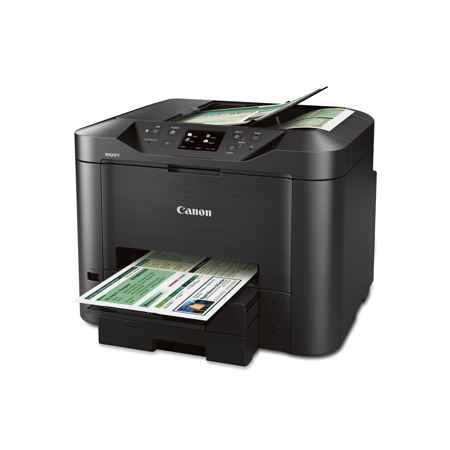
I bought the MB5320 to replace my old HP printer. Some of the previous comments stated the printer was loud. This printer is very quiet. At this point I have no issues with this printer.
T B.
Originally posted at
2016-03-02T19:00:00
Rated 1 out of 5
A Nightmare
This printer is a nightmare. We purchased it for our home office about 8 months ago and it is nothing but a headache almost every time someone in the house goes to print something. It takes forever to warm up and makes the world's most atrocious and obnoxious sounds whilst doing so. When it finally does warm up, it takes forever for the printer to recognize that the computer is sending it a message. As of my writing this review, this is now my fourth attempt to try to get the monster to print a document. If you're lucky enough to get it to print before quitting out of frustration, the printer is so loud and jostles so much that it seems as though it's going to combust because it just can't deal with printing a five page document. On rare occasions, the printer conversely works extremely smoothly, which is confusing. Overall, a very temperamental machine. Not impressed whatsoever.
brugg
Originally posted at
2015-11-06T19:00:00
Rated 5 out of 5
Great quality
Great quality
Love this printer
Thank you Canon
Great printer
Chriss
Originally posted at
2015-05-16T20:00:00
Rated 4 out of 5
Good but not great
Forced to buy new printer when MX892 died after paper jam and stopped feeding paper. Looked at other printers in MX line but opted for this instead as I frequently print a lot and this had a higher page/month rating.
I like the dual paper trays and generally satisfied with the print speed. Text quality is outstanding. Noise level is a little higher than previous printer but not objectionable.
Text appears darker than id did with the old printer - almost like everything has been st to "Bold".
Absolutely hate that everything has to be set through the small touch screen, this is especially tedious with fat fingers and somewhat cryptic menu system.
Wish I could set everything through the computer as I could with every other printer I've owned.
Really miss the fast/low quality print setting that has been available on every other Canon printer I've owned.
Also miss having an easily accessible single sheet/alternate path paper feed for printing labels and other special products.
As with every "new" generation or line Canon releases, the cost of ink will exceed the cost of the printer within the first year. Still not sure exactly how much I'll be able to print from each set of cartridges, but do know they're expensive.
RamblinReck67
Originally posted at
2015-05-04T20:00:00
Love my MAXIFY MB5320! Quick, clean and high quality prints. I'm really happy with this printer!
ΛLΛNΛ J.
Originally posted at
2015-04-08T20:00:00
Rated 5 out of 5
Love this printer! Easy to use.
I was very excited to get this printer because of a few specific features. I loved the two drawers because I print from different floors in my home and I was tired of having to run up stairs to change paper before I could print. I also love the two-sided scanning. I do a lot of contracts for my business and this makes the scanning in much easier and faster. It took me about an hour to set it up, mainly because the printer had to pause and do it's configuration. However, it was VERY easy to set up. It comes with a CD Rom, but since my laptop doesn't have one I was able to go online and download the software I needed. It connected immediately and I had no problems. I love this printer so far and I'm very excited to have it! I received this printer for free as a Klout Perk.
Webgrl
Originally posted at
2015-03-20T20:00:00
Rated 4 out of 5
Nice so far
We got this last week as our Pixma MX870 malfunctioned and we were told it would be cheaper to buy a new one than get it repaired. Really like Canon All in Ones so this was was our choice. Not super tech savvy here so it took almost 3 hrs to get everything hooked up and running. Some of the directions were a bit confusing. Paper says blah blah then follow screen on printer and screen directions have you back tracking or jumping ahead.
Other than that is prints super fast compared to the MX870 and it has the 2 drawers which is what we wanted as we liked that about the MX870 because we print checks from Quickbooks so paper in one cassette and checks in the other.
Farm g.
Originally posted at
2014-12-09T19:00:00
Rated 4 out of 5
Very solid product...
I was concerned at first because the color wasn't right, but it turned out I didn't have the right paper for my settings.
Overall I've been really please with the product -- it's fast, and prints look really professional.
Humptydank
Originally posted at