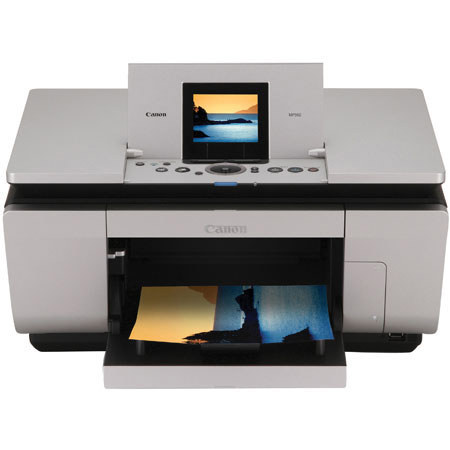
Canon PIXMA MP960 All-in-One Multi-functional Color Bubble Jet Printer with 3.5"LCD Viewer, 7 Color, 8.5" x 11.7", USB Interface, for Mac & Windows.

SKU: ICAMP960

This item is no longer available.

Overview
Compare
Learn
Specs
Protection

Reviews about this item

Review Summary

2009-03-06T19:00:00

Rated 4 out of 5

Beautiful Printer

I bought this because it scans slides. It does a nice job.

Tom F.

2009-02-26T19:00:00

Rated 5 out of 5

Great printer, greater price!!!

I still can't believe I got a factory new MP960 printer, with ink, at such a great low price. It's great!!!

Explr1

2009-02-20T19:00:00

Rated 5 out of 5

Good quality and function with low price

I use this printer for family photographs and papers. this works well, silently and printing quality is very good with using the apropriate paper. Also, I sometimes use for my job, scanning the film data and printing. I do not think its scanning quality is not enough for me but other functions work very well.It is important that this is the previous high level printer and very cheap now. I think that cost perfomance of this product is quite high, so it is very good for prosumer users. It is noted that ink costs are not low as other high lebel printers are.

MASA

2009-02-19T19:00:00

Rated 4 out of 5

Nice Printer

I have not replaced the faulty ink cartridge because it is still new and full of ink, but I have to reseat it every couple of days because the printer indicates an error.

SIR-K

2009-02-19T19:00:00

Rated 4 out of 5

Wonderful Printer, expensive ink

This is a big footprint printer that has excellent print quality and speed. The replacement ink could easily cost you [$] if you use OEM ink. My last canon MP printer lasted 3 years and died of Can not determine the ink cartridge failure which locked the unit. Canon tech support, although excellent could not revive the unit...

Michael R.

2009-01-21T19:00:00

Rated 5 out of 5

I might buy another for my home

I bought this printer to replace a Canon i860 which had great quality after five years, but was really slow. This printer is fantastic. It prints with the same great quality (beautiful photos) but much faster. Plus it's really nice to make quick copies or scans at my desk. I might buy another one for my home.

Happy c.

2009-01-21T19:00:00

Rated 5 out of 5

Very Nice! Would buy again!

I am very impressed with the print quality, no complaint. This is a great product.

BRYAN D.

2009-01-20T19:00:00

Rated 5 out of 5

Fits my needs perfectly

I've had my Pixma printer for about a week and I've printed over 800 pictures from a vacation. I haven't had one problem with it. The color is perfect, the ease of operation is great, and the range of choices fits my needs perfectly. Discount photo services will never see me again.

janfromkan

2009-01-20T19:00:00

Rated 5 out of 5

Great

I needed to upgrade a Canon that I absolutely loved for it's quality but hated for it's slow printing speed. This Canon is fantastic. It has great color quality and prints much faster. I am thinking about buying another for my home.

Happily P.

2009-01-20T19:00:00

Rated 5 out of 5

High Quality, low cost

Bought to replace a previous Canon MP printer— which did not last as long as I'd hoped. This seems more sturdily built & is up several levels in overall quality and ability (and model #). Control panel is better laid out & easier to use, though still maybe not perfect. After a month's use, I'm generally impressed. Easy to set up, scans are good quality & the ability to scan 35mm negatives/slides and thick books is nice, but means you must raise the cover w/2 hands: one hand unbalances the cover. I use this printer for photo & color docs & as a supplement to a B&W, copy based laser. Photos are crisp & clear, but not professional grade. Most ink jets have not lasted as long as I'd like, no matter the brand, so it might be a class characteristic.

JEFFREY S.

2008-12-28T19:00:00

Rated 5 out of 5

Canon PIXMA MP960 All-in-One

Father uses it for photos, wife uses to make lables and I use it to print out rebates for products.

Vincent C.

2008-12-21T19:00:00

Rated 5 out of 5

A top drawer printer!

This is a hefty, well constructed printer. The setup was a breeze. It even uninstalled my old printer software and prompted me to update with newer versions of some programs. Used the scanner feature right away to print directly to a multi-page PDF document. Can't wait to print some pics from my Nikon D80. Adorama has an unbeatable price on this printer. Buy it!

jgordon

2008-12-12T19:00:00

Rated 1 out of 5

This is not an All-In -One

I want to replace my present old All-In-One unit with a new one. I send many Faxes and need a machine that has that feature. They waste our time by calling it an All-In-One when it is not.

Len

Specification about this item

Related Articles & Videos

About Canon PIXMA MP960 All-in-One Multi-functional Color Bubble Jet Printer with 3.5"LCD Viewer, 7 Color, 8.5" x 11.7", USB Interface, for Mac & Windows.

The power to create is right here at your fingertips. With the 7-color ink system you'll produce photographs that are richer and more detailed than ever before. Scans of photos, 35mm slides and negatives will yield superb 4800 x 4800 color dpi results. And with the included Dual Color Gamut Processing Technology (DCGPT), even your copies will be faithful to your originals. The new Easy-Scroll Wheel makes operation so much easier, and the new 3.5" TFT display lets you preview images in high definition, then enhance them before printing.

The Canon PIxMA MP960 Photo All-in-One can print up to 9600 x 2400 color dpi for sharp and detailed prints. It even takes creativity to a new level, by allowing users to produce beautiful prints on a variety of Canon photo papers from the glossy Photo Paper Pro to the thicker Fine Art Photo Rag paper. The FINE technology print head makes quick work of photos and text with a next-generation 3,584-nozzle print head that ejects precise droplets as small asone picoliter.

The advanced seven-color ink system incorporates six dye-based inks, including photo cyan and photo magenta colors perfect for life-like photos, as well as a pigment-based black ink that produces laser-quality text for business documents. All of those ink tanks and nozzles means speedy printing, as the MP960 Photo AIO can print a borderless 4 x 6- inch photo lab quality print in approximately 35 seconds.

While copying documents, this device shines as a home office companion, coping up to 30 pages per minute for black and white documents and up to 22 pages per minute for color documents. To save time and paper, the MP960 can also automatically duplex, producing double-sided documents and photos. With two standard paper trays, consumers can conveniently load plain paper in one tray and photo paper in the other, avoiding the hassle of switching papers for different print functions.

As a photo or document scanner, the high resolution maximum 4800 dpi color CCD scanning element with vibrant 48-bit color depth, designed for scanning up to eight slides, twelve negatives and film using the built in adapter. Consumers can also make photo reprints and enlargements directly from film or prints without using a computer.

The PIxMA MP960 Photo AIO employs advanced copy technology to help give the user amazing reproductions of original images and documents. Dual Color Gamut Processing Technology improves color accuracy by independently controlling brightness, hue, and other elements to make sure that there are minimal differences between the original and the copy.

In addition, with Text and Image Separation Technology, the system can actually differentiate text from an image,making black text and fine lines darker and sharp. Now when black text appears over an image, the text on the following generations of copies can be virtually as clear as the first.

What's in the box:

  • PIXMA MP960 Photo All-in-One Printer
  • Power Cord
  • Print Head
  • Ink Tanks: PGI-5 Black CLI-8 (Black
  • Cyan
  • Magenta
  • Yellow
  • Photo Cyan
  • Photo Magenta)
  • Film Adapter Unit
  • Easy Setup Instructions
  • Document kit: Setup Software and User's Guide CD-ROM
  • Quick Start Guide
  • Registration Card
  • Canon Warranty