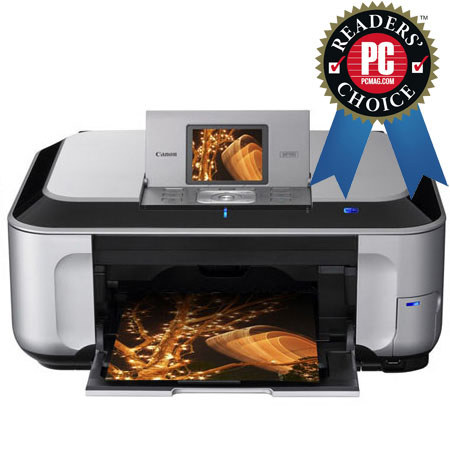
Canon Pixma MP990, Wireless All-in-One Photo Inkjet Printer with USB Interface, 9600 x 2400 dpi Resolution, for Mac & Windows
SKU: ICAMP990
This item is no longer available.
Share:
Overview
Compare
Learn
Specs
Protection
Reviews about this item
Review Summary
2020-09-16T20:00:00
Rated 5 out of 5
Easy to use and set up....
I use this printer on a daily basis. Beautiful color! Love the ability to buy the ink that I need. What a money saver!!! I have had this printer for -11- years. If and when it goes out and cannot be fixed, as sometimes happens, I will by another Canon printer. Way to go Canon you are GREAT. Love your great quality. Looks great in my living room!
222250robert
Originally posted at
2017-08-23T20:00:00
Rated 4 out of 5
Difference in the Pixma 880 and 990
Just thought I would express my opinion on my new 990. I loved my 880 and was really sad when it finally gave up. It had one tray for the paper and a stand-up slot on the back for other 'stuff'. This new model has 2 cassettes...1 for letter, legal, and larger envelopes and 1 for small stuff, pictures, etc. When you do the desktop publishing I do for my church I need to print cards on letter size cardstock and A5 envelopes. Previously on the 880 I put envelopes in the back and cardstock in the cassette. On this one, you have to take out the letter paper, load the envelopes, rearrange the size, print, then reverse all these steps. If I am doing 20-30 that is not such a problem but it is terrible if I only need 1 or 2. That said, I am not as happy with the 990 as I was with the 880. :-(
Hilltop A.
Originally posted at
2016-03-07T19:00:00
Rated 5 out of 5
Quality of print
I bought this printer at least 3 years ago. It still prints clear, quality photos ever time! Love it!
Magoomba
Originally posted at
2016-02-12T10:48:41
Rated 4 out of 5
a real bargain in an excellent printer for a hobbiest.
This printer is a bit noisy and it takes a while to crank up, but the price is right, and the results are excellent. It!s a good copier and scanner to boot. It is user friendly, and the various functions are easily mastered by anyone with average tech skills. Customer support by Canon is really good, too.
STEPHEN S.
2013-04-30T20:00:00
Rated 1 out of 5
Ink use ruins this printer
The Canon MP990 offers reasonable print quality on plain paper and very good print quality on Canon photo paper. In addition, the CCD scanner is better than the less expensive CIS scanner found on almost all other multifunction printers. However, the MP990 is ruined by its excessive, wasteful, and very costly ink consumption. The MP990 will run a cleaning cycle every time the unit is turned on or off, most of time that a new print job is started, and at random times while the printer is sitting idle. I've never had a Canon inkjet printer go through ink cartridges like this one does. And it is a disgrace that Canon refused to offer a firmware upgrade to curb this ridiculous ink consumption. Avoid this printer.
JB
Originally posted at
2013-02-17T19:00:00
Rated 4 out of 5
Complicated to use
Complicated to fix the programs of sizes to documents and photos. However prints well.
Lois H.
Originally posted at
2012-10-09T20:00:00
Rated 2 out of 5
Big Ink Sucker
The wireless on this printer is OK. Photos are very good. WiFi set up was easy but the printer won't print. Finally found a setting change in the online manual to get it to print (change RAW to LSR ?? maybe I don't remember, just not RAW. Main issue, be prepared to buy ink by the truck load, It uses tons of expensive ink that comes in little bitty cartridges (6 count them, 6). It also cycles constantly. I would not recommend because of cost of ink.
Gruncle
Originally posted at
2012-09-17T20:00:00
Rated 5 out of 5
Great Product
I have used this printer for 2.5 years as a small office/home printer. My highschooler uses this printer quite often for school work, my husband uses for his business and I use very much to print articles. Printer does calibrate often which I consider to be good...have never had any problems. The ink use and replacement is relevant to the amount of color/black and white printing done.
Joy
Originally posted at
2012-08-18T20:00:00
Rated 1 out of 5
Constant cycling causes ink to run out
The printer is constantly cycling, apparently cleaning the heads. All I know is that I was able to print only about two photos and a few documents before the ink ran out. And, once the ink runs out, the printer freezes, and you can't do anything else until you buy more ink. I don't get it. I guess I got a lemon. I can't believe that a product like this would last long in the marketplace.
Matt
Originally posted at
2012-03-16T20:00:00
Rated 5 out of 5
Great Printer
Connected via USB, have not used WiFi. Printing text, web pages, utility statements and etc. Photos occasionally. Use as a copier both black & white and color. I have used this printer almost every day for over 2 years. It is much faster and better than the F30 that quit after 7 years.
LcOkie74
Originally posted at
2012-02-05T19:00:00
Rated 3 out of 5
Doesn't like multiple computers
Have to unplug to reset
Peoria g.
2011-12-20T19:00:00
Rated 5 out of 5
great printer
love this printer / actually my 2nd canon printer that I have purchased. Toner is not expensive plus individual ink cartridges mean you only have to replace the color needed. Great quality prints.
cper7
Originally posted at
2011-12-18T19:00:00
Rated 3 out of 5
Good quality, uses lots of gray ink
Won't print from PSE.
JULIE H.
2011-05-17T20:00:00
Rated 5 out of 5
Best printer ever
I have owned alot of printers...This cannon is the best I have ever owned.. I wish it was smaller.. I am thinking about buying another one as a backup.. I love my cannon.
Toy1
Originally posted at
2011-05-04T20:00:00
Rated 3 out of 5
Ink usage kills it
Excellent print quality and scans. WIFI is very usefull. I had no problems setting up the printer and the WIFI. The single biggest problem I found with this printer is the high ink consuption. This is probably due to the frequent head cleaning. Having small ink cartridges makes this printer very expensive to maintain. Because of the high ink consumption I will not recommend this printer to anyone.
rocketman
Originally posted at
2011-03-07T19:00:00
Rated 4 out of 5
Works well but eats expensive ink
Great combination of features, including a very good 35mm film scanner. Bad news is that a whole set of inks cost about $60, and it doesn't take that long to use the inks up.
Michael S.
2011-03-06T19:00:00
Rated 4 out of 5
Works as expected
I've had to reset a couple of times and not sure why. Print quality was much better than expected. Just wish it worked with my iPad also.
JULIE H.
2011-03-03T19:00:00
Rated 3 out of 5
WiFi Flaky
Set up very easily. Worked great for several months, then could not scan wirelessly (but could print. Spent six hours with tech assistance - very helpful. Then it worked again for several months - now can print wirelessly, but cannot scan. Don't want to spend another day getting it to work without finding out what is going wrong. So now I plug in to scan. Ink goes fast - found satisfactory ink one third price online. Print & scan quality very good
Volvamus
Originally posted at
2011-01-22T19:00:00
Rated 1 out of 5
Very Disappointed
After reading some of the reviews it is apparent this is a good photo printer. I do not do photo printing. I wanted a good office printer. I found it difficult to set up, no documentation, and a confusing user interface. I have 2 laptops and did get them set up on my network, but now a document is stuck in the print queue and I can't print from one of the laptops. The worst problem is the ink usage. I placed orders for ink 4 days in one week which was rather expensive. I was initially impressed by the low cost of the ink cartridge, not realizing that they are very small cartridges. It is a real pain to stop and change ink in the middle of a project. I had rather pay more for a larger cartridge and not have to change so often. I also find that when the printer sets idle for a time, it makes a lot of noise and takes a long time to start printing. I think this printer was designed with too many functions to attract as many customers as possible without regard to the quality of the product in general.
beejay1796
Originally posted at
2011-01-15T19:00:00
Rated 4 out of 5
Good value
I had to look at a YouTube video to set it up as the instructions are less than clear. The instruction booklet is hard to read and almost useless. The user's manual is online only. The printer's footprint is fairly large. Make sure you have the space to set it up. No cable is included. If you need one, you have to buy it. Documents are very good. Photos are satisfactory. Scanning and copying are very good. The price is right, but the high ink consomption makes up for the low price. The printer is extremely noisy. There is a noise reducing function but it somewhat slows down the printer. In all, I'm glad I bought this printer.
Iris
Originally posted at
2011-01-14T19:00:00
Rated 4 out of 5
Easy to set up
Now I can print from the various laptops without unhooking the desktop from the printer.
JULIE H.
2011-01-13T19:00:00
Rated 3 out of 5
Decent basic unit for the price
Pretty basic unit that does what we need it to.....so far. I'm curious to see how economical it is on ink.
Pi
2011-01-11T19:00:00
Rated 5 out of 5
i would buy this product
i love the wireless feature!
raider
2010-12-24T19:00:00
Rated 5 out of 5
Fine features but it guzzles ink
I've been using the MP-990 since mid-summer. PROS I've used it for ordinary printing, printing decent quality prints on Canon Pro-Platinum paper, copying, and scanning negatives at 4800 dpi and high bit-depth. Given that this is a single piece of relatively inexpensive consumer gear, and not two or three pieces of more expensive, higher quality gear, it provides impressive results across the board. The software package allows quick 'n easy ways of getting decent results, as well as more advanced methods to get better results. CONS The most significant downside has been how quickly ink disappears. Are there little sprites in the case siphoning it out? Or has Canon devised a neat way of making ink disappear during the frequent, long sessions of self-cleaning? Ink cartridges cost an average of around $10-$11 and it's surprising how many you go through. BOTTOM LINE If you can stand replacing ink cartridges frequently, and the slow, noisy prep sessions, this is a modestly priced unit that delivers surprisingly good results at printing, copying, scanning documents, and doing high-resolution scans of negs and slides.
STEVEN M.
2010-12-23T19:00:00
Rated 5 out of 5
Great Printer/scanner
I was impressed with the accuracy of the color tones in making both a print from an image file and from a scanned print & film file. Scanning was easy from prints, negatives and Slides. The only thing that I was disappointed in was that the ink cartridges are not bigger so I don't have to change ink cartridges as often. But the plus side is the ink cartridges are individual colors and you can replace only the color you need. The ink is said to be long lasting quality (archival?)
shutterbug78
Originally posted at
2010-12-19T19:00:00
Rated 5 out of 5
Great Printer!
I really love this printer. I print approximately 20 to 40 8 x 10 photos a day on this printer with excellent quality. I have a small home business that requires me to print a lot each day and it stands up to the job. It does go through ink a bit, but works great. I really love this printer and will buy from Canon again.
Dee
Originally posted at
2010-12-15T19:00:00
Rated 1 out of 5
Sucks ink; very expensive to operate
I have had this product for about 6 mos. I bought the printer to print excellent photos -- I'm not satisfied with mediocre quality photo prints. Like several of the other reviewers, I was initially impressed with the print speed and quality, but I soon realized that the printer was clamoring for a new ink cartridge almost every time I turned the printer on, and I don't print very many pages -- 3 to 4 typed sheets per day. Despite my general satisfaction with the printers quality and features, I would not recommend this printer, and I Will soon throw this thing away, not to be replaced by a Canon printer.
westhampnett
Originally posted at
2010-10-29T20:00:00
Rated 1 out of 5
Horrible
I've had this printer for many months. Initially I was really pleased with it, although the photo printing is not as good as I hoped. I'm writing this review because I now hate this printer. Here's why: 1. It drinks ink like I cannot believe. I swear it has a system to just drain ink into some huge internal reservoir so it can evaporate. It seems like I'm always buying ink and we don't print that much. 2. The wireless network printing quit working. It broadcasts its wireless signal but it no longer accepts any incoming signals. And I thought my last printer was bad...
JimmyShocker
Originally posted at
2010-10-08T20:00:00
Rated 1 out of 5
Anger
The way in which Cannon sets this printer up, it is difficult to easliy select black and white prints...hence, you use more ink, and then it is EXTREMELY frustrating and NOT user friendly in getting things printed. I hate this printer so much, I am convinced I will never again buy a Cannon printer. EVER!!!!
JDewDog
Originally posted at
2010-09-12T20:00:00
Rated 2 out of 5
Printer uses too much ink
The wireless on this printer is spotty at best. One day it works, then it stops for no reason. It uses tons of expensive ink. I would not recommend because of cost of ink.
Bunny365
Originally posted at
Canon Pixma 3749B002 Wireless All-in-One Inkjet Printer Specifications
Related Articles & Videos
About Canon Pixma 3749B002 Wireless All-in-One Inkjet Printer
The Canon Pixma MP990 is the ultimate Wireless All-in-One Photo Printer. You'll experience peak performance once it's taken out of the box and hooked-up. This unmatched quality begins with a built-in Wi-Fi capability that lets you print wirelessly from anywhere around the house. You can also connect to a wired network if you choose via built-in Ethernet. Built-in Auto Duplex Printing helps you keep it green by automatically printing on both sides of the paper, which can help reduce your paper cost by 50%.
The PIxMA MP990 Wireless Inkjet Photo All-in-One touts a maximum resolution of 9600 x 2400 and boasts a six individual ink tank system that includes a photo black and gray ink for professional color and black & white photos. Its superior 4800 dpi high-resolution CCD scanner includes a Film Adapter Unit to easily scan 35mm film and slides. Plus, the White LED eliminates warm-up time for document and photo scanning.
The PIxMA MP990's ease of use continues with a large 3.8" Color LCD, the Easy Scroll Wheel, Auto Photo Fix II, Auto Scan Mode, Quick Start and computer-free printing through compatible USB Flash Drives, Memory Cards, IrDA , PictBridge and optional Bluetooth devices. All of this with a gorgeous borderless 4" x 6" photo that prints in approx. 16 seconds!
Join VIP PRO
Earn 2X Points + Exclusive Perks!
Request a Callback
Chat one-on-one with an expert
Sell or Trade your Gear
Get started in 3 easy steps
What's in the box:
- Canon Pixma MP990 Wireless Inkjet Photo All-in-One Printer
- Cross Sell Sheet
- Getting Started
- Important Information Sheet
- Network Troubleshooting Guide
- Safety Environment Information
- Setup Software & User's Guide CD-ROM
- Warranty Card
- PGI-220 Pigment Black
- CLI-221 Cyan
- CLI-221 Magenta
- CLI-221 Yellow
- CLI-221 Black
- CLI-221 Gray
- Power Cord
- Print Head
- Sample Media (PP-201
- 4"x6" / 5 sheets)
- Canon 1 Year Limited Warranty