|
|
ATP
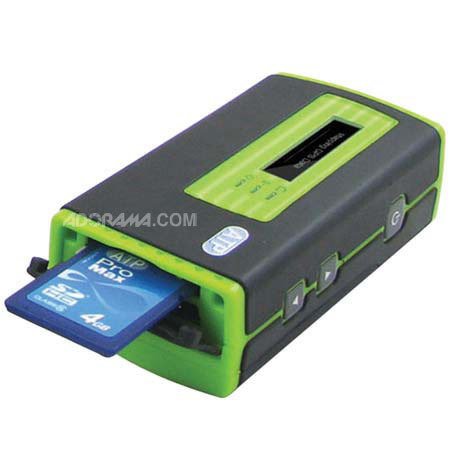
ATP Photo Finder, GPS Picture Tracker for Google Earth & Google Maps, Compatible with most Digital Camers & All Memory Cards
Mfr. Part: PHOTOFINDER SKU: ICDATPPF

enlarge image
|
|
 |
|
 |
 |
Description
The ATP Photo Finder calculates and records GPS position data and allows you to precisely track the exact location and time of where your pictures were taken. Activate the Photo Finder while you're taking pictures with your digital camera.
After you finish taking pictures, simply insert your SD, Memory Stick or MMC memory card into the Photo Finder's built-in card slot and the GPS data will be synchronized and added to all pictures on the card.
Even more convenient is the fact that this is all performed "on the go" without a PC. All you need to carry with you is your digital camera to take the pictures and the ATP Photo Finder to log your location.
Photos GPS tagged by the ATP Photo Finder can be used with any GPS compatible photo software or geotagged photo compatible sites such as Google Maps, Flickr, and Panoramio.
For example, when used with the Google supplied software Picasa2, Google Earth, or Google Maps, your photos will be shown on an online map, giving youa whole new way to organize, enjoy and share your pictures. Share your pictures and trip route with your friends and family.
More importantly, never forget where you took a picture again. You can also use your GPS tagged photos in a compatible GPS navigation system, allowing for features such as choosing your destination and landmarks visually.
Partial Digital Camera Compatibility List: Canon, Casio, Fujifilm, HP Photosmart, Kodak, Konica, Kyocera, Nikon, Olympus, Panasonic, Pentax, Samsung, Sanyo, Sony. The OTG (On-the-Go) function of Photo Finder is compatible with most digital cameras on the market. |
Features
 |
Photo Finder GPS Picture Tracker |
 |
Add GPS Data to Photos for Geotagging in One Step Without PC! |
 |
Designed for use with Google Earth & Google Maps |
 |
Compatible with digital cameras of major brands and all memory card formats on the market |
 |
Built-in LCD screen provides instant feedback on the status |
 |
GPS Data Synchronization without a PC (Patent-pending design) |
 |
How Photo Finder Works: |
 |
STEP 1) Turn on the Photo Finder for the first time. This first start will need around 45 seconds for satellite signal acquisition. |
 |
STEP 2) In order for your camera to be synchronized with your Photo Finder, refer to the Photo Finder's screen "UTC time" and adjust your camera to the same time. |
 |
STEP 3) Start taking pictures and make sure that the Photo Finder is activated while you're taking pictures with your digital camera. |
 |
STEP 4) After you finish taking pictures, simply insert your memory card into the Photo Finder card slot and the GPS data will be synchronized and added to all pictures on the card. (SD/MMC/MS Card) |
 |
STEP 5) Using GPS compatible software such as Picasa2 or Google Earth, you can precisely track the exact location and time of where your pictures were taken. |
 |
Then you can share with friends and family using online maps, giving you a whole new way to organize and enjoy your pictures. |
 |
Note: Picasa2 and Google Earth software can be downloaded for free from www.google.com. |
Specifications
| Display | 128x32 Dot Matrix FSTN with backlight |
| Compatible Card Format | Compatible with Compact Flash Specification Revision 4.0 Compatible with SD 2.0 SDHC Compatible with MMC 4.2 Compatible with Memory Stick PRO/Duo |
| OTG Interface | Mini USB |
| Embedded Memory | 128MB NAND Flash |
| Battery | AAA x 2 |
| USB cable | Mini USB to Type A female connector cable |
| GPS Module |
| Chipset | SiRF Star III |
| Channels | 20 |
| Sensitivity (Tracking) | -155dBm. |
| Cold start | 45 sec |
| Warm start | 35 sec |
| Hot Start | 1 sec |
| Reacquisition | 0.1sec typical |
| Maximum altitude | 18000 m |
| Maximum velocity | 514 m/s |
| Operating temperature | -30 C ~ 85 C |
| Dimension | 82 x 43 x 26 mm |
| Weight | 60g w/o battery |
| | |
|
 |
|
|
|
|
 |
|
 |