

This item is no longer available.
Review Summary
2012-01-15T19:00:00
For a mac user it is actually easier to take a picture with an iPhone now and then and copy the location data to the Aperture library than to mess with this thing.
Samuel E.
2011-01-11T19:00:00
By tagging your photos, later you don't have to question where you shot the frame.
OldTimer
2011-01-11T19:00:00
Setup was easy and intuitive. Finds satellite super quickly. Pegs where you are flawlessly. Software outstanding. Just what I had been waiting for my Canon cameras.
RICHARD S.
2010-11-11T19:00:00
I travel a lot so I really needed an easy to use GPS system. This is it! The JOBO PhotoGPS is very easy to use, the battery lasts forever, and the accuracy is 100% each and every time. This incredible device NEVER falls off of any camera because they now include platelets in the box that hold the device very securely and tight onto the camera hot shoe. The price is very reasonable for all the benefits. I wound highly recommend it for everyone that has a digital camera. I purchased 3 units, one for everyone in my family. Great gift idea! BUY ONE NOW! You wont' be dissappointed.
Rob g.
2009-05-26T21:00:00
I bought this to Geo tag photos on my Nikon D60 for use in iPhoto '09. It captures the location well and the location assist button is useful. (assuming i remember to press it) The main problem with this thing is the Mac software. You don't seem to be able to tag the photos once they are IN iPhoto, so you have to load them into a folder on the Mac first. (If my camera supported direct access to the memory card, I could skip this step.) After the images are loaded, you can load the locations from the device using the included software. It does a fairly decent job of putting the correct location with the correct photo, although if you give it some photos which don't go with the location tags in addition to ones which DO go with the location tags, it can get confused. If you are working with JPEG images, the included software will write the Geo information directly to the image. (GOOD) If you are working with RAW images, it will write the Geo information to an XMP sidecar file. This is fine if you have a program that reads those files. Unfortunately, iPhoto '09 does not do this. (BAD) As I am a programmer, I had a suspicion that I could fix this nuisance. In fact, I WAS able to write the XMP information directly to the RAW image using a command line program called exiftool, and some clever bash scripting. Now, after matching the tags to the images, I only have to run one command before importing the images into iPhoto. I've read that people have had problems with the build quality and, I can definitely see where they are coming from. It could use some work, but I figure when it breaks, I'll end up building a better mount, it's only got 2 contacts. The only other gripe I have with the PhotoGPS is that it gets in the way of the built in flash. If it sat just a LITTLE BIT higher, my built in flash could raise and be used in conjunction with the device. Overall, I'd say the PhotoGPS was worth what I paid for it, but I hope some new Mac software comes out later to make it easier to use. If not, I guess I'll have to look into writing it myself.
Tom M.
2009-05-12T21:00:00
I use the PhotoGPS with a Nikon D60 and a Mac. The Mac software is not on the CD, but is available for download on the manufacturer's website. All works as expected. The ONLY gripe I have is that sometimes the unit does not recognize that you have traveled from one location to another -- there is no way to tell that the location has been updated (even when using the "hint" button). Only when you get pack to the computer do you find a batch of photos appear to have been taken at the previous location. I have not figured out how to correct this with the software (though admittedly I have not looked that hard). Otherwise, unit is perfect, and stays solidly attached to the hot shoe.
Howard R.
2009-05-03T21:00:00
I sometimes forget I have the unit on my camera...it just always works. No need to wait for a lock...just concentrate on what's important which is the shooting. The match & tag software is simple, bug free and works great.
Tom B.
2009-04-13T21:00:00
Works as advertised. You can forget about it while you shoot, unlike the Nikon unit which must always be checked to make sure it has a lock. Matching/tagging software is easy to setup and use, although It doesn't run properly on my Vista machine. Works perfectly on two different XP machines.
Tom
2009-03-29T21:00:00
PhotoGPS works as advertised and it is great to be able to add geotags to photos. I just wish the process of merging the GPS data to the photos was a bit more automated and more easy to integrate into my workflow. The GPS data that is added to the photos for some reason doesn't show up on Flickr when I upload photos.
Slade W.
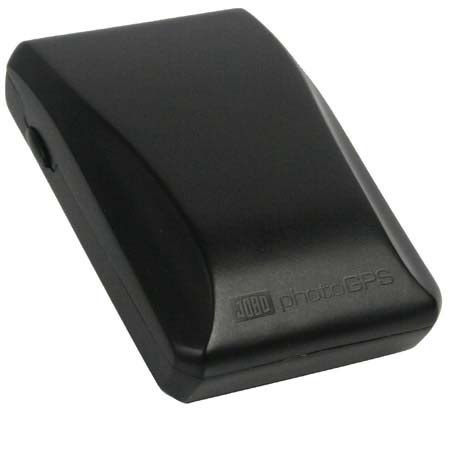
JOBO photoGPS is a small and lightweight Global Positioning System (GPS) receiver that fits directly on any digital camera's hot shoe, just as if it were a regular flash unit, without the need for extra cables.
Through an innovative new capture and process technology, this affordable device allows automatic geo-tagging by capturing raw GPS data and time which enables new and more efficient ways to organize, search, visualize, and share photo collections.
In response to today's mobile lifestyles, geo-tagging of photographs is becomingan increasingly popular technology for today's picture-taking consumers. JOBO's new photoGPS has been designed to be easy-to-use and extremely compact allowing it to be a travel-friendly accessory for people wanting to share the joy of their adventurous lifestyle with others.
Other mostly organizer-based geo-tagging solutions can be both expensive and/or cumbersome. The goal at JOBO was to automate this process, which has been accomplished with JOBOs breakthrough new photoGPS and capture and process technology enabling photographers to find specific images that they want to share within seconds.
Each time a photographer's digital camera takes a picture with the photoGPS attached to the camera's hot shoe, JOBO's photoGPS automatically captures raw GPS data too and stores this information in its own internal memory.
When the photographer has finished taking photographs, they unload their photos onto their PC in their normal way and transfer the companion raw GPS data informationonto the PC with the included JOBO photoGPS software. Matching times and locations is quick and easy, since the photos and raw GPS data were captured simultaneously.
Next, the JOBO photoGPS server (accessible via the Internet) provides historic GPS satellite information corresponding to the times the raw GPS data was recorded.
This is used by JOBO's PC software to calculate the locations, reversegeocodes them, and geotags the photos with the resulting location information such as Country name, Region and District, City, Postal code, Street name, and nearby points of interest (POIs) such as tourist attractions, beaches, mountain peaks, museums, opera or theatre houses, concert halls, sport stadiums, parks, etc. In addition, Latitude, Longitude and Altitude are also available.
And the JOBO photoGPS consumes very little power. One capture just needs 18 Megajoule (MJ). It is the camera's flash synchronization connection that instantly awakens photoGPS.
The JOBO photoGPS includes USB cable, user's manual, PC compatible CD-ROM featuring photoGPS matching software for Geocoding and Reverse Geocoding, ITag Photo-Organizer by IPTC Data, and Irfan View, a powerful Image viewer with EXIF / IPTC function.