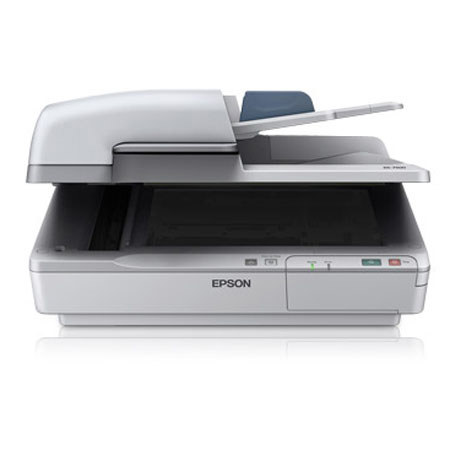
Epson WorkForce DS-7500 Document Scanner, 1200 dpi Flatbed Resolution, 100 Pages Capacity, 4000 Pages Daily Duty Cycle

SKU: IESDS7500

This item is no longer available.

Overview
Compare
Specs
Protection

Reviews about this item

Review Summary

2021-05-31T20:00:00

Rated 5 out of 5

Great, Fast Scanner

This replaced a GT-2500 and the difference is night-and-day. Hopefully the feeder will last longer than a year. So far, very pleased with the speed. The software requires some getting used to. Outstanding machine.

Scanups

2020-02-16T19:00:00

Rated 5 out of 5

Extraordinary Paper Inhaler

Scanner functions with no fuss or bother. It just inhales paper when sheet feeding multiple pages. Very solid construction

Swelfelo

2015-11-20T12:15:28

Rated 2 out of 5

Requires and Epson printer to make direct copies

Beware! The copy to printer function in Document Capture Pro only works with an Epson Printer. If you do not have an Epson printer you will not be able to print copies of a document using Document Capture Pro without saving it to your computer first. The separate Epson Scan application has no connection to print directly at all. To print a copy of a document it must first be saved to the computer then printed and then if you don’t want to keep an electronic copy on your computer it must be deleted from its file then deleted again from the recycle bin. 23 Clicks are necessary to scan and print a file when you don’t want to keep the electronic copy. “Epson-Scan” may work with a few less clicks but not significantly so. You still have to save the file to your computer somewhere. Open it into an application in order to print it and then close the application and delete the unwanted files. UGH!!! If you have an Epson printer this problem is not supposed to exist. There is a print button in two places in the Document Pro window which will, I am told go directly to an Epson printer when you have one. When you don’t have an Epson Printer you get a message saying “The printer Driver is not available. Quit the application, then reinstall the printer driver.” There is however nowhere to reinstall the driver and none other than an Epson Driver and printer will ever be recognized. I have verified this with two separate second echelon techs from Epson. The other save to computer functions connected with the scanner seem to be working well. If you have an Epson printer, all is well. If you don’t want to make unsaved copies, all is well. But! If you want to make unsaved copies and you don’t have an Epson printer, do you really want an Epson Scanner with Document Capture Pro????? I do not advocate buying an Epson printer to solve this problem. I am questioning the appropriateness of buying an Epson Scanner. I think Epson should know better. If you don’t believe that 23 clicks are necessary, here are the steps.. Click 1: Open Document Capture Pro. Click 2: Click folder icon in the destination choices. Click 3: Choose Desktop unless you want to save the file. It will be easiest to find and delete. : Click 4: Click on the scanner icon. This opens the Main Settings dialogue box listing choices and parameters of the scan. Click 5: When you have set your parameters for the scan, click the highlighted scan button in right bottom corner. The document is scanned. An Image of the scan appears in the main window and also in the thumbnails window. Click 6: Click “File” to open its menu. Click 7: Mouse over “send” to open the send menu and click “Folder”. The Batch File dialogu box opens. Click 8: Choose file type, name and any other options listed. PDF seems to be best for “quick” (?) copy, and click OK. A PDF icon for the file saved appears on your desktop in the first open space available. Click 9: “Folder – Progress” box appears with advancing green line showing progress. When the space for the green line is filled click Close. Click 10: Double click the new PDF file to open it in Acrobat Reader. Click 11: Click File in Acrobat Reader to open its menu. Click 12: Opens Acrobat Reader print Dialogue Box. Click 13: Choose the parameters of an Acrobat Reader document that you want and the properties of your printer that are relevant to your copy. Click print, and it should print. We now have the desired copy but unless we want the electronic copy we are not done. Click 14: Click red X in top right corner of Acrobat Reader (if you have Win 7) or whatever works in 8 or 10, and close Acrobat Reader. Click 15: Click X in top right corner to close Document Capture Pro. Click 16: Mouse over and right-click the PDF icon on your desktop for the document just printed to open it’s right click menu. Click 17: Select “Delete” and Click it. A dialogue box opens “Are you sure you want to move this fine to the Recycle Bin?” No you don’t want to move it to the recycle bin. You want rid of it NOW but that isn’t a choice. Click 18: Click yes. The Icon disappears but we are not done. The file is in the recycle bin and it will become clogged if we don’t always remove the unwanted copies we just put in there. Click 19: Double click the recycle bin to open it. Click 20: Mouse over and right-click your file icon Click 21: Click Delete which opens a dialogue box saying “Are you sure you want to permanently delete this file?” Click 22: Click yes and the file disappears. Click23: Click X in top right corner (Win 7) and close the recycle bin. WHEW!!!

ruthchar

Select a plan in the Add Protection section above and purchase with this product by clicking “Add to Cart”.

image-protection

TRUSTED PROTECTION PLANS, EXCEPTIONAL SERVICE.

Invest In Your Gear and Peace Of Mind!

Accidents happen where life happens. Protect your favorite Adorama products and purchase a protection plan to stay covered from accidental damage, mechanical or electrical failure, and more.

Repair or Replacement

Repair or Replacement

If we can’t fix it, we’ll replace it at no additional cost.

Accidental Damage

Accidental Damage

Protect your product from drops, spills, and more.

Peace of Mind

Peace of Mind

Enjoy your gear without fear. We have you covered!

Malfunction Protection

Malfunction Protection

When regular use of your product over time results in mechanical or electrical failure.

Zero Deductible

Zero Deductible

We will never charge you a deductible after the purchase of a plan.

Customer-Focused Support

Customer-Focused Support

Our claims process is simple & easy and our customer service team is happy to help.

Adorama Protect powered by Extend is available for purchase to customers in the United States. Not available for purchase Internationally or in U.S. Territories.

Epson DS-7500 Specifications

  • Scanner Type

    Flatbed color image scanner with ADF

  • Optical Sensor

    1200 dpi 4 line color line sensor (RGB & Black)

  • Optical Resolution

    Flatbed: 1200 dpi
    ADF: 600 dpi

  • Hardware Resolution

    Flatbed: 1200 x 1200 dpi with Micro Step Drive technology
    ADF: 600 x 600 dpi Micro Step Drive technology

  • Color Bit Depth

    48-bits per pixel internal / external

  • Grayscale Bit Depth

    16-bits per pixel internal / external

  • Maximum Scan Area

    Flatbed: 8.5" x 11.7"
    ADF: 8.5" x 40"

  • Light Source

    ReadyScan LED

  • Scanning Speed

    200 dpi
    B/W: Up to 40 ppm / 80 ipm with ADF
    Color: Up to 40 ppm / 80 ipm with ADF
    300 dpi
    B/W: Up to 40 ppm / 80 ipm with ADF
    Color: Up to 40 ppm / 80 ipm with ADF
    600 dpi
    B/W: Up to 8 ppm / 16 ipm with ADF
    Color: Up to 8 ppm / 16 ipm with ADF

  • Document Feeder Type

    Sheet fed 1-pass, duplex scanning

  • Capacity

    100 pages (80 g/m2)

  • Document Sizes

    A4, Letter, Legal, B5, A5
    Max. Size 8.5" x 40"
    Min. Size 4" x 6"

  • Paper Weight

    Thickness 50 - 128 g/m2

  • Scanner Interface

    Hi-Speed USB 2.0
    Optional Network Module(RJ45, 10BaseT / 100Base TX)

  • Software

    Epson Scan
    EPSON Event Manager (Mac only)
    ABBYY FineReader Sprint
    Document Capture Pro (Windows only)
    ISIS Driver (Web Distribution)

  • Operating Systems

    Windows 8
    Windows 7
    Windows Vista
    Windows XP
    Windows XP Professional x64 Edition
    Mac OS X 10.5.x, 10.6.x, 10.7.x, 10.8.x

  • Main Unit MCBF

    100000 cycles

  • ADF MCBF

    400000 cycles

  • Daily Duty Cycle

    4000 pages per day

  • Operating Temperature

    41deg. to 95deg. F (5deg. to 35deg. C)

  • Operating Humidity

    10% to 80% (no condensation)

  • Storage Humidity

    10% to 85% (no condensation)

  • Rated Voltage

    AC 100 - 120V or 220 - 240V

  • Frequency

    50 - 60 Hz

  • Power Consumption

    Operating: 45 W (with ADF)
    Ready: 12 W
    Sleep: 1.6 W

  • Dimensions (W x D x H)

    19.4 x 14.1 x 8.5" (49.27 x 35.8 x 21.59cm)

  • Weight

    22.5lbs (10.2 kg)

  • UPC Code

    010343886445

About Epson DS-7500

FEATURED REVIEWS

Great, Fast Scanner

By Scanups

This replaced a GT-2500 and the difference is night-and-day. Hopefully the feeder will last longer than a year. So far, very pleased with the speed. The software requires some getting used to. Outstanding machine.

Extraordinary Paper Inhaler

By Swelfelo

Scanner functions with no fuss or bother. It just inhales paper when sheet feeding multiple pages. Very solid construction

The Epson WorkForce DS-7500 delivers remarkable scans from 4" x 6" and up to 8.5" x 40", quickly scanning 2-sided documents in just one pass. Use the 100-sheet Automatic Document Feeder (ADF) to scan stacks of one- or 2-sided documents. Or, use the 8.5" x 11.7" flatbed to scan hard-bound books or other odd-sized items. The DS-7500 blazes through each task at speeds up to 40 ppm / 80 ipm. And, its 4 line CCD sensor (RGB and black) consistently delivers vivid colors and crisp, sharp text. Plus, with productivity software included and the optional network scan module, each member of your team can access high performance scanning for critical project needs.

Epson DS-7500 Features

  • Capture large, two-sided documents in a single scan - scans documents as small as 4" x 6" and up to 8.5" x 40" via the ADF or 8.5" x 11.7" via the flatbed scanner bed
  • Achieve remarkable results - 4 line CCD (RGB and black) provides vivid color and crisp, sharp text; included book spine correction eliminates distortion when scanning bound materials
  • Boost productivity - one-pass, duplex scanning at speeds of 40 ppm / 80 ipm
  • Work smarter and more efficiently - built-in 100-sheet Automatic Document Feeder, plus auto duplex scanning
  • Ultrasonic double-feed detector - automatically stops the scan job if two pages have fed together
  • Convenient, network scanning capabilities - use the optional networking module and included Document Capture Pro software to scan to any PC on the local network
  • Scan to popular cloud services - scan to SharePoint, Evernote, Google Docs and more
  • Scan to searchable PDF - save scanned documents as PDF, PDF-A or jpeg files and more
  • Do more with powerful productivity software - includes EPSON Scan, Document Capture Pro and ABBYY FineReader Sprint OCR
  • One-touch scanning - create up to 30 user-programmable jobs

Key Features

  • Boost productivity - one-pass, duplex scanning at speeds of 40 ppm / 80 ipm
  • One-touch scanning - create up to 30 user-programmable jobs

What's in the box:

  • Epson WorkForce DS-7500 Document Scanner
  • Setup Sheet
  • USB Cable
  • Software CD
  • AC Adapter and Power Cable
  • Epson 1 Year Limited Warranty