2020-01-18T19:00:00
Rated 2 out of 5
Not up to the Work Force Name
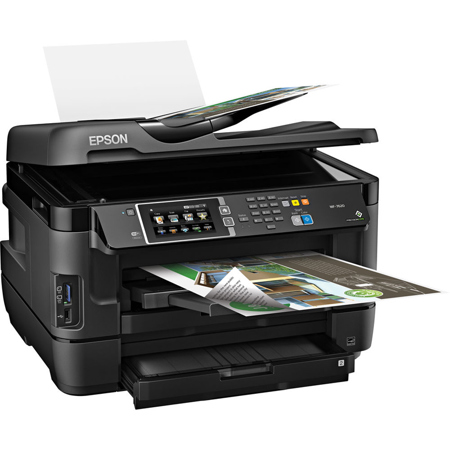
I had the WF-500 Great Printer for my family and work/church needs. So I decided to upgrade and give my mom my WF-500. I purchased the WF-7620 so I could print larger papers for church. This printer has never lived up to half the of the Work Force standard, it guzzles ink, printer heads stay needing cleaning, bottom line not dependable. This will be my last Epson, I will try HP or Brother, this large space grabber has to go. Too much money spent to not work when needed...
James Rankin
Retired Air Force
Big B.
Originally posted at

2020-01-17T19:00:00
Rated 5 out of 5
Great printer
I love my printer.
Dianneshr1
Originally posted at
2020-01-09T19:00:00
Rated 1 out of 5
can't stand Epson
Epson must have half the staff filed with lawyers. These big companies must learn someday that there are humans out in the world and stop this nonsense. I can't stand the forced registration, the forced updates that almost always result in screwing up the system, where nothing is compatible because of the update.
Sick t.
Originally posted at
2020-01-07T19:00:00
Rated 5 out of 5
Nice large print format
Purchased a while back, I have a farm and equipment doing drawings of fields, installations I needed something that would print on 11x17 to make useful prints. This has been wonderful, even my 87 year old dad can see and use the prints to make a farm wide installation drawings of piping, electrical and irrigation ditches. After nearly 100 years, everyone knows where stuff is located now.
Terry123
Originally posted at
2020-01-06T19:00:00
Rated 1 out of 5
terrible product
my epson is absolutely terrible. always an error. printing is horrible.takes support forever to answer the phone. I'm going back to brother printers.
carlos t.
Originally posted at
2019-12-31T19:00:00
Rated 5 out of 5
great for getting needed updates
I've had it for several years and used it with a variety of computers so I needed to be sure this computer was in sync with the printer.
noneused
Originally posted at
2019-12-30T19:00:00
Rated 5 out of 5
Great Printer
I was very happy with the printer. I was so disappointed when it gave a hardware failure code, but EPSON sent me a new printer and the replacement works great!!! Very Impressed with EPSON support.
ChrisRed123
Originally posted at
2019-12-27T19:00:00
Rated 2 out of 5
Poor Online Customer Support for Troubleshooting
Recurrent challenges since purchase with paper size sensing when making copies---> Now persistent & recurring error message of "Invalid Paper Size/Source" though the letter sized original and paper tray selected match. ADDITIONALLY, Firmware update reminders keep recurring despite Firmware installation error message of "Downgraded-- unable to update...".
HGWFOM
Originally posted at
2019-12-17T19:00:00
Rated 3 out of 5
11 x 17 format
I am having problem getting to print 11 x 17. When I select paper size. 11 x17 does not show up. When I go on website to get help, it ask my credit card . I need help
bob333
Originally posted at
2019-12-10T19:00:00
Rated 5 out of 5
Love my All-In-One 7620!!!
I bought my All-in-one 7620 and it's fantastic! Handles any job I send to it with ease. The job can be one page double sided or several pages and double sided. I can send the job from my desk top or from my IPhone. Now that's fantastic! Color or mono-color doesn't matter.
Shes b.
Originally posted at
2019-12-10T19:00:00
Rated 5 out of 5
Best Ever Desktop Printer!
I have purchased Two WF-7620 Printers for my small architectural business. So far, I have little to complain about, except the occasional normal paper jamb. However, I only wish that the Epson WF-7620 Engineers could redesign the Cartridge Carrier to hold larger Ink Cartridges, similar in size to the Black 252XL. Why can't all the cartridges hold enough ink like the 252X size of cartridge? The Cartridge Carrier can be expanded on its horizontal travel path. Why limit the Ink Cartridge Size?
Byron48
Originally posted at
2019-11-26T19:00:00
Rated 5 out of 5
Love my WF-7620!
I have always been an HP fan until I went to OfficeMax (to get an HP 13x19 printer) and saw the WF-7620 which looked like a better quality product and took a chance. I'm glad I did, love it!
MackMack
Originally posted at
2019-11-24T19:00:00
Rated 3 out of 5
better packaging technique
The paper guide for ADF had been broken from its two linkages. I have not been able to make USB connection to my laptop. Wish you had detail instruction on the us manual. wireless connection is easy.
SimonUSA
Originally posted at
2019-11-20T19:00:00
Rated 3 out of 5
Error codes
my printer is only 1 year old and its giving me an error code:0x97 so whats up with that?
The printer is one year old and does't print any more.
For the price of it, I am not happy. Do you stand behind your products?
Norm504
Originally posted at
2019-11-16T19:00:00
Purchased about a year ago and has been good until I got a 0x97 and cannot clear the error.
gakool
Originally posted at
2019-11-15T19:00:00
Rated 4 out of 5
Excellent printer except...
...for one thing.
Quality is great as is flexibility. I need large format which this printer provides. Just two complaints:
1.This is the third or fourth time I have gone through a "filter failed" error which stops all printing. No information on this error is available, and I have had to go through complete re-installations to be able to print again. Beyond irritating.
2. The last printer software upgrade has apparently blocked the useage of third-party ink cartridges.
Still. I would buy it again. The output is outstanding.
DogDude
Originally posted at
2019-10-28T20:00:00
Rated 5 out of 5
A work horse!
Have one for more than 2 years with no problems and still working like new. The best printer I have ever had. Highly recommended.
Dorcas
Originally posted at
2019-10-27T20:00:00
Rated 5 out of 5
Support is excellent!!
My year old WF-7620 had a circuit board failure. Support team was excellent at making it right. I love the printer and its features. No matter how long I leave it idle, it always wakes up on the network and gives me my work. I haven't had that luck with other brands I've tried. I'm now a big fan of Epson.
Jack A.
Originally posted at
2019-10-26T20:00:00
Rated 5 out of 5
Epson WF 7620
I have had this multifunction printer for over three years! Great service, wonderful features. Does take a while to learn the proper use and a few idiosyncrasies. Incredible value! I recommend to other artists who need to scan ledger size art.
Would possibly eventually upgrade to the ink tank version...but I am not sure I print enough to justify the cost.
Jonathan G.
Originally posted at
2019-10-26T20:00:00
Rated 1 out of 5
trouble here
these things need replaced every 6 months they clog up, I have two of them and it is a struggle to keep them printing. the scanner works fine
architectdale11111111111
Originally posted at
2019-10-25T20:00:00
Rated 4 out of 5
easy to use
price was very good.
Bregis
Originally posted at
2019-10-11T20:00:00
Rated 1 out of 5
disappointing
error code 0x97
flyingcat
Originally posted at
2019-10-06T20:00:00
Rated 1 out of 5
Unreliable and constantly broken
I have had this printer for almost 2 years. I was excited over the features and wide format printing. I have found that my Epson products have had the best printing quality compared to my other printers. This one however, will not print...anything. Just when I think I have solved all the issues with it, it will only print the banners of some documents. It sounds like it is printing, but nothing is on the paper. I am very disappointed. I have spent the past 4 hours updating the firmware, software, epsonconnect settings, etc. I am HOPING that it will actually print something.
KFreee
Originally posted at
2019-09-25T20:00:00
Rated 1 out of 5
Not user friendly
I bought over a year ago and have had trouble using this copier ever since.
WTFdumd a.
Originally posted at
2019-09-24T20:00:00
Rated 4 out of 5
Nice Multi-Function Device
Owned for a year and does everything it promises.
I did figure out best to use Epson ink. I used Meijer brand because of price when original ink ran out.
When installing non Epson ink you will get a warning message but you can override it. Colors were not as vibrant. When that ran out I went back to Epson and it is noticable difference.
Jim D.
Originally posted at
2019-09-24T20:00:00
Rated 2 out of 5
2 units smeared print
I bought two printers, one for work and one for home. Both units within a month started to print blurry, missing lines or very faded. Color was off. Did all updates and firmware installs that Epson sent. Cleaned multiple times and still prints horribly! Bought at Staples and even with extended warranty said I had to ship printers to Epson during Factory warranty. (Best Buy would have exchanged or fixed on the spot). Wasted at least $100 in ink doing cleanings with OEM ink! Two print cleanings and cartridges are empty! If it wasnt for the fact that it is a great scanner the rating would be 1.
Chris C.
Originally posted at
2019-09-19T20:00:00
Rated 4 out of 5
overall rating of my epson
I brought this product about 2 years ago and for the most part this product has worked really well. I use it a lot for printing. It is only recently that I am having some problems with it. I am not sure what can be done.
ZRobinson
Originally posted at
2019-09-19T20:00:00
Rated 1 out of 5
Printer is a piece of junk
I bought 2 of them two years ago. One works just ok. I need to select the paper size every time I print a job and go to the printer propertied and select high quality print otherwise some lines of text are illegible.
My other one quit working all together. I googled the error code and found out that the motherboard is bad and needs to be replaced. Leading up to this issue its network connection was unreliable. I had to reset my network frequently to restore the connection and finish my work.
Overall very unsatisfied with the quality and reliability of the printers. I did replace the second one with a Xerox laser jet. I plan on running them over with my bulldozer and posting the video on social media to show my frustration with your product.
Upset u.
Originally posted at
2019-09-16T20:00:00
Rated 3 out of 5
Unhappy from the start!
I bought this a couple of years ago and it has never been great.
Service is impossible to find.
Jeanious
Originally posted at
2019-09-15T20:00:00
Rated 2 out of 5
Works great until error code 0x97 pops up
This printing has had great quality during the time of its use. Great quality photos and color documents being printed at fast speeds. However I now get error code 0x97 which I have to shut it down and restart. It will happen again after 1 or 2 more prints. I have watched many videos and looked at documents on the web and see that this error code is a common problem. Not sure what more to do at this point.
Supernosty
Originally posted at