2011-09-04T21:00:00
Rated 5 out of 5
If you can find one...ii's a keeper
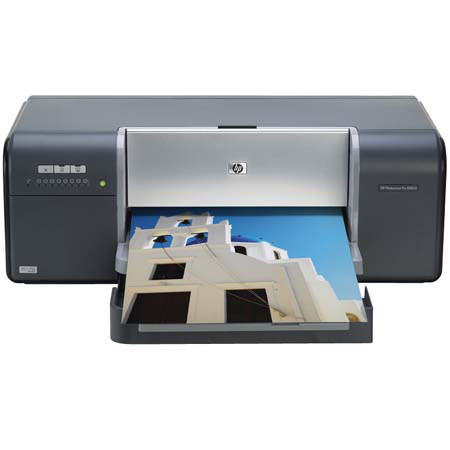
I'm an aspiring art photographer. Prints form the 8850 are as good or better than my colleagues. I can print on many types of media other than photo paper with this printer, as well.
Richard R.
2010-03-19T20:00:00
I received a new Pro B8850 and had a problem right off the bat. FedEx picked up the defective printer on a Wednesday and I received a replacement the next day at 3 pm. I have a small photo business and need it for the 13X19 size print. My Pro B885 prints amazing color and quickly. It is everything I wanted in a pro printer and more. My customers are delighted with the finished photos. I know that my business will increase due in part to the new printer.
Fotos2000
Originally posted at

2010-02-08T19:00:00
Rated 3 out of 5
Maybe wait for the next genration of this model.
Got it last June just to do photos. I have had major problems with the Media Tray feature, which is the main reason I got it. it is very quirky, and I'm not sure if it's the machine or the software. It takes time for the machine to adjust to that feature because the ink jets have to move up, so if you're trying for fast output - several pictures, one after another- forget it. It makes a lot of noise and takes a lot of time adjusting itself.
I do like the large 13x19 feature (again why I got it) but have had to work on getting the right colors. Was using Photoshop CS2 with the plug in, but you can't use that or a lot of features if you try to go wireless, a definite flaw.I gave up on the wireless. Now I have Elements 8 (other computer was stolen), and the color is very good . When it works right, the results are very good, but you have to have a lot of patience.
Dogwalker
Originally posted at
2009-12-31T19:00:00
Rated 2 out of 5
Very disappointed
I've used HP printers for many years with fairly good success. I've had this printer for almost a year and this is my first very big disappoint with HP printers. I have had difficulties with the software (cannot open/use the HP Toolbox on my PC). I have had problems with excess ink usage during the daily cleaning cycles. I have had problems with getting accurate color prints when printing from Lightroom or from Photoshop (I am not double profiling and have a calibrate monitor). I can only get reasonably accurate color when printing from Photoshop Elements which I don't use except to print. There have been a number of software/driver problems that have existed for both this printer and it's twin 9180 printer that have existed for years without being fixed by HP. Very disappointed overall.
PhotographyExpert
Originally posted at
2009-11-17T19:00:00
Rated 5 out of 5
Great Photo Printer for the Money
I have had my printer for about 3 months and it has performed flawlessly. With a bit depth of only 8, the color space is somewhat limiting but to my knowledge, no one is producing a 16 bit depth printer as of yet. Great value for the money and HP had the quality I was looking for in my photography business.
I would recommend this printer to anyone seriously interested in print quality and consistency of work flow.
JohnVaughan
Originally posted at
2009-09-27T20:00:00
Rated 5 out of 5
Super Printer
I am a professional photographer. I had a back log of photos to process, boy am I glad I waited. The setup was paintless, less than 25 minutes and I am printing fantastic quality pictures. Great Job HP.
Dan
Originally posted at
2009-07-19T20:00:00
Rated 5 out of 5
Excellent printer
I have been using the B8850 for almost 6 months and I am very satisfied. I never had any plugged nozzles, the colors match my screen and using the color profiles make life easy.
Overall, it's an excellent 13x19 inch pigment printer.
JMKinKY
Originally posted at
2008-11-04T19:00:00
Rated 4 out of 5
Good printer but want more
Pictures come out good but not with the clarity I was hoping for. I use a pro-level digital camera and expected the printer to match the clarity. I have used the recommended photo paper and also find it somewhat lacking. I am not a professional photographer but I have enough artistic talent to know what looks good. I have tried other brand printers in the same price range and I believe that HP is equal. I was just looking for the best in the price range.
Photocrazy
Originally posted at
2008-09-20T21:00:00
Rated 5 out of 5
Excelent printer-- Archival
I had the canon pixma pro 9000, the archival quality was poor. This HP makes higher quality and durable prints. I made test prints from both to test even the ones I left out in the sun and rain held up much better. there has been very little fading, even the area I had to wash a bird dropping off of held up. the tonal range is greater and the printer is easier to use. Defiantly recommend if you plan on selling your prints.
Bkiltz
2008-09-10T20:00:00
Rated 5 out of 5
almost as good as the 9180
The only real difference to me is the network plug, so, for me, it was not worth the extra price. HP shipped this to our business and we received it the next day! HP's price was about the same as all the online retailers but we had it in our hands in less than 24 hours from the time I placed the order. Setup was easy if you follow the guide. It took about an hour to finish. The print quality is simply amazing. I've been using home photo printers since about 1998 and this one is by far the best I've seen yet.
CharlesA
Originally posted at