


This item is no longer available.
Review Summary
2019-08-21T20:00:00
I've had this printer for several years now and basically have tolerated problems with it consistently. The drivers have to be reinstalled repeatedly, which takes forever because the download keeps failing. Print jobs get stuck in the queue repeatedly and I have to go to the spool file to delete it. It's unreliable, refuse to print because of constant error messages just when I need it the most. Ink cartridges don't last, even the high yield HP cartridges. I've had to uninstall and reinstall the software over and over again because "HP printer doctor" says it doesn't have the correct software. Have unplugged it, waited, and plugged it in again, with no effect. Every once in a while it will shoot out blank pages even with full ink cartridges. It stopped printing in color, even with a full color cartridge. I can't say how many hours I wasted on this thing and how much paper I wasted because it couldn't print pages correctly. A few days ago, after spending hours and wasting more paper, I spent the remainder of my day looking for someplace to make copies of my documents that were due that day!!!! Not the first time! When I returned, I went online and purchased another brand printer. I will never purchase another HP printer. I can't wait to get rid of this piece of garbage.
Tekwho67

2011-01-12T19:00:00
I use this great printer for printing coupons, documents, photo's and other items. Love the scanner as well.
DC
2010-12-09T19:00:00
great buy i bought this product on sale same price as hp direct but i bought this at rs and i also had a $10 coupon off... it seems to work just fine i printed a photo and it looks great... i am amazed. i did need to get more ram on my computer; but i was going to upgrade anyway. i read all the review before buying someone said that it was not great if you had windows 7 but i had no problem.. so do buy this product.
pinkstarz
2010-12-09T19:00:00
the printer looks really good. at first it froze with the hp logo but hp has a download update and it fixed it. now the problem i have is when i print in color , any document the letter come with a shadow in the back. i already align the printer, clean it and a whole bunch of things and it still does it. its and ok printer.
glinys
2010-12-08T19:00:00
Have had this printer since 9/10. Prints fine, scans fine, do not use wireless feature. Price of printer was good, however you make up the difference in having to buy ink cartridges due to poor ink consumption. VERY POOR INK CONSUMPTION!!!!! My old HP printer never used the amount of ink that this one does and I printer more with it.
Jane02
2010-12-07T19:00:00
I bought this printer because it was wireless and included everything that I wanted and needed and it was a good price. I have noticed, as others have said, that it seems to go through ink quite quickly even if I put the settings on the ecomony setting. Overall I like it, I have used every feature that it offers and plan on using the scanning feature a lot more in the future to scan photos into my computer from years ago so that I can edit them and put them into scrapbooks. I have not printed a photo from this printer yet but imagine that it will be of good quality since everything else is.
emt716
2010-12-06T19:00:00
This copier is not reliable. It prints on it's own time. Prints many blank copies first. Could take 10 min or 20 hours...or not print at all. It has caused havoc on all my work. I had an old HP that was showing it's years. It wins hands down over this. This one is flimsy...noisy(when it works). Would love to bring it back in person. I would not waste the money mailing it back...it would be more money into the hole. It was recommended by apple when I bought my new MAC. Keep your rebates!
2too
2010-12-06T19:00:00
Purchased new in August 2009. Stopped working working in less than a year, however my wife waited too long to follow up with HP and now it is out of warranty. This is the first time I have ever had any problems with any of our previous printers. Definitely would not buy this model again in spite of all of the positive reviews.
Paulymk
2010-12-05T19:00:00
This printer is one of the best that I've owned. Had a bit of a learning curve in terms of using the scanner and setting the default directory for scans. Other than that, however, I'm extremely happy with this purchase and would recommend this printer to anyone, whether for a small business or for home use. HP is the best!
MaryVS
2010-12-03T19:00:00
The mfp performs as advertised. Easy wireless set up. So far the only problem is every once in a while it gives an 'Out of paper' error when there is paper loaded. The only way around it is to restart the printer. I have been unable to find a permanent fix.
john23
2010-12-03T19:00:00
My old printer stopped working,so wanted one a little more up date. I love the wireless C4780. so much more to do with it and really gives me good clear pictures. I also love all the programs that came with it. Will be doing my own Christmas Cards this year with the photo program.
Carolmarie
2010-12-02T19:00:00
I have had many printers and this one takes the cake. I love the print quality, price (especially the price of new ink cartridges), that it is wireless (which works wonderfully), and that it is Mac compatible. No problems whatsoever and I have it for several months and use it often. Will definitely recommend this to others!
Topher72
2010-12-02T19:00:00
I've had about 4 printers, but this one is tops in my book. I looked at the reviews before my purchase and I am very very pleased with my selection. Keep up the good work HP.
Gagaiam2
2010-12-02T19:00:00
This is the second HP printer we purchased. The first one just stopped printing and now this printer is doing the same thing. My husband and I are very unhappy with HP printers and now wish we had purchased a different brand. The ink cartridges are hard install and run out very quickly and the performance is not what we expected, we are very unhappy.
borntoshop
2010-12-02T19:00:00
i bought this printer and it hasn't worked since even though i took it to service three times. am thinking that there's some defect but the technicians are saying the printer is fine.
sarab
2010-12-02T19:00:00
While I really like the wireless feature on the C4780 I do not get clear printing capabilities from this printer (always a little blurry). I also find it large, and bulky. I would, in hind sight, pay a little more for a smaller, better print, wireless all-in-one.
jennie
2010-11-06T20:00:00
The printer arrived quickly, but so did the problems. The printer would not align properly! I had to print the alignment page a bunch of times wasting ink and then the scanner would not set up the alignment! Once it did say that it was aligned, I started printing my assignment and it printed diagonal and with no margin on the top, cutting off the top of the document. Then, the printer began to not pick up the paper and had to be fed in manually. My old HP printer bought in 2007 did the same thing. I bought a new one in the hopes that they would work out the kinks...clearly not. On a brighter note, I didn't have a problem with the wireless like the others. Also, the customer service was great!
smashiin
2010-11-06T20:00:00
Very easy to use, print quality is very good. Installation disc was worthless. Had to download drivers, and use customer support for wireless and scanner. Wish it had more paper capacity, but for the price it is great.
niblick
2010-11-05T20:00:00
I was worried about set-up and wireless glitches appearing. This is my first wireless printer purchase. But installation was simple and there have been no glitches except that, if I move it just a touch while it is printing, it shuts down. But that doesn't really matter. How often must you touch or move your printer while it was printing? Photo printing quality is excellent, much better than I expected after reading CR review. The only reasons I rate it only "good" in features and performance are; 1) It comes with no printed manual that I can browse so I can learn its features. 2.) It is noisy when it gets ready to print, clunking and sputtering like it was going to break down - but I can get used to that.
Bills3
2010-11-05T20:00:00
THIS PRINTER IS SO EASY TO USE AND QUALITY IS THE BEST THAT I'VE HAD TO DATE IN PRINTING PHOTOS , DOCUMENTS ETC. HP WILL BE MY FIRST CHOICE IN THE FUTURE. J.F.M.
crushed3
2010-11-04T20:00:00
This printer will not print from a computer running Windows 7 with 64-bit internet explorer. Had to return to running 32-bit to be able to print anything. Not a good feature when your selling this printer in 2010.
poloman
2010-11-04T20:00:00
I purchased this to replace my last HP All in One that finally decided it was done. I have been very happy with it. It prints with great quality both photos and regular pages. The price was very good and my ink is lasting very well. It was an easy hook up and it is easy to use. HP did it again!
michiganmom
2010-11-04T20:00:00
the printer is a good choice. The wireless feature is really helpful. It is really great to be in another part of the house and be able to print a document without having to stop what I'm working on and need to print to go and plug the laptop into the printer. The pictures and printing are clear and concise.
Redm
2010-11-04T20:00:00
Very easy setup. two laptops worked with it first try
DocF
2010-11-04T20:00:00
We purchased this printer as a special promotion with a new Mac, and while we are long-time Mac owners, it is our first step into the wireless printer market. The HP printer set-up was pretty straight forward, but it's wireless printing capabilities have been far less than adequate. While we have an Apple Airport 82.11n wireless router positioned less than 10 feet from the printer, the printer is very slow to respond and often loses connection before completing a printing job. Half a page will print and not the rest. If multiple jobs are in the print cue and the first one stalls, all the rest are lost. While this printer seems to work fine when connected via USB, we've found it to be totally useless for wireless use with our Macs. My wife has a PC laptop running windows and it does appear to work fine with the printer wirelessly. However, we are primarily a Mac household and I would definitely NOT buy this printer again, even if it were offered for free on special as it was to us this time.
TwoCrows
2010-11-04T20:00:00
The install clicked on Spanish and nowhere was the information for reset. Had to call for help. Could have been labled or included in a manual of which was on the install disk in Spanish The touch screen did not work as it should. Some functions on it would not change without over and over retouching. The screen looks like a toy and someone added at the last minute. I have bought and used HP printers with all my computers and have bought and installed for many people and this printer could have been a lot better with just a little tweaking. HP needs to redo this printer and at least include some instructions or manual in the box.
JimG
2010-11-04T20:00:00
I had this printer for about a month. While printing labels a pin came loose on the roller section. Had to have the printer replaced. On the plus side, HP was very quick to offer a gift card so that I could purchase any printer up to $100.00 and also sent a label to return the defective printer at no charge to me. I replaced it with a C4795, wireless photosmart, but still not completely happy. FYI I have always had HP printers, this is probably my fifth or sixth. Seems the quality goes down on each successive purchase.
bobbie484
2010-11-02T20:00:00
I ran the installation cd and it took down my wireless internet! Lost the software connection between the router and the cable modem. Would not let me access the printer because of a firewall issue, even though I turned everything off. Would be nice if the cd did that for me. After ten to twelve hours over three days, it is installed. Except I still can not use it. Now it says that it is off line. How do you put it on line?? I have to install a new printer with control panel. It will work for a day or so and then I have to do this over again. I am sure that it is a very nice printer, if I ever get to use it!!
cx500
2010-10-26T20:00:00
I got this printer due to a special when I bought my Macbook Pro. This printer had everything that I need and I was excited about the wireless feature, which turn out to be a big dissapointment. It took over 1 hour on the phone with tech support to get the wireless feature working. Plus for every 2 times I used I had to reset the printer due to gems on cartidrige or scanner inner arm. Thank Goodness for the excellent support that HP has. The agent helping me told me that this printer is 50% of all the calls they get about printer issues. Don't buy this one, buy another. But HP is still the best brand out there. My 2 older printers from HP still works great!!
moulin6801
2010-10-21T20:00:00
I was amazed the first time I printed out a photo--the color was fantastic really beautiful. I don't do much photo printing but I do a lot of black & white and occasionally color printing. Already I have saved $ on ink over my previous printer. The black & white and color are good copies not offset quality but good quality. I am very pleased with my inexpensive printer.
wxyz
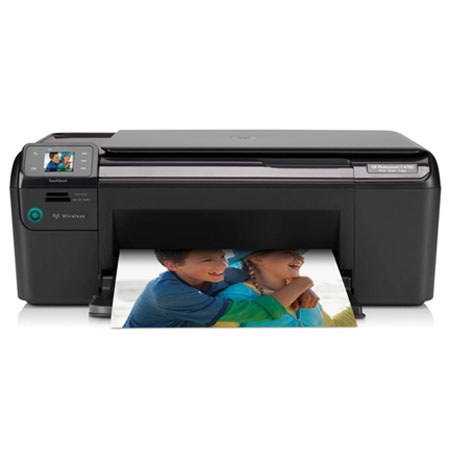
Print photos, copy recipes and scan documents using the HP Photosmart C4780 All-in-One Inkjet Color Printer. Without a PC, use automatic image adjustment to get lab-quality photos. Enjoy the convenience of HP wireless Photosmart C4780 All-in-One, which puts everything at your fingertips via an HP TouchSmart frame and color display.
Join VIP PRO
Earn 2X Points + Exclusive Perks!
Request a Callback
Chat one-on-one with an expert
Sell or Trade your Gear
Get started in 3 easy steps