


This item is no longer available.
Review Summary
2018-12-23T19:00:00
Have had this printer now for a few years and overall it's a disappointment in most areas. Goes offline and has to be power cycled weekly. Printer errors and slow printing of color docs. Would not recommend. Not worth the trouble.
Robert123456

2012-03-14T20:00:00
This printer takes too long to get "warmed up", it calibrates and cleans all the time. I have to wait ridiculously long for any print job. This was a $600 mistake. Too bad I can't just return it and buy another brand.
dontbuythisone
2012-03-01T19:00:00
Shortly after purchase, we required a replacement device from HP. After that, it worked "OK" for about a year. Once the warranty ran out, we've had nothing but trouble. It will periodically shut down in the middle of a fax, copy or print job. We've had it serviced by local HP repair center, they keep replacing parts, only to have the issue(s) continue. Looking to replace this expensive device, just not sure it will be with another HP product. Seems like the company is not what they once were.
TDSAdmin
2012-02-20T19:00:00
I have had this printer in three different offices and each time something has been wrong with it! i feel like it is haunting me. In the first office this printer would constantly be cleaning or calibrating itself. it couldn't get through printing 3 pages before a 2 min cleaning, it was ridiculous. In the second office it would randomly give us the "white screen of death", which meant we had to not only turn it off but unplug it, for it to restart, then it would take 10 mins to restart. Also it would only scan to e-mail intermittently one moment it would be fine and literally 5 mins later it wouldn't work. In the third office we had similar scanning issues, we would have to unplug and restart in order for it to scan a page to e-mail. It is a good printer but if you want to use it for scanning just forget about it.
GirlFriday
2012-02-12T19:00:00
We've had this printer for a few years now, and it does mostly what we need. The unfortunate thing is lately it's been making an awful high pitched noise. It ONLY makes this noise when we select a preset printer setting for a thicker paper (like labels, envelopes, card stock or anything over 20lbs.). We've had a technician in twice to look at it, and they recommend we don't try to put thick paper in it. We've been advised that it is not made for paper over 20lbs. (which is what is recommended in the Media Guide), but we've never had this problem before. Under "Printer Properties," when one goes to print, there are options to change the settings to accommodate these thicker pieces of paper, and there is a picture of an envelope on the manual feed tray... We've been able to avoid the terrible noise by ALWAYS selecting the "plain" paper type when we print anything. The unfortunate thing is this solution does not work with printing envelopes. Other than that problem (and we can't figure out how to get it to print double sided) it works GREAT. Picture quality has always been excellent.
TaxGirl
2011-12-25T19:00:00
Alright i am currently in Afghanistan, I work on a small networking team. The lastest issue we have encountered is that we can't add anymore users to the printer. Is there some slot limit for this printer and if so how many, and how can I enlarge the slot limit if possible?
DisgruntledSoldier
2011-12-19T19:00:00
We have used this printer/fax/copier without a single problem. Beautiful 2-sided docs and professional reports. Love it.
rockhammer53
2011-11-15T19:00:00
I have had nothing but trouble since the one year warranty ran out. Fortunately (HA HA) I had purchased the extended warranty. Initially, the only problem was that the upper document feeder would not function. Rather than sending a technician to diagnose the problem and fix it, I was sent a "NEW" printer. With the second printer, the lower document feeder will not work. Now, the warranty company has washed its hands of the whole deal and sent me a refund check for the purchase price of the printer. WORST PART: Each time a printer had to be uninstalled and reinstalled, it cost me $100.00 for a technician (hired by me) to come and perform these actions. HP needs to realize that not everyone in the universe is a computer/printer geek. Now I am stuck with a $600.00 printer that is basically a piece of junk.
Jewel53
2011-10-19T20:00:00
Installation was straight forward. The only issue was that Window 7 drivers did not come with the printer. however they where easily obtain via web support. Performance has been execellent.
deerman
2011-10-07T20:00:00
This is the 4th HP Color LaserJet CM2320nf MFP I have picked up in the past 2 years, for various clients and applications. Of all the color multifunction units out there, this may not be the very best, but it is a solid choice you will not regret. It's big, clunky, heavy, and sometimes noisy. (It arrives in a box slightly smaller than a Toyota, and it seriously takes 2 people to unbox it, unless you are unusually buff and have a good back.) Don't even think about putting it on your desk, it needs a serious stand of it's own. And the ink is not cheap, (until you compare it to any inkjet and do a little math, and then you realize just how cheap it is.) And of course being an HP, it has a boatload of largely unnecessary and annoying software that insists on running it's TSR's at boot, but we have all come to expect that from HP over the years. >.< But all that said... This unit does it all. It does everything you need. And everything works, naturally and logically, exactly as you would expect it to. There are no ugly surprises. Even with all the negatives, that alone makes it head and shoulders above almost everything else out there.
Siege
2011-09-14T20:00:00
Until such time when you people make a driver that works with Windows 7, I have no use for your product. I have tried 19 times to get your driver to work with no results. There is no comparsion of this product to my former product the HP Color laserjet 2840. The 2840 is twice the machine that the CM2320nf is.
McCloud
2011-05-19T20:00:00
This printer was ordered for a large business and it is the worst. Yea it looks good,but everything that looks good isn't. First off if you order it with legal and letter trays, tray 3, which is for legal sticks out and doesnt close all the way. This printer is less than a month old and tray 2, which is supposed to be letter keeps asking for legal. So I switched the two trays and put legal in tray 2 and the letter in tray 3. Well at this point, the legal paper jammed when inserted and then it started saying insert letter into tray 2. I put the trays back in there original slots and it kept asking for legal in tray 2 and would stop in the middle of printing documents that were more than a few pages. I restored the defaults twice and it still didn't fix it. The help menu that is built into the printer had the defaults for tray 2 and 3 both set for legal, which could not be changed. What a piece of junk! I told my bank to send it back for a full refund.
Miley
2011-05-16T20:00:00
This printer is very fast and does a great job, when you can get it to print. I do a large amount of small print jobs. Two or three product labels, or a couple of shipping labels. I am constantly having to shut the printer off to clear the memory. If you don't shut it off it takes up to three hours before it starts again on its own. It also has a bad habit of stopping in the middle of a large job to recalibrate itself. I also do a lot of shooting, and I have reciently began to think of the printer as a good target.
JerryM456
2011-05-02T20:00:00
We bought this printer a little over a year ago and a few months ago I started having problems with sending faxes. I couldn't send or receive any faxes so I went to the manual to find a solution. It tells you to clear to fax memory so I did that and it worked for only a few faxes. I proceeded to call the hp solution center where they told me how to clear all the memory from the printer. The woman said that I should not have to do this very often. I cleared the memory like they told me, which is NOT in the printer manual, and it worked. Now, about every few weeks I am having to do this. It's a few months later I am having the same exact problem except this time it is not working. Needless to say my printer is now out of warranty, I can't send or recieve faxes and I'm sure it'll cost more to fix it than to replace it. This is the second all in one printer our small business has bought from HP and it will be our last. I do not recommend buying this product, especially if you do a small amount of faxing.
FamOwnedSmBus
2011-02-28T19:00:00
I have had this machine for 10 days now and have basically just used the copy (color & B&W) and fax functions. Set up was very easy. The machine even told me that the fax line was in the wrong port. So far I am pleased with the quality of and the speed of the copies. I switched from an Epson that was fairly slow and very expensive to run and keep up. ($350 for a drum assembly and $350 for a fuser) I finally said enough is enough. All in all I am happy with this machine.
libtax
2011-02-17T19:00:00
I've had nothing but HP printers since starting our business in 1996. In fact I'm still running my old HP5P. I last had a Color LaserJet 3500 with the JetDirect wireless print server. It was great but then I had to get a new computer with Windows 7, giving up my old XP. Guess what? My 3500 was not compatible. So I bought the CM2320nf MFP thinking I could ditch my Canon scanner and also have copy ability in my section of the office as well as the color printing. Little did I know that this printer will not work with any wireless print server and the USB direct connection has known repeated difficulties. The printer regularly hangs after a couple of prints in Word or Excel and also Quickbooks Pro. HPs advise is to restart your computer. It has diminished by productivity greatly. I do not recommend this printer!
Abbie133
2011-01-22T19:00:00
First off, I purchased this printer about 2 years ago for my small business. This printer seems to have a lot of trouble printing Card Stock paper, Jams after every 10 pages or so. Now I am having a problem with it printing documents with pictures on it. It took 15 Minutes to print one page of my 5 page document. I ended up having to go to Staples to print the document there and spend $35 copying them there, since the copy feature on this printer is not good as well, in regards to contrast and blurry outcomes. I am very disappointed in HP, because I paid $600 for this printer, and I expected it to print documents with no problems for a few years. The Toner is more than I wish to pay for, nearly $150 per Toner, it takes 4 at one time. However, it does seem to last me 4-6 months, so in comparison, the total price isn't too much, but I would still like to pay less. I don't think I will purchase another HP printer in my life, because I have had trouble with all HP products. I wish I could get my money back for this printer in order to try another HP printer, so the company can prove me wrong and show me they can produce printers that work. All in all, avoid this printer
Bretterss205
2011-01-06T19:00:00
It performs great in color, even pictures, easy to print addresses on envelopes and changing toners is a breeze. For an all-in-one, it does each with perfection. I replaced a Brother with this model and am super pleased. The Brother leaked toner that I could never clean up, which made small marks on all printed items. My only question is why this model is more expensive direct from HP than at Office Depot.
BobD
2010-12-22T19:00:00
Positives: --Great black-and-white and color printing quality --HP Solution Center Software is very useful --Faxes, scans and copies well and quickly --Easy to use Negatives: --Does not print well on smaller media, including envelopes. If you plan on printing a lot of envelopes, this is not the printer for you. --The printer software can be hard to install. I had to use customer support to get it to install on Windows XP. --The toner is expensive. --The printer is noisy --The printer will, without warning, go offline to clean or calibrate itself (noisily). This process can take several minutes and is extremely frustrating if you need to print something quickly.
CHLA
2010-12-16T19:00:00
I am an apartment manager and have a large complex that requires an exstensive amount of printing, faxing, and scanning. I had a Lexmark before that clearly could not handle the work load, I had to send it back 3 times over the course of the year. I finally purchased this printer and already I can tell the differance. I can put a stack of papers to copy/fax and not have to worry if it going to double feed or not read a page. I also can now scan with ease with out an error message everytime I do it. I also can fax and know that someone is going to get it. Before, I would fax and it wouldn't send (even though it said it did) and I would not receive fax's until someone would call and say "hey did you get this fax?" No..because I would have to turn it off and back on again to reset the machine. Set up was easy and fast and I am confident this printer will last long after I leave. Thank you!!
CourtyardMaster
2010-12-01T19:00:00
We have had a LaserJet 2320nf for six months and are generally pleased with its performance, but there are a couple of quirks, one large, one small, that mar its performance for us. The small quirk is that the printer consistently prints photos darker than they are rendered on our monitors. We discovered we have to set the printer preferences Color Themes (Color Tab in Preferences) to "photo" for each photo we print. The photos are still darker than they are on our monitors, but the setting does lighten them some. There are other settings that help some, but they are less effective in our configuration. You may have to throw out a few prints until you find the setting that works best for you. The large quirk is that on our Vista computer, documents from Microsoft Office Word 2007, hang up during the printing process. They may take an hour or more to print, or may not print at all. This is a well-documented issue, but it appears no solution has been developed. My XP computer does not have the same problem. Apparently it does not affect all users, and it seems to be a problem only when configured as a network printer. If you do a lot of work in Microsoft Office, you may want to consider another printer at leasst until the problem is resolved.
gpinzino
2010-11-23T19:00:00
Our Agency purchased many of these printers and we've had nothing but breakdowns. We've had one replaced by HP and continue to have additional problems with the rest of them. Fax issues, print quality, the toners dont last long and are expensive. Not satisfied and overworked by the issues with this printer!
Lopez619
2010-08-23T20:00:00
The printer was supposed to come with a Windows 7 driver. It did not. I could never set up the scanner to work from the menu on the printer and HP couldn't solve the problem. I regularly got an error that stated "misprint" when printing and HP couldn't solve the problem. The printer regularly froze up and required that I restart my computer. It was such a miserable printer, I ended up throwing it away after 4 months of use. Waste of money.
Horizon
2010-06-11T20:00:00
Setup was slow and took a lot of steps. It was worth it. Once the server and computers were setup right the printer works GREAT.
dr1897
2010-06-10T20:00:00
From 1986 until January 2010, I used HP LaserJets or AIOs (All In Ones) in my office. In January 2010, I purchased a competitor inkjet AIO on the basis of its low per page cost. During April 2010, the printhead on the inkjet failed. After numerous phone calls and diagnostic interventions over the internet, the other company sent me a new printer. That process took a week during which I had no printer. So far, no problems with the HP and it is printing fast - especially B/W. One major hint, press SETUP, then go to SYSTEM SETUP, press OK, then go to PRINT QUALITY, press OK, then go to REPLACE SUPPLIES, press OK, then go to OVERRIDE OUT, press OK twice, and press return three times. This allows you to use an "empty" toner cartridge until it is empty. So far, I have been running on an "empty" black toner cartridge for almost four weeks with no visible change in output. I use this AIO to print discovery for my clients, to receive faxes, and to scan to PDF for attaching exhibits to federal filings in the CM/ECF system. Previous reviewers have mentioned curling and the electronic controls accessible to minimize curl. Curl prevention also depends on minimizing, to a degree, the relative humidity in your home or office.
environmentallawyer
2010-05-05T20:00:00
I bought the 2320 to replace my epson. When scanning with a setting of 300dpi, Black & White with low file size, the HP 2320 took over 5 mintues to scan 16 pages. The espon was less than 1.5 minutes. I called asked tech support and after checking setting (whcih I had done numerous times) there was no solution. I asked him what the published scan speed was per minute. He placed me on hold and after doing some research he indicated there was no published scan speed. I wish I never bought it and wish Office Depot would take it back but its to late as I threw away the box.
rjjdfch1
2010-03-08T19:00:00
If you don't turn off calibration on this machine, you will want to throw it out the nearest window. By default it will be set at every 15 minutes and will eat up your toner. After loading the software, browse from within HP Solution Center > Settings > Printer Toolbox > System Settings > Print Quality > Power On Calibration = Never; Calibration Timing = Never > Apply OR From the machine itself, the steps will be similar to: System Setup Menu > Print Quality > Calibrate Color after Power On Time = Never. This info was more difficult to come by then it should have been.
HarrySBeaver
2010-03-08T19:00:00
I found this printer a bit hard to set up. In fact I still have do not have the fax part working correctly. The toner that came witht the printer took a long time in being accepted by the printer. The lady at the help desk was quite helpful. She not only made proper suggestion as to how to get the toner to work but stayed on the line until I was sure it would work. Over all I am pleased with the printer. This printer will eventually replace 3 other printers in my office. Thanks HP
HRDDJD
2010-02-16T19:00:00
it got the job done, nice colors cant complain. Fair price
Ingrid
2009-12-14T19:00:00
I am very disappointed with this all-in-one unit. I purchased this primarily for the scanning, second for faster printing. I upgraded from a officejet 9120 all-in-one. My old unit interfaced nicely through the network directly to a share on my printer, creating a PDF document. No additional software was required on the PC. The new unit requires interaction with additional software (that has to be installed) on my PC. Some changes have to be made with the additional-PC-Software (toolbox) and cannot be made directly using the internet explorer interface (using the IP address). The scanning takes 3 times as long on the new laser all-in-one and was a big step backwards from the old officejet all-in-one.
Beiler

Accidents happen where life happens. Protect your favorite Adorama products and purchase a protection plan to stay covered from accidental damage, mechanical or electrical failure, and more.

If we can’t fix it, we’ll replace it at no additional cost.

Protect your product from drops, spills, and more.

Enjoy your gear without fear. We have you covered!

When regular use of your product over time results in mechanical or electrical failure.

We will never charge you a deductible after the purchase of a plan.

Our claims process is simple & easy and our customer service team is happy to help.
Adorama Protect powered by Extend is available for purchase to customers in the United States. Not available for purchase Internationally or in U.S. Territories.
Browse our FAQ
Up to 21 ppm
Up to 21 ppm
Up to 600 x 600 dpi
Up to 600 x 600 dpi
Manual (driver support provided)
HP ImageREt 3600
160 MB
450 MHz Freescale Coldfire V5X embedded processor
Letter, legal, executive, envelopes (No. 10, Monarch)
Up to 40000 pages
250-sheet input tray, 50 sheet multi-purpose tray
1000 to 2500
Standard (built-in Ethernet)
1 USB, 1 Ethernet
Windows 2000; Windows Server 2003; Certified for Windows Vista; Windows XP Home; Windows XP Media Center; Windows XP Professional; Windows XP Professional x64; Windows XP Tablet PC
Mac OS X v 10.3 or higher; Novell NetWare 3.2, 4.2, 5.x, 6; HP-UX 10.20, 11.x; Red Hat Linux 6.x or higher; SuSE Linux 6.x or higher
Solaris 2.5x, 2.6, 7, 8, 9, 10 (SPARC); AIX 3.2.5 or higher; MPE-iX; Citrix MetaFrame; Terminal Services; Linux
HP PCL 6, HP Postscript Level 3 emulation, HP PCL5c emulation
No
19.6" x 19.4" x 21.7"
59.3 lb
HP 1 year parts and labor warranty
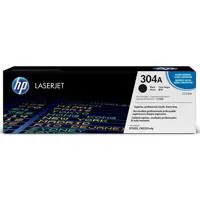
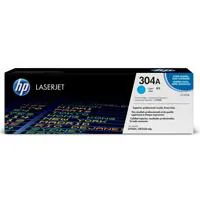
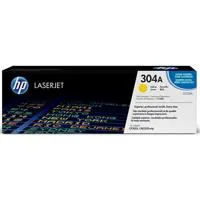


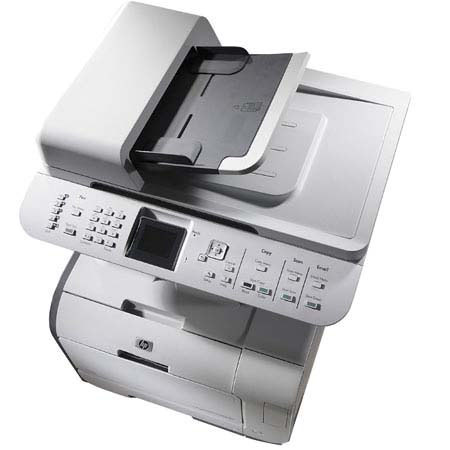
The HP CM2320nf Color LaserJet Multi-Function Printer lets you color print, copy and scan, plus fax, with one easy-to-use machine. It's fast too, with print speeds of up to 21 pages/minute for black and color. And you can copy or scan unattended with the 50-page automatic document feeder.
Join VIP PRO
Earn 2X Points + Exclusive Perks!
Request a Callback
Chat one-on-one with an expert
Sell or Trade your Gear
Get started in 3 easy steps