



This item is no longer available.
Review Summary
2011-12-21T19:00:00
I was a little nervous when I took this out of the package as it was larger than I thought it would be but after a few days of thinking I kept it and I am glad I did. My old printer was a Konica Minolta which was, well taller than this one but about the same dimesions, however it was loud. The new HP 3525n that I purchased is much, much quieter than my old one and doesn't sound like it is going to take off like the Konica Minolta did. Great printer quality and the speed is out of this world for color. I thought set-up with my home network would be hard but the CD took care of it and it found it, so all I did was click a button to find the network printer and it found it without me typing in the IP and all of the information. THIS IS A MUST GET PRINTER! Plus the toner that comes with it will last a long time if you are using this for home so just think you may not have to buy ink for long periods of time. The only drawback is the size, it is a bit larger than I had imaged on the site when I compared it but for the quality, ease of set-up, and print speed I can live with it. This is a must get printer!
NateinMN

2010-11-15T19:00:00
The printer did not work properly after it was installed. After working with technical support for a few days and replacing several different parts, HP decided to replace the entire printer. When the replacement printer arrived, it was not a "new" printer, but a "refurnbished" printer. My IT person told me this is a common HP practice, buy a new product and replace with a refurbished product if defective. The refurbished printer also had problems which were resolved after replacing only one part. My only issue with the printer is when the printer runs out of ink in one cartridge, you cannot print anything until the cartridge is replaced. This is extremely aggravating especially if only needing the black cartridge to print and one of the color cartridges is empty. I like the speed and print quality of the printer, too bad the above issues have soured me on it.
trapshootgal
2010-06-02T20:00:00
After 30+ years in Corp America I am pursuing a career as a professional educator in CT. I have had my share of printing nightmares with expensive Corp laserjets that require daily maintenance, home office laserjet AIO scanfaxprinters that are obsolete the day you unwrap them and therefore get the hindmost in manftr support. This HP CP3525n printer is an incredible Laserjet resource. For what it is (a CP - not an AIO - it is, in my humble opinion, the best for the $. As a networked color printer working in a school it is terrific. Go for it!
PHDinCT
2010-03-31T20:00:00
I replaced a 10 year old 4550n that had been a great printer for almost all of that time. When it finally died, I was looking for an economical solution and found the CP3525n. Set-up was a breeze on Win7 Pro (as well as on my old XP Pro PC) and it works great in my home office network. The wake-up from stand-by is only a few seconds compared to what seemed like several minutes for the 4550n. The colors are vibrant and in addition to the wake-up, print speed is approximately twice as fast as the printer it replaced. I was initially concerned that Win7 wasn't native to the design architecture, but those worries were completely unfounded (online chat with an HP sales assistant was spot-on). The footprint might be considered large for a desktop, but I actually GAINED a sizable chunk of desk space by replacing the 4550. I did take off a star for the cost of the replacement toner cartridges. However, my printer usage is not extreme, so I won't be buying new cartridges with any great frequency (I hope). I've had this printer for almost 3 months and set-up and work impressions have all been favorable. I highly recommend this printer.
MPSKY
2009-10-20T20:00:00
This printer should be advertized as a printer that does not print to the edge of the paper. When graphics are to the edge and you print, there is an automatic white border that you can do nothing about. I contacted the technical support and they commented - it does not print borderless.
cald
2009-09-19T20:00:00
This is a quick printer. The output quality is good to excellent. It's footprint is a little large. However, we've gotten used to it. We tried a smaller one and it was flimsy and had poor print quality. Having the toner amounts show on the display is very helpful. The menus are clear and easy to follow. The only real complaint with this printer is that the paper tray capacity is small. We have had this printer for about 9 months and have been very satisfied.
INTPLady
2009-06-16T20:00:00
Have had the printer for about 2 months...The printer is pretty decent for your basic print needs...it really comes out with nice color...Downfall is the printing tray is pretty small, only holds 250 pages....but not a huge deal
Techgooroo
2009-06-15T20:00:00
I bought this printer to replace an HP 4550n. The 4550 was perhaps a solid printer when it came out, but its design flaws, performance quirks, and fragility became increasingly apparent, annoying, and costly. It became an issue of buying a new printer or paying for yet another set of repairs to keep an old printer going. There are things to like about the 3525, but you have to keep in mind what it was replacing when you assess the ratings. From an aesthetic point of view, someone at HP must think that it is stylish to have the beige panels contrasting with the grey. Once you see it in your office, and get that full grey side-view, it reminds me of a car with a primed but unpainted replacement fender panel. This is a matter of personal taste, and others may find it charming. I think it would look better all in beige. Setting the printer up was very easy, as was getting the network to recognize the printer, and my Mac to properly interface with the printer. I was up and running/printing very quickly. The printer (compared to the 4550) is lightning fast, and the print quality on plain black and white prints is very good. There seem to be problems in getting schematics and "artwork" to print with uniform grey or color shading. One gets banding of greyscale elements on one print but not on the next of the same document. This seems to be a common problem with the low-end HP printers; we also run some other HP color laser printers and getting a flaw-free print is challenging. Images that contain color elements can also be challenging. Artwork in which the color of certain elements is identical across a page will end up coming out with different shades of the color depending on where they are located on the page, e.g., yellow-gold in one region, and much closer to orange in others. It is not consistent from print to print either. Since we do not generate final copy on this printer this is merely a bit annoying. For others it could be a more serious issue. I don't know if this is "normal", but based on the performance of our other contemporary HP printers it does not appear to be unusual. One of the biggest differences between this and the 4550 is the amount of time required to print after the printer has gone into sleep mode. On the 4550 you could make a cup of coffee and have time left over. It was comatose mode. Heaven forbid you then got busy doing something else and the printer went back into sleep mode. The 3525 comes out of sleep mode very quickly and paper starts coming out within a few seconds. I was pleasantly shocked when I first had this experience. Any time things change, there are adjustments. On the 4550, when you printed from the manual feed tray, the side you printed on was the up side. On this one, it is the down side of the paper. It is a bit counterintuitive at first, but you get used to it. Overall, I am happier with this printer than with the 4550 it replaced. It cost less than a quarter of the printer it replaced. It is fast. The print quality is a bit less than I would like. Overall, for the money, and if you are not trying to produce final copy of artwork on it, it is a decent buy, and I would recommend it.
nahNoScience
2009-03-16T20:00:00
We recently purchased a CP3525n as an upgrade for our home office. While it takes up a bit more room than the one it replaced, it more than makes up for it with its speed and quality. We generate reports which include graphics and numerous photos and the quality is excellent. It is quick, quick, quick and kicks out the reports in record time. The only complaint we have is that it can be loud at times, particularly when using the second tray on the side. When it pulls up paper from this exterior tray, it sounds like its mangling and gnashing the paper (it isn't, of course). Paper jams are quite rare -- we've only had one in the two months we've had it. We also like the ink monitoring system for the printer. It has an indicator on the printer which gives the user a running gauge of ink levels. Additionally, it sends a message to your computer when levels are getting low with an estimate of how many pages remain for a particular color. While the ink is costly to replace, the cartridges do last a long time. We ultimately upgraded our other older color printer with a second CP3525n have been very happy with the purchase. This allows us to just keep one set of back-up replacement ink cartridges to accomodate the two printers. Works like a charm!
GlacierGirl

Accidents happen where life happens. Protect your favorite Adorama products and purchase a protection plan to stay covered from accidental damage, mechanical or electrical failure, and more.

If we can’t fix it, we’ll replace it at no additional cost.

Protect your product from drops, spills, and more.

Enjoy your gear without fear. We have you covered!

When regular use of your product over time results in mechanical or electrical failure.

We will never charge you a deductible after the purchase of a plan.

Our claims process is simple & easy and our customer service team is happy to help.
Adorama Protect powered by Extend is available for purchase to customers in the United States. Not available for purchase Internationally or in U.S. Territories.
Browse our FAQ
Up to 30 ppm
Up to 30 ppm
Up to 1200 x 600 dpi
Up to 1200 x 600 dpi
Manual (driver support provided)
HP ImageREt 3600
256 MB
515 MHz Motorola Coldfire V5x Embedded
Letter, legal, 8.5 x 13 in, executive, envelopes (No. 10, Monarch (7 3/4))
Up to 75,000 pages
100-sheet multipurpose tray, 250-sheet input tray
1500 to 5000
Standard
1 USB-B, 1 10/100/1000 Base-T Ethernet
Windows 2000; Windows XP Professional; Windows Vista; Windows Server 2003; Windows Server 2008
Mac OS X v 10.3; Mac OS X v 10.4; Mac OS X v 10.5; Linux
HP PCL 6, HP PCL 5c, HP postscript level 3 emulation, direct PDF printing v 1.4
No
20.2" x 19.3" x 14.1"
72.5 lb
HP 1 year parts and labor warranty


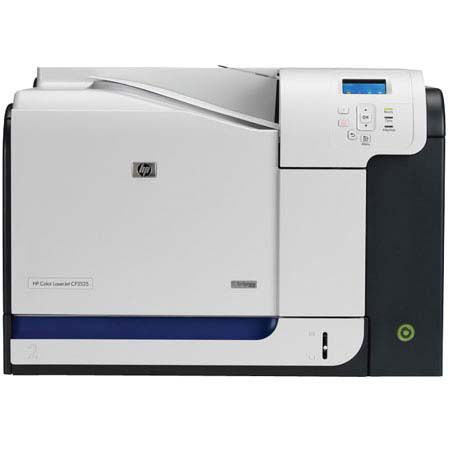
The HP Color LaserJet CP3525n printer turns out impressive color and prints fast, at up to 30 pages per minute (letter size). Printing in black costs you the same as it would with an HP black-and-white LaserJet printer.
Join VIP PRO
Earn 2X Points + Exclusive Perks!
Request a Callback
Chat one-on-one with an expert
Sell or Trade your Gear
Get started in 3 easy steps