



This item is no longer available.
Review Summary
2010-11-04T20:00:00
The printer prints well. When it works. Which it almost never does. Its no wonder that they give it away free. Buy something else.
kjsh

2010-10-14T20:00:00
I opened my own business and run this off an invertor in my truck. Occasionally get a print issue where i need to reboot printer and laptop but that is not too surprising since it runs inside a hot truck in Phoenix. Has always worked even when it gets so hot i have to cool it down in the a/c of the cab.
RobertsRVRepair
2010-10-07T20:00:00
I actually bought this printer for my teenage daughter. I then bought another HP printer for myself on ebay, which did not work properly at all. It was an all-in-one printer that I needed for my home business. I eventually did return that printer and now share this printer with my daughter. All it does is print, and it does that very s-l-o-w-l-y! It does print clearly however. I am now looking for a new all in one printer that does everything including faxes
mizscorpio
2010-10-07T20:00:00
Love HP but this one has a bad bent power button and faults unless I turn it on before every print job, and turn it off afterwards? Printing is what you would expect for a HP of this value. It works so no return would be made. I own many HP products from laptops to various all in ones, as a computer service provider In two states I always promote HP. This one though has what it needs for a work station unit and adds to the executive look of a home office. If you purchase this unit look it over very good before installing for off level buttons etc.
rcharby622
2010-09-28T20:00:00
I've had HP printers for ages that I loved but I would never recommend this model to another person - it is noisy and an ink hog. Even though I've substantially trimmed the amount of printing that I routinely do, this printer constantly needs more ink!
Katerina
2010-09-02T20:00:00
This is the first HP product I have ever been disappointed with. For some reason printing is never simple. Most times it takes 3 to 4 attempts to print a simple airline boarding pass. I have tried online tech support to no avail.
octimbo
2010-08-24T20:00:00
I have this printer for 2 weeks. One the disappointing features is, when I try to print a PDF file form acrobat professional version 7 via the network(shared printer) it hangs. After about 10 minutes the document prints. My previous Epson stylus c86 worked just fine printing the above. However Ms word, Note pad and Word pad work fine with Hp DeskJet D2660.
tristar
2010-08-21T20:00:00
I have long been an admirer of Hewlett Packard's products. I've become accustomed to associating this brand with great, high-quality products that perform well and last a long time. I tend to believe that I can't go wrong buying an HP product. When my ancient DeskJet 890c ran out of ink, and I needed urgently to print something, at an absurd time of day, a panic trip to the only place open at the time to carry such things ensued. Finding that they no longer carried ink cartridges there for the 890c, my wife and I instead purchased the D2660. We can't go wrong buying an HP product right? Well, as it turns out, we did. We found the D2660 to be of poor quality—certainly far poorer than we would ever expect to see of an HP product. The ink cartridges are tiny, and have an absurdly-small capacity. This turns out to be an amazingly-expensive printer to run, because of how quickly the ink cartridges run out. It doesn't even have a tray to catch the output. If you don't remove each printed page right away, you risk having it feed back into the printer and cause a jam. My wife, using this printer from her Windows Vista system found that the drivers for it put up all sorts of unwanted popups every time she printed anything. It's rather alarming to see legitimate printer driver software from a reputable company behaving in such a manner as one usually associates with malware. The MacOS X drivers tended to behave in a similar manner, but not nearly so much as the Windows version. After a few months of use, this printer broke. Something in the feed mechanism ceased to work correctly, producing constant paper jams accompanied by the sound of stripped gears. It's possible this printer may still be under warranty, but as bad as it was, we didn't feel it was worth the bother of trying to find out, or of seeking warranty-related service on it. Into the trash it went. As luck would have it, about the time this printer broke, a certain office store chain was having a fantastic sale on a much higher-end HP printer. So far, the printer that we bought on this sale appears to be more in line with what I have always expected of HP.
TheForkliftWhisperer
2010-08-14T20:00:00
Be sure to never, ever use anything other than a Genuine HP replacement ink cartridge! Otherwise, TERRIFIC product-for-the-price! Just commit yourself to Genuine HP ink cartridges and you will be HAPPY with the D2660. Otherwise, expect grief ... of the kind that definitely is not worth the hassle that will ensue; i.e., you will lose. I run Win XP Pro-4SP2 on an e-Machine ET1810-01.
lemmer58
2010-06-10T20:00:00
I needed an additional printer only for prescription printing (I use special tamper proof paper), and this was the perfect choice for this. The price is a steal compared to the crisp printing it can produce (if settings are for higher quality), and the speed is out of this world when printing prescriptions. It can print six consecutive prescriptions in seconds unlike my bigger MFC which will take its time to warm up and start printing. Overall I'm very happy with this purchase. I did run into trouble with the smaller version 1660 and customer service was very helpful and got full refund, so I had no second thoughts on going with HP again. And by the way, ink economy is amazing.... I've replaced the black cartridge once only since the purchase (a while back), after printing a ton of prescriptions.
Seattledoc
2010-05-06T20:00:00
My wife and I had had a HP deskjet C-620 printer that had gone on the fritz on us and while we were out I noticed the D-2660 and liked the design of it as well as it's energy star rated. We bought it and I am very impressed with the speed at which it prints out documents and pictures. I would highly recommend this printer to anyone who wants an economically priced printer that will do what they want with no fuss or muss. It's very easy to use and takes up very little space on my desktop.
Logan1957
2010-04-30T20:00:00
so far i have the printer for 6 months and no problems yet. only thing i have noticed is the black ink goes fast. but the price of a replacement isnt bad. alot cheaper the the last HP i had. the ease of intstallation was good. updates are fast and easy. no jams or binding. and prints clear and crisp for a low costing printer.
wfussner
2010-03-08T19:00:00
Good quality print, however is slow and noisy. Overall, for the price, is a good printer.
Woodturner
2009-11-26T19:00:00
My HP6940 died after long and reliable performance. Apparently the 6940 model was discontinued. The 2660, as described, seemed to have all the needed functions and a very attractive price and was immediately available. Good news: quick delivery, easy setup, excellent print quality. Worries and annoyances: must be turned on manually before printing (I got used to the automatic start on the 6940 and first thought the 2660 was broken when it did not print), slow to start printing, uncertain handling of envelope printing (no guide) and no divider between input paper and output paper. Overall: just fine for the price but would have paid more for another 6940.
jbc123
2009-11-17T19:00:00
I got this printer for my b-day along with a brand-new computer. Was thrilled to see the computer (HP TouchSmart tx2) and the hp deskjet d2660. I have to be honest, I HAVE HAD PROBLEMS SINCE DAY ONE. First of all you can't load more than one paper at a time, or else it jams, then you HAVE TO UNPLUG IT or it keeps going. Then you have to restart your computer to finish thee printing. Second I found it to be difficult to use, you press the red X to stop the printing, yet it keeps on going. Ya, it looks cool, but does it work cool. N-O spells NO. I am returning this product and getting one where the paper actually loads in the top, so i don't have to keep inserting paper. THE REASON THE PAPER JAMS IS THE STUPID DESIGN, paper loads in the bottom and prints while the paper is curving uppward, THAT IS WHY IT JAMS!!!!! I load the paper properly, and it jams. DO NOT BUY THIS PRODUCT!!!!!!!!!!!!!!!!!!!!!!!!!!!!!!!!!!!!!!!!!!!!!!!!!!!!!!!!!!!!!!!!!!!!!!!!!!!!!!!!
TheGameMista
2009-11-04T19:00:00
Have used this printer for 6 weeks and find it to be an excellent machine. Can't believe that it's available for such a low price. I use it on both my PC & Mac and had not a moments trouble setting it up. Can't imagine that the folks writing negative reviews are actually using this same printer. Also very happy with the price of the ink cartridges. Am still using an HP printer I purchased 8 years ago. Don't know whether I'm just lucky with my purchases or that some people expect the machine to fix breakfast for them.
lonestar
2009-11-01T19:00:00
When it prints it's great. Serious connectivity problems and tech support was no help. Very disappointed.
JohnL
2009-09-04T20:00:00
I have been using this printer for 2 months and it has not let me down! I am not a high tech person, so I need machines and instructions fairly simple. I cannot believe what fine performance with a printer so modestly priced! I did not have difficulty doing the setup, and the quality of both my b&w and color copies are superb! I print a lot of artwork projects in color - I am so pleased with the clarity and brilliance! Cartridges are not as expensive as last printer I had which is a big plus for someone on a budget! Easy to use, FAST output, easy changing the cartridges too! I'll stick with H P products from now on - and recommend this inexpensive no nonsense printer to all my friends!
ArtsyWoman
2009-07-13T20:00:00
Well, the printer was just a bit on the minimalist side, however, the print quality was great, and produced fine printouts very quickly. Besides having a modern look, the printer is ergonomic, simple, and reliable...backed by a name i trust: HP.
Deltari
2009-06-30T20:00:00
I bought one of these printers several months ago to replace a larger printer that died of old age. It prints fast and with better quality than my previous printer and I have had no issues with it - no paper jams, not print problems - nothing. I really like the smaller ink cartridges. Their significantly lower cost than larger cartridges makes buying ink much less painful and I don't have to wait until payday to get ink. I am going to buy one for my college daughter who needs a printer.
Stargazer
2009-06-03T20:00:00
I just recently bought a new HP desktop computer and it's just as amazing as this printer. It was a gift for my fiance, and it is so fast. The quality is amazing. I even printed pictures from offline on just regular printer paper, and they came out beautiful. I can imagine how good it will come out with better paper. I would definitely recommend this printer. It way exceeds my expectation. Price is great they could even charge more for the performance it does. The printer cartridges are so cheap to. Only 15 for each. that's great! Definitely would buy this again, or another HP printer! I want to get one for my camera now. I love HP!
Bronxbarbiegrl
2009-05-30T20:00:00
very good new HP colored DeskJet, with better features and performance. heavy duty and will fullfil the job.
samir
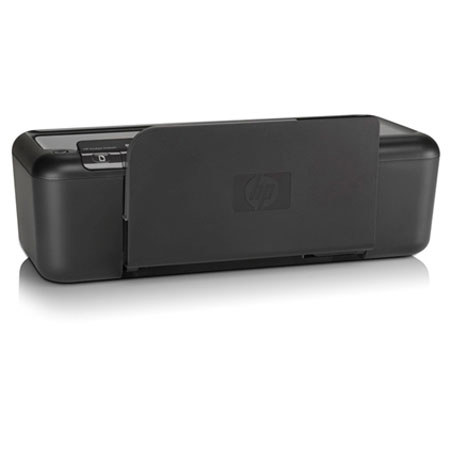
The HP Deskjet D2660 Inkjet Printer is an affordable, easy to use printer you can count on for quality documents and web prints. Easily print your documents with the simplicity of only three, one touch buttons power, resume and cancel. Save ink, paper and time by quickly stopping unwanted prints with the print cancel button.
You can also save ink and paper by combining content from multiple Web pages on one page with the Smart Web Printing. Have new ink ready when you need it thanks to automatic low ink alerts. The HP Deskjet D2660 Inkjet Printer has you covered, whether you want to print a document or pages from the Web.