



This item is no longer available.
Review Summary
2010-04-23T20:00:00
tHE M1319 IS A GOOD PRINTER, AND COPIES. i AM STILL A BIT CONFUSED BY THE FAX. THE BIGGEST DRAWBACK TO THIS IS THE FACT THAT IT INTERFERES WITH A A hp SCAN JET 4890 MAKING IT MUCH MORE INEFFICIENT. HAVE WORKED WITH TECH HELP, BUT THAT HAVE BEEN UNABLE TO SOLVE THE INTEFERENCE PROBLEM
TROBBP

2010-04-12T20:00:00
Used in a multi- phone line office. There is already a dedicated fax line & machine that prints the incoming fax calls, so this unit's fax function is outgoing only. It did take one call to tech so that the machine would not "answer" or break into existing calls. Only took a couple of adjustments to the settings to fix the conflict. Excellant unit. Print, Scan and Copy functions are very quick. Unit uses the same standard HP toner cartridge as all the other printers in the office. No need to stock a special cartridge just for this unit. Fax sending seems a bit slow, but not objectionable. I would definately recommend this unit!
Administrator
2010-03-29T20:00:00
THIS PRODUCT WAS NOT USER FRIENDLY AT ALL. IT WAS TOO SLOW IN SENDING AND RECEIVING FAXES AND YOU COULD ONLY SEND ONE AT A TIME. NOT WORTH THE MONEY AT ALL. HP SHOULD REALLY DISCONTINUE THIS ONE.
NOTPLEASEDINMICHIGAN
2010-03-08T19:00:00
Bought this as a refurb model and with the exception that it is a little noisy, it has worked great so far. meets my needs in all areas.
julvrug
2010-02-19T19:00:00
We bought more than 20 sets of this model within 4 months, many of them troubled me a lot, this fax print founction is fine. but when sending fax or receiving, there will be troubles, many times, we can't send fax out, it is just dialing and sending and stay there maybe for several hours, we had ever contact HP support and upgrade the firmware for out fax, but seems working for a while then again, it will not fax out or it seems fax out but the other side get nothing, we almost feed up this and got many complains from our stores, they all said this fax machine not work well as the old one, but the old one was too easy to be broken.
myen
2010-02-02T19:00:00
Even though it has an 500 page memory it cannot scan a fax into memory and then send it later while another is being received or sent. You have to completely wait until the preceding fax was received or sent before sending your next fax. Our $99 Bother fax machine did this.
RichIT
2010-01-09T19:00:00
Purchased the 1319 to replace a contractor-owned 1319 I had to relinquish. Price from Adorama was phenomenal--12A cartridges are much more efficient and inexpensive than inkjet style. Prints fast, never jams...perfect for the home-office.
CO D.
2009-12-22T19:00:00
I SAID THIS PRODUCT IS MY FRIEND BECAUSE IT'S IT EASY TO USED, STRONG, HAVE GOOD PRINT, AND IT HELP A LOT OF OFFICES, SCHOOLS, COMPANIES, AND INDIVIDUALS. MOST OF MY FRIENDS HAVE IT AS THE BUSINESS, SOME USED IT FOR THEIR OFFICE WORK. IT'S MY FRIEND BECAUSE IT NEVER LET ME DOWN SINCE I USED IT IN MY WORK PLACE AND MY FRIEND BUSINESS PLACE. I WANT TO USED THIS TIME TO ENCOURAGE EVERYBODY THAT SEE OR HEARD OR READ ABOUT THIS PRODUCT TO BUY IT AND TEST IT, THEY WILL NEED MORE. THANKS
Samsonic
2009-10-12T20:00:00
I am a real estate agent and work from home alot. This is a great tool for scanning and e-mailing documents. I use all functions. It replaced our inkjet 4 in 1 and is more cost effective and faster. I use it with another program, PaperPort, which organizes the files. (among other things). I rarely fax anymore.
Gailfromoakhills
2009-10-09T20:00:00
I purchased the HP Laserjet M1319f as an All-in-One machine 3 months ago for my business from a local Computer store. I've generally used only HP printer products and have been overall pleased. The machine presents well and the print quality is excellent. However, it does use an analog fax line, not the fiber line with digital capabilities. Set-up took quite a while and I spent nearly an hour on the phone with HP Tech support (they are great to work with). The fax feature was difficult to initialize and and continually receive error reports indicating other fax "line busy" or "no answer" - no resolution to this issue (my previous machine had no problems). I will say that utilizing the fax feature through my PC is much easier. Scanning is fair - in process - but quality is generally good. Paper feeder frequently picks up more than one sheet - even when the mutli-sheet lever is switched. I wouldn't recommend this particular All-in-One machine to others - reliability difficult to predict.
Econo57
2009-09-22T20:00:00
Purchased to replace an aged ink jet fax machine and and even older HP LaserJet 1100 which still works fine, but is slow. The new machine works flawlessly so far, much faster than the 1100 with the same good print quality. A bit bulky, but okay for a home office. No problems with the fax component; works fine with my cable phone service and has more options and features that I am ever likely to need. If it proves as reliable as the 1100, I will remain very pleased with this purchase.
Elcho
2009-07-16T20:00:00
For many months I've had very good luck with my M1319f for faxing, copying and printing until Vista laptop died and I changed to a Vista-64 bit machine. I can still print, but HP doesn't yet have software for scanning and faxing for Vista-64 bit machines. Earlier reviewer had problems with scanner picking up more than one sheet; there's a setting on the scanner for single or multiple sheet input that solved that problem for me.
Doctabill
2009-05-11T20:00:00
The feeder tray is supposed to take multiple documents. You can not put a stack of 3 or more in the tray and expect them all to be copied. The first one didn't work so we got a replacement and it does the same thing.
rasas
2009-04-06T20:00:00
Do not buy this product. That is why it is on sale. Fax doesn't work.
Keko
2008-11-23T19:00:00
This is a replacement for the LaserJet 3100 which was a real work horse. I had tried a HP InkJet and couldn't take the noise. After two days I went on line and after more research purchased the HP 1319. This is a quiet machine, that is important for me with all of the other machines in my office and their own little noises. It was easy to set up, takes less space on the desk than either the HP 3100 or the HP InkJet. The programming is straight forward. The faxes (the main purpose of this machine in my office) are clean and clear. I am very pleased with this machine.
JLMeade
2008-11-03T19:00:00
I've had this printer for a few weeks now and feel ready to give a review. I am a work-at-home attorney so needed this for quick printing of longer documents as well as scanning and copying capabilities. I did not set up the faxing function on this machine. So far am very happy with the purchase. My favorite part is the feeder tray for scanning. The only issue I'm having so far is that it tends to pick up more than one sheet at a time. However, I have not tried using laser printer paper which may produce different results. Scanning function is much easier than my previous printer and I can send multi-page pdf files with ease.
Workathome
2008-06-16T20:00:00
I bought a HP Laser jet 1319 to replace several other machines on my desk. Well this machine was a real challenge to progam but afterabout 1 hr. it was all ready to go. Then after the box and packing were all destroyed I found out that it does not FAX or receive FAX unless you have old fashioned analog phone lines. My high tech cable digital phone service will not function with this machine at all. This is a new model I was told but still does not accept digital phone lines. My 6 year old 69.00 fax machine worked fine on the digital lines but this new High tech machine will not and most Hp machines according to the letter I received will not either. Thisdigital not compatable factor should be noted .I would surely not bought an outdate feature machine as this.I now have to buy a digital fax machine.
nondigital

Accidents happen where life happens. Protect your favorite Adorama products and purchase a protection plan to stay covered from accidental damage, mechanical or electrical failure, and more.

If we can’t fix it, we’ll replace it at no additional cost.

Protect your product from drops, spills, and more.

Enjoy your gear without fear. We have you covered!

When regular use of your product over time results in mechanical or electrical failure.

We will never charge you a deductible after the purchase of a plan.

Our claims process is simple & easy and our customer service team is happy to help.
Adorama Protect powered by Extend is available for purchase to customers in the United States. Not available for purchase Internationally or in U.S. Territories.
Browse our FAQ
Black-and-white printing, black-and-white copying, black-and-white scanning, black-and-white faxing
Up to 19 ppm
Up to 1200 x 1200 dpi
Manual (driver support provided)
REt, HP FastRes 1200
32MB
240 MHz
Optical: Up to 600 dpi
Enhanced: Up to 19,200 dpi
24-bit
8.5 x 14 in
Sheetfed
3 sec per page
Up to 300 x 300 dpi
Up to 500 pages
Up to 119 numbers
Up to 19 ppm
25 to 400%
Letter, legal, executive, envelopes (No. 10, Monarch)
Up to 8000 pages
250-sheet input tray, 10-sheet priority slot, 30-sheet automatic document feeder
1 USB, 1 fax
Windows 2000, Windows XP Home, Windows Server 2003, Certified for Windows Vista; Mac OS X v10.3, v10.4 and higher
18.4 x 17.3 x 18.1 in
22 lb
HP 1 year limited warranty

Required

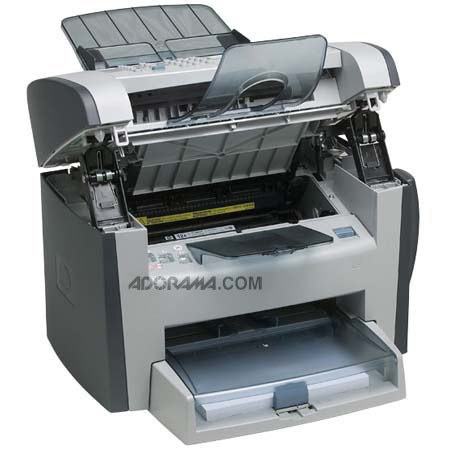
The HP LaserJet M1319F multifunction All-in-One is a combination of fax, copy and scan capabilities with high-quality laser printing. Just about everything you need is in the HP most affordable multifunction laser printer. It's a high-end fax machine that can do so much more.
Save money with a multifunction laser printer with a low purchase price. One can Print, fax, copy, scan-save money and space with one device that includes four functions.
Join VIP PRO
Earn 2X Points + Exclusive Perks!
Request a Callback
Chat one-on-one with an expert
Sell or Trade your Gear
Get started in 3 easy steps