



This item is no longer available.
Review Summary
2010-10-17T20:00:00
The motorboard went out in 16 months. Of course the replacement costs is less than the motorboard. This event was most disappointing because the Laser6P. I have is still working. Then my 1600 color printer stopped working as well, USB issues. Is the quality disintegrating? No more HP for me!
blessedandhighlyfavored

2010-10-06T20:00:00
I PURCHASED THIS PRINTER FOR A SMALL BUSINESS VOLUME AND AFTER 12 DAYS MY WARRANTY EXPIRED, JUST STOPED WORKING I BARELY USE TWO CARTRIDGES OF TONER WHEN THIS MACHINE'S CONFIGURATION AND FRONT PANEL JUST FAILED. I CALLED HP SUPPORT, THEY WERE NOT ABLE TO HELP ME ON ANY WAY. I AM VERY EXCEPTIC TO CONTINUE USING HP PRINTERS-COPIERS. VERY BAD EXPERIENCE
HRASSOCIATES
2010-09-02T20:00:00
We've used this as our main printer / scanner and occasional fax for over two years now and it continues to perform flawlessly. We also receive good performance and long life from the toner cartridges. You can't go wrong with this one.
99Prez
2010-08-01T20:00:00
After upgrading my OS to Windows 7, the M1522nf was no longer able to effectively scan to my PC. Once scanned, the file cannot be located. HP's driver and software updates are useless. They have been saying for months that the new driver update for Windows 7 compatibility will be out "next month" and they are STILL not available. I've had other problems with this machine, so much so that the first time it broke HP had to replace it. Of course it was replaced with a refurbished model (and I had bought a new one originally) and therefore a whole new set of problems. I DO NOT recommend this machine if you rely on PC to all-in-one communications.
2setsof3
2010-05-23T20:00:00
I've bought several of these printers. I've sold all of them except for one that I used in my shop. Half of them have died. I've been able to get 2 of them replaced under warranty and another has died right after warranty. Sometimes the firmware upgrade fixes the problem but not always. I encourage you as a buyer to expect more then a year of life from your Laserjet. I also haven't seen one of these printers where the automatic document feeder works with out twisting and trashing the documents. I like HP's printers but this one has definitly caused more than enough problems for me.
ComputerChris
2010-05-04T20:00:00
This printer is disappointing when compared with other HP printers I have owned. I bought it last year, May 5, from Office Depot, hoping that it will solve my printing needs at home to reduce shuttling to office for my large printing needs, but alas!!! my hopes are dashed. The printer performs abnormally. It hangs most of the time, and requires switching on and off for it to initialize. I am frustrated with its performance and need help to obtain my money worth on this printer. My frustration is multiple because of my inability to get any support from HP. There is no contact information on the manual, which is not useful in providing required assistance for effective use, and Office Depot will not accept the printer back or exchange it for another. I need help from HP and an exchange for a better printer.
Ecka
2010-03-17T20:00:00
We bought this printer for a year and a half. Now it is totally death. I can't even turn it on. What a piece of junk. My previous laserjet4L worked great for the last 15 years. It broke during moving to different house. I think new hp printers are not reliable compare to their old ones.
sb105
2010-02-25T19:00:00
In airline field. Worked great for 6 months, then fax card died, HP replcaed next day. Lasted 2 days, mother board crashed. HP replaced next day, worked for 2 months, kept re-seting itself in middle of printing, missed some faxes from customers. HP finally replaced with different model which seems to be working well. All other HP printers before this one were very reliable. (2 other laserjets and various inkjet all-in-ones) This is first one I've had problems with. At least HP's customer service is still very reliable while unit was in warranty.
Billz
2010-02-18T19:00:00
I loved this machine for about 11 1/2 months...then it started to "die." I thought this might be due to not using it for nearly a month, but then it really died. Cost of repair=new machine. The scanning system was toast and it wouldn't initialize. Trying to get in touch with any form of real customer service or support is a near impossibility so I finally resorted to a "snail mail letter" with no response as yet. So, I registered. Now I'm inundated with sales offers. I would not recommend this machine if you want something to last beyond a year.
Ogema
2010-01-25T19:00:00
i have other hp printers that are far superior than this. after 15 months the printer just stopped working. HP offered NO help at all after waiting on phone for 45 minutes. Web and chat support was non existent. i would be hesitant to buy this product without purchasing an extended warranty, which for a printer over the price of $ 350.00 seems like i should not have to purchase. HP get it togehter.
rwats54
2010-01-11T19:00:00
I only had the printer for a year and half and it died. Took it to repairman and he informed me not only did not main board go but so did the scanner board. Recommended not replacing boards as too much money and better off to buy new one; .
tmr1
2009-12-09T19:00:00
It uses a lot of toner. We have had to have a repairman look at it twice in the 6 months we have had it.
finance d.
2009-12-08T19:00:00
After printing less than 20 pages, the printer started making very loud noise when the power is on. I turned off all volumes including the fax speaker but this loud static-like noise is constantly on. I had no choise but to turn this stupid printer off. I have heard so many bad stories about this printer but I foolishly made a mistake buying one thinking that I can fix whatever problem.
JLEE38
2009-08-16T20:00:00
This is an update of my previous review: I'm now on my 4th toner (I do a lot of printing & faxing). This printer has out done itself and has well exceeded my expectations. To anyone who is on the fence, What are you waiting for?
Fred15992ndreview
2009-07-29T20:00:00
My HP3380 died after 4 1/2 years and 40K pages. I replaced it with the M1522nf. So far it is great. It comes on and prints very quickly. The networking SW was a surprise. It was very easy for me to install on several machines. I can easily scan to any computer on my home network now.
eclecticme
2009-06-23T20:00:00
It appears that this printer must have a bug that they can't fix since two others here have had the same trouble--the printer goes to sleep! It actually stopped in the middle of a process several times. I know that all of these printers are not bad because we have another one that works fine. This one has been replaced twice and I am waiting for the third replacement. When it works properly, I am very happy with the speed and quality of the printer/scanner/fax.
Landex
2009-05-25T20:00:00
Last summer I needed to buy a multifunction to replace an old Brother multifunction that had stopped working in an academic department with 14 users. I bought my secretary one of these. We were very impressed, so I bought my secretary assistant one and myself one. All of us scan and print moderate amounts of material. I was so impressed with these multifunctions that I bought two for my household computers. I am back this year to buy one or two more and note that they are all out of stock so am concerned that they have been discontinued. These are fantastic printers which I bought for $299 each including shipping. My only complaint is that the scanner scans slow in black and white scan mode. My old Brother multifunction scanned slow in color mode but really zipped through black and white documents about 4 or 5 times faster paper transport speed. This one scans at the same speed regardless of type of scan and the scan is slower than I would like to see. Also, there are no X size toner cartridges for this unit yet and we do seem to go through 2000 page cartridges pretty quickly. One very important issue that HP technical service and product sales people seemed to not know about was that this printer does scan directly into Adobe pdf format documents. This was very important. When done scanning, you can pick from tif, gif, jpg etc and one of the options is pdf. Simple as that. We scan a lot of academic files for long term storage. I hope they replace this machine with something just as good.
Garyy
2009-05-20T20:00:00
I had to send one printer back because it would not use the universal driver on our server but this one works great. I am recently working from home and I am inept with electronic equipment but I followed the directions and set it up without any problems. The scan goes a little slower than expected but I have not had any problems with print quality or faxing in the last few weeks. I am very pleased with the purchase and it suits all my needs at this point.
AB39
2009-04-16T20:00:00
Machine must have a software problem. I have had the unit replaced 3 times. Goes into mode (printing document) and stays there. Have to turn printer off to get it to reset. Have lost several incoming faxes due to this. I finally gave up and purchase just a printer only and using this multi-function just for fax and copy. I does not seem to do well using several functions. The ink is cartridge is expensive and uses up the cartridge too fast. I do not print that much but have gone thru 1 cartridge in 2 weeks.
kim123
2009-04-12T20:00:00
We bought this printer couple of months ago but it seems to be a bad product. We replaced that printer so far three times,Thanks to HP's excellent customer service. We are using lot of HP products but this machine sometimes go to sleep mode and never came back up when you send a print job.
Imran
2009-04-08T20:00:00
1.There are problems with Vista compatibility inspite of downloading the drivers from HP. Print command from the PC sometimes does not work. Have to shut printer and restart. 2. Scan To from the 1522 does not work. 3. Flatbed gets jammed for scan and fax.
tonymorgan
2009-03-22T20:00:00
Three of us keep this mid-range laser humming at about 5,000 pages per month. Scanner software is excellent. output quality exceeds requirements for daily work. The only drawback is cost of new cartridges, but some internet research and a little manual effort can take care of that issue. Overall this is one of the best computer values I have purchased... since my first PC-XT.
CharlestonM
2009-03-03T19:00:00
I just received the M1522nf MFP Multifunction Printer today and have spent the day configuring and getting acquainted with the functions. It's a great machine. I hooked it up with the 2101nw HP Wireless Printer Server and after a few connectivity glitches (from not reading the manual correctly), I have printed a 40-page document, copied and faxed a few pages directly from MS Word on my computer without having to print. My verdict is that this is a superb machine, and I highly recommend it to anyone with a modest need for a fax, printer, scanner and copier.
Wordsmith
2009-02-22T19:00:00
I have had this unit about 1 month. So far it has performed as hoped. I am using it primarily as a printer which is why I purchased a Laser unit. It prints extremely well and have not had any problems. I can't comment on life of toner catridge as I have only printed about 200 pages hoping that it will last significantly longer than an inkjet. The tool box indicates about 96% capacity remaining. The fax machine was very easy to setup and works well with my answering machine. The ADF has worked perfectly and have not seen any marks on paper. Would recomend.
SMS1
2008-12-30T19:00:00
Very satisfy with this printer. It does everything I need and it does it quite well. The only drawback is that the power switch is located at the back of the printer; it's not very accessible.
Ambles
2008-12-29T19:00:00
Except for the waiting approx 9 seconds for the 1st page to print I would recommend this printer to anyone looking for a versatile all-in-one Laser printer. The pring quality is Great and the fax DOES NOT JAM. The OCR program can be a little more user friendly but that should not be a deal breaker. I had another Major brand all-in-one printer and the Fax was the worst I have ever had. I will only purchas HP printers for now on.
Fred1599
2008-12-28T19:00:00
Nice printer at a good price
Bob
2008-12-01T19:00:00
I was skeptical to buy this unit due to extensive research and finding bad reviews and some great reviews. Bought anyway under pressure due to old sharp am900 mulitfunction unit failed and I own a very busy Automotive repair facility and need consant use of product. Took 15 minutes to install unit and software. All features work great right out of the gates. Clarity and speed of printing is great, faxing is great and very user friendly.
cmonsters
2008-10-21T20:00:00
On the good side, the printer is fast, fax works well, fair scanning, and the automatic feeder works perfect. Print quality is great. So, the only bad thing is the cartridges seem to become empty fast. I've gone through 3 cartridges in 6 months. Cartridges are expensive for their short life span. I haven't used the scanner much because when I did, the files were a little large for what I needed and when I reduced the quality, they were not clear enough. The comparison is our office printer/scanner. Feature I'd like, an auto detector for legal sized pages during scanning or faxing In comparison, I have an old HP4, a little slow, but prints reams and reams of pages without replacing the cartridge(and cartridges are cheap too!!) What a workhorse that one is!!
Raymond
2008-09-30T20:00:00
I just had to replace my laser printer, and was looking to add a scanner and copier. I was looking for an all in one and came across the HP. I have used it over the past 4 weeks and could not be more pleased with it. The scanning (both pictures and documents) is quick and easy to use. The quality is superb. The printer is fast, and very good quality. I did read another previous review that said there were marks on the paper, but mine works well. Although I have not used the fax feature so far, I would highly recommend this product!
marckuss

Accidents happen where life happens. Protect your favorite Adorama products and purchase a protection plan to stay covered from accidental damage, mechanical or electrical failure, and more.

If we can’t fix it, we’ll replace it at no additional cost.

Protect your product from drops, spills, and more.

Enjoy your gear without fear. We have you covered!

When regular use of your product over time results in mechanical or electrical failure.

We will never charge you a deductible after the purchase of a plan.

Our claims process is simple & easy and our customer service team is happy to help.
Adorama Protect powered by Extend is available for purchase to customers in the United States. Not available for purchase Internationally or in U.S. Territories.
Browse our FAQ
Black-and-white printing, black-and-white copying, black-and-white faxing, black-and-white and colour scanning
Up to 23 ppm
Up to 600 x 600 dpi (1200 dpi effective output)
Up to 125
Manual (driver support provided)
Up to 23 cpm (single sheet on flatbed, multiple copies, ADF copy speed is up to 14.5 cpm)
25 to 400%
Flatbed, ADF
Up to 19200 dpi
10/100Base-T Ethernet network, Hi-Speed USB (compatible with USB 2.0 specifications)
Motorola Coldfire V5e
450 MHz
64 MB
< 9.5 sec
Up to 8000
Up to 600 x 600 dpi (1200 dpi effective output)
Manual (driver support provided)
HP PCL 6, HP PCL 5, HP Postscript level 3 emulation
Up to 23 cpm (single sheet on flatbed, multiple copies, ADF copy speed is up to 14.5 cpm)
Up to 600 x 600 dpi
Up to 99
25 to 400%
Flatbed, ADF
Up to 19200 dpi
Up to 1200 dpi
21.6 x 29.7 cm
No minimum
24-bit
Yes
256
JPEG, TIF, BMP, GIF, PDF, PNG
33.6 Kbps (3 sec per page)
Up to 300 pages (black and white)
No
Up to 300 x 300 dpi (halftone enabled)
Yes
Yes
119 locations
Standard, 50 sheets
2
Jan-00
Paper (bond, colour, heavy, letterhead, light, plain, preprinted, prepunched, recycled, rough), envelopes, transparencies, labels, cardstock
Up to 260
Up to 260
Up to 125
Priority input tray and Tray 1: A4, A5, B5 (JIS), C5, DL, 16K, European postcard; Automatic Document Feeder (ADF): A4, A5
Priority input tray and Tray 1: 76 x 127 to 216 x 356 mm; Automatic Document Feeder (ADF): 127 x 127 to 216 x 381 mm
Tray 1, Priority input tray, Output bin: 60 to 163 g/m; Automatic Document Feeder (ADF): 60 to 90 g/m
250-sheet media input tray, 10-sheet priority input tray, 50-sheet Automatic Document Feeder, 125-sheet face-down output bin
10/100Base-T Ethernet network, Hi-Speed USB (compatible with USB 2.0 specifications)
Microsoft Windows 2000, Server 2003; Certified for Windows Vista; Microsoft Windows XP Home, XP Media Center, XP Professional, XP Professional x64; XP Tablet PC; Mac OS X v10.3 or higher; Novell NetWare 3.2, 4.2, 5.x, 6; HP-UX 10.20, 11.x; RED HAT Linux 6.x or higher; SUSE Linux 6.x or higher; Solaris 2.5x, 2.6, 7, 8, 9, 10 (SPARC systems only); AIX 3.2.5 or higher; MPE-iX; Citrix MetaFrame; Terminal Services
Via On Board 10/100 Ethernet connection, supports TCP/IP based solutions: Windows 2000, Windows XP Home, Windows XP Professional, Windows XP Professional x64, Windows Server 2003, Windows Vista Ready, Windows Vista-64; Novell NetWare NDPS services via TCP/IP only on 3.2, 4.2, 5.x, 6.x; HP Gateway and Novell LPD gateway; Mac OS 10.3 or higher; Bonjour discovery supported; RED HAT Linux 6.x or higher; SUSE Linux 6.x or higher; HP-UX 10.20, 11.x; Solaris 2.5x, 2.6, 7, 8, 9, 10; AIX 3.2.5
Microsoft Windows 2000, Server 2003: any Pentium II processor or higher, 64 MB RAM, 250 MB hard disk space, SVGA 800 x 600 with 16-bit colour display, Internet Explorer 5.5 or higher (full install), CD-ROM drive, USB port; Microsoft Windows XP-32 Home, XP-32 Professional: any Pentium II processor, 128 MB RAM, 250 MB hard disk space, SVGA 800 x 600 with 16-bit colour display, Internet Explorer 5.5 or higher, CD-ROM drive, USB port
2-line LCD text display, alphanumeric buttons, navigational buttons plus 2 LEDs (setup, up, ok, down, back, cancel), fax buttons (start fax, phonebook, volume, resolution, redial, one touch keys, shift), copy buttons (start copy, reduce/enlarge, lighter/darker, quality, number of copies), 2 scan buttons (start scan, scan to).
HP Toolbox FX, HP LaserJet Scan, TWAIN 1.9 or WIA scanner drivers, HP LaserJet Fax, HP Fax Setup Wizard, HP Fax software, Readiris PRO text recognition software (not installed with other software, separate installation required), printer drivers (HP PCL 6, HP PCL 5e, HP Postscript Level 3 emulation), installer/uninstaller, HP Director (Macintosh)
410 watts maximum (active/printing), 325 watts maximum (active/copy or scan), 10.5 watts maximum (ready/sleep), 0 watts (off)
Input voltage 110 to 127 VAC (+/- 10%), 50/60 Hz (+/- 2 Hz), 4.5 A; 220 to 240 VAC (+/- 10%), 50/60 Hz (+/- 2 Hz), 2.6 A
15 to 32.5° C
496 x 406 x 402 mm
11 kg
HP 1 year limited warranty

Required

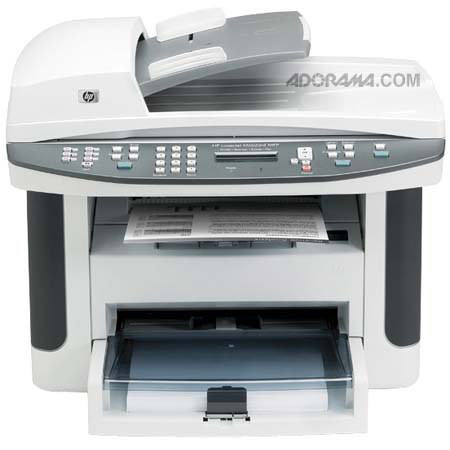
The HP LaserJet M1522NF is an All-in-One Monochrome Printer, Fax, Copier & Color Scanner. It has a flatbed design that can copy and scan a variety of documents; it also sends faxes and it's networkable. You'll get sharp-looking text in speeds as fast as 24 pages per minute.
This model also includes one RJ-11 fax port, as well as an RJ-11 line-out telephone port.
Join VIP PRO
Earn 2X Points + Exclusive Perks!
Request a Callback
Chat one-on-one with an expert
Sell or Trade your Gear
Get started in 3 easy steps