



This item is no longer available.
Review Summary
2012-06-27T20:00:00
lack of a windows 7 scanner software is causing marked degradation in scanner abilities. the download interface is generic and has terribly slow scanning speed / complialtion
TPCmedical

2012-06-27T20:00:00
Other than a slightly large footprint, I am very happy with this MFP. The manual feed tray is the best and most consistent I've ever experienced with an HP product. Nice feature. Intuitive except for the Scan setup. That always seems to be a problem with HP. Well worth the price.
DoctorW
2012-06-26T20:00:00
This is a great printer when it works. But two years after purchase had to replace the formatter board for $286...ouch! And almost exactly two years later, out of the blue it stopped working again. Sounds like it is booting up, but then nothing. Printer msg screen is blank and not recognized on my network. I only use it for home so it is not like I am working it to death. Not worth spending about $300 every two years to keep it running. The way this printer goes through formatter boards, HP needs to get the price down under $100 to keep this puppy alive! Mine is just going to have to stay dead.
teadam
2012-05-14T20:00:00
I was trying to replace an HP multi-function laserjet printer with the HP2727nf. However, I found the HP2727 was not up to the task for the following 2 reasons: It is not set up for a office network environment (with a network server) - rather it is suitable for a peer-to-peer network. Also, one of our main purposes was to have a fast document scanning feature; however the HP2727nf scans at a rate of 3 per minute - which was not acceptable for our fast paced business.
Doug90
2012-05-10T20:00:00
I wish I had not wasted by money on this. I barely used this machine for 14 months after which the "mother board" failed. I had anticipated using it for light home office work. I used it far less than I ever thought I would. HP agreed to repair the machine with me paying the shipping to return it to them even though it was technically out of warranty. The machine worked for about 9 months more and then the same thing happened again. HP tech support advised that the mother board had again failed but they refused to do anything more about it. I called an authorized HP serviceman and learned that this model is famous for mother board failure. It is a problem well known to service technicians. The cost of repair would be more than half what I paid for the machine new. I'm stuck with expensive HP ink cartridges that I can't use. I figure I got about 2,000 copies/prints and maybe about 20 faxes out of the machine. This was the most unsatisfactory purchase I have made in recent years even with making allowances for the decline in the quality of everything made these days. I thought HP would feel some obligation for selling such an inferior product and try to make it right but apparently not. This was my experience and I hope my sharing it helps other potential buyers of this product. This is my second attempt to post this review--HP says the first one must not have posted for "technical reasons". Seems like HP is having a lot of problems.
officeboy2
2012-04-13T20:00:00
I have purchased about 8 of this printer. It has decent value, great features for the money. You can scan, copy and print from both Macs and Windows on the network (not through USB cable). Unfortunately, if you have a Mac running version 10.7.3, the HP Assistant will not work; which means the network scanning will not work. Printing is fine. I had called technical services, who requested that I sent the invoice, even though I just received the products earlier that day. Then technical support told me that the problem has to do with the Macs that we have, not with the OS compatibility. They promised to call me, but they never did. This model, LaserJet 2727 also have some known issue, the screen goes blank and the printer didn't start properly. I had 2 printers that displayed the same symptoms. I would still buy the same printer again because of its great value despite its shortcoming and known issues. I'd simply buy the 3 years extended warranty, at approximately $160, it's still a great value.
srusmantijo
2012-03-20T20:00:00
I bought this unit over three years ago for use primarily to send and receive faxes, and to scan to email. Fortunately, I purchased a three year extended warranty, because it was used often. There were software installation issues, where I was told to install updated software but the installation wouldn't work, due to the impossibility of removing the old software without 30 minutes of a technician's help. You would think that HP could write a program that could uninstall HP's own software. Twice the memory went blank so faxes couldn't be received, requiring zapping the unit to ground zero and installing the fax numbers and preferences again. And it's supposed to have one button scan to email, but a confirming message would come up on a networked computer 10 feet away that would require walking over to that computer and pressing a key. The auto sheet feeder had to be replaced once under warranty. I received an email after my extended warranty ran out, telling me to re-up, which I would have gladly done except after trying to register, I was told that HP doesn't offer extended warranty support on this printer any more. HP obviously knows their product best when you can't purchase a service contract on it! It's still in use, but we're keeping our fingers crossed. Don't buy this printer.
corkyjon
2012-03-13T20:00:00
I am enjoying it. However the instructions that came with are not very well.
macc
2012-02-23T19:00:00
We have had this printer in our small office for four years. We use it all day long as a network device for printing, duplex printing, scanning, faxing and copying. It has never failed us. We first used it with Windox XP computers. Recently we switched to Windows 7 computers. The only hiccup after the switch is that scanning now takes about twice as long. We can live with that. We have been extremely happy with this MFP.
MLBLB
2012-01-26T19:00:00
Good printer, does the job.
twbcpa
2011-12-15T19:00:00
impressed with fast print cycle, disappointed with scan speed/software operation
jpunkie
2011-11-16T19:00:00
I used this printer for my printing/copying/faxing needs. It worked well up until the 14th month. Since then, on power up, the machine freezes and the display goes blank. After several power cycles I was able to get the printer back on-line. I then updated to the latest frimware and tried re-initializing the NVRAM and it froze again. Since then it stays on only for an hour or two, then it freezes again. I called HP and was told that since the warranty had expired, I would have to pay for technical support or send the printer in for repairs. Given that my duty cycle is moderate and below the recommended number of pages per month, I expected no problems with this printer for years. The Laserjet M2727nf fails after just a year of moderate use and for this reason, I would not recommend it.
archiemd
2011-09-26T20:00:00
I used this printer for a small business (2 people) that has minimal printing/scanning/faxing needs. It worked pretty fine up until the 13th month, one month after the factory warranty expired, then it slowly started to fail. First the machine would randomly shut down and need to be completely rebooted, then it started to print once in a while (50% of the time) then the copy and scan function stopped working completely. I had an online chat with HP when issues began but was told that since I had it for more than a year (one month more) I would have to pay to ask questions. Sometimes things don't work but the manufacture should help out in that case, unfortunately HP does not have that system. Based on this experience I would not recommend purchasing an HP.
stonecrestre
2011-09-15T20:00:00
Pros: When it works, it does a great job. I needed a unit that would collate and this one does that. Cons: Most unreliable HP I have ever owned, and I have owned several. My unit is about a year and half old and has been in the shop 2x. Both times I had problems with receiving faxes, feeder issues and frequent freezing up of the entire unit. I would hesitate to bring it in, because I need it everyday and because the problems would come and go. Finally, I said enough. The first time the shop loaded new software that HP had released (the software was something the end user could not load - needed to be a shop). That solved the problems, for a few months. Second time around, similar problems, but a reload of the software didn't do it this time. Repair shop says the fax card is bad and the feeder needs to be replaced. Total cost of possible repairs = more than a replacement unit would cost. In the trash after a year and a half. I noticed on CNET and other web sites this printer gets good reviews for features and poor reviews for reliability. My repair guy said the same thing.
Likeable
2011-07-11T20:00:00
The features of this product are great. Every once in a while, it loses memory of the programmed settings. You have to re-program over and over. When it loses the programmed settings, it shuts down. I do not recommend this product if you have no back up fax machine. It is a great copier and a great scanner. It is fast for faxing, but it is weak when it comes to receiving faxes
alabis
2011-06-27T20:00:00
This printer quit working just after 2 years. Good features and performed reasonably well. Not compatible with windows 7 (no updated driver from HP?)
Vabull
2011-06-15T20:00:00
We have used this printer in our office for just over 2 years. Its quick, prints nice and we use it all day long in my business. I put in about 100 contacts with fax numbers for speed dialing and one day it was gone. Vanished. Now having trouble with the machine freezing up. Fax callers get no answer and I have to keep rebooting the machine to print reports. I'm told the format board is toast. Apparently this is an ongoing problem with HP on this particular printer. Of course, its out of warranty and the part is about $300 plus labor and tax, bringing it to about $400. We will buy another printer, but not this one.
ATC2
2011-05-18T20:00:00
Acquired my M2727 almost 3 years ago. Everything worked fine until a week ago when out of the blue I got an Error Message on the printers LCD screen "Scanner Error 5, Turn off and then on." Doing this accomplished nothing. A Internet search disclosed this is a common error going back to at least 2008. What it means is that the scanner and formatting boards have to be replaced. Authorized Service Tech estimated it will cost approximately $350 to $400 to fix and it would probably be cheaper to buy a refurbished machine than to fix it. There was no fore-warning of the failure, it just happen. The scanner, copier, and faxing functions when activated return "Device is busy, try again later" message. Printer stills prints from computer but one owner stated he continued to use the device as a printer, but that feather didn't last long. Used my machine primarily during tax season to print tax returns (I'm a retired CPA you does a small number of returns for friends and associates). Only print 4,000 to 5,000 copies a year with little scanning and/or faxing. Total usage before this printer stopped working is somewhere around 15,000 copies. For $600 I expected more. Please do not BUY this machine as it will not last.
twoton
2011-05-05T20:00:00
This unit performs very well on a network. It is also able to use the large capacity toner cartridges that helps save on cost of ownership. It has performed without a glitch and is used very heavily.
SJVCFresno
2011-04-02T20:00:00
I love HP and own 7 differenct HPprinters. My home office uses the M2727nf and it is a good workhorse. However after the first few weeks I needed to scan a document. Black and white scans very light and color is impossible. Changing the enhancement settings to allow for a document to scan makes the file so large (if in color) that it will take days to print if it can. I downloaded all the updates still no success. On the web their were many complaints about this same issue. I cannot get HP to respond unless I PAY for technical support. I need my scan feature to work. Can someone please HELP! it is ruining my productivity and paper management. It is a perfect machine otherwise but for scanning I want to throw it out. Also when it prints from an email document that was scanned it reduces the size of the original text. Double sided printing my model does not have that feature.
BusyBee401
2010-12-12T19:00:00
This is a fantastic product if you use Windows XP. Its potential is proven. But if you use it with WIN 7, it is a disaster. What a waste - when do we get a new driver that works for this printer ??
COPOLO
2010-12-02T19:00:00
i owned this printer before, worked great with XP, i bought new one, i used the old one for my home, but many function is not working with window 7, i knew this, that is why i have been waited for a long time to purchase the new one, but still HP has not solve these problem. think about 600 printer, scan, fax are not work!
ladygaga
2010-09-20T20:00:00
This is why I always wait to write a reiview. I work in an office that has always used hp printers. In fact we have a laserjet 1200 that is still running after 14 years.! However, they sure don't make them like they used to. After not even two years of service, this printer is dead. Needed two control boards to repair which would cost more than a new one--and this one wasn't cheap! If you buy this one --get the extended warranty! (never thought I'd need one with an hp).
luv4igz
2010-08-10T20:00:00
I used this printer and loved it with XP, however it does not work well with Windows 7. Especially problematic is scanning to Adobe to create PDFs. I am sending mine to ebay. I have spent over $1,500 with three tech support firms, still does not work.
Okoboji
2010-08-09T20:00:00
It's my best device in my office that do 90% of my jobs. I have printed more than 100000 pages with this device.
mehdi
2010-07-12T20:00:00
We have bought upwards of 300 printers for our company. We have in the past loved HP printers as they usually are work horses and don't quit on you but this M2727 is the worst printer HP has ever made. out of the 12 M2727's we bought all 12 have needed service more than once and parts needed to be replaced well within a year. They are nothing but trouble and should be avoided at all costs! summary: -- pain to setup -- pain to use -- doesn't last -- shotty workmanship -- don't buy
ThisPrinterMakesMeSad
2010-06-13T20:00:00
I've had this product for over a year. The printer overheats and shuts down. I would NOT purchase this unit because it will not last. Check on line for other reviews - I'm not the only one with this issue. I didn't have that information when I made my purchase. This is a little too expensive for a disposable printer!
Sunshine2
2010-05-17T20:00:00
I bought this printer about 2 years ago. It worked great for 18 months, when the printer began to reboot every 3-4 minutes as well as going offline from the computer. At first this could be fixed by turning the printer off and on. Now the printer is dead in the water. Before it totally died, I tried switching the printer to my brand new HP pavillion elite but found out that HP does not yet have all the drivers available to support this printer in Windows 7 64 bit (how long has Windows 7 been out guys?). As I am out of warranty, I will get no help from HP unless I pay $$. A check on the internet suggests that the rebooting/disconnecting problem is widespread and caused by a bad motherboard. The fix is to get a new motherboard. I think I will instead just get a new printer from someone other than HP.
Devo100
2010-04-22T20:00:00
We own two of these mfps. One for my home-based business and one for my wife's business. The home one has been an excellent product for 2 years. The one at my wife's office has started off well enough. The only issues that I experienced is trying to get both installed on the same laptop and not having a call from my wife every time she tries to use the one at her office. We have also had issues with a Mac maintaining connection to it. All connections are wireless, and the Mac is the only one that fails to regularly find it. Very solid mfp's. I could not expect more from the hardware.
Prostang
2010-03-15T20:00:00
On paper seemed like a nice printer, however, there are no Windows 7 64 drivers available, when the printer was purchased we were told that is was 2 weeks, now 4 MONTHS later, still no driver, and no word on when they will be available. This puppy is going back, and we will get a Dell printer. If you are using anything but windows 7 64 bit, and you have the drivers, you will love the machines.
MarcoB

Accidents happen where life happens. Protect your favorite Adorama products and purchase a protection plan to stay covered from accidental damage, mechanical or electrical failure, and more.

If we can’t fix it, we’ll replace it at no additional cost.

Protect your product from drops, spills, and more.

Enjoy your gear without fear. We have you covered!

When regular use of your product over time results in mechanical or electrical failure.

We will never charge you a deductible after the purchase of a plan.

Our claims process is simple & easy and our customer service team is happy to help.
Adorama Protect powered by Extend is available for purchase to customers in the United States. Not available for purchase Internationally or in U.S. Territories.
Browse our FAQ
Black-and-white printing, black-and-white copying, black-and-white faxing, black-and-white and color scanning
Yes
Up to 8 ppm
Up to 27 ppm
Printer: up to 15,000 pages; copier: up to 15,000 pages; ADF: up to 2250 pages
750 to 3000 pages
Less than 10.0 sec
450 MHz
Laser
Up to 1200 x 1200 dpi
REt, HP FastRes, HP ProRes 1200, HP TrueRes
1 (black)
2
2
Up to 300 sheets (Tray 1: up to 50 sheets; Tray 2: up to 250 sheets)
No
Up to 10 envelopes
Up to 125 sheets
Up to 125 sheets
Automatic (standard)
Sheetfed
Tray 1, output bin: 16 to 43 lb; Tray 2: 16 to 32 lb; automatic document feeder (ADF): 16 to 24 lb
Tray 1: 3.0 x 5.0 to 8.5 x 14.0 in; Tray 2: 5.8 x 8.3 to 8.5 x 14.0 in; Automatic document feeder: 5.5 x 5 to 8.5 x 14.0 in
Paper (bond, color, heavy, letterhead, light, plain, preprinted, prepunched, recycled, rough), envelopes, transparencies, labels, cardstock
64 MB
64 MB
One slot (144-pin DDR2 DIMM)
HP PCL 6, HP PCL 5e, HP postscript level 3 emulation
45 scalable TrueType, 35 PostScript
Flatbed, ADF
Up to 19,200 dpi
Up to 1200 x 1200 dpi
24-bit
256
Multi-page letter document with colored text was scan to file (200 dpi, 24-bit, JPEG) via WIA, total scan time was 58 seconds for 3 pages (not including the first page)
Standard, 50 sheets
8.5 x 11.7 in
Up to 600 x 600 dpi
25 to 400%
Up to 99 copies
3 sec per page
Up to 300 x 300 dpi (halftone enabled)
Up to 600 pages
119
Yes
Yes
Yes, using CSI field
Yes
Yes (receive only)
No
Yes
Up to 120 numbers (119 group dials)
10/100Base-T Ethernet network port, Hi-Speed USB 2.0 compatible port, RJ-11 Fax port, RJ-11 line-out port
None
Yes
HP PCL 6, HP postscript level 3 emulation
Windows 2000, Windows Server 2003: any Pentium II processor or higher, 64 MB RAM, 250 MB hard disk space, SVGA 800 x 600 with 16-bit color display, Internet Explorer 5.5 or higher (full install), CD-ROM drive, USB port
Windows XP-32 Home, Windows XP-32 Professional: any Pentium II processor (Pentium III or higher recommended), 128 MB RAM, 250 MB hard disk space, SVGA 800 x 600 with 16-bit color display, Internet Explorer 5.5 or higher (full install), CD-ROM drive, USB port
Windows XP-x64: any Pentium II processor (Pentium III or higher recommended), 128 MB RAM, 250 MB hard disk space, SVGA 800 x 600 with 16-bit color display, Internet Explorer 5.5 or higher (full install), CD-ROM drive, USB port port
Windows Vista-32 Home, Windows Vista-32 Professional: 1 GHz processor, 512 MB RAM, check user guide for minimum hard drive space, SVGA 800 x 600 with 16-bit color display, Internet Explorer 5.5 or higher (full install), CD-ROM drive, USB port
Windows Vista-64: 1 GHz processor, 512 MB RAM, check user guide for minimum hard drive space, SVGA 800 x 600 with 16-bit color display, Internet Explorer 5.5 or higher (full install), CD-ROM drive, USB
Macintosh: Mac OS X v 10.3 or higher; G3 (500 MHz), G4, G5, or Intel processors; 512 MB RAM; 100 MB disk space; USB or network port; CD-ROM drive
Energy Star qualified
Windows 2000; Windows Server 2003; Certified for Windows Vista(TM); Windows XP Home; Windows XP Media Center; Windows XP Professional; Windows XP Professional x64; Windows XP Tablet PC; Mac OS X v 10.3 or higher; Novell NetWare 3.2, 4.2, 5.x, 6; HP-UX 10.20, 11.x; Red Hat Linux 6.x or higher; SuSE Linux 6.x or higher; Solaris 2.5x, 2.6, 7, 8, 9, 10 (SPARC); AIX 3.2.5 or higher; MPE-iX; Citrix MetaFrame; Terminal Services
19.7 x 16 x 18 in
37.8 lb
HP 1 year limited warranty

Required

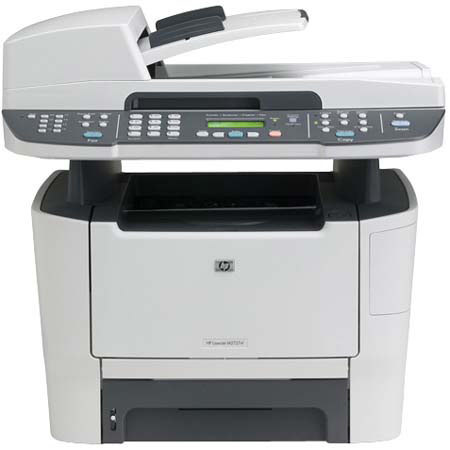
The HP LaserJet M2727NF is an All-in-One Black & White Printer. It features fast speeds, consistently great print quality, value-featured networking, a new fax solution and a host of additional features mean serious improvements in user productivity. Print speeds up to 27 ppm minimize waiting so you can be more productive. Instant-on Technology prints your first page out from PowerSave two times faster than printers without it.
Join VIP PRO
Earn 2X Points + Exclusive Perks!
Request a Callback
Chat one-on-one with an expert
Sell or Trade your Gear
Get started in 3 easy steps