
This item is no longer available.
Review Summary
2010-04-26T20:00:00
This is the worst printer in the world after two months and less than 50 pages printed ,the printer stopped working. i click on print but nothing is going
qualcom

2010-04-21T20:00:00
I bought this printer almost 2 years ago because I was writing a book and needed a fast printer. I love this printer! It does all I need it to do for speed and it's not too noisy. The cost of the ink cartridge was a little shocking but it's worth the cost. I have only strayed away from HP printers once and I learned my lesson. I use 3 different printers and they are all HP.
Allyson
2010-01-20T19:00:00
I liked this printer, even though the ink was really expensive, until I installed Snow Leopard on my MAC. It works OK until you have a problem or run out of paper. Then you have to turn off the printer and reprint the item If you schedule a print job before you turn the printer on, the printer stops and you have to delete the job before performing the two steps above. I spent a lot of time working with an HP technician and installing the driver multiple times. Eventually, I discovered that HP print drivers for other models are on the Snow Leopard disk, they didn't include anything for the P1005 or P 1006. Now I am trying to find a good deal on another printer.
Kathyb
2010-01-19T19:00:00
I wanted a quality, single-function printer for documents, correspondence, directions, etc and all I asked was crisp copies and easy setup. I am techno-inept and had no trouble setting this up. The speed of copies is amazing and the quality is excellent. I resisted a purchasing a printer for a very long time but am happy I got this one. Unfortunately taxes are my next project.--
PittsburghDave
2010-01-09T19:00:00
Very compact, typically excellent HP laser quality, and very easy to use. It is by far, the best bang for your buck for everyday home use in black and white. I haven't used a full cartridge yet, and imagine that it will be chintzy as most of them are today. After all, how will they continue to get money from you after you've purchased the printer if you don't buy a cartridge every 5 minutes? The first page is a bit slow to print but subsequent pages come fairly quickly. After suffering through 3 all-in-ones, I finally decided to go back to a stand alone HP laser, and am glad that I did.
cme p.
2009-12-28T19:00:00
Went to a store and ask a salesman that I wanted a basic B/W printer Laser.One just to use at home that wood be trouble free and easy to use.He said that the P1005 is what I would want. Was he correct ! I took it home and had it printing in 20 minutes. This printer has never failed me and is pretty fast.It has never jammed or misprinted at all.I was at my Dentist the other day and they were using one.Ask about it and they said it was excellent. I would recommend this to anyone for a basic printer.Also I have printed 500 pages and still same cartridge.BUY ONE YOUL BE HAPPY
Gerr
2009-12-14T19:00:00
I love this printer. It is fast. The quality is very nice. It's never had a paper jam. I've printed about 20,000 copies with it. The price per page for tonor is one of the most reasonable out there. For a monochrome laser printer, it's one of the best I've used. I have no hesitations about printing out 100s of pages at a time. The size is also pretty good. It's also fairly portable. When I push the trays in, it forms a rectangular, sturdy shape. It's the smallest printer I have owned.
jennn
2009-12-05T19:00:00
Upon opening the box, I found no instruction book. However, I went on line and found instruction. I installed the CD etc. plugged in the printer and although the test pages look OK i could not get it to print any word document without distorting the letters immensely and leaving 75% of the text off the right hand side of the page. After struggling with on line help, etc. for an hour, I am packing the machine up and returning it. What a disappointment!
Nazard
2009-08-10T20:00:00
I bought this printer a year ago and am still currently on my first cartridge. The cartridge cost me 89.00 and it has printed so many reams of paper I can't even remember the number. My guess would be at least 6. It prints very fast and has not failed me yet. It is definitely worth the investment. I have a inkjet for color and this for black and white. I can't say enough good things about this product. In addition, it is compact and relatively quiet. It is very quiet compared to an inkjet. Furthermore, HP's shipping was super fast and there service is great. I would definitely use this over a inkjet any day! It will cost you about two-hundred bucks to get going (including cartridge). Also, the starter cartridge lasted me for about 2 1/2 months. Well worth it and will save you tons of money. Thanks SLL
MNguy1028
2008-12-29T19:00:00
Excellent for routine day to day printing activities
J
2008-12-28T19:00:00
The "introductory" print cartridge didn't last too long, and the replacement is pretty expensive. To print envelope addresses you have to remove all the paper first and readjust the guides.
bodo
2008-12-28T19:00:00
I was tired of paying the cost of high priced color inks, so i switched to the black-only printer, and I love it. Should have done it sooner.
Mwauky
2008-08-04T20:00:00
I recently swithed to hp laserjet from deskjet and this is my first laser printer that i have bought and i found this printer very good in perfomace.it is vey compact and do not take too much of my valuebale desk space and it is best for my personal use. As for as text printing is concerned it is best but for images it is not as good for my first 15 pages only the page that contain a image was poor in quality. I advise use if you are a student and want to print the documents like notes ebooks ,slides etc it is best.......
kiani
2008-07-29T20:00:00
I bought this printer several weeks ago. For the price I paid and even for the regular price, I think this is a great deal. I was used to inkjet printers. If you are looking for a non-color printer that is fast, dependable, small in size but big where it counts, you are looking for printer like this. You can get a better, and faster printer but be prepared to pay more.
ECM3000
2008-07-26T20:00:00
Excellent product ! Considering price and presentation - fantastic. Print quality supreme and works most efficient in my medical office. Bought a few as back-up for our other brand printers, which we'll eventually all replace with these. Good job HP !
DrHMD
2008-07-23T20:00:00
Bought this item for my son for college. It is small enough to fit on dorm desk and leave space for work. It's also lightweight. Print qualtiy is excellent. Getting it on line for the sale price made this printer an exceptional deal. Wish I had gotten one for myself.
gilly
2008-07-13T20:00:00
Bought this printer and hooked it up to Airport Express and it works. Had to change update the firmware and from there on it worked great with Airport Express. I print from anywhere in my home. I bought it for 50 bucks, which is even cheaper than buying a new tonner. If you're looking to buy a new tonner, just go and buy one of these instead, it might be cheaper. USB works great. Only problem i have, is lack of features (buttons) there's only a power button and that's it. On my old LaserJet 1100, at least there was a statues/supply button i could press and details would print out.
Investor09
2008-07-11T20:00:00
I really liked the price of this model. I have never seen a laser printer so cheap and small. I am also amazed at the print quality. Also works with leopard!!! I have a few small quarks about this machine though- 1) No set-up/instruction manual came in the box 2) No color printing Both of those remarks are very small negatives but I was able to install the printer with out any help.
AlexSchwa
2008-07-10T20:00:00
Pros: Easy setup and install. Works flawlessly with Macs. (I had to install the software from the CD on Mini running Tiger and set it up as a shared printer. I can print to it from my MacBook/Leopard without a glitch.) Good print quality. Reasonably fast. Cons: Not many, maybe a little too slow to start print jobs. Overall, it would be a fair deal at full MSRP, but with the $80 discount it was a steal.
Lekics
2008-03-05T19:00:00
And that's all I need to say about that. Is compatibale with some Macs, but not Leopard. SO Macheads beware.
tattoo55
2008-03-02T19:00:00
If you want to print double-sided a pop-up will direct you to turn the paper around, reinsert it and press "go" on the printer. Well there is no go button!! What will initiate printing is the "continue" button in the pop-up. This only becomes an issue if you press continue while the first sides are still being printed. If you do press continue before the first sides complete printing, the second sides will not be printed. In addition, it is very difficult to cancel the printing of said document and I often have to restart the printer and computer before I can start over again.
E545
2007-12-21T19:00:00
This printer is looks very nice. Printing also very good. Low price good output.
Suryam
2007-12-11T19:00:00
This is a fast machine, clean printing and good speed for your home needs. Big difference with tradicional inkjet printers, that in my case most of the times gave me trouble. The relation between price and quality is excellent, I can tell is an very affordable machine.
Hpinto

Accidents happen where life happens. Protect your favorite Adorama products and purchase a protection plan to stay covered from accidental damage, mechanical or electrical failure, and more.

If we can’t fix it, we’ll replace it at no additional cost.

Protect your product from drops, spills, and more.

Enjoy your gear without fear. We have you covered!

When regular use of your product over time results in mechanical or electrical failure.

We will never charge you a deductible after the purchase of a plan.

Our claims process is simple & easy and our customer service team is happy to help.
Adorama Protect powered by Extend is available for purchase to customers in the United States. Not available for purchase Internationally or in U.S. Territories.
Browse our FAQ
Up to 14 ppm
Up to 600 x 600 dpi (1200 dpi effective output)
250 to 1500
Up to 5000
Manual (driver support provided)
1
Up to 150
Up to 100
None
Laser
< 9 sec
266 MHz
Tensilica
Paper (laser, plain, photo, rough, vellum), envelopes, labels, cardstock, transparencies, postcards
Up to 150
Up to 150
Up to 100
Up to 100
Manual (driver support provided)
150-sheet input tray
100-sheet face-down bin
A4, A5, A6, B5, postcards, envelopes (C5, DL, B5)
147 x 211 to 216 x 356 mm
Tray 1: 60 to 163 g/m
2 MB
2 MB
None
None
Host-based printing
None
Hi-Speed USB (compatible with USB 2.0 specifications)
None
Microsoft Windows 2000, XP Home, XP Professional, XP Professional x64, Server 2003 (32/64 bit); Works with Windows Vista; Mac OS X v10.3.9, v10.4 or higher
None
Microsoft Windows 2000, XP Home, XP Professional, Windows Vista Ready, 120 MB free hard disk space, CD-ROM drive, USB port
2 lights (Attention, Ready)
315 watts maximum (active/printing), 3 watts maximum (ready/sleep), 0.6 watts maximum (off)
Input voltage 110 to 127 VAC (+/- 10%); 60 Hz (+/- 2 Hz); 7 amp; 220 to 240 VAC (+/- 10%); 50 Hz (+/- 2 Hz); 4.0 amp
10 to 32.5° C
10 to 32.5° C
Yes
Host-based
347 x 224 x 194 mm
4.7 kg
HP 1 year limited warranty

Required

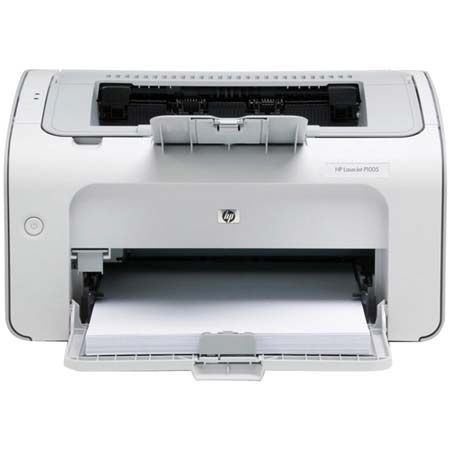
The HP LaserJet P1005 B&W Printer provides performance and reliability that is just right for your small business or personal needs with a 266 MHz processor, 2 MB of memory, and speeds up to 15 pages per minute (ppm). Print bold, crisp text and sharper images with HP spherical toner and a redesigned, intelligent cartridge. The HP LaserJet P1005 Printer is Vista-certified, meaning it will work seamlessly with computers running the new operating system.
Join VIP PRO
Earn 2X Points + Exclusive Perks!
Request a Callback
Chat one-on-one with an expert
Sell or Trade your Gear
Get started in 3 easy steps