


This item is no longer available.
Review Summary
2010-03-06T19:00:00
I found the printer pretty easy to setup and install. My first job was spooled and printed very quickly and clearly. My only dislike is the noise level.
tiagj76

2009-12-22T19:00:00
I use this printer at my office and have recently purchased one for my home, great price - I paid $150/web and the printer has worked perfectly, just change ink. Quick startup and great print quality.
tallCPA
2009-12-10T19:00:00
Despite what the inept HP service reps in India will tell you, you CAN network this printer using a cheap print server if you'd rather not spend the extra cash for the P1505n. I used a seven year old Hawking H-PS1U print server but it takes some networking savvy to get it all set up. All network computers are PCs with XP SP3 OS. The printer is noisy and the paper tray cover is cumbersome to replace each time you add paper. The setup instructions are typical for HP, i.e., user-unfriendly, with a number of omissions and miscues. But the bottom line is after all the gnashing of teeth to install it, the printer works great and the quality of print is superb. I heartily recommend it
Montalvo
2009-10-23T20:00:00
it work very easy & fun. it save my mone. it ic force.
mafsystems
2009-03-04T19:00:00
I've lost count of how many of these simple inexpensive printers we've deployed on our test stations. These stations print data constantly through three shifts without any issues. Their proven reliability has been great and the cost is so low if one ever does break (none have yet broken) we'll just purchase a new one. This isn't a feature full printer so all you can expect is reliability and that it delivers in spades!
Kestrel
2009-02-06T19:00:00
I've had the printer for several weeks. It has been perfect for our daily home usage.
Senior C.
2009-01-04T19:00:00
The wife went back to school and we needed a printer that was network friendly and that would be a document print work horse. Both of us print to this printer all day and it works great. After several reams of paper and toner cartridges, it still works great.
Drstamp
2008-09-27T20:00:00
I have had many HP printers in the past and have had one laserjet previous to this one. I have not had this much trouble with one printer in my 25 years using a computer and personal printer. It is first of all too noisy, too many clunking sounds that make me wonder how long it will last. I have trouble with the toner flaking off on envelopes and labels. Seems to be okay as long as the papers is not too smooth or shiny. I have tried all the suggestion on HP's website and still no success. I am very dissappointed with this product.
GenP
2008-08-19T20:00:00
This is a step backward , we previously used the 1022 which was an excellent printer. This printer is noisy, takes forever to install probably because you have to install .net framework. If you have to do any terminal or dos printing forget it, it doesn't work.
Johns300
2008-07-21T20:00:00
My place of employment ordered this printer for me to use in my office since I deal with a lot of confidential papers that cannot be sent to the general printers. It has worked very well for me; however, I was extremely disappointed that a color cartridge is not available for this printer. If you are wanting a full-service printer, then this is not it -- it is strictly for writing letters and papers.
LoriEllen
2008-05-29T20:00:00
After having succesfully installed a HP1505n (network version) a customer bought the HP1505 and was in the opinion that the only difference is the lack of a network interface. However the HP1505 doesn't have a printer emulation and won't for example support remote desktop. pcl5e drivers for the HP1505n can't be used with this printer. My advice don't buy this printer, but take the n version instead.
printpartners
2008-04-10T20:00:00
This is a bad product from HP. I used the 1022's that were superb in print speed and "QUIET". HP engineers or R&D did a horrible job with this printer. Have to buy 36a cartridges instead of 12a. Who cares if it can print 3 more pages than the 1022. This printer is terrible with the thump noise, it takes "LONGER" to print than the 1022 did, but the smartest thing HP did was put the power button on the front. I bought 2 of these P1505's to replace 10 year old HP MP4 printers, and I am sending the P1505's back and looking for something else. HP should put the 1022 back on the market, it was a fine printer......Paul
prl423
2008-04-01T20:00:00
I use this printer with Office 2003 and XP Pro with no problems at all. I am the Comptroller for a medium size manufacturing company and I generate 2000 + prints per month. Initial response and print time is very quick. The only issue I do have with the printer is the noise factor. This little puppy is very noisey. Other than that it is great for the price.
TerryBear
2008-03-26T20:00:00
Printing from Windows Standard Server 2003 R2 64-bit via terminal services does not work properly. Regardless of driver (from CD or downloaded version) the print task gets hung. The temporary fix (one page at a time) is to recycle (off/on) the server print spooler (via control panel). Sometimes the same must be done at the workstation. Typically once the print spooler has been restarted the page to be printed spins out. This software bug makes this printer usable only via USB and not suitable for remote client/server printing.
chasster123
2008-03-11T20:00:00
Use the "Printer Icon" on your menu bar to print to this printer until the new drivers for OS 10.5.2 are available. Using Print from the File menu will, for some reason, not work. Neither will other routes.
MAJP
2008-01-28T19:00:00
Getting started with this printer was pretty easy except for one minor detail that HP should clarify on its step-by-step instructions. An extra step is required to ready the toner cartridge for use. This step isn't shown on the illustrated instructions that come inside the printer. You need to locate the orange tab on the side of the cartridge and pull out the plastic strip that seals the toner. I didn't realize this and so the first few jobs I sent to the printer came out as useless white sheets of paper. Once removed, the printer prints as you would expect; although it is a little loud in my opinion. The other problem that I have encountered is that I cannot print from Word 2004 for MAC. The print job just hangs in the queue while the computer tries "to connect to the printer." Eventually the job stops on its own with no error message or info to help resolve the problem. You need to delete the job from the queue before sending other jobs to the printer. Hopefully HP will resolve that problem and then I will feel better about the purchase
windwardrun
2008-01-21T19:00:00
I bought this printer for my mac book pro because it said that it would work with leopard. No such luck. I can get it to print sometimes but most of the time I get a client-error-not-possible error. If you are trying to print off of Microsoft word 2004 you might as well look for another printer since it will not work at all.
MacOSLeopardUser
2007-11-27T19:00:00
Extremely disappointed in this machine since I cannot purchase the Micr Cartridges for it. I can't believe HP would manufacture a product and you cant purchase the proper toner cartridges for it. If this machine was not intended to be used for micr cartridges then it should be stated on the description of the product.
JMiller

Accidents happen where life happens. Protect your favorite Adorama products and purchase a protection plan to stay covered from accidental damage, mechanical or electrical failure, and more.

If we can’t fix it, we’ll replace it at no additional cost.

Protect your product from drops, spills, and more.

Enjoy your gear without fear. We have you covered!

When regular use of your product over time results in mechanical or electrical failure.

We will never charge you a deductible after the purchase of a plan.

Our claims process is simple & easy and our customer service team is happy to help.
Adorama Protect powered by Extend is available for purchase to customers in the United States. Not available for purchase Internationally or in U.S. Territories.
Browse our FAQ
Up to 24 ppm
Up to 24 ppm
As fast as 6.5 sec
Up to 8000 pages
250 to 2000 pages
Up to 600 x 600 dpi (1200 dpi effective output)
REt, 600 DPI, HP FastRes 1200
1 (black)
1 (plus priority input tray)
1 (plus priority input tray)
Up to 260 sheets
Manual (driver support provided)
Letter, legal, executive, postcards, envelopes (No. 10, Monarch)
3 x 5 to 8.5 x 14 in
Paper (laser, plain, photo, rough, vellum), envelopes, labels, cardstock, transparencies, postcards
Sheetfed
2 MB embedded inside SIP ASIC
2 MB
266 MHz
None
Host-based printing
Hi-Speed USB port (compatible with USB 2.0 specifications)
Windows 2000, Windows XP Home or Windows XP Professional, 1 GHz processor, 512 MB RAM (Windows Vista(TM) Ready, check User's Guide for minimum hard drive space), Mac OS X v 10.2.8, v 10.3, v 10.4 or higher; Macintosh computer with PowerPC G3, G4, G5, or Intel Core processor, 128 MB RAM (256 MB recommended), 120 MB free hard disk space, CD-ROM drive, USB port
Mac OS X v 10.2.8, v 10.3, v 10.4 or higher; Macintosh computer with PowerPC G3, G4, G5, or Intel Core processor; 128 MB RAM (256 MB recommended); 120 MB free hard disk space; CD-ROM drive; USB port
Yes
Windows 2000; Windows XP Home; Windows XP Professional; Windows XP Professional x64; Windows Server 2003 (32/64 bit); Certified for Windows Vista(TM); Mac OS X v 10.2.8; Mac OS X v 10.3; Mac OS X v 10.4 or higher
Energy star qualified
50 to 90.5 ° F
14.9 x 9.6 x 8.9 in
14.9 x 15.9 x 8.9 in
12.9 lb
HP 1 year warranty

Required

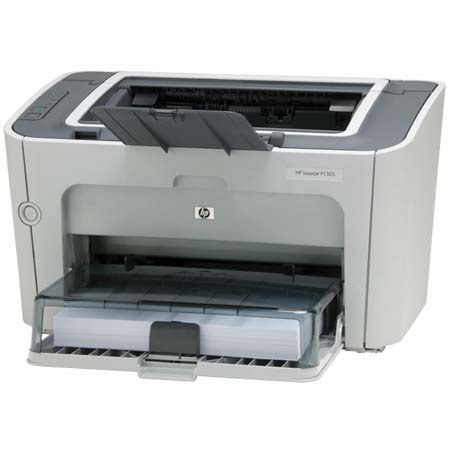
LaserJet P1505 Printer is ready to work hard and help you get ahead! Highlights include HP's new spherical toner and an intelligent cartridge design that enables high-end features on your desktop.
Join VIP PRO
Earn 2X Points + Exclusive Perks!
Request a Callback
Chat one-on-one with an expert
Sell or Trade your Gear
Get started in 3 easy steps