
This item is no longer available.
Review Summary
2019-09-02T20:00:00
I installed the printer about a week ago, even though I purchased it 3 months ago. I printed out about 600 sheets and the black toner was empty. My main problem is the price of the ink for so little toner.
JoyceENMR

2019-07-22T20:00:00
I'm not a tech-savvy person so wanted a printer that was foolproof. This one fits the bill so much I've since bought 5 more. I love that there are high capacity cartridges for this printer and wish all office equipment were this hassle-free. Highly recommend.
yupyup
2019-06-27T20:00:00
We have this auto printing docs from email. It is great and a serious workhorse.
Qujo
2019-06-03T20:00:00
I would give this printer a five start review but for the fact for the last two years I've owned this printer every few months it will stop working and tell me the cartridges are low when they are anything but. Over the last few years I have owned extra color cartridges that have never needed replacing and as of yet not one faded picture has come through because I print maybe 20 or 30 color prints period. but if I listened to the software I would have a thousand dollars in toners and ink in this thing. One 85 dollar cartridge and having to restart and ok this thing every week is enough to make a saint mad.
RCLynx
2019-05-02T20:00:00
I bought this recently and have had no issues. Love how sleek it is.
MDar
2019-04-16T20:00:00
Bought this printer a little over a year ago and within the first few months it needed to be replaced due to an error code of 50.F0. It turned out to be a hardware issue and HP replaced it because it was in warranty. Fast forward a year and a half and the replacement printer has suffered the same issue. Speaking with an HP rep they stated that they know the product is defective and cannot help us since it is out of warranty. Funny that they are selling a product that they KNOW is defective.
TG40424
2019-04-12T20:00:00
The 452dn is better at everything over the 451dw except for one thing...printing envelopes. The first envelope out has a ghost print to the left of the real print. Subsequent envelopes are fine. Drivers for Debian Linux are needed to get duplex printing turned on.
HP x.
2019-03-11T20:00:00
Excellent color with sharp crisp images. The fonts are clean and sharp edged.
Mark H.
2019-02-22T19:00:00
A bit heavy, but performs great. Prints quickly and colors are vivid.
missilier6667
2019-01-31T19:00:00
I have been using the machine about on month. It works very well.
nukes5404
2018-12-14T19:00:00
This replaced an HP CP1525 which I had for several years...it had recurrent paper feed problems with card stock, which we primarily used it for. This model does not have those problems. It is a little faster, but with some tasks like multiple copies of photos in documents can be slow, but it gets the job done. The full duplex feature is nice, but it does not have a wifi connection. Watch what model you order!
PABresler
2018-07-25T20:00:00
I've had the printer over a year, and it is a great physical device, with good printing output. However, the none-Adobe PS RIP in there has problems every few months and a factory reset is required to fix it. That's a real let down, for such a great (otherwise) piece of hardware. I have reported the problem: https://h30434.www3.hp.com/t5/LaserJet-Printing/Memory-Leak-in-PostScript-RIP/m-p/6373606 But no one at HP seams interested in it.
john_coach_14
2018-07-04T20:00:00
replaced an older laser jet 2520. this is better than the old one
Buck5111
2018-03-20T20:00:00
Just upgraded from inkjet to laser, like night and day performace.
HPclown
2018-03-15T20:00:00
When the printer prints it is fast and has excellent resolution. This printer is severely crippled by a lack of internal memory, 128 MB. I cannot print many pictures due to a "low memory" warning that terminates the job. This complaint is well noted on the internet. I will go back to the M553dn that this replaced. It never failed. It had 1 GB of internal memory
TAC8612
2018-02-05T19:00:00
Nice compact look for high quality printing. Haven't put it through the test yet, but the prints look great and the double sided prints work just fine. Biggest frustration is the bright blinking light for the on/off switch. Just part of the design. Only suggestion the forum group had was to put a piece of tape over the light. If you have a paper hole punch and some sort of dark sticker, that would cover it perfectly.
Spencer123
2018-01-15T19:00:00
I love the print quality this machine can produce, but the problem is I cannot get it to print constantly. I am running Windows 10 on my more than capable desktop gaming PC. I gave up trying to get the wireless printing working so I resorted to a hardwired connection. Every other time I need to print something, I will spend at least 5 min trying to print my document. The printer constantly goes "offline" even though it is hardwired to my computer! To fix this, I power off the printer, delete the drivers off my computer, and reinstall the printer. Also, I keep getting an error saying that the printer is "Out of Paper", even when it is not out of paper. To fix this issue, I have to power off the printer, and reinstall drivers. The reliability of this printer sucks in my opinion, but when I am finally able to get it working, the print quality is quite impressive.
BairdB
2017-12-11T19:00:00
A thorough evaluation of the HP Color Laser Jet Pro M452dn would take more space than is suitable for the space provided here. I will offer a few highlights may be helpful to some potential buyers and HP product developers. For me this product replaces an HP4600d laser jet purchased about 20 years ago. Most noticeable is that a 90 lb. printer is now a 50 lb. printer. The HP4600 errored grabbing sheets about 25 times out of 500 sheets of paper. The same problem has not occurred in the M452dn. The HP4600 would run out of memory space when printing images. This has not been a problem in the M452dn. The image registration errors in the HP4600 could be seen by holding the printed duplex page up to the light. In the M452dn the registration slippage is normally less than 0.02 inches. The M452d system was easy to initialize right out of the box. The first job assigned to the HP452d was to print 125 copies of a six page Holiday Greetings letter on 8.5 x 11 laser jet paper. This meant using the manual handling 125 times to print the second side for each letter. That was okay because it was clear the printer never grabbed two sheets at once. That is interpreted as excellent engineering of the feed mechanism, which is a characteristic of an excellent printer. The M452dn printer rates A+ in performance. There are some questions in my mind about longevity of the printed product. How many years does the paper printed with colored toner last. Might the image be destroyed by storing the printed output in warm or humid environments? Why is there no information out there about the longevity of the page printed with toner? One other thing needs to be reviewed: cost of printed images. The printing cost of my Holiday Greetings letter appears to be $6.00 per copy of six pages which contained 27 images and black text. When determining the net weight of the toner supplied in a cartridge, the result showed an ounce of toner costs more than an ounce of gold. Because of this cost I generally scale back my use of laser printers. It was also a reason I waited 20 years to purchase a replacement laser printer. That is my honest evaluation of the HP452dn.
G8W2Z7A4
2017-12-05T19:00:00
I have had several HP printers, this one is receives docs quickly from network. Nice and quiet.
Liz20
2017-11-30T19:00:00
Very Nice printer, had a little difficulty getting the jargon correct for 2 sided printing, but that's good now. Expensive toner, hope it lasts long!
whyquestionmark
2017-11-30T11:44:01
Printer is an excellent replacement for a previous HP printer. Adorama has been an excellent company to do business with, having purchased a nomber of items in the past.
ALLAN K.
2017-11-27T19:00:00
Setup is easy and fast. Bring a friend, it is much easier for 2 people to get it out of the box and into place. I was printing in Windows in just a couple minutes. Even Linux setup was easy. The printer wakes up for a new print job very quickly, then pages appear <3 seconds apart.
Teo42
2017-11-20T19:00:00
The printer is working great. It holds all the types of paper that I need since I ordered the extra drawer. So far all employees are happy with the new printer. It would be nice if the drawer for Legal size paper went out the back instead of sticking out the front, and Could always use a larger loading space for printing envelopes.
HappyGCat
2017-11-02T20:00:00
I am very pleased with this printer and it is what I have always wanted. It has automatic duplex printing and up to 3 trays. I purchased the third tray on ebay for $90 new and am very pleased with it. The first tray is a little deceiving to call it a tray as it is a manual print fold out tray but heck, I am pleased to have that feature as my last laser had 1 tray and no manual tray. I have once had an issue with it being asleep and not knowing I tried to print. Other than that, no issues. I am very pleased with my purchase and the price I paid! I would highly recommend.
Mallard27
2017-10-26T20:00:00
Turn on response time from sleep, impressive. print quality B&W and Color excellent. 2-side printing very smooth. THE NEW Toner flat tray VERY COOL! You can always access the color cartridge you want at any time (as they are no longer locked in an immovable drum). And the "Plastic" parts work extremely well with NO sticky plastic feel! Like the bottom paper tray adjusts to paper sizes with no effort , and the manual paper tray is just as good.
JeffnKaneohe
2017-09-18T20:00:00
Easy to install. Color could be a bit more vibrant. We haven't had long but so far so good.
Kelleyg
2017-08-31T20:00:00
Was upgrading from CP1518ni for something with duplex. Works perfect for what was needed and believe it is faster than what we were using.
itsn
2017-07-02T20:00:00
Prints fast and the color is beautiful!
Mbrenda
2017-06-29T20:00:00
The paper tray is tiny, so I ordered a larger one from HP and received one that did not fit. If you are going to call a printer "pro" it should at least hold a ream of paper.
AlexMtk
2017-06-26T20:00:00
If you require a third tray for legal paper, do not buy this printer. The third tray will never close. This printer is designed for 8 1/2 x 11. If that is what you need, I would suggest that you buy this printer. I was guided by HP incorrectly. If they could develop a third tray that actually did not allow debris to fall into the tray, I would buy it. Very disappointed. After years of buying HP printers this was the worse experience.
Peggy611

Accidents happen where life happens. Protect your favorite Adorama products and purchase a protection plan to stay covered from accidental damage, mechanical or electrical failure, and more.

If we can’t fix it, we’ll replace it at no additional cost.

Protect your product from drops, spills, and more.

Enjoy your gear without fear. We have you covered!

When regular use of your product over time results in mechanical or electrical failure.

We will never charge you a deductible after the purchase of a plan.

Our claims process is simple & easy and our customer service team is happy to help.
Adorama Protect powered by Extend is available for purchase to customers in the United States. Not available for purchase Internationally or in U.S. Territories.
Browse our FAQ
Normal: Up to 27ppm
Normal:Up to 27ppm
Black: As fast as 9.0 sec
Color: As fast as 9.9 sec
600 x 600dpi, up to 38400 x 600 enhanced dpi
600 x 600 dpi, up to 38400 x 600 enhanced dpi
Up to 50,000 pages
750 to 4,000
Laser
1200MHz
HP PCL 6, HP PCL 5c, HP Postscript Level 3 emulation, PDF, URF, PCLm, native Office, PWG Raster
2-line backlit LCD graphic display
HP 410A Black LaserJet Toner Cartridge (2300 pages) CF410A
HP 410X Black LaserJet Toner Cartridge (6500 pages) CF410X
HP 410A Cyan LaserJet Toner Cartridge (2300 pages) CF411A
HP 410X Cyan LaserJet Toner Cartridge (5000 pages) CF411X
HP 410A Yellow LaserJet Toner Cartridge (2300 pages) CF412A
HP 410X Yellow LaserJet Toner Cartridge (5000 pages) CF412X
HP 410A Magenta LaserJet Toner Cartridge (2300 pages) CF413A
HP 410X Magenta LaserJet Toner Cartridge (5000 pages) CF413X
Yes
HP ePrint, Apple AirPrint, Mopria-certified, Google Cloud Print 2.0, mobile apps
No
Hi-Speed USB 2.0 port
Built-in Gigabit Ethernet 10/100/1000 Base-TX network port
Easy-access USB
Standard (built-in Gigabit Ethernet)
Windows Vista (32 & 64-bit) or newer, 233MHz processer or higher, 512MB RAM, 400MB available hard disk space, CD-ROM or Internet, USB or network connection
Mac OS X v 10.7 or newer, Internet, USB or network connection, 1GB available hard disk space
Windows OS compatible with In-Box Driver: Windows 10 all 32 & 64-bit editions (excluding RT OS for tablets), Windows 8/8.1 all 32 & 64-bit editions (excluding RT OS for tablets), Windows 7 all 32 & 64-bit editions, Windows Vista all 32-bit editions (Home Basic, Premium, Professional, etc)
Windows OS compatible with Universal Print Driver: Windows 10 all 32 & 64-bit editions (excluding RT OS for tablets), Windows 8/8.1 all 32 & 64-bit editions (excluding RT OS for tablets), Windows 7 all 32 & 64-bit editions, Windows Vista all 32 & 64-bit editions (Home Basic, Premium, Professional, etc)
Mac OS: OS X 10.7 Lion, OS X 10.8 Mountain Lion, OS X 10.9 Mavericks, OS X 10.10 Yosemite
Mobile OS (In-OS drivers): iOS, Android, Windows 8/8.1/10 RT
Linux OS (In-OS HPLIP): SUSE Linux (12.2, 12.3, 13.1), Fedora (17, 18, 19, 20), Linux Mint (13, 14, 15, 16, 17), Boss (3.0, 5.0), Ubuntu (10.04, 11.10, 12.04, 12.10, 13.04, 13.10, 14.04, 14.10), Debian (6.0.x, 7.x)
Other OS: UNIX
256MB NAND Flash, 128MB DRAM
256MB NAND Flash, 128MB DRAM
50-sheet multipurpose tray
250-sheet input tray
150-sheet output bin
Up to 150 sheets
Automatic (standard)
Paper (bond, brochure, colored, glossy, letterhead, photo, plain, preprinted, prepunched, recycled, rough), postcards, labels, envelopes
Input voltage: 220 to 240V AC (+/- 10%), 50Hz (+/- 3Hz)
570 watts (printing), 17.6 watts (ready), 2.4 watts (sleep), 0.6 watts (Auto-On/Auto-Off, via USB connectivity), 0.05 watts (off)
ENERGY STAR certified
Blue Angel
EPEAT Silver
15 to 30 deg. C / 59 to 86 deg. F
20 to 70% RH (non-condensing)
4.8B(A)
49dB(A) (active, printing)
Minimum: 412 x 469 x 295mm / 16.22 x 18.46 x 11.61"
Maximum: 412 x 649 x 340mm / 16.22 x 25.55 x 13.39"
18.9kg / 41.67lbs
888793383131




print with quality and speed
By HPclown
Just upgraded from inkjet to laser, like night and day performace.
Excellent design engineering
By G8W2Z7A4
A thorough evaluation of the HP Color Laser Jet Pro M452dn would take more space than is suitable for the space provided here. I will offer a few highlights may be helpful to some potential buyers and HP product developers. For me this product replaces an HP4600d laser jet purchased about 20 years ago. Most noticeable is that a 90 lb. printer is now a 50 lb. printer. The HP4600 errored grabbing sheets about 25 times out of 500 sheets of paper. The same problem has not occurred in the M452dn. ...
View full Review
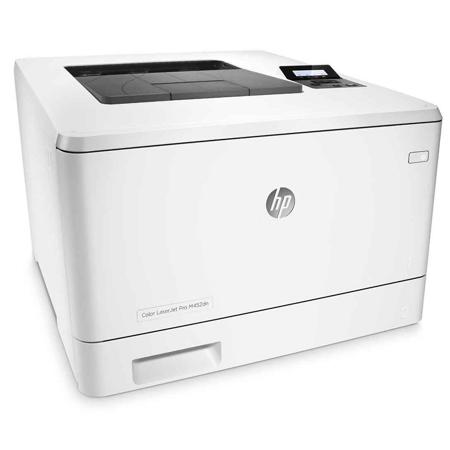
Ideal printing performance and solid security for how you work. This capable color printer finishes jobs faster and delivers comprehensive security to guard against threats. Original HP Toner cartridges with JetIntelligence produce more pages.
Fast printing. Strong protection
• Grab pages and go - without waiting around. This printer wakes up and prints faster than the competition
• Breeze through multipage documents with two-sided printing that's faster than leading competitors
• Keep printing safe from boot up to shutdown with security features that guard against complex threats.
More. Pages, Performance and Protection
• Get the most prints for your money - with Original HP High Yield Color Toner cartridges with JetIntelligence
• Count on professional quality at high speeds with HP ColorSphere 3 toner
• Help ensure you're getting the authentic HP quality you paid for with innovative anti-fraud technology
• Print right away with preinstalled toner cartridges. Replace them with optional high-yield cartridges.
Easy management. Efficient printing
• Easily manage tasks directly at the device. The 2-line LCD display is simple to read and operate
• Set up this printer fast and easily manage device settings to help increase overall printing efficiency.
Stay connected with easy mobile printing options
• Easily print from a variety of smartphones and tablets - generally no setup or apps required
• Easily set up, print and share with built-in Ethernet networking.