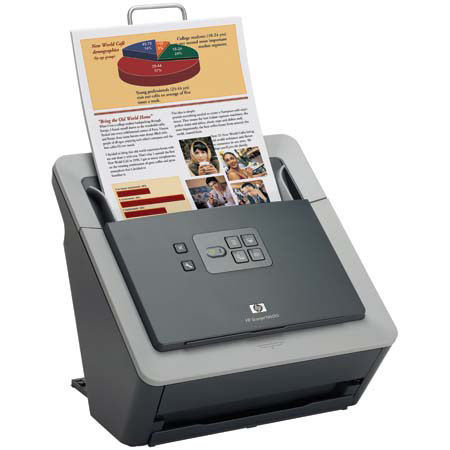
HP ScanJet N6010 Document Flatbed Scanner, 8.5x14", 600-dpi, USB Interface, for Windows
SKU: IHPN6010
This item is no longer available.
Share:
Overview
Compare
Learn
Specs
Protection
Reviews about this item
Review Summary
2010-08-02T20:00:00
Rated 3 out of 5
Not a good replacement
I am a medical Biomed Tech, dealing with end-users in several Sleep Labs. I have Scanjet 7800's in all but one lab where I needed to replace a failed one with the N6010, as it is supposed to be a direct replacement. It's physical performance is similar, except for the document feeder, it seems to have more trouble than the 7800. However, the biggest complaint is the scanning software. It is over-complicated, with less options and configurability than the 7800's. The Smart document scan software that comes with the 7800 is easy and simple to use, fast, and provides all the options required by my end-users in an almost idiot proof interface, and believe me, I need that. The people I have using the software are professional sleep technicians, not professional document specialists. I have so far been unable to find an easy way to use the N6010, which means I will probably have to go to considerable expense to replace that with another brand that provides an interface similar to the 7800, in software features at least.
micklex
Originally posted at
2010-07-27T20:00:00
Rated 1 out of 5
Possibly the WORST HP Product I ever owned
I purchased this product a couple of years ago - so it is possible that HP has fixed the multitude of issues that my product had. First, from the very beginning the product had paper pick issues. It could not be left unattended. At some point it would pick up multiple pages and feed them through. I contacted HP service and they sent out a new set of improved grit wheels to help the paper picking. These worked for awhile, but then the paper picking issues returned. The machine also makes a very loud screeching sound when the last page of a document is scanned through it. The noise sounds like fingernails scrapping a chalkboard. In the last few months, I have moved this scanner from an old XP computer to a brand new HP Win 7 PC. Unfortunately, this has introduced a couple of new problems. First, the USB connection between the PC and scanner is continually being dropped. The problem starts slowly, however by the end of the day, it can be heard disconnecting every couple of minutes. Additionally, I am now also seeing the scanning reliability problems others have mentioned. The scanner will start the day working fine. As the day proceeds the system scans fewer and fewer pages before a fatal scan error occurs. I define a fatal scan error as any error that requires a hard reset of either of both the scanner and PC. The problem will get so bad that I am literally down to scanning one to two pages at a time. I have owned and still own many HP products. This is the worst experience I have ever had with one of their products. If you see this product – run as far away from it as you can, as fast as you are able. This product is not worth your time and especially your money.
SmallBusinessOwner
Originally posted at
2010-04-18T20:00:00
Rated 2 out of 5
Awful Scanner!
This scanner is the worst computer product I have ever owned. I have had it for about a year now and it has some seriously connection issues. My company has to pay for a consultant to fix the issues every month- and thats just because it takes the consultant that long to get back to me on the issues. He will fix it and quite literally after using it for 4 times after he leaves it will have more issues. They aren't always the same but it always ends with the scanner not being able to scan because even see or detect the scanner. I'm sick of having a product that only works some of the time. And for $400??? Forget it! Waste of money and time!
lovingreen
Originally posted at
2010-01-27T19:00:00
Rated 1 out of 5
Very dissatisfied
Paid $600 in 2008. Product has never worked correctly, except when I scan one sheet at a time. ALWAYS pulls multiple pages, forcing my staff to hand-feed the machine. If I had not paid so much for it, I would place it with its friends at the junkyard. I will never buy another HP product.
Ruralattorney
Originally posted at
2009-10-13T20:00:00
Rated 5 out of 5
Fast Quiet Easy to Use
I have been using this scanner for about 3 weeks--heavy use. It is fast (speed is important to me)and very user-friendly. I am hard to please (frankly) and I have no complaints. This scanner has satisfied my needs in a document heavy and scan heavy environment. I also like the fact that it is smaller (footprint) than my previous scanners.
WooLaw
Originally posted at
2009-10-08T20:00:00
Rated 5 out of 5
HP N6010 Scanner
This is the best scanner I have ever had. It never jams unless the paper is in bad shape, and then very little. I can do a stack of 50 pages in just a couple of minutes. A double-sided document that is, say, 10 pages is just a few seconds and it ready to print without enhancement. Gerald
GeraldLS
Originally posted at
2009-09-08T20:00:00
Rated 1 out of 5
Frustrated
When we orignally purchased this product it worked well, scanned duplex quickly, quality was good, etc. We have had it for about 2 years now and it only scanned 1-2 pages at a time and sometimes won't even do that. It shuts itself down and has to be re-booted constantly and is a very frustrating machine to use. Not worth the money spent!
PerplexedNJ
Originally posted at
2009-08-07T20:00:00
Rated 2 out of 5
Document feeder does not work well.
The document feeder does not work well. 4 out 5 times the more than one paper goes at eh same time. The soft wear also has problems that need to be reset.
Realtors
Originally posted at
2009-08-06T20:00:00
Rated 3 out of 5
Quick with problems
+ The speed is just ok for document scanning. + Nice OEM software + Silent + Good design - Problems with high resolution quality - Bad construction of paper feeder - Adobe Reader regularly loose connection with scanner (OEM soft is not enough for business use) after restart. Have to connect scanner manually !!!
Ruslan
Originally posted at
2008-09-26T20:00:00
Rated 4 out of 5
Setup conflicts with software
I had to install and uninstall 3 times. My system is a xp pro with 1gb ram. In the end I uninstalled everything and downloaded the drivers and basic software. Finally it works great with no duplexing features, I am sure it is just a setup problem. I only used the pdf button and it works great, but could be a sharper image, perhaps more setup issues. It is still a good product with good speed and speed. I am planning on purchasing an other one for my home office.
advisor
Originally posted at
2008-09-14T20:00:00
Rated 2 out of 5
The worst scanner from HP
Black and white and in lowest resolution possible works as specifications, but don’t even try to switch to color or increase resolution, then you will have a scanner slower that the ones you can find for 1/3 of it price. Feeder is not good either, is paper is too thin it breaks it, if it is too thick then it gets stacked. On the plus side, the double side scanning at the same time is quite combinient.
Walter6010
Originally posted at
2008-04-12T20:00:00
Rated 4 out of 5
Guess it depends on what you use it for.
First I have to say, I don't use their included software to manage documents. I use PaperPort. Used to scan in receipts and documents before shredding and store directly to PDF. I load it up, and scan 30-40 documents at a time. It is a great unit, small footprint, easy to load and very quick scanning of both sides at once. Is it perfect? No, but it does the job and I've had zero problems with it. Keep it clean and don't load up the input hopper to the max and it will work fine. Don't buy this for quality photo scans, buy it for document scanning.
rlrjupiter
Originally posted at
2007-11-26T19:00:00
Rated 1 out of 5
Terrible Item
I so hate this model AND the software. We are a large company and my day-to-day function is scanning. This is the last straw with this contraption - the Pagemanager software never works properly, and the machine pulls all the papers thru at one time; and to boot, no one in our tech support area knows how to fix this program? Now, after just a few months of owning this product, we're trying to find another type of scanner that will meet our needs.
frustratedinnj
Originally posted at
2007-10-25T20:00:00
Rated 1 out of 5
BEWARE.....
I bought 2 of these for work and had to send both back. Anytime you put multiple sheets in to scan, it pulled all of them in at one time.....ridiculous for how much we paid for this.
14dwain
Originally posted at
2007-09-27T20:00:00
Rated 3 out of 5
HP Scanjam 6010
Works ok, Software ok. - Needs slight improvement. High volume issues, Pulls multiple sheets. Jams from time to time. Not a bad unit, but I think it could be improved.
omega
Originally posted at
2007-04-18T20:00:00
Rated 4 out of 5
Scanner 6010
Had to send the first one back for pulling multiple pages through anytime we scanned over about 10 pages. All other features are great. Will see with replacement scanner.
rickm
Originally posted at
2007-04-07T20:00:00
Rated 1 out of 5
rugged hardware, terrible software
I had this for a few months, the hardware was rugged and sturdy. it seemed a very good design. the software was horrible. I was constantly struggling with it to the point I decided not to use it anymore. I would never recomend any one to buy this model.
evaluator
Originally posted at
HP ScanJet N6010 Document Flatbed Scanner, 8.5x14in Specifications
Related Articles & Videos
About HP ScanJet N6010 Document Flatbed Scanner, 8.5x14in
Seeking speedy document scanning? Check out the Scanjet N6010. It not only moves at the rapid clip of 18 pages per minute, it can scan both sides of the page, giving you 36 images a minute. Automatically scan unattended using the 50-page document feeder. Scan fast, at up to 18 pages per minute with Scanjet N6010. Get great results with the 600 dpi optical resolution and 48-bit color.
Join VIP PRO
Earn 2X Points + Exclusive Perks!
Request a Callback
Chat one-on-one with an expert
Sell or Trade your Gear
Get started in 3 easy steps
What's in the box:
- HP Scanjet N6010 Document Sheetfeed Scanner
- Hi-Speed USB 2.0 cable
- Power cord
- Power adaptor
- Paper path Cleaning cloth
- I.R.I.S. registration flyer
- Setup and Support guide
- Sticker for task-button descriptions and LED for scanner status
- CD-ROM
- Output tray
- HP 1 Year Warranty