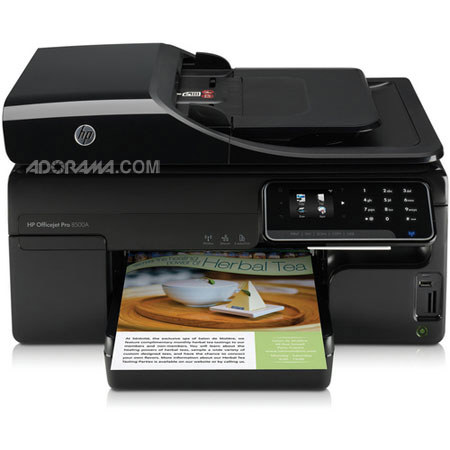
HP Officejet Pro 8500A e-All-in-One Inkjet Printer - A910a, Up to 35 ppm Print Speed, Up to 1200 x 1200 dpi Print Resolution
SKU: IHPOJ8500A
This item is no longer available.
Share:
Overview
Compare
Specs
Protection
Reviews about this item
Review Summary
2013-08-31T20:00:00
Rated 2 out of 5
good features
has to many paper jams, some hard to correct , gets to a point to where there is no paper anywhere and you cant print. If you get a year use of the printer before it goes into the paper jam mode and stops working you will be lucky
Benny123
Originally posted at
2011-11-28T19:00:00
Rated 2 out of 5
Borderless printing and scanning not as advertised
The specs claim the unit prints borderless prints, however after two hours online with three tech support reps, and trying the unit in Windows Xp, Vista Windows 7 and OS X 10.6.7 and Ms Word, Publisher 2003, 2008, and 2010, Illustrator, InDesign and Photoshop CS4 it either crops or prints 1/4" borders depending on settings. My two year old Epson workforce printer seems to be able to print borderless, so I and the support reps are left to conclude there is some driver issues. Also, from what I read on an HP support forum I wrongly concluded this unit does dual sided scanning and copying. It does not, you need to get the Plus or premium version to do that. Other then that it seems promising.
Gl47
Originally posted at
2011-11-24T19:00:00
Rated 2 out of 5
Great Prints, Poor Quality Product
After having DOZENS of printers from various manufacturers, I decided to settle down and buy two good printers for our home. Accordingly, I purchased 2 HP Officejet Pro 8500A Wireless printers. Installation on my WIn7 computer was easy and flawless. That's where the good ended. As I have many printers, these units did not see much service. After a few months, the first unit started making a clanging sound on each pass, which got louder as time went on (months). Finally, the printhead line just broke. This has never happened on any of my cheap printers, much less a mid-to-high end (for me) printer. Lost about $100 in ink, and the unit. Total use was a set of starter cartridges and 1/4 of a set of XL cartridges. I still have the second unit, and am babying it along. (As my plan was to keep these units, I purchased 2 sets of XL cartridges for them. Hopefully, I'll get them used before this one dies. DO NOT BUY THIS WITHOUT AN EXTENDED WARRANTY. I thought HP meant quality, and performance. They got the performance right, but the quality is missing on this unit. NEVER AGAIN.
ricciardelli
Originally posted at
2011-11-24T19:00:00
Rated 5 out of 5
8500 a910a
Bought this to replace a 6180 photosmart which the wireless didn't work and its been nothing but great in all area's. Faxing, double side printing, copies, and eprint have been this side of fantastic. Document feeder feed 15 pages correctly and fax recieved 23 pages and printed out correctly. I have had this for a couple of months of heavy use and still on the original cortridges. Setup was easy and the wireless was the best ever and no problem. I haven't got it to print from my blackberry phone with the new os but working on it. So far too good!
jesseray
Originally posted at
2011-11-22T19:00:00
Rated 1 out of 5
Don't waste your money on this 8500A lemon
Purchased the All-In-One 8500A printer model last October and had good service for about 9 months. The printer developed a problem where it leaks yellow ink inside the right front of the printer causing the ink to drip down on the paper and paper feed mechansim causing a real mess. Did some research on-line and found several instances of people who have purchased this same model reporting leaking ink problems. Seems like a design defect to me.
FrustratedFloridian
Originally posted at
2011-11-16T19:00:00
Rated 4 out of 5
Best Purchase Ever from HP
This is a quiet, fast, and feature rich workhorse. The e-All-in-One Printer is the best printer I have ever had. I'm impressed with the 2.4" color touch screen and the tracking it has for usages. I'm experimenting with two sided and color photos. There good but I think they can get better as I am using a paper not listed in the menu. I have not gotten APPS to work, I'll call customer service for that. PS, I loaded the software while the printer was initializing.
Squire
Originally posted at
2011-11-14T19:00:00
Rated 5 out of 5
Another Great All-in-One
I had great service out of my old L7590, so this was the recommended replacement. I did not really think that this could be this good. It does everything my old one did, but better. This is a pleasure to work with. 5 stars for this!!
david34a
Originally posted at
2011-11-13T19:00:00
Rated 5 out of 5
Great SOHO printer
So far has been very easy to use, with only a slight exception with the scanning. I've setup wirelessly to access it from all our home PCs, and the duplex printing has been great. Quiet machine. The scanning doesn't like to start from the printer, but works fine when initiated from the computer. The quality is excellent for both prints and scans. I've checked the ink levels, and even after a couple of weeks of use they are all still indicating full. I would definitely recommend this all-in-one for those of us who simply cannot afford a color laser equivalent.
MrBugWriter
Originally posted at
2011-11-07T19:00:00
Rated 1 out of 5
Taking it Back
I bought this printer at Costco and installed it yesterday. Everything seemed fine until I put 4 pages in the document feeder to scan. It took 2 of the 4 pages, then wouldn't take any pages at all no matter how many times I tried. If a document feeder has the capability of holding 35 pages, yuo'd think it could pull 4 with no problems. I'm taking this back. Thank goodness I bought it at Costco... no problems returning to them. Ever.
MrsSharon
Originally posted at
2011-11-06T19:00:00
Rated 4 out of 5
Perfer HP products
The only disappointment I had was I expected more out of the HP Officejet Pro 8500A. I replaced my 5610 officejet all-in-one and was suprise how much noise it makes and how it shakes during the process of initalizing or setting up.Also the time to set up I was not use to waiting 20 minutes. Eventhough, I know this is a more advance machine than what I previously had, I was looking for and even better product. I expected more but, I do value the HP products and would perfer HP products inspite of.
Symone
Originally posted at
2011-11-04T20:00:00
Rated 5 out of 5
Like eprint
I really appreciate the sprint feature. My only disappointment is that there is not a driver for my iMac which is 10.4.11. Other than that it works extremely well. I am very satisfied.
MiltP
Originally posted at
2011-11-03T20:00:00
Rated 4 out of 5
EXCELLENT CUSTOMER SUPPORT
This printer was a bit difficult to set up as the "fast start" illustrated guide is, at best, simply that, a guide...would be better to have fewer pictures and more detailed instructions. Nonetheless, I ran into a wireless issue with the latest version of Lion OS on a new iMac, and the customer support personnel were the best. They are, for the most part, Mac users themselves and know how to quickly bring issues to a speedy resolve. They are both friendly and professional...a great combination when you are a frustrated customer with an issue! The printer works flawlessly and wirelessly with my iMac and Mac Pro laptop.
Cincinnati
Originally posted at
2011-10-29T20:00:00
Rated 5 out of 5
Great Printer
I had a Photosmart printer and it got where it could not printer envoples and i think it was making too much noise and then it went out of warranty and the tech at HP were great help me at this point and the new printer got here in 2 days. But so far this is by far the best printer so far. The manual is I would have to rate a B needs some improvement. The auto fax I only wish it had a button to turn it on but you can make two clicks on the control panel and it is set. Thank you HP
Tommy28
Originally posted at
2011-10-28T20:00:00
Rated 1 out of 5
Worst Purchase of Printer
The printer "looked" good but "looks" can be deceiving. Unfortunately I was away just after setting up the machine and returned past the "return printer if unsatisfied for any reason" date. I am stuck with it!!! Color, fair, the machine needed to do much preparation on starting, aligning, and fussing that there was little time to do any actual printing. This made "printing" painfully slow. The end product's color was only fair--black or color. It ought to be scrapped! And worse yet, prior to my buying I called customer services and explained exactly what I wanted for "my" personal printing needs. The "agent" assured me this was a good machine and what I wanted. Now, this printer suited none of them--not even an envelope section and it could not produce printed envelopes well. HP please pay attention. Thank you.
MelanieCruz
Originally posted at
2011-10-22T20:00:00
Rated 1 out of 5
wonderful customer service
This review is following one I just wrote. This review is to say although I am still frustrated with the constant "out of paper" message on my printer, the service through live assistance just revived my faith in HP products. I'm not allowed to post details but I would now recommend HP again!
outofpaper
Originally posted at
2011-10-14T20:00:00
Rated 4 out of 5
I like this printer
I have had a le*ma*k and a *EL* and I had problems with both of them. Their ink cartridges would always dry up before I would have a chance to use them. They both had tech support that fixed the problems, but all the wasted time. I have must have spent at least 12 hours of my valuable time on the telephone with Asia fixing these printers.The wireless would never work for very long they would lose the signal. Like I said before the print quality would only be there when I would purchase 70 dollars worth of ink then if I did not print every five or six days the heads would clog up. I have had my 8500 now for a 3 weeks and all I do is wireless printing, I have done desk top maybe 7 times and I have yet to have a problem. I did have to call customer support to set it up the wireless network connection. I found that complicated After that no problem at all. Plus I bought mine at a store that offered 50 dollars for my L brand printer, this made the price that I paid ridiculously low under 130 dollars. So, to summarize I like my HP 8500 Officejet All-in-one Printer. ( I was not paid for this advertisement LOL )
ComputerMan1
Originally posted at
2011-10-09T20:00:00
Rated 2 out of 5
Dissappointed
Have two older HP Officejet all-in-one printers. Thought would upgrade to newer model and get one that just sets up as network. Wrong... Set the new one up worked great for couple days then would have to turn off and on to get it to print after it rested for 30 minutes. Work with support and finally got esculated up to someone in USA. They were very nice took care of problem sent me another one. Set it up worked just fine the first couple times then same old thing had to shut down and turn back on. Called my esculated number they are sending me another one. My old ones are still working but this model is for the birds. Yes will still continue to buy HP everyone has trouble every now and then with a model. Do not consider this one try one of the other HP models.
Wankei
Originally posted at
2011-09-30T20:00:00
Rated 5 out of 5
Best Printer yet.
I purchased this printer 3 days ago and the setup went very well. Printing is great with no problems noted at this time. Im pleased with the purchase. All features are working well. Patrich.
Patrich
Originally posted at
2011-09-29T20:00:00
Rated 2 out of 5
HP8500 not all that its suppose to be
This printer has the bells and whistles but it often fails to blow. Often time is wasted on fixing printer paper jams, or feeder not feeding properly for a fax going out. The failures always seem to happen when time is in the essence. Most people want to "go green" and not print everything but often in our business review of documents are best previewed on paper. All too often I have had to bail out my boss from taking a sledge hammer to the printer because she needs to print something and can't get it. The printer is still under warranty and the problems encountered should not be for a printer that is less than a year old.
gloriaA
Originally posted at
2011-09-28T20:00:00
Rated 4 out of 5
A satisfied customer.
So far so good. The copy quality is excellent. The scanning (both pictures & documents) have been fine. I especially like the document feeder; and the legal size copy/scan mode. I tested the wireless printing via my iPhone and it worked without any problems. Anyone who needs to scan/print legal size docs should make sure you get the A910g or A910n.
eds4usc
Originally posted at
2011-09-28T20:00:00
Rated 5 out of 5
So Far So Good
I just came from using a Color Laser and this machine is doing just great plus it was less expensive and does a lot more things. With today's economy we need to cut where we can and it is nice when the results make me happy! I have always enjoyed buying from HP.
shoppingsaint
Originally posted at
2011-09-28T20:00:00
Rated 3 out of 5
color printing problems
Since we bought this machine for our office I have used three different print head assemblies and it still will not print color documents. It also is very touchy when you scan documents, which we do several times a day. We also have a L7680 which is a real work horse.
fastbuck
Originally posted at
2011-09-19T20:00:00
Rated 4 out of 5
good investment
It is different from my laser printer. Not as fast but it will do. Good for the value
koppe
Originally posted at
2011-09-17T20:00:00
Rated 4 out of 5
8500A Printer
Excellent picture quality-sharpness and color balance easy set up Moving from HP Deskjet 882C which was outstanding for color photos. 8500A beats it hands down
gatorparks
Originally posted at
2011-09-17T20:00:00
Rated 2 out of 5
Still not set up to do what I bought it for
I bought this with a new HP Windows 7 computer, thinking they would be able to talk to each other well. I really had no reason to retire my old HP deskjet except that I'd have to buy a parallel-to-usb adapter and it was going to be a pain to find and install drivers for Windows 7. Considering that the new computer came without a modem, I decided to buy a printer w/fax capability. I have not been able to set it up to receive and print a fax and save an electronic copy on my computer, so I bought a new external fax modem that does the job. There's still a "digital fax error" message on the printer control panel, and I can't make it go away. The printer comes with a software disk that steps through the setup process. I followed it carefully - but there are features of this printer not completely addressed, so one must read the manual for the finer points. After about 8 hours of setup and trouble shooting,I was able to do many things (e-mail the printer a document to print, crop and print pictures from my SD card,scan a document and save it on my computer (as a .pdf file - haven't tried the ocr yet), print from Google docs, fax from the printer, receive a fax on the printer, print from Windows 7 and XP machines on the network, print double-sided, copy,...) but I could not convince the fax to receive a fax, print it, and send an electronic copy to my computer. It keeps saying "digital fax error," and I can't find a way to make the error message explain what to do or go away. I gave up and ordered a $12 external fax modem that does the job - receives the fax, saves an electronic copy, and prints a copy. The error message is still on the printer, though. The printer has nothing about it that makes me glad I have it -- it prints, but not noticeably any faster or better than my 10+-year-old deskjet, and it suffers more paper jams because it has more complex paper paths. I had to put it on the other side of the room because it's so much bigger than my old deskjet. I have to be careful to uncheck boxes every time I install the printer to a new computer or else it adds tons of unneeded add-ins. The best part is that I bought it from HP.com and they have a 21-day return policy, so I'm having a chance to see whether it redeems itself before I pack it back up and ship it back to them.
nutmegrater
Originally posted at
2011-09-11T20:00:00
Rated 5 out of 5
Great Home Office Printer
If you need the ability to scan, fax, and print photographs in color in addition to printing business documents rapidly, the OfficeJet Pro is the product for you.It is reliable, inexpensive to operate, and has a very quick time to print. Being able to print from smartphones, tablets and other devices via the Internet is also very helpful.
RPJohnston
Originally posted at
2011-09-10T20:00:00
Rated 4 out of 5
Awesome
This all in one is awesome. It is full featured and we love the wireless function which makes it a breeze to print from anywhere in the house. The design and features make this state of the art with HP reliability and quality behind it.
LeighD
Originally posted at
2011-09-08T20:00:00
Rated 5 out of 5
Love this 4-in-1
This was the easiest set up and installation I have ever had, and I am a Mac user...the product exceeds the expectations and would recommend to any home office or small business. Try this one - you won't be sorry.
SpencerWebb
Originally posted at
2011-09-07T20:00:00
Rated 5 out of 5
Satisfied after getting 8500 Pro Plus .
The 8500A Pro model has an ADF to feed the Legal paper into the system . This ADF system has a few bugs that need to be worked out . I switched to the 8500A Pro Plus with the Legal size flatplate and my problems went away . The quality of the Print pages and Copy pages are excellent with the 8500A Pro Plus . I highly recommend this product and HP's development of the Case Management System for solving problems and satisfying customers . Thanks Phil .
stealth11
Originally posted at
2011-09-05T20:00:00
Rated 5 out of 5
Best Printer Ever
First time ordering from HP. Great website, easy to navigate, easy to order, & fast shipping. Highly recommend ordering from HP & will order again. Good pricing on recognized products. Superb customer service. No negative feedback here. I recommend joining the HP rewards as special pricing and shipping privileges are available. I got good pricing on HP cartridges with 2nd day air ship, FAB!!! My husband & I decided to change out our old "Lexmark 6570X" & fortunately HP had a phenomenal printer sale with free ship. I couldn't believe it! We got HP Officejet Pro 8500A e-All-in-One Printer - A910a for $105 total + free ship. I couldn't be happier as this printer never ceases to amaze us. It was very easy to set up and install. One word of advice... Use the phone cable that HP provides otherwise the printer won't recognize the connection. Total set up time was less than an hour. Print quality is superb, graphics are clear like that from an industrial printer. It does print slower than my other printer but nevertheless, it's worth the wait in quality. There are apps on the screen to print calendars, lined paper, check lists, games, recipes & much much more what a wonderful attribute. Also the cartridges are reasonably priced and you get alot more product for the price. One cartridges delivers 1000 pages. Can you believe that??? Overall, I am 100%+ satisfied & would definitely recommend this printer as you won't be disappointed. Don't forget to join the HP rewards program to get special offers and amazing discounts on HP products. I called in to the customer service line to join the HP rewards proram & got great customer service from them. Good job, HP! THANK YOU!!!
Minxy810
Originally posted at
HP Officejet Pro 8500A Printer A910a CM755A#B1H Specifications
About HP Officejet Pro 8500A Printer A910a CM755A#B1H
Save up to 50% per colour page compared with lasers. Print professional-quality colour documents for a cost per page up to 50% lower than lasers. Get great value with individual inks - high capacity xL ink cartridges available for frequent printing. Save on external print costs too - create vivid, high impact marketing materials with HP Officejet inks. Use as much as 50% less energy than lasers with this ENERGY STAR qualified All-in-One.
Share high-speed printing over your wired or wireless network. Print at speeds equivalent to a laser printer with up to 15 ppm black/11 ppm colour, draft speeds up to 35 ppm black/34 ppm colour. Share the performance across your wireless or Ethernet network, or connect directly with Hi-speed USB 2.0. Boost productivity with automatic two-sided printing and 35-sheet automatic document feeder. Get more done with this versatile device - send digital faxes, scan instantly to a PC or e-mail and more.
Streamline processes with web apps and 'anytime, anywhere' HP ePrint. Use the intuitive 6 cm HP TouchSmart screen to print direct from the web - without a PC - via a growing range of web-based apps. Print from any mobile device - anywhere, anytime - directly to your All-in-One with HP ePrint. Make use of a range of innovative tools, including copying two-sided ID cards onto one side of paper. Print directly from USB drives and notebooks using the front-facing USB port; memory card slots too.
Join VIP PRO
Earn 2X Points + Exclusive Perks!
Request a Callback
Chat one-on-one with an expert
Sell or Trade your Gear
Get started in 3 easy steps
What's in the box:
- HP Officejet Pro 8500A e-All-in-One Inkjet Printer
- Two-Sided Printing Accessory (Duplexer)
- HP 940 Black/Yellow Printhead
- HP 940 Cyan/Magenta Printhead
- HP 940 Black Officejet Ink Cartridge (Approx 1000 Pgs)
- HP 940 Cyan Officejet Ink Cartridge
- HP 940 Magenta Officejet Ink Cartridge
- HP 940 Yellow Officejet Ink Cartridge: Composite Yield (Approx 900 Pgs)
- Power Supply
- Power Cord
- Phone Cord
- Setup Poster
- Getting Started Guide
- CD-ROMs
- HP 1 Year Limited Hardware Warranty