


This item is no longer available.
Review Summary
2011-01-06T19:00:00
The last good HP printer I owned was a LaserJet 4. With that in mind, the last three 11"x 17" duplexing printers I've had from HP were/are utter garbage. My Business InkJet 2800 is a noisy, slow, flimsy, paper jamming pile of junk. It's predecessor, the CP1700D was the same canine twinkie with different frosting (e.g. case), and the desktop DesignJet I had before that was the noisiest piece of rubbish I ever put on a desktop. I'll be looking at Canon now, or God forbid...Epson instead of the K8600dn.
MJNCAD

2010-12-17T19:00:00
I use a dual G4 running 10.4.11 and OS 9.2. This printer does not support OS9, but it works. Amazing! For this alone, I give it 5 stars. Some of the other reviewers comment negatively on photo quality. They're right. I get unintentional lines across photos when using staples photo paper. These lines disappear when I use the best HP photo paper - and that is a lot more expensive unless you get a sale. I had one print head go bad even though I only used HP ink. It was covered under warrantee and HP quickly sent me a replacement. I printed about 9300 pages from 4x6 to 12x18. I never had a feed or jamming problem. To me this is a pretty quick business printer that I use to run off quality color enhanced letters to parents of my students. (I like to print failing grades and class cuts in red!} If I had to do all over, I would definitely buy this printer again.
Gregskya
2010-11-29T19:00:00
I have had this printer for quite a while now and am very happy with it. I didn't expect laser-fast printing so I am happy with its speed. I love the duplex feature and use it all the time. I got the printer primarily so we could print on 11x17 paper. We also print labels and on index cards. We've had no problem handling the different media sizes. When there are printing problems, though, it is sometimes hard to figure out what's wrong. That's the only shortcoming I can think of.
neomom
2010-09-20T20:00:00
I bought this product back in July 2009, and bought the extended warranty through staples.. 1st of all I will NEVER buy a printer from Staples again.. I think I will go to best buy, their warranty is a lot better.. During the year that this was under warranty through HP I had to have them send me 2 different printers and 3 different times on print heads.. The warranty is no longer valid through HP.. Now, the warranty is on with Staples and now it is acting up again... The print heads are DEF. not out of date yet they said they will send me a new printer but they don't cover the print heads.. and the print heads are $80 a piece (2) When I took the paper that I printed out to show Staples what it was doing the Mang. said he thought it was the print heads.. So now I will get a new printer but still have the bad Print heads??? And if I go and spend the $160 on new print heads and within 2 months they die as well??? That would DEF. will be WRONG!! So NO I would DEF. stay away from that printer!!!
Shell
2010-08-17T20:00:00
This is the first review I have written and the first HP printer I have been disappointed with. It is fast and the print quality is good, but the machine is unreliable. No matter how carefully I fanned and loaded the paper (way below the full mark, I might add), the machine would still jam frequently. Duplexing was so slow that I rarely printed 2-sided prints, especially for documents under 10 pages. The last print of a job (actually the first page of the actual document) always hung up in the printer. If I had the patience to wait for several minutes, the page would finally eject with the bottom two or three lines missing. Also, after a job was sent, it would usually take 30-60 seconds before that job would start printing. For a printer labelled "Pro" and for such a relatively expensive machine, I expected much better performance. After 2 1/2 years of frustration, the printer is now sitting in the garbage can. I have considered switching brands for my next purchase. But so far, the HPs I have been looking at outperform their Canon and Epson counterparts, so I will probably stick with HP for now. A year ago, I picked up an Officejet 6500 as an MFP and backup printer and have been more pleased with it (notwithstanding its high ink usage). Dollar for dollar, it is a better printer than the K8600dn and will probably last longer. I doubt that I will spend $300.00 + for a single function inkjet again. Why do so, when it jams more, is not much faster, and does not last as long as a printer 1/3 of its cost?
wiljo
2010-08-04T20:00:00
When the printer is working its fantastic. However, as soon as the ink that came with the printer ran out and I replaced the cartridges, I found that the yellow line had air bubbles in it. The printer knows its got ink but apparently there is no way to get the air bubbles out and consequently it will no longer print that color. There are several forum entries with this same problem but different colors. If you don't mind buying a new printer every 100 pages - you will like this one. But when the ink runs out - its dead.
Munchiniwa
2010-07-28T20:00:00
For about 20 months this printer was fast, efficient, and generally excellent; we used the duplex option, and it's speed at normal quality settings couldn't be beat. However, after 20 months it began developing a CRITICAL problem: huge air bubbles in the almost 2' of thin clear ink tubes running from each ink cartridge to the printheads. This produced random performance where one print would be great, the next would completely or partially lack some combination of cyan, yellow, and/or magenta ink. No amount of printhead changes, ink cartridge changes, or diagnostic tests could touch the problem; the air bubbles in the lines just keep coming.
Njorl
2010-07-06T20:00:00
Well I have had this printer for a least a year now... while it does 99% of what I want it to do...it is the 1% missing thing as to why I bought it...I bought it to print off scrapbooking pages at home....no matter what I do, it will not print a 12 x 12 borderless print....it always leaves a .46 margin at bottom and .13 margin at sides and top..frustrating..if anyone can tell me how to fix it This would be the perfect printer....and would give it a 100% percent satisfaction report...otherwise it is great...double sided printing without having to flip the paper...indivdual inks so no waste of ink...energy star rated...great prints of a variety of sizes...all around great printer except the 1% percent problem
brownville
2010-06-28T20:00:00
Using Mac Pro 2.66 Quad-core / OS 10.4.11 / Adobe Design Standard CS4. This printer has been one battle after another: 1. HP's "current" driver does NOT handle 64-bit apps without causing major frustrations (Hence it does not do well with CS4). Canon's drivers are 64-bit ready on their printers. Unfortunately, I didn't find out until after my company had purchased this one. 2. Printer will not recognize when 8.5 x 11 paper is in the tray; 3. Computer has to be re-started before a job will print; 4. Page-yield claimed on ink cartridges are inflated about 700% (by real-world standards--not that ISO standard they use). This is all after we sent the first printer back to exchange it for this one. We thought the first 8600 was a lemon, but apparently it is the fact that HP doesn't plan to update the driver to handle 64-bit until they "have the time to get to it after all their new products for this year are released and current." (I was told that by an HP rep.) The features are nice--on the occasions when the printer works. The HP reps that I spoke to (and there have been lots of them regarding issues with this printer) have all been as helpful as they could and courteous. Problem is they don't have much to work with on this printer which really isn't their fault--it is a lack of planning and execution by management and IT). Final thoughts: If you don't run any 64-bit apps and don't plan to while using this printer, then roll the dice and take your chances. It may work for you. If you need a printer that you can count on to be reliable without giving you problems, then perhaps shop around for an alternative.
anonymous2
2010-06-19T20:00:00
This printer has been the source of so many headaches for me. I had to return the first one I bought because it would destroy paper rather than print on it. Then the yellow and black printhead went bad. Now the cyan and magenta one has gone out. Even when the printheads are "good" the quality is pretty weak unless you select "best." Under that setting it consumes huge amounts of ink and has a tendency to print documents askew. I would never recommend this printer to anyone.
anok79
2010-06-14T20:00:00
Macintosh, don't even try the do not support their software. Printer prints at snails pace if at all also does not center text. Some programs will work but it is rare and graphics programs are a no go. Windows XP, well it was working but it no longer likes to print adobe attachments. I can print the same attachment on my cheap HP desktop no problem. No support for this Junker either . One rep told me it had bad memorey chips, I got two units that both failed.
Dave8
2010-03-08T19:00:00
I saw there were bad reviews for this printer, but said "It won't happen to me." Was I ever wrong about that!. The first page printed great. It was downhill after that. This printer does not respond to printer speed settings in CorelDraw, Safari, Mail, and other applications. As a result it is very slow, and a tremendous ink hog. I get 40 pgs/cartridge where I used to get 800 with my old HP CP1700. Error messages and paper jams are common. HP will only exchange it for another of the same. Hopefully the exchanged one will be better. Otherwise, Canon, here I come!
jerseyjack
2010-03-02T19:00:00
Overall reasonably satisfied with this printer. Replaced an HP 1220 after paper feed no longer worked reliably. Initial defective print head cost me almost 20 hours of support time and much ink/paper to finally prove this was an HP hardware defect. Had to repeat multiple tests many times as different people responded to my problem. Buy the large ink cartridges! Would not recommend primarily due to poor support and length of time to resolve.
ootpa
2009-12-31T19:00:00
I have used numerous HP Printers in the past and until now all have been excellent workhorses. This print quality is good on this printer and the photos have been excellent. However, I am using Microsoft Windows XP Media Center Edition 2005 and Microsoft Office 2007. This printer will not print anything from Excel or Outlook. I have not tried printing from Power Point. I contacted HP support about this 6 months ago, and they are aware of the problem. Thus far (12/31/2009) nothing has been done about the printer drivers. I am having some paper jams which I consider unusal for HP printers. However, some of them are driver related problems. This printer seems to prefer 20 lb or heavier stock. If HP ever fixes the driver problems, this printer will be a 4+ rated across the board.
John2
2009-11-04T19:00:00
Problems with Vista driver (words and drawings not printed completely randomly) and now no driver till late January 2010 for Windows 7 and the Windows 7 default driver dosn't works properly... The result is that the printer is not reliable with Vista (and XP also) and now I can't use my printer for work till Jan 2010 with Windows 7!!! DON'T BUY THIS PRINTER
Matteo
2009-09-01T20:00:00
I do not recommend this printer... I "upgraded from a K850 to the K8600 when the earlier printer stopped working. I need 11 x 17, so HP did a swap upgrade for me. I was very pleased with the program... Unfortunately, the printer is much slower than my last printer, jams unless one uses thicker paper, and often goes into strange slow down / non-print phases. I do not recommend this for anyone who does graphics, prints from CAD or is looking for something more than a slow background printer.
ross107
2009-05-16T20:00:00
I had so much problems with this printer since day one. Like it for what it says it can do but it did not but jam when duplexing.
Ladies
2009-02-19T19:00:00
I first want to say is HP's customer service is great. They were very helpful in every step of the purchasing, troubleshooting, and returns process. Unfortunately, I had to return the product due to its borderless printing issues. The print quality is great...but when it came to borderless printing it does not fulfill its specifications. It always printed a bit crooked and the edges never would line up. I would not recommend this product if you are trying to print items such as brochures that have color around all edges.
JKreview
2008-11-10T19:00:00
I had had my 8600DN for 3 days and it's worked like a charm. I run a little business and needed a tabloid duplexer without spending thousands on a color laser. So far so good.
Lemm
2008-06-11T20:00:00
I have had several HP printers. This is another good printer… Comparing it to the HP Photosmart D7460, the one thing I wish the Officejet printer would do is, when you have turned the printer off, for it to come back on just by sending a print gob to it.
JDRPC
2008-05-04T20:00:00
From opening the box to printing my first student manual, complete with images in full color... very easy, user friendly, excellent quality even on 'proof' settings. On best settings... great detail and color. Very fast ... and as fast on best settings as my old Hp 2250TN.
blake8907

Accidents happen where life happens. Protect your favorite Adorama products and purchase a protection plan to stay covered from accidental damage, mechanical or electrical failure, and more.

If we can’t fix it, we’ll replace it at no additional cost.

Protect your product from drops, spills, and more.

Enjoy your gear without fear. We have you covered!

When regular use of your product over time results in mechanical or electrical failure.

We will never charge you a deductible after the purchase of a plan.

Our claims process is simple & easy and our customer service team is happy to help.
Adorama Protect powered by Extend is available for purchase to customers in the United States. Not available for purchase Internationally or in U.S. Territories.
Browse our FAQ
Up to 35 ppm
Up to 15 ppm
Up to 5.8 ppm
Up to 35 ppm
Up to 14.5 ppm
Up to 4 ppm
Up to 6250 pages
192 MHz
Up to 1200 x 1200 dpi
Up to 4800 x 1200 optimized dpi color (on premium photo paper, 1200 x 1200 input dpi)
Pigment-based (black), Dye-based (colors, CMY)
4 (1 each black, cyan, magenta, yellow)
1
1
Up to 250 sheets
Up to 10 envelopes
Up to 150 sheets
Up to 150 sheets
Automatic (standard)
Letter, legal, statement, executive, tabloid, super B, 8.5 x 13 in, envelopes (No. 10, Monarch), index cards
3 x 5 to 13 x 19 in
Paper (inkjet, photo, plain), envelopes, labels, cards (greeting, index), transparencies
32 MB
32 MB
PCL 3, PCL 3 GUI
Hi-Speed USB port (compatible with 2.0 specifications), HP Jetdirect Fast Ethernet embedded Print server
HP Jetdirect external print servers
Yes
Windows Vista(R): 800 MHz 32-bit (x86) or 64-bit (x64) processor, 512 MB RAM, 750 MB free hard disk space; Windows XP Professional x64: Intel Pentium II or Celeron processor, 128 MB RAM, 280 MB free hard disk space; Windows XP Home and Windows XP Professional (32-bit): Intel Pentium II or Celeron processor, 128 MB RAM, 250 MB free hard space; Windows 2000: Intel Pentium II or Celeron processor, 128 MB RAM, 150 MB free hard disk space; Note: Windows 2000
Mac OS X (10.3.9 or higher, 10.4.9 or higher, 10.5*): 400 MHz Power PC G3 (v10.3.9 and higher, 10.4.9 and higher) or 1.83 GHz Intel Core Duo (10.4.9 or higher); 256 MB RAM, QuickTime 5.0 or higher, 200 MB free hard disk space, Adobe Acrobat Reader 5 and later
15 to 80% RH
15 to 90% RH
80 watts maximum
6.1 B(A) (printing at default mode); 6.4 B(A) (printing at 24 ppm)
Energy Star qualified
24 x 19.7 x 8.78 in
31.5 lbs
HP 1 year limited warranty
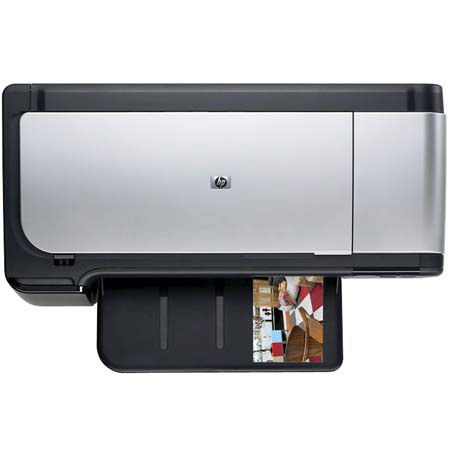
The HP Officejet Pro K8600dn is a Color Inkjet Printer. It streamlines your home office printing plus connects up to five computers and saves money to boot. Rely on professional-quality color at a cost per page of up to 50% less than with laser printers. It features automatic two-sided printing and built-in networking are standard with this model.
Join VIP PRO
Earn 2X Points + Exclusive Perks!
Request a Callback
Chat one-on-one with an expert
Sell or Trade your Gear
Get started in 3 easy steps