



This item is no longer available.
Review Summary
2012-01-18T19:00:00
My K5400 was not compatible with Windows7, so I purchased the HP Officejet Pro 8000. I have always liked HP printers, going back to the HP560, my first inkjet. My all time favorite was the HP2000, it was perfect. I use this printer mostly for printing greeting cards for fun. It works great with a generic 5x7 glossy card through Photoshop 6. One time, the greeting card text was a teeny bit slanted. I changed the "type" of paper that I was using and that corrected the issue. I guess choosing the correct paper-type setting is pretty important as to how the printer pulls the paper and delivers the ink. Rather quiet and not as noisy as the previous printer. I think I saw a connection for a wired ethernet cable in the back. I don't need to set it up for wireless, so I can't comment on that feature. I would be happy to recommend this printer.
011911

2012-01-16T19:00:00
The last printer I bought was an HP. It never worked correctly. Paper never fed properly. So I bought another one. This new one is faster but so poor quality is is of no use to anyone. VERY disappointing. I used to think of HP as a quality brand.
overviewer
2012-01-13T19:00:00
OK, this printer usually works (worked) flawlessly. (Except that it would indicate out-of-ink far too early.) But every time a problem cropped up, getting it fixed was an exercise in frustration. Case in point: currently, it is insisting that it has a paper jam and will not pick up paper, despite having been cleared, repeatedly, of all obstructions and paper. Overall, a terrible waste of consumables for light home use. Incredibly unclear spool management on a home network. Not recommended.
SFTigger
2012-01-11T19:00:00
I usually love all HP printers. I have never had an issue with any other HP printer till this one. I bought myfirst 8000 about a year ago and in the first week the paper was being pulled at an angle and the print was also being thrown off and the paper was torn. I was sent another printer from HP and intil today it worked great. Now the same problem has started on this one and it is out of warenty. I am really nervous about any of the HP anymore. I can't believe that all this junk is being built after so many years of great products.
pepelepeu
2012-01-09T19:00:00
I don't understand all the little gripes about this printer. I own 3 of them for heavy office use and they work like a charm. No paper jams, no freezing up, no complaints at all. Perhaps the use of "high quality" paper accounts for the lack of jamming. Ink use is acceptable -- if only HP would reduce the cartridge price!
FotoGraffer
2011-12-27T19:00:00
Great printer for speed and ink conservation Drawback, no separate tray for pictures Well-suited for small office VJ
veejay
2011-12-27T19:00:00
Usually, I don't comment/review products I buy, but this printer had all the features I was looking for 3 yrs ago, but I've come to hate it. Wireless connection always has to be reset on laptop every time laptop is used. It's always popping messages the ink cartridges are low or cannot print because no ink EVEN when the ink cartridges are NEW and FULL. I really like HP products but this one is driving me nuts, so it's going to be gone just as soon as I can find another printer that has wireless capabilities and print qualities that this one was bought for. Makes me wonder just how many of those "empty" ink cartridges were really empty as they sure sound(ed) like there was a lot of ink left in them.
Kileyray
2011-11-29T19:00:00
This is without a doubt the WORST printer I have EVER purchased. I have used it for about a year and have nothing but trouble with it. Paper CONSTANTLY jams and software had to be reloaded three times because it just shuts down. I have two predessors to this model and they are great but this version is a nightmare. Do not buy this printer!!!!!
WesB
2011-11-27T19:00:00
This printer has been trouble since the day I unboxed it. Every time I go to print on it, it won't respond. I have to power it off, let it sit and power it on again. 7 times out of 10, when it powers on, it give an error message that blinks on the display. The particular blinking display shown is not documented in the manual and the HP help desk basically told me that it could not do what I observed it doing. After several attemps to power up, the printer will come online and when it is online, it prints fast and beautifully. Very frustrating to use and not worth the money.
rpellicciotti
2011-11-26T19:00:00
The Paper jams and, if it does decide to print, it rips the right side of every piece of paper. I purchased mine directly through HP so I had them do an RMA and I sent mine back.
JaniceWood
2011-11-25T19:00:00
This printer would probably be OK if it would work more than once without having to reboot the dumb thing. Worst product I ever bought from HP.
MrHockey11
2011-11-13T19:00:00
I have used HP Printers for over 10 years now and the "PRO 8000" is the worst I've had. I bought 2 of them after using the Pro K5400 for 4 years and the problems are present in both of the "8000" units so it is not like I got a random lemon: Eats paper especially labels due to an aggressive feed mechanism. Many times it won't feed paper and the "out of paper" warning light flashes. The feed problem will also cause labels to print incorrectly, sometimes off at the top or off at the bottom. Refuses to feed cardstock the rollers spin and leave blackmarks, I tried different brands, virgen & recycled paper/cardstock it does not like any of them. Likes envelopes as in it likes to crumple them. Randomly goes into self-diagnostic mode and will sit there noisely spinning wheels and clashing gears like a c grade sci-fi movie and don't think about trying to shut it off with the power button while this is going on. Franken-Printer is alive! Serious Bad Dog printer when I replace them I'll pass these on to a brother I don't like.
Trout
2011-11-01T20:00:00
I would recommend this for any one requiring a lot of printing at a very low cost. We're now on our second unit and will buy another if they're still available.
theconvert
2011-10-26T20:00:00
If fast, water-resistant printing of documents in simplex mode (one side of a sheet of paper) is all you need, the HP Office Jet Pro 8000 is a great printer. However, its design causes you to loose almost 3/4" of print space per page when you turn on the auto-duplexer. The printer can handle margins as small as 0.13 inches in simplex mode, but requires both top and bottom margins to be at least 0.47 inches when using its auto-duplexer. If your document's margins are less than 0.47 inches on either top or bottom, the printer either inserts an extra page on which it prints the last few lines of each page. Or optionally compresses the content to fit within the reduces printable area. This squashes squares into rectangles and flattens fonts making them hard to read. The same design flaw exists on the Office Jet Pro 8500 line. This problem has been fixed in the 8100 and 8600 line.
CERTGuideBook
2011-10-02T20:00:00
This is a good buy for the value, especially when on sale. Set up is simple and print quality is very good. The only quirk is the little start up noise it makes when you turn it on which is normal on most printers. Hope this helps. Ink was included with my printer which I missed in items included, but at least I have replacement print cartridges ready.
BMajor27
2011-09-26T20:00:00
Does a good job of printing. This is a cranky machine, given to hanging up, requiring a reboot. It is definitely a geek's printer. Sometimes has paper feed problem. Does not play well with the Google Chrome browser, particularly if you attempt double-sided printing. This requires that your default printing be set at single-sided. Our first 8000 died after 2 years, 1 month, when it began shedding paper feed parts. We do quite a bit of printing and liked the features, so we bought another. This one doesn't work as well. I guess it has been "improved."
DrTom
2011-09-22T20:00:00
Bought this to replace my Officejet Pro 5400k which lasted 4 years. This printer is quieter, prints crisply although I haven't tried photos yet. Doesn't take forever for the first page to come out after you turn the printer on, like my previous printer (the printheads weren't in good condition even though they were both only a couple months old). One downside is that when you automatically duplex it does go slower (maybe 6 pages a minute) but that can be sped up.
Galen
2011-09-17T20:00:00
I own 5 HP printers and when a Deskjet 6980 died, I called HP up and they recommended this printer (I needed a printer I could stack with my remaining 6840s). It seems to print fine, but what is a real drag is that it takes a very long time from the time I turn on the printer until a page can be printed. I have not timed it, but I suspect it is 4 minutes or so. I really prefer the old 6980 because I could simply turn it on when I wanted to print, but with this printer I have to turn it on several minutes before I want to print. The printer is also slow in printing out the first page, even once it is warmed up. Not as slow as when it is first turned on, but definitely slower than an old 6840. I can send jobs to my 6840 and this printer at the same time, and the first page is almost done printing on the 6840 before this one even starts printing. That being said, once it begins printing this is a very fast printer, and for long jobs it would be a lot faster than my old 6840. The printer is also a lot bigger than the 6980 or 6840, but I can live with that. I just wish it wasn't so slow to begin printing. I know my two remaining 6840s will die at some point, and I hope by then they have a printer that is stackable that doesn't take so long to get the first page out.
bahboric
2011-08-10T20:00:00
This printer is an answer to prayer! I was looking for a printer that offered a low price-per-page, plus auto-duplex. I was under the impression that I would have to go the laser route, but was so pleased to find this gem. I have had it a few weeks now and printed numerous materials for my homeschool (9 at home) and found it worth the price. It seems to be better built than the other inkjets we have bought in the past couple of years, it takes up more space on the desktop, but I don't mind, since it works a lot better than the others! My hp photosmart gives me all sorts of issues--shuts down without notice for no apparent reason, etc. But the 8000 hasn't had one issue, even after numerous prints. I read that there are a few plastic, high-wear parts that can cause a break down, so I also bought the extended warranty--which I would recommend. Also, things are a little slow between the time I select print and the paper actually begins to move in the printer--and I am running Windows 7. I am not sure why this is--but once printing starts, it makes up for the lost time. I have already recommended this printer to my blog fans, and I know that hp should see some business because of it!
largefamilymother
2011-07-22T20:00:00
Poorest performance in a printer I have seen in years. Takes several min to do anything (cycles the rollers, moves the heads, cycles the rollers, just sits there, moves the heads, etc, etc, etc...... Uses Very expensive ink much to rapidly. Now it is telling me the print heads need to be replaced. All this from a uni9t that averages less than 10 pages a day for about one year. I will never buy a printer from HP again!!!
JDG20
2011-07-16T20:00:00
This printer worked great out of the box. Less than three months later after printing only a few hundred pages the ink cartridges were empty and the inside of the printer was covered in ink as though the cartridges had blown up inside. After contacting HP I was sent a remanufactured unit with new ink cartridges and new print heads that I installed. This one worked for about 18 months and a couple thousand pages and then it started refusing to print. This, after I just ordered over $100 in ink refills. It would start to print and then the cartridge and power lights would start flashing and it would act as if it had no ink and start trying to prime itself. That is when I noticed that the new XL ink cartridges I just installed were almost half empty. I have always owned HP printers and had good luck with them until this monster. Stay away from it unless you want trouble. It is definitely not up to past HP standards.
Redman
2011-07-13T20:00:00
The print quality of this machine is great for what I have used it for. However, I use this printer for a variety of tasks, and found it to be lacking in a couple of key areas. With the initial setup and installation on my Windows XP machine, I found it to have a long delay (up to a couple of minutes) between clicking the print button and the machine actually making any kind of noise to indicate printing was about to start. Ironically, while I was trying to troubleshoot, my computer was attacked by a virus unrelated to the HP support webpage, so I was unable to determine if I could have solved the problem myself. Our tech support staff reinstalled my computer with Windows 7, and the delay in printing is no longer existant. I work in a busy college office, and I print a lot of envelopes. However, I often only need to print them sporadically instead of in a large group. This printer lacks a designated envelope feed slot that I so appreciated with my previous HP printers. While you can adjust the paper guides to print envelopes, photo paper, etc., it is a pain because you have to take the regular-sized paper out of the machine, adjust the guides, print your envelope or other special-sized paper, and then reload the regular paper in the machine before you can continue. This is especially frustrating to the person who has to print the occasional envelope, rather than large groups of envelopes, and it is probably easier to feed a sheet of labels and print a single one to affix to the envelope. Overall print quality is excellent for standard black and white and color documents. No shadowing or double printing like I had when I printed labels with my old printer. Keep in mind this is an OfficeJet Pro and not a PhotoSmart printer. It does okay with photos, but the quality, even on the good HP photo paper, was fairly grainy from high quality photo files.
Careers4U
2011-07-11T20:00:00
Some assembly required, but instructions were easy to follow. Once set-up all of my computers were able to detect the printer and install the correct drivers, except for the old Windows2000 machine. Even my Linux laptop detected the printer and installed the correct printer configuration files automatically. The printer is fast and produces nice looking pages. For an all-in-one this printer is hard to beat.
Fiona
2011-07-07T20:00:00
I have owned several HP printers in the past and four other manufactured printers also in the past had various problems with them all. But this one out does them all. Takes in different paper sizes different envelope sizes runs them thru without hesitation and none of them gets stuck in the machine like other printers I have owned. The quality of the prints are outstanding and simple to use. This printer was made properly it seems like it is more durable and does not hang up waiting to print nor does it have trouble adjusting to different paper sizes and thicknesses or photo paper stock. Recommend it highly. It works fine with my Windows 7 Home Premium 64-bit computer also. Ink in the cartriges seems to last longer than other models.
Ronsprinter
2011-06-28T20:00:00
This printer ran for about 18 months, printing a few thousand pages. Print quality, speed, ink usage were all pretty reasonable. I had issues installing the complex software driver, but was able to resolve them eventually. However, last week, the unit reported a "paper jam" and stopped working. The HP troubleshooting list assumes this is actually due to a paper jam, not a broken part. It turned out that a small white drive gear inside the printer broke. I was able to fish out the two pieces. The design of the gear leaves a lot to be desired. It has two rather thin spots that take a lot of stress every time the carriage moves and it feeds paper (basically, every time you print). Forget about repairing it unless you have a service plan. The repair is almost the cost of a new unit. Of course, the printer broke after it was out of warranty, so no luck there either. It would be nice if the HP troubleshooter said more than "you may have a problem that needs repair" when you have exhausted all of the steps to check for jammed paper. My older HP printers (DJ895CSe, OJ5610xi) are still chugging along after many years and many pages.
Jman4
2011-06-22T20:00:00
When I got this printer... I first found it difficult to set up and I've set up many many printers. Once I figured it out and got it running I liked the features for the most part. The best feature I liked was duplex printing a real page saver for me as I print hundreds of two page documents. I subsequently learned, however, that the color printing in an excel document was extremely light and sometimes difficult to read...but as the docs were only for my use.. I could live with it but I was disappointed. My next disappointment was in how quickly the ink cartridges were depeleted and how often they needed replacement. About two months ago, the printer just refused to print any document sent to it. So it has been sitting here unused. I am so diappointed because I always choose HP products if I can. This is not up to HP quality standards I have come to expect.
jc1624
2011-06-18T20:00:00
I would recomend this printer to anyone , it is excellent, except for pictures using the black ink. I have not had a problem with using the color ink and it does not smear, but the black ink smears if you use gloss photo paper. I use hp's semi-gloss and it does not smear that bad , the photos still come out dry, but if you are using a lot of black, be careful how you touch it. Other than that it is wonderful and the ink does'nt cost as much as I use to pay for their 21 22 ink which would run out so fast, boy did they make money off me, had to buy so much, but this ink for this printer go and go , it last so long. And it's two-sided as well. Great!!!!!!!!!!
Ladybugred
2011-04-14T20:00:00
Works fine with Windows 7 for me; at $69 with free shipping, what's not to like? Well, OK, the footprint with the paper tray and duplexer is a waste of space. Other than that, all I need in a basic printer.
RCKTMAN
2011-04-14T20:00:00
I bought this printer quickly as my printer needed a part that was the same price as new printer...go figure. It seems to be a fair value for the money and the support guy was so very helpful. It is very slow to get started but once it does it prints very well. It seems to have to think about what it is doing for far longer than it takes to print any pages. I only print a 1 or 2 pages at a time and it might be faster printing more since it has to "think" about it and set up for each individual page...including double sided. All in all a good home printer not great but appropriate for the money.
DiHa
2011-04-12T20:00:00
As an online student I print numerous articles. Having to purchase less paper and ink cartridges saved me money quickly over a less expensive but ink using machine. It does not copy or do other functions. I am in the process of finding another printer for multipurposes. If you download and print a lot from the internet this is the printer for you.
stue
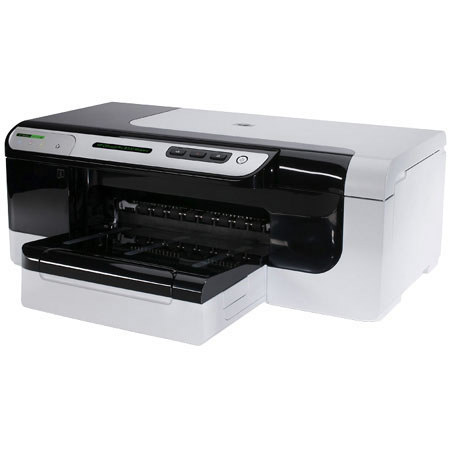
The Hewlett Packard - HP OfficeJet Pro 8000 Color Inkjet Printer offers excellent performance at an affordable price. Networkability makes this energy saving inkjet a great choice for small workgroups. The HP 8000 allows you to print impressive business documents quickly using automatic two-sided printing. This printer not only has a 50% lower cost per page compared with lasers, it also uses 50% less energy.
Join VIP PRO
Earn 2X Points + Exclusive Perks!
Request a Callback
Chat one-on-one with an expert
Sell or Trade your Gear
Get started in 3 easy steps