


This item is no longer available.
Review Summary
2012-02-26T19:00:00
Printer has several faults. It's gigantic! It takes up a lot of my small desk space. My wife has an "All in one" printer that's smaller than this thing. The printer's program does not work well with other wireless programs already installed in my computer. I need two wireless printers available at all times. The two sided print system seems to work randomly. One time it will work, the next time it prints only one side of the page. The cost of replacement ink cartridges is outrageous!!! HP should give you the printer free, because you"ll pay big time for the ink!
jsdurk

2012-02-24T19:00:00
i have always had good luck with HP printers, but this one is a game changer. Paper tray problems and machine randomly turning off make me rethink another purchase. I have had my printer for 17 months and it stopped working. I have purchased one set of ink cartridges and just put them in. What a waste.
rice512
2012-02-24T19:00:00
Thought this was a great printer, however, I cannot put my labels on my products. The labels smear horribly even after I let them sit for a week to dry. I have wasted my ink and my labels. The machine works well otherwise except that sometimes it won't load paper even if only a few sheets in the tray. I usually love HP products but this one stinks!!!!
candlemaker
2012-01-30T19:00:00
Have always had good luck with HP printers in the past, but this one is just a lemon. Multiple problems with this machine - printing multiple test pages, bad print head cartridge, paper jams, and finally not printing at all. Makes noise even when nothing is printing. At this point I suspect it's possessed. Do not buy one!
desktoplyn
2012-01-25T19:00:00
Product works well, if you do not run it out of ink in any of 4 cartridges. At that point it quits printing anything. I have had to replace the cyan cartridge four times since my purchase last summer.Also, cannot get the install program to run to completion for a network environment.on Windows 7 Home. Also, avoid "paper jams" at all costs.
GEORGEATEK
2011-11-24T19:00:00
While very pleased with unit for 12 months, it quit working the 13th month. (Note: Warranty is for 12 months). It states I have a paper jam, and there is ZERO paper in unit. I have removed both front and rear trays, reinserted ink units, checked all cables, downloaded HP drivers, and NOTHING works. Apparently a part is broken somewhere in unit. Thankfully the AMEX credit card provides extended warranty, and they are reimbursing me original cost. Not happy but looking for another HP unit so can use large supply of ink units recently purchased.
Kennie
2011-11-15T19:00:00
This printer works ok for everyday printing, but for an office setting, it's rather loud.
hawaiianrsch
2011-09-17T20:00:00
Did not notice that it did not have all the features I already had. No operation manual. Not able to hook up. It is on, but could not set up to use. Not able to get it to work on desktop (w/o wireless card) by direct hookup
Josepah
2011-09-09T20:00:00
I've owned several HP printers over the years and this is one of the best of them. I use it via the wireless connection from my laptop and the USB connection from my desktop. It makes very good photo prints although not as good as a dedicated photo printer. If all you print are 4 x 6 inch snapshots, look no further. I like the separate ink cartridges and would recommend buying the larger XL size refills, especially in black. I really have nothing negative to say about this printer. I works as advertised and I would highly recommend it.
KSonde
2011-08-05T20:00:00
The setup for wireless was easy for this printer. The print quality is very high and surprisingly fast. The duplexing is a bit slow but this I see as a minor issue since there are ways to speed it up. You can print high volume multiple copies using "manual duplexing" feature where the first side print is done on multiple copies then you are prompted to put the printed paper back into the tray and it will print the "other" side. I know you can do this without this feature if you do it entirely manually but the feature is easy to use and keeps track of the pages itself. The printer "goes to sleep" energy-use wise and unlike laser printers,it is quiet all the time and silent during "sleep time",
Workingman
2011-08-01T20:00:00
I was told I needed a USB cable so I purchased one. However it was not necessary as there was a USB cable in the box with the printer. I spent $13. and change for something I did not need.
Hisservant
2011-07-28T20:00:00
We replaced our HP Photosmart printer with the HP Officejet Pro800 wireless, thinking this would be better and cheaper than fixing the Photosmart. We find the warm up system takes much longer than the Photosmart and we find the print quality for photos not as good. Add to that, the cost of replacing cartridges which are more expensive, we feel that this was not the quality we were expecting.
Bonnie1
2011-07-26T20:00:00
I've had mine for 2 weeks and it is really remarkable. I am printing 8 x 10 photos with no borders and the brilliant prints are marvelous. It is fast and does wonderful 2 side printing also. I recommend it highly and am putting my Xerox Lazer printer down now. It is also wonderful to use it wireless with all our laptops, I have one, my wife has her laptop and my son and my brother-in-law visits with his. It is also very economical to purchase and to operate. The ink is very reasonable from both HP and Costco.
BigJR
2011-07-10T20:00:00
I've read all the reviews of the OfficeJet Pro 8000 Wireless and if it had been just one week ago, I would have said that there are just a bunch of whiners out there because my experience up to that point had been great. BUT one year and eleven months months of service later, I had a small white gear that is located over to the left of the 8 white rollers (as you look inside the cover) split. There is also a black cylinderical housing with a small arm that points to the left that is wrapped around the rod that holds the gear that popped open. What does all this mean...? My printer quit and is out of warranty and would cost more to repair (good luck finding the part anyway) than it's worth. Did I mention that I have over $50.00 in XL940 ink cartridges in the printer? HP customer service was pathetic. Everything from poor communication (foreign accent) to providing me with the wrong phone number of authorized HP repair center here in Atlanta. The best they could offer me was an "upgrade" to my present printer. Wait a minute...you mean you want me to do this again? Best news I got was that I charged the purchase on AMEX and have automatic one year extended warranty. At 1 year and 11 months, I'm coming just under the wire to have my purchase refunded. AMEX will continue to get my business, but HP has lost a long term customer. It makes me sick!
hlityga
2011-06-21T20:00:00
Absolute piece of junk. The wireless continuously goes to sleep forever, and it jams constantly. This clearly ends my long term use of HP inkjets. My old 722C works far better! I'm not even going to bother trying to fix it under warranty.
DrBill
2011-06-10T20:00:00
I am on my third printer that hp has replaced with a refurbished unit because the printer shows paper jam and it will not print the power light and resume blinks when this happens. it does not have a paper jam. I will have to say the support team is great with all their help for me. I have used hp printers for a long time and all were very good but this model wireless has been a head ache.
skinner
2011-04-28T20:00:00
This printer has been a problem from day one.When you turn on the device the warming process is taking forever. Also it is very annoying noisy process /grunting and grinding/. After two days it starts print picures in unnatuiral colors. When I checked pinchead heads health it shows that MagentaCyan printhead has "Monitor" status. Nothing help. I cleaned this pinhead with the coffee filter paper/following instructions/t Turn the printer on and you will spend most of time monitoring this preaty bad product. Because I had troubles with HP printers in the past - By-By HP.
woytek
2011-04-23T20:00:00
I'm not a professional, only a 72 year old grandmother who does need a good quality printer, especially at tax time and on a weekly basis during the year. I had to make a quick and unexpected purchase of a new laptop and new printer in January for tax time and a 500 mile trip with new equipment. The printer of course was still in the box and I had to set it up myself. The beginning of the instructions were simple--put CD in drive, did that--no go, said my computer was not able to work with this printer. Contacted HP tech. support. They were "wonderful" and within 3-5 minutes, we were up and running. This round was with a cord, not wireless, but when I came back home, I used HP help site to set it up wireless, and within 5 minutes, it walked me through it. No problems ever, wonderful machine and help site. I do suggest leaving the printer on all the time, it sleeps just fine and comes on instantly when needed. I would not hesitate in buying this model again. It is very economical, printed over 1000 pages out with my first ink cartridge that came with it.
YellowCottage
2011-04-06T20:00:00
This printer is extremely slow and wastes paper. It was advertised as being faster than a laser printer. It doesn't hold a network connection and wastes paper and ink. Everytime you turn the printer on or cancel a print job, it prints 4 pages of diagnostics. It also continuously jams, shreds the paper and/or prints crooked despite the fact that the only paper we use is HP Inkjet Paper purchased directly from HP. I do not recommend this printer and I will never buy another HP printer based on my experience with this printer.
DeeA
2011-03-26T20:00:00
This is a fine printer except for one thing - it does not do what it is supposed to. The only way I have every been able to print on this computer is with a USB cable attached. The wireless cannot be set up, in my experience of use for about 1 year. I am using Mac OS X which is supposed to be compatible. This is the second time I have tried and failed to set it up for wireless printing.
benhow
2011-03-15T20:00:00
I have been an ardent full-day user and supporter of HP printers for 15 years. I was told this printer had a huge capacity for ink to paper-production and the ink cartridge capacity printed on the boxes would make one think so. However there are two glaring problems that take a ton of my time each day. I have now owend this 8000 OfficeJet Pro for over one year of full-time business work. One - I cannot fix nor does anyone at HP's (offshore) tech help understand why, each and every time I print, the platten draws up a sheet of paper and holds it in readiness. Now, if my next print job is an envelope, the usual "advance paper" button will NOT cause this paper to roll through and come out. I have to make it print something before I can free the intray to put in other media. Also, each and every time I change the document on my screen to print, the printer draws up another blank sheet and then rejects it BEFORE I am able to print the document. Meanwhile, I WAIT. I wait. I wait. All day long this goes on. What a time waster! Then, what they don't tell you about the three color cartridges, is that they will ALSO be used each and every time you want to print in black. So, even if all my jobs form the last month are in black and white, my color cartridges are used up along the way. That's four times the cost of one black ink cartridge. I thoght I was going to save money on ink on this printer. I have spent $$ buying color ink when most of my jobs are in black and white. On the plus side, it is a fast printer but the downside to this makes me swear at this printer all day long. I have never not liked an HP product until this one. I am so dissappointed!
Citrus
2011-03-07T19:00:00
I would not have bought this printer if I knew how many steps would be required to print a standard business-size envelope. You have to remove the cover to the paper tray, fumble around taking out all the paper, line up your envelope and reset the paper guides to envelope width. Only then can you click print in your word processor to print the name and address on the envelope. I print a lot of letters and envelopes, and this is definitely a pain. Evidently you can buy a separate paper tray, but I can't determine from the web site if the second paper tray is any help in printing envelopes. The part description doesn't say so. Otherwise, the printer is fine after 4 weeks of use. Haven't tried wireless yet, though.
Tim8806
2011-03-03T19:00:00
I had this item and unjammed a paper incorrectly and ruined it. So I ordered another and do not intend to unjam it improperly. IT has not jammed. The printer seems to take a while to intialize itself each time it is turned on...the way around this is to leafve it on and let it go to sleep. IT wakes up pretty quickly. Color is fine for pictures and it prints reasonably quick. The ink will last a reasonable time but liek all ink is expensiv. Easy to change ink out. I like it for the price and functions. Wireless seems to work well.
C6C6
2011-03-03T19:00:00
The printing I have done with this has printed very fast with rich, crisp colors! Much, much better than my old printer!
ChazW
2011-03-03T19:00:00
I completely do NOT recommend this printer. Basically, you pay nothing for the printer but end up paying a ridiculous amount of money for the ink cartridges. The ink cartridge has a crazy number of pages that are supposedly printed. No way. Also, if the slightest amount of dust gets on the machine, the paper handler does not work. So, as I said Stay away
Metsgo
2011-03-02T19:00:00
I bought the Officejet Pro 8000 Wireless about 10 days ago to replace a very trustworthy HP 952C that just finally wore out. When I brought it home, I could not complete the setup. Then my computer failed (don't know whether the computer failure was related to the printer, so I won't lay the blame for that on the printer). I called HP, and they sent me a replacement. When I tried to set up the replacement, I spent two hours with the online chat agent, but still no go. I finally had to elevate the problem to HP's "Case Management" service. HP as a company was fine, but I would rate this printer as a DO NOT BUY!
ybugs
2011-03-01T19:00:00
Printer is 15 months old, but have had problems since we got it. Power light flashes and you cannot turn printer on/off. When power is on, the printer is always 'offline' and doesn't print. During warranty period HP techs fixed problems by doing uninstall/reinstall as they said it was a corrupt print file. Now that I am out of warranty period they tell me its a printer hardware issue and I need to buy a new printer. Unplugging printer to get it to print has cost a fortune in cartridges.
JEPhilly
2011-02-24T19:00:00
We have two Officejet printers, the Officejet Pro 8000 Wireless and the Officejet 6000 Wireless. The print output of both is excellent in either text or graphics. Once they finally start to print, the output is reasonably quick. Both our Officejet printers are hooked up directly to individual computers. Both have the same characteristic of extremely slow initialization/print start. This process takes so long that it causes wonder if the printer received the document even though the print manager indicates that the document is printing. If for some reason printing needs to be aborted the printer then initiates a diagnostic printout which cannot be stopped without turning off the power to the printer. When power is turned on again the printer again goes through the lengthy, time consuming process of initialization. Unlike printers from several other manufacturers, these HP printers will not print if it is determined that a color ink cartridge is empty even though the print project is text only and color is not required. Rather than resuming the project from the point of stoppage (also unlike printers from several other manufacturers) the printer aborts the print job. This, of course, results in another lengthy initiation process. I downloaded and installed the most recent drivers hoping that some of these issues would have been corrected. They were not. The driver package also included unnecessary "features". In spite of these shortcomings I would recommend either of these printers because of the excellent print quality.
geezer
2011-02-22T19:00:00
I purchased This good looking printer but soon there after I realized I got a bad printer Even new in the box. So you may ask what does he mean by being a dud? Every once in a while the printer would start its print diagnostics which was annoying. After this ritual the printer would simply power itself off. Since I run the printer in the wireless mode another quirk would raise its ugly head. That was The wireless Blue indicator led went off and came back on (sometimes). I had been working with HP's group of experts (sounded foreign to me) But after a few calls and like a taffy pull I finally was able to convince the gurus that I needed a like for like printers. That was granted and discovered the replacement unit was a factory "refurbished" unit. That being said I will admit the refurbished look even better than the first printer...and of most of my concern how well will it perform? After hooking up the "new" printer and running the setup software all went so smoothly I was astonished! It did not recalibrate or go offline. I would now rate this printer a "solid 5"
SirGeno1
2011-02-18T19:00:00
I purchased this printer about 2 months ago and have found it to be another good HP product. The wireless was easy to set up by following the CD directions. I had it up and running in 10-15 minutes and haven't had any problem with it. I like its sleep feature and it is amazingly fast coming out of sleep to print. This printer is FAST and the print quality is excellent. Now for the cons: Duplex printing is slow because there is a pause between printing the front page and the back page of several seconds. I had an old HP Photosmart printer that was a lot smoother/faster. It is pretty noisy. It bangs and clanks and I attribute this to its speed. I use it at home so the noise is not a major issue but I think it could be in a crowded office environment. OVERALL: I gave it high ratings because I think the pros are more important than the cons. It produces high quality print and I think it's a very good product for the money. I would certainly buy it again.
BillInTen
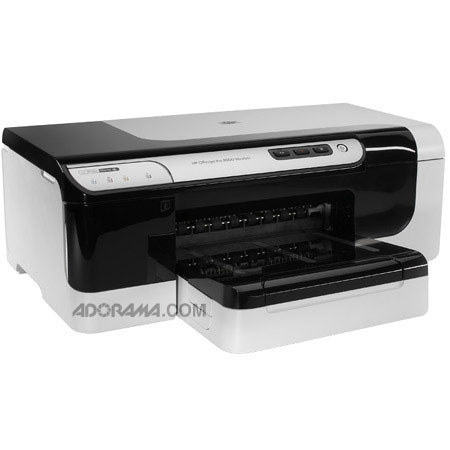
The HP OfficeJet Pro 8000 Wireless Color Inkjet Printer Cuts your energy use and improves your bottom line. With a 50% lower cost per page compared with lasers, plus automatic double-sided printing, you'll also save money. You can share this printer with a group via embedded Ethernet networking, or, if you don't want to deal with cables, just go wireless.
Join VIP PRO
Earn 2X Points + Exclusive Perks!
Request a Callback
Chat one-on-one with an expert
Sell or Trade your Gear
Get started in 3 easy steps