
This item is no longer available.
Review Summary
2011-09-11T21:00:00
Liquid ink cartridges are much better than the old "toner" powder cartridges, especially if you have any allergy problems. At times it will say the ink cartidge is empty, when it's NOT. So I keep a spare, and toggle a set of cartridges, until they are truly empty. I've had these for 18 months now, and no operational problems.
Trumpeter
2011-04-16T20:00:00
I have had this printer now for over 4 months - ever since it arrived, it has given me nothing but trouble. The print and scan quality is poor and I have been on the phone on several occasions with technical support trying to get one issue resolved or the other. Once they had to delete the printer and add it back in.
Amita

2011-04-02T20:00:00
This model took a dump earlier than usual. Only a year and a half into using it the automatic document feeder stopped working. Of course this is six months AFTER the warranty expired. No surprise. My experience with HP's all-in-on inkjet products has been awful. I'm lucky to get an average of two year's use out of them for average work load home office stuff. Time to find a new manufacturer.
Robert2040
2011-03-28T20:00:00
This is a shared printer we've used “lightly” in our office for just over a year. It's been a reliable machine with adequate functionality, but occasionally had problems with the printer "grabbing" paper when trying to print. More recently, we started getting phantom "Paper Jam" issues. This has become a serious problem and now the printer is permanently broken. After some research it appears to be a common problem with this model. (This is a large thread on HP's forum dedicated to this problem). Without going into technical jargon, it's a troubling issue that renders the machine useless. Just know that it's a mechanical issue, where a cheap plastic gear assembly fails. It's not a serviceable part, so once it breaks, the printer is dead. There's no point in buying this model, unless you buy an extended warranty, which in all honesty is pointless since it will break eventually. I wouldn't buy this printer again and would be careful about buying any HP printers in the future without doing some serious research.
DustyDog
2011-03-25T20:00:00
This printer was easy to set-up and connect. The printing is good. I am happy with the scanning, copier features. I will be returning this printer because I cannot print greeting cards with this printer. I use greeting card paper size 6 3/4 in x 10 in (or 17.5 cm x 25.5 cm--a size used for a Hallmark greeting card) This model is unable to accommodate paper sizes other then those that are custom set by the manufacturer. Hallmark card size is not supported by this printer. This was a surprise for me as I have owned 3 other HP models, most recently the 7300, and all the previous HP models had the ability to set cusom paper sizes. I was stunned to find that a new printer was missing a feature present on my last 3 models. This was confirmed by Tech Support, "the HP Officejet Pro 8500A e-All-in-One Printer - A910a it is a v22 software, in this we dont have custom paper size settings." I am disappointed that I am having to return a new printer because a basic feature is missing.
aomatteson
2011-03-20T20:00:00
I am suffering through my 3rd 8500 now! I had paper feeder problems with the first one. The second one had a scanner feeder problem. And now this third one, although the printer seems to work fine, I can't fill the paper tray without getting an 'out of paper' notice. I have to make sure there are no more than 25-30 sheets in the tray. This seems to be a common problem when I read other peoples notices. The worst thing for me is I bought this printer with the understanding it had duplex scanning. It doesn't!!! Do not be fooled into thinking it does! The wireless version seems to have it according to Youtube videos, but- The standard 8500 - DOES NOT HAVE DUPLEX SCANNING! Like many others I've been a loyal HP fan/customer. This is a sub-standard machine with disappointing software and horrible sales documentation.
SProds
2011-03-12T19:00:00
The only downfall I have it the startup time. It takes a good minute and a half for the printer to startup. If this can be fixed then i would give all five stars.
Littlejumper
2011-03-10T19:00:00
I LOVE WHAT THE PRODUCT CAN DO. HOWEVER I PURCHASED THIS PRINTER ONLINE THROUGH LA COMPUTERS AND I DIDN'T GET A POWER CORD,USB CORD AND NOT EVEN A MANUAL. THIS IS TOTALLY UNEXCEPTABLE. HP SHOULD DO SOMETHING ABOUT THIS.
COOKIE40
2011-03-03T19:00:00
Unless I am using it frequently during any online session, the printer is constantly going offline - all on its own. The only way I can get it (the printer) back online so that I can print whatever document I need to print is to shut the device down and power it up again. I have downloaded whatever patch you have sent that was SUPPOSED to have addressed this problem, and it has NOT worked. This is NOT what I expected from an HP product; I am frustrated by this poor performance, and very disappointed that you put an inferior device out into the marketplace. Henry - Fort Mill, SC.
Printer00
2011-03-03T19:00:00
Not compatible with Quickbooks. First one we received had a broken part. Printheads both replaced within 6 months with only average use. Goes to sleep frequently and the only way to get it started back up is to unplug..this wastes ink, time and etc. Ink is expensive and I have trouble getting accurate readings for ink levels in cartridges. Lid for paper tray is flimsy and keeps coming off. When you want to print an envelope, you have to remove all the paper.
elkins
2011-02-23T19:00:00
I had a Model 7200 for over 8 years and it worked great. I purchased a new Windows 7 computer and Model 8500 printer and have been very unhappy with the printers performance. You can not darken or lighten print copies and the lable printing does not work. Try it before you buy it.
sam7656
2011-02-17T19:00:00
This printer seemed like a good idea initially, as far as features go. However, the original printer failed within the warranty period, and had to be replaced by HP. Now that replacement has failed, and the warranty period has been exceeded. Current problem is that it will not print, "claiming" that newly installed color cartridges are always "empty". This is an expensive waste of cartridges before the customer realizes what is really going on. No way around the problem. Attempting to "continue" sets the printer into an endless "canceling alignment mode". HP technicians have acknowledged that this 2nd unit is also toast, after a lengthy diagnosis. This model also has problems if there ever is a "bump" in the power. The On/Off button is rendered useless if the power ever goes out. The user must physically unplug the cord from the source to restart.
ModelAPic
2011-02-15T19:00:00
Bought my 8500 in December 2009 as a replacement for a 6 year old K60. It worked great for the first 13 months, though we weren't heavy users (about 3300 pages and 3 sets of ink cartridges). Recently we got a Paper Jam error because it picked up 4 sheets of paper at once. After clearing the jam, the machine would print 1 page, then get another paper jam error, except there was no paper being picked up to jam. Went through all 5 troubleshooting scenarios and the best fix I got was that I could print single pages and resetting it before printing another page. A call to tech support did not offer any help other than to say it was a hardware proble, and since it was out of warranty, they offered me a refurbished model or an upgraded 8500A Plus for essentially the going street price. Not real happy with my options, especially since I just spent $130 for new ink cartridges a month ago. As my title says, it worked great for 13 months and 3300 pages, but very disappointed by it's early demise. I expected better.
misterb
2011-02-13T19:00:00
We purchased the printer about a 13 months ago along with $200 worth of ink cartridges. Over the course of the year, I used the printer and scanner function on two occasions successfully. I was real happy with our purchase until I attempted to use the printer a 3rd time. At this point, the printer keeps indicating that there is a paper jam. No matter what troubleshooting we do, the printer still indicates that there is a paper jam. We worked with online technical support and even called in. After several hours of troubleshooting, tech support acknowledge that the printer was broken and that it would be cheaper to just buy another printer. So I'm out $350 + $200. (all in one printer + extra ink) The printer died on the 3rd printer job. It was very rarely used over the course of 12 months and tech support says it is out of warranty. I would stay away from this printer.
nightowl6785
2011-02-12T19:00:00
This printer has multiple problems and according to review sites this is common for this model. 1) says out of paper-paper is full 2) constantly cleaning printheads 4 to 5 times a day time consuming 3) uses twice the ink of my old officejet 9110 (had to get rid of 9110 because upgraded to windows 7 and HP doesn't have a driver that will print more than one page at a time) 4) On my fourth set of printheads in six or seven months 5) computer doesn't recognize printer-after HP tech helped me, now my scanner and other software is missing. Can't install won't recogize printer. HP sent me over 70 pages of stuff to try. HP sent a replacement bad out of box and leaked ink on me my clothers and furniture. Gave up got another printer
matobi
2011-02-09T19:00:00
I bought three of these printers for my office on the advice of the salesman at Office Depot. After a year none of them are functioning properly. They are loud (no big deal) but have proven unreliable. I am very disappointed.
TheDoc
2011-02-04T19:00:00
I have had 3 HP printers before this one and thought they were the best. This 8500 is slow - envelopes get stuck and don't print well . I thought this printer would be better or as good as my 7210 but it is not. I have only had the printer for a little over a month and everything was smeary - HP told me to clean the print head. I did - 3 times before the smear went away. I wonder how much ink that used. Very unsatisfied.
family4me
2011-02-04T19:00:00
After reading many reveiws on th Officejet Pro 8500 Premier, I was having second thoughts about my selection of printers. Yes it did shake a bit and took some time, about 20 min.to do its setup. Went through the printing very well with no problems. I hooked up to my wireless router by ethernet cable. My linux system reconized printer right away. Installed cd for windows xp on my laptop with wi-fi.No problems. Could not believe how easy and fast the whole process took. This is a very fast and awesome machine. Also much quieter than my old 6300 series printer. I would very much recommend this AIO. I just got it so I can't really comment on the ink useage, but print and colors are very good
rrman
2011-02-03T19:00:00
I am not a technical person and had no trouble installing or using the printer. I love the convenience of wireless printing and the duplex capability. The price was right too. I would recommend this printer to family and friends.
Nontech
2011-02-03T19:00:00
No unreasonable issues to date.
LJohn
2011-02-03T19:00:00
I like the features and the price. I have had it only three months. I had a problem with both the paper pickup feed and the auto document feeder. The paper pickup problem was solved with updated firm ware. The adf did not get fixed and HP replaced the printer. Great tech support!!
DabidW
2011-02-03T19:00:00
Needs a firmware update to allow apple AirPrint. This is too expensive of a printer not to offer this feature. HP please listen to loyal users. As director of IT for a large government agency I have been exclusively an HP shop from servers to printers because they take care of their customers. It is unacceptable to require owners of such an upscale printer to buy another version of the same model to get this feature. Please update firmware to include AirPrint.
Janeaddams
2011-01-26T19:00:00
Bought 9/24/09. Had to exchange. A spring came loose in the paper feeder. Replaced on 10/26/09. Now the ADF (Auto Document Feeder) for faxes and top copying does not work at all. Cannot believe that these $250 (including tax) printers work for only one year! Good luck trying to get anyone to assist you at HP. Inconvenient to have to remove the paper from the tray to print an envelope. Print cartridges seem to run out quickly and are expensive.
AnnoyedAlso
2011-01-16T19:00:00
I bought this one over the cheaper ones just because I was told that although the ink is more expensive it comes out cheaper per page but I ended up getting a mere 200 pages per cartrige which is as surprising as can be! plus it takes long to initialize. So think twice before buying this beast!
Jack146
2011-01-11T19:00:00
Seems to really use ink heavier than last 6500 hp printer ... but works great
Jo
2011-01-09T19:00:00
Had to replace my HP 7210 all in one due to printer simply stopped working. Bad choice on replacing it with the 8500. I am about to place my 4th service call due to contstant disconnect errors every time I want to print something. Once I reboot the printer everything will work but I am tired of having to do this everytime I want to print something.
WAYNE85
2011-01-08T19:00:00
I bought from Tiger Direct. This printer is awesome. I have owned all in ones before but never of this quality. The scanner will sheet feed half sheets which is great for me. The only negative is that is behaves irratically if I send it a file when it is off and turn it on. I typically have to turn it on, reset it, shut it down and turn it back on if the printer is off when I send it a job.
KevR
2011-01-07T19:00:00
When this thing works as designed; I love it. Trouble is, it often does not work as claimed. i.e. Scanning both sides works sometimes and results in paper jams often. It loses contact with the computer often, requiring a reset or reconnect with computer. In my opinion the software is not up to HP's standards. I'm standing in line now for the 9000 series. Pat
Patt
2011-01-06T19:00:00
One of the best HP products I have purchased. It replaced my Lexmark and has so many more features. Easy to set up and wonderful for everyday use.
DiscoDan
2011-01-06T19:00:00
We exchanged our HP printer for this All in One Officejet Pro 8500 and I love it. Being a control freak with allergies I love the way the paper is locked away and doesn't sit out in the open gathering dust. It also works, fast, smooth and accurate. Thanks HP
gracefullygf
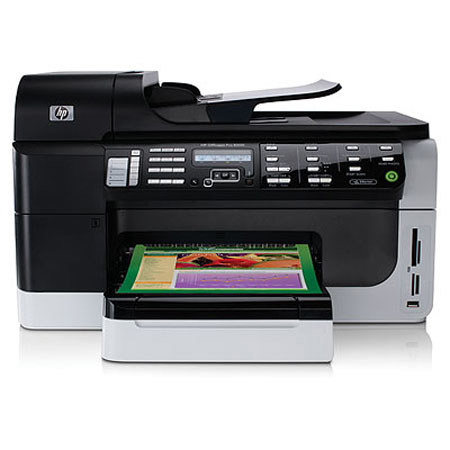
The Hewlett Packard - HP OfficeJet Pro 8500 Color All-in-One Inkjet Printer supports a variety of memory cards for your scanning needs, including SDHC, MMC, microSD, SD and more. With an optical scanning resolution of up to 4800 dpi, your friends will be dazzled by the clear quality and detail of your pictures. Expect the same high quality with your documents that can be printed in up to 34ppm (color) and up to 35ppm (black).
Join VIP PRO
Earn 2X Points + Exclusive Perks!
Request a Callback
Chat one-on-one with an expert
Sell or Trade your Gear
Get started in 3 easy steps