



This item is no longer available.
Review Summary
2011-10-02T21:00:00
I use it to print letters forms and other documents, that may include photos and other graphical inserts,which I scans in. I also uses it to print Dvd case covers, business cards, leaflets etc.
Trini
2011-09-10T21:00:00
It saves you time and money, it is truly a wonderful AIO, I have no regrets with my purchase.
Trini
2011-02-05T19:00:00
Easy to setup, but will not work with older computers
rick
2011-01-24T19:00:00
This is my 3rd HP printer. HP gets better every time. I have every confidence that several yrs from now I will purchase another HP printer-they are king of hill. It was delivered sooner than expected (a few days early) which was nice. Packing was superb. Setup was quick & easy, up & running in about 35-45mins. Although it's plastic, it has a very good strong look & feel about it. It's quiet, no complicated doors, nice big tray for paper, I don't have to struggle to remove the tray cover to print envelopes, cards, etc. This machine is pretty much self explanatory. You don't need any tech savy to work this machine. The printing speed is more than I expected for documents, pictures, specialty paper or projects. It's very smooth & effecient. The fax worked great, so did scanning & copying, I'm no longer at the mercy of the printer fighting with my programs to print items the way I want them printed.
pdc2

2011-01-18T19:00:00
First 8500 Pro we bought 1/6/2010 was Dead out of box. Got second one the same night that was OK till a week later when it had a paper jam. Finally had to reset all. Final paper Jam could not get cleared after trying all HP had to offer. On top of that, when it died on December 20th, Didn't call HP till after Holiday when we finally found an "In Warranty" number to call and then they refused warranty. Reluctantly bought a the new 8500A which has been redesigned to fix most the 8500's constant trouble and used the same print cartridges. So far so good. Now if they'd just get rid of that glossy black plastic that shows every finger print. Maybe this one will last longer than 2400 pages...Invest in the XL cartidges; they're worth it!.
Swedishpassions
2011-01-14T19:00:00
The printer is, as usual, a good, solid printer. Set up was easy and the wireless works well. I do find that after long periods of inactivity I sometimes cannot wake it up and have to reboot the printer and/or the system to print. This happens at most once a month. Overall, it does exactly what I need it to do.
brick
2011-01-13T19:00:00
Definitely like this printer, set-up is easy and most important the print quality is outstanding. My wife and I are college students, she's also an instructor and we weekly print numerous documents and we've had this printer since November 2010 and know is when the black ink level is low. I recommend it for it's features, print quality, ease of use and I've once had to contact customer support and great service overall.
MarzanCastro
2011-01-11T19:00:00
Fast printer...good quality printing and scanning. Fast copies
laurap
2011-01-07T19:00:00
very quick printer and easy to scan documents/pictures to your PC/laptop or to the web
jayermd
2011-01-07T19:00:00
If you want to get a printer that will last no longer than less than 1500 pages, this is for you, last 2 printers I have bought from them have went out with none exsistant paper jams, so good luck on any printers the have
bjstew
2011-01-07T19:00:00
This printer worked fairly well and did everything I asked of it for about 10 months -- then it died. Can't give it a good review for that reason alone. After spending nearly $300 I really expect more than a disposable product. Now I'm sitting on about $75 worth of printer cartridges that I stocked up on. The problem boils down to the fact that the printer thinks there is a paperjam and will not proceed with anything until it is cleared. There is no paperjam. Not even the smallest scrap of paper is in it, I checked. Looked online at some of the comments about this printer and this is apparently a common problem. Maybe a defective sensor in the machine? So now, after only 10 months, I have to go out and get a new printer.
Admiral
2011-01-06T19:00:00
I use this printer for home use but I have found that if you buy a good, professional model of something it usually out lasts and out performs the lesser models and in the long run is worth the extra money. The only problem I had was initially setting it up to my computer. The disc for Windows 7 would not correctly load the drivers for scanner and HP Solution center so I had to remove and reinstall after downloading a fix from HP. Worked great after that. Ink usage is amazing - I have printed tons of things and am still on original cartridges. Love the fax feature that allows it to work with an answering machine.
soldonHP
2011-01-06T19:00:00
I have owned 6 HP printers (and 1 non-HP printer), 3 of which were all-in-ones. This unit is by far the best-built and most convenient machine of them all. Bottom-fed paper, combined with the duplex function has given me jam-free, hands-free printing jobs ever since I got it 5 months ago. The CMYK individualized ink cartridges are also a huge money saver, as I only replace the ink that is out, rather than throwing away a tri-color cartridge just because the magenta is out. After a semester's worth of printing lab exersizes and study manual chapters, I have only now had to replace the black cartridge. Granted, I did buy the high-yield cartridges, but High-yield really does mean just that in this case. The 8500 really is a reliable, sturdy printer that replaces the 7110 VERY nicely. If you need to replace your old printer, and want an all-in-one... Get This One.
JustifiedHomicide
2011-01-06T19:00:00
I have had this printer for approximately one year now and it performs like the first day it was in operation here. The setup was very simple and beautifully explained, so there was no way to mess it up. Within a short amount of time, it was up and running. I love the wireless feature and being able to print from other computers on the home network. I am involved in a couple of large volunteer projects and I do a LOT of printing. I really like the option to print both sides and the way the ink dries on side one, then prints side two, while still taking little time for the job to be done. The printer has performed like a champ and I have not found the ink to be used up fast or to be costly. I also appreciate being able to order the ink and have it shipped so quickly. My last printer was an all in one HP, but it was about 8 years old and did not have some of the newer features. However, it is still working and in a new home. Thank you, HP!
FLShopper
2011-01-06T19:00:00
In the last year or so I have had 2 Dell Printers. I purchased a PC from them and a Printer along with it. The first printer had an unfixable hardware problem that jammed everytime I tried to print duplex. The replaced it with a V505 and this Printer was always, I mean always losing the Drivers and had to be reinstalled. When I had enough I shopped HP for a Printer because I had an HP PC and a couple HP Printers before and they worked fine. I received my HP OfficeJet Pro 8500 Wireless and had it installed in less than 20 minutes. I have been using it now for about 2 months or so and have not had 1, no not 1, problem with it. I've used all the functions and everything worked jusy exactly as it is supposed to. Luckily I bought it when there was a $150 rebate and I got a $70 coupon with it! The only other thing I can say is I have been "computing" for about 15 years now, have had several printers, and this one out performes them all. I haven't printed a lot of coor documents or pictures yet but the ink usage appears better than any I have had. Do yourself a favor if you're shopping for a printer and carefully consider this one even if there is no rebate or sale. Jerry
jyeagley3
2011-01-04T19:00:00
I bought my HP 8500 on 5 December 2009 and after 2 or 3 months it was replaced by HP, free of charge, as the paper pick-up wasn't working. The replacement one worked fine until 17th December 2010, when a paper jam occured which could not be cured. Sadly, HP has washed its hands of this problem on the grounds that the replacement product's warranty period dates back to the date of the original purchase. I have had a specialist printer repairer recommended by HP look at it for a fee of £90 and they said that it needed new parts including a memory board which would cost more than a new printer. What a disappointing performance from a once great company.
Oldvic
2010-12-29T19:00:00
This is my 2nd replacement 8500 printer for 1 of my machines and have 2 of the 8500's- they BOTH have "paper out" issues. There is enough paper, not too little and not to much - i have no idea why this machine constantly errrors with "no paper in the tray". Very frustrating especially if you have a big print job and walk away. I wanted an HP because that is what I always used previously for our business, however I think a change is needing to take place. (in our business we have 10 HP's - all different models) Only 2 are "all in one" - this machine is a major disappointment. When it works, it is great however it errors everyday with the paper out issue (on both machines) - that is why the low score!
JanetA
2010-12-26T19:00:00
This printer works reasonable well most of the time. Unfortunately, most of the time doesn't cut the mustard. The most annoying problem is that the printer occasionally simply doesn't print a portion at the top or bottom of the page. The same source page will reprint fine. When comparing the two, the text that does print is aligned perfectly on both copies: it's as if the ink simply turns on too late (or shuts off too early). Unfortunately, it's often not possible to reprint singles pages when this happens printing a long page from the web. Problem #2: when printing Excel spreadsheets with grid lines enabled, the printer occasionally simply doesn't print a line. On a given page, there may be 2 or 3 missing lines out of 30-50. This doesn't occur on all pages, but on those it does occur on it is consistent each time the page is printed. The missing lines appear normally in Print Preview. Unfortunately, I don't have another printer to compare against. Problem #3: Scattered spots with low ink density. When printing with large fonts, this will show up as a portion of a letter being very light. In one instance where I printed two copies of the same page (a MS Word document), this problem was present on only 2 letters out of an entire line of text -- in exactly the same location on both pages. Problem #4: Occasionally the printer cannot be waken from power save mode. In this state the printer doesn't even respond to the power button - the power cord must be removed to power cycle. After powering up, the device appears to work fine.
JerryE
2010-12-23T19:00:00
Very good printer, my first all-in-one and what a time saver and if you dont think you would need a scanner, fax or auto feed copier, well I'm glad I got one. I have had nothing but great experiences with HP customer service. I had to use the warranty service as well. Brand new machine 4 days later Very happy customer.
cabotvt
2010-12-17T19:00:00
Very disappointed. It constantly resets itself in the middle of print jobs, taking 5-10 minutes. Shutting down can take 10 minutes. It can't copy even 1 copy of a 20 page document without running out of memory. (Maybe if I turn off collated 2 sided copies it might work (TBD), but aren't these business features why this printer costs so much?). It often says it is out of paper though the paper tray is full. For a $400 business printer I am very unhappy that it is so non-productive. I want my money back from HP.
MileHigh
2010-12-05T19:00:00
Contrary to the User's Guide, THIS MACHINE DOES NOT OFFER THE BASIC FAX CAPABILITY OF Send a Fax from Memory Using the Glass. Excellent HP support reps confirmed User Guide states place the document on the glass or in the Automatic Document Feeder (ADF). Because unit is so new they were not aware the machine only scans into fax memory when using the ADF but not the glass/flat bed. If you have paper not compatible with the ADF like photo, card stock, crinkled, 3 hole, staple holes, or if you want to fax multiple pages from a book, magazine, brochure, menu, manual, etc., you cannot scan into memory to fax multiple pages using the glass! A counter productive and cumbersome work around is to photo copy all of those pages you wanted to fax from the glass/flat bed and run them thru the ADF, or scan them into your PC first. This is a WASTE OF INK, PAPER & TIME! Even the rep at the retailer tried his 910a in the store and confirmed no capability of Sending a Fax from memory using the glass. That also means you cannot Schedule a Fax, even a single page, to send later using the glass/flat bed. I've owned numerous fax machines and All-In-One's over many years and have never had a fax that did not scan multiple pages into the memory from the glass. For anyone keeping this unit and doing the "work around" just hope your ADF doesn't fry! CRITICAL FAX FEATURE THAT HAS EXISTED FOR A VERY LONG TIME IS MISSING FROM THIS MACHINE--BIG DISAPPOINTMENT. Lawyers, restaurant owners, hotels, party planners, mechanics, construction businesses, architects, students, government offices, designers, photographers, marketing departments, sales reps, beware!
DeeManding1
2010-12-04T19:00:00
We have had this printer for few months now and love it. It was easy to set up and produces great prints.
niccolo
2010-12-03T19:00:00
Uses lots of ink. Keeps cleaning the printer head and checking the machiine. The first one stopped working after a few months. The carraige wouldn't work correctly. I got another one and this one also keeps cleaning the print head and checking the machine.
frangot
2010-12-02T19:00:00
it's a great all in one but I have occasions where it loses connectivity with my wireless system. also, I had trouble getting it to work with Windows 7
Jazzbo
2010-12-02T19:00:00
I love this printer and buying the XL ink gave me over 2000 pages of print per cartridge. The print was superb I get top quality pictures and prints. I can't say enough about it! I have owned many printers and this is the best ever!
jamansmam
2010-12-02T19:00:00
Printer often goes off-line for no apparent reason -- need to unplug/plug in -- fax software is hard to access -- help menus are incomprehensible -- but it is fast printer
Andy1234
2010-11-25T19:00:00
HP is still having engineering problems on their double sided printing. Duplexers constantly jam and are not designed to allow removal of the jam. The self help jam instructions are almost laughable for they do not address the jams that really jams up the machine.
wwhunter
2010-11-19T19:00:00
I love it. Couldn't be easier to setup or use!
B144
2010-11-16T19:00:00
Product was fairly easy to get the running, including the software setup. The ink doesnt seem to last as long as they state, but I am not counting the pages so maybe it does. The biggest issue I have with the printer is that it takes several minutes before it is ready to print. Just dont expect to run into the office to quickly print out a document, not going to happen. One other small issue is that the device comes on whenever a phone call comes in regardless of whether it is a fax or just plane voice. If I could change one thing, I would want the ability to print 11x17.
SMB100
2010-11-15T19:00:00
This thing does it all! No more waiting for the one computer with a scanner to free up.. now my entire office can scan docs right from their system! Great quality prints too.
Vince G.
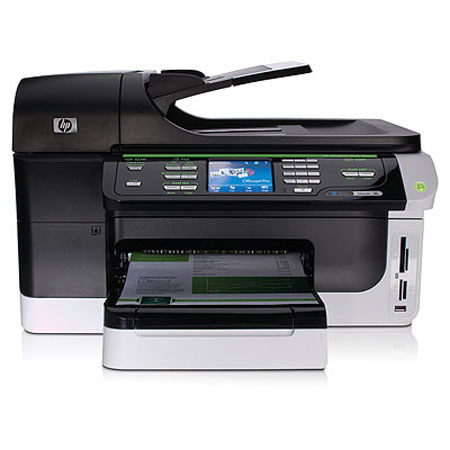
The Hewlett Packard - HP OfficeJet Pro 8500 Color Wireless All-in-One Inkjet Printer allows to copy and scan at up to 8.5 x 14" on the legal-size glass. It also has a 3.4" color touchscreen. It is ideal for work teams with both Ethernet and wireless network capabilities. With this all in one you can print, copy, scan and fax all from one easy to use machine.
Join VIP PRO
Earn 2X Points + Exclusive Perks!
Request a Callback
Chat one-on-one with an expert
Sell or Trade your Gear
Get started in 3 easy steps