


This item is no longer available.
Review Summary
2011-01-11T19:00:00
My secretary and I both use it in a law office. It does do a good job and so far has handled our work load well. I like that it has an automatic feeder for scanning and copying.
Kim C.
2010-09-27T20:00:00
I love my new C309a printer! There is nothing that I have wanted to do but can't on this all in one. It has replaced my laser jet, ink jet, fax machine, copy machine, and scanner in my small business office. I have been able to use it for my kids' homeschool tasks, quick prints, turning single sided documents into a 2 page document. It's GREAT!!! I have recommended this printer to many!! About the only thing my husband has been able to find that my old printer did that the C309a can't do is scanning my photo negatives from my events. This printer is worth the money and very conservative on its ink usage.
BookMommy

2010-09-27T20:00:00
Overall this printer does an excellent job of printing both text and photos. I really like the automatic two sided printing. One drawback this printer has that can't be found in the manuals or anyplace else is printing labels. When printing to a writable CD/DVD the only software a person can use is Photosmart Essential 3.5. One can also download a free Roxio Express Labeler that is suppose to work also. All other label maker software is not compatible with this printer. The same goes for most other labels you may need to print such as mailing labels. I was told by tech support that again the only software they recommend using for labels and the only software that is compatible with this printer is the Roxio software. To me this is quite disappointing. I have owned many HP printers and this is really the first time I have been disappointed that it is not compatible with all software.
kagnew
2010-09-25T20:00:00
The printer died about a month after the warranty expired. This is my second HP Inkjet printer in two years.
noInkJet
2010-09-24T20:00:00
This is by far the best printer that I have ever had. It replaced a 6-year-old HP 6100 that is still in excellent condition and I plan to donate it. The 309a has many more features. It was extremely easy to set up and the print quality is excellent. My photos are professional quality. Everything works fine, printing, faxing, scanning and photos. I even convinced my neighbor to purchase one after seeing the quality of this printer and she is equally pleased with her 309a.
Macy
2010-09-21T20:00:00
I have always chosen HP for my printers, scanners, and most recently desktop computer. I am very impressed with the features this printer has and would highly recommend it to anyone looking for a quality product at a low cost. The cartridges are easy to install, and the option of having the capability of 2-sided printing has been a plus. I have had this printer for a few months now, and I have absolutely no complaints.
Janel
2010-09-20T20:00:00
ALL HP PRINTERS SEEM TO JUST GET BETTER AND BETTER! I USE THIS FOR MY HOME OFFICE AND EVERY FEATURE IS SO EASY TO USE! VERY USER FRIENDLY AND I AM NO COMPUTER GENIUS! SO VERY EASY FOR THE AVERAGE KNOWLEDGED PERSON JUST TRYING TO GET YOUR WORK DONE!
FERGIEOFFLORIDA
2010-09-19T20:00:00
In theory, this AIO should be everything anyone would want in an AIO. Basically , it is. The one problem I am experiencing that nobody seems to know how to combat is; If the AIO is not used for more than a day, it goes into sleep mode and will not function until you physically unplug the power supply and re-initialize. Short of sitting on the phone for 3 hours with Customer Support, I don't know where to go with this issue. The other issue is that I still have two XP(in addition to two Vista) machines that do seem to work properly with it. When I called customer support, they suggested I upgrade to Windows 7 and subsequently offered to sell me the upgrade. Any suggestions?
Lbkeys
2010-09-16T20:00:00
I have a lot of experience with photo printers and this is my second HP photo printer. My previous printer and this printer both ran through ink (which is not cheap for this printer!) quickly and had reliability issues. My thought in buying this printer was that, if it costs a lot of money, it must be quality. This printer will give you stellar photos of great quality. Additionally, I digitized 1700 family photos with this printer with ease (the scanner is slow so it took ages but it's easy to use and good quality). However, expect it to come up with a couple random errors along the course of a multi-photo print job (to include one of your ink cartridges running low or a paper jam). It seemed as though every time I sat down to do a print job something minor would go wrong which would make it quite a time consuming process. I found myself redoing print jobs quite a lot because of errors and glitches on both HP photo printers which I have owned. This printer would print about 40 photos before one of the ink cartridges would begin to run out and to replace the whole set of 5 cartridges is $50. Add the cost of the printer and it is more economical and quality to get your pictures printed at the store. Additionally, my printer completely quit printing magenta ink 4 months after I bought it. I have done all sorts of troubleshooting with HP and they have deemed the printer irreparable. This is, of course, an isolated event but as far as dependability this product is batting 0 for 1 for me right now. Additionally, even though I bought the printer 6 months ago, HP records show the warranty as out of date and I am in a warranty update battle with them which may not end in my favor so my advice to you, if you do buy this printer, is to KEEP THE RECEIPT FOR WARRANTY PURPOSES.
bchaddy
2010-09-14T20:00:00
Love this new printer. I actually set up the printer wihout outside help Awesome......
dancer25
2010-09-13T20:00:00
I have always bought HP printers. This has been the slowest printer ever. It spends more time preparing to print than can ever be imagined. Its noisy. It buzzes. Now the black ink decided it need to rest or something. It just won't print black.
Redrock
2010-09-12T20:00:00
Needed a multifuntion device in office and this one fills the bill.
Redd
2010-09-11T20:00:00
This machine has great features, but the wireless connection sometimes causes lock-ups.
JJMsr
2010-09-11T20:00:00
I've had this printer for 6 months. It does seem to use more than the normal amount of ink, but paired with Surething label maker, the labels I print directly to disc are amazing both to me and my friends. The document feeder means I don't have to keep opening the lid to fax, scan or copy multi page projects. This thing has 3 trays, all loaded and you pick what you want to print, a 4x6 picture on card stock, a Family DVD with a picture (or collage of pictures) on it so you can easily identify whats on it, and 8x11 paper. This printer is far better than the Brother we have at work. Set up was easy and everything works. I don't like the user interface that comes with it, I use an aftermarket product. If you can't afford the ink, don't buy the printer.
Comfortablypoor
2010-09-10T20:00:00
I bought this printer directly from HP. About one month later, the wireless radio died. When the printer did work, it was loud and locked up in the middle of jobs. Troubleshooting would not solve the reoccuring issues, The printer also uses an incredible amout of very expensive ink. HP is replacing the unit under warranty, but I had to get the same model printer. I like HP, but not this printer.
LynneS
2010-09-09T20:00:00
I just bought this over the Web and it took me all of 30 minutes from the time I got it at my Door to my house,, to printing, faxing, coping, and scanning... I had to call the HP Support and they took control of my computer and it took the Support Team about 15 Minutes to get my Product to work "Wirelessly",,, and I have my USB Cable hooked to my computer to my old HP Printer, Copier, and Scanner to use when I want to Print many Pages because my old HP All in one Product (except for the Fax), uses Less Ink... But I could not be more happy with my Photosmart All in One Product... I have read that some people have said it looks Pink,,, and Viberates when it Prints,,, and the USB Cable is Hard to pust in,,, My Product does NOT do any of that... I can find NOTHING WRONG WITH IT AT ALL... (Except,, it Does use More Ink than my older HP All in One Printer (Except the Fax),,, so I still use that one when I am going to Print many Pages... I would tell anyone to Buy this Product... It is called: "HP Photosmart Premium, Print, Fax, Scan, Copy, All in One Product "C309a" and I am Very happy with it... Thanks HP,,, Everything I own "Computer-Wise",,, is All, "HP" Products... Thanks, Rick
Rickn
2010-09-09T20:00:00
I needed an All in one printer to prevent me from having to go to a friends or a staples store for productivity. Now I don't have to worry about anything. If I want to copy something really fast and go do something else while it prints I can too, thanks to the (ADF) Automatic Document Feeder on top. My old printer didn't have one so I had to manually scan and copy every page so if I had 50 pgs to copy I would be the for a while. No worries now!!! I just recently created and printed all my wedding invitations and it came out wonderfully. My family and friends were asking me where did I get them from. So when I told them I did them myself they were absolutely shocked and didn't believe me. Thanks HP for creating such an awesome product!!!!
AngelSwt
2010-09-08T20:00:00
Having issues with the auto feed for faxing and copying multiple pages. Also pictures have lines through them where the ink is missing.
Puparoo
2010-09-06T20:00:00
I was given this as a gift about 1 1/2 years ago. For the first year it was fantastic. At one year the wireless radio quit working and I had to go to cable connection. Now the 4x6 photo paper will not feed so I can no longer make copies of my photos. I now have a very expensive printer/copier with no photo capabilities. All the trouble shooting steps do not correct the problem at all
nvlizard
2010-09-03T20:00:00
My wonderful husband just bought me the HP Photosmart Premium Fax All-in-One printer and I just love it. It is so nice to not worry about how something is going to turn out and when you use HP Printers you do not have to worry . I have tried many other brands and you get what you pay for. Thank you HP for the wonderful quality printers that you design and sell. Keep them coming.
Dawnshay
2010-09-02T20:00:00
Very happy with this all-in-one, although I have only used printer and scanner modes so far. This all-in-one replaces a similar all-in-one (C7280) that was destroyed by lightning, and its operation is very similar. Easy to set up on wireless network. Impressed with all of the software that monitors operation and informs of any problems, such as low ink colors, out of paper, etc. Also provides a number of reports on all-in-one status, capabilities, network configuration, etc. I learned very quickly that one must use the XL ink cartridges to keep from running out of ink in a rather short time, and the XL cartridges make more sense economically, too.
Kizzme
2010-09-02T20:00:00
I have had the unit for 4 month now and it has exceeded my expectations. I have 3 laptops and one desktop all printing to it wirelessly without a problem. Installation was easy but it's important to follow the wireless connection directions carefully. The phot quality is very good and the CD/DVD label printer was an unexpected surprise. I'm slowly creating labels for all my home movies that I moved to DVD. I like the 5 seperate ink cartridges so I'm only replacing the empty color, but buy the XL they last much longer than the standards and are worth the extra money. I did find you do need to load portions of the software for Window7 to get full fuctionality even though Windows7 say's it's already loaded.
Kid60
2010-09-02T20:00:00
I've been a loyal HP printer user for decades and this model disappointed me a bit because of the following: 1) It consumes ink cartriges like crazy 2) Some times it doesn't finish printing the bottom of a page 3) The CD printing is very nice but the software is very very very poor (I recommend EPSON Artisan 50 for this purpose instead) 4) It becomes unresponsive very often requiring a reset I will continue to be a loyal HP printer user but I cannot recomment this particular model, it came out full of bugs.
eemr123
2010-09-02T20:00:00
So far this is a good printer with lots of nice features.
JustmeMel
2010-09-02T20:00:00
A little tough to install software. Initially, wouldn't save scans (although it appeared to - no error messages). Googled solution, installed update, all fine. Use XL ink cartridge. Smaller ones do go fast...Great for photos, prints fast, drag and drop printing.
Uptownray
2010-09-02T20:00:00
This unit is like "when it's good, it's great, but when it's bad, it's a nightmare." I love all the features, but when I need something done, the ADF locks up half way through. There is no clear function, just shut off and reboot to clear the feeder. The copy mode will lock up in a very similar manner. I have to monitor the fax function to be sure all pages go through, as it will stop sometimes. Don't get me wrong, this doesn't happen all the time, but when it does, you want to see if the unit can fly. Fred
enon
2010-09-02T20:00:00
Takes a loooonnngggg time to install. First one didn't work and after spending 2+ hours on the phone a replacement was sent. It doesn't seem to work either......doesn't print, crinkles paper and tells me the paper tray is empty when it's not.
Simonize
2010-09-02T20:00:00
The program that came with the Photosmart Printer is hideous!! The older programs allowed to to choose photos, layouts, and enchancement all on one site. Now you have to leap from place to place and there is not as much choice of printing layouts. A big step backwards! So far my prints have been just so so! Not as good as my old seven year ojd Photosmart.
Barbarajean
2010-08-31T20:00:00
We purchased this boat anchor on the recommendation of a friend. They're Nuts! It took my husband - with a computer science degree - days to get it to communicate with both our wireless systems. We can send faxes, but can never receive them. Uses ink like water, is slow, noisy, shakes the desk it's on when working and now that the warranty is out the print head needs to be replaced and it will cost almost as much as a new machine! I bought it to use in my small business - a cartridge printed 100 business cards before running out, that was about 50 cents each including paper - I could have had photos professionally done for less!!!!! I wanted mostly to print out expense report copies instead of going to staples. If I had gone there for printing, it would have cost me less than the cost of this machine and constant replacement of cartridges.
beadlady
2010-08-31T20:00:00
I usually do not write a review right after I purchase a product because I want to use it for a while and see how it performs. After using the C309a for a year I can honestly say it is a great printer. When I first purchased it I was using Vista and then upgraded to Windows 7 with very little problems. It works great with all of my wireless products. I am not a computer geek but I have not had any problems making this printer do anything I want. If I had to complain about something it would be that I think it uses ink quicker than I would like but all in all it is a great printer and a great buy for the price.
WLSNC
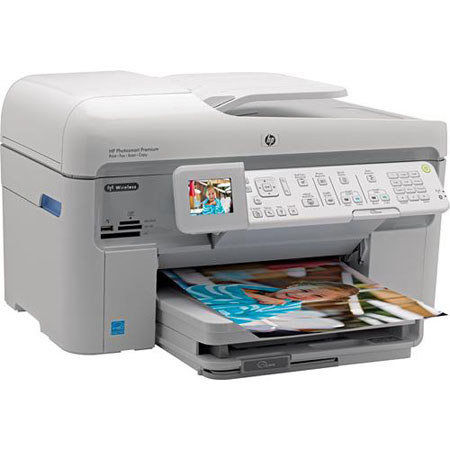
The Hewlett Packard - HP Photosmart Premium C309A All in One Inkjet Printer has built-in wireless which enables you to print from virtually anywhere. It's multiple functions like printing, copying, scanning and faxing mean you can tackle almost any office task with the HP Photosmart Premium C309A. Included photo enhancement features ensure you'll get consistent high quality prints. With two-sided printing you'll be able to reduce paper use.
Join VIP PRO
Earn 2X Points + Exclusive Perks!
Request a Callback
Chat one-on-one with an expert
Sell or Trade your Gear
Get started in 3 easy steps