


This item is no longer available.
Review Summary
2010-03-03T19:00:00
I have owned at least 6 HP printers; the HP C8180 All-in-one is the worst HP I have ever owned. I'm cussing it right now as I write this. It jams entirely too much and since I cleared out the jambed paper 30 minutes ago it prints nothing... This is not the first time I have cussed this unit, it is horrible except when it is printing correctly, then I produces great photos... It is not worth the aggrevation, I'll buy a new printer this weekend,,, it will probably be a HP since they make the best color printers; just not this one.
thebsfactor

2010-03-02T19:00:00
The quick setup and clean instructions make this a wonderful non tech install on a wired network (did not use the wireless app). 15 minutes and I was printing. Fast printing in Color and B&W and as with all of the vera inks no smugging on the photos I do print. If your in need of a great value in an all-in-one, this is your goto printer, scanner, and copier.
MinnPhoto
2010-02-11T19:00:00
I love this printer. It does a great job on scanning, printing and is so well built. Heavier duty than some of the less expensive ones. One thing to note - it uses ink quickly - especially yellow and light pink - but the cartridges are much smaller than the older photosmart printer I owned. Considering that, I've done all my photo printing with this printer not only for myself but for friend. The learning curve was the software - settings for the rpinter. Having an older one, I had to get use to this one and figure out how to set the paper sizes I wanted and the options that I wanted. With a small amount of time, I can do what I want with this printer. I'm very happy with it. It is probably the next best thing to a commerial grade printer that you can find for this kind of money. On Sale it is a real bargain.
Rettain
2010-02-08T19:00:00
As concisely as possible: Wifi/Ethernet/Bluetooth/Web scanning/touch screen/DVD writer/scanner/copier/USB sharing/HTML web access... What's not to like?
gthoms
2010-02-02T19:00:00
I purchased this to print my church bulletins but unfortunately, it chews up 3 to 5 out of every 50. They are 8 1/2 by 14 and get caught when it makes the turn inside the printer. Other things like school reports seem to print ok, but the problem with the bulletins is driving me crazy.
mycat
2010-01-25T19:00:00
I bought this printer in November and it's excellent. The first one had an issue with the scanner not working but HP didn't hesitate to send me a new one at no charge, they didn't even argue over paying the shipping both ways. Second printer is wonderful. No issues. Excellent quality pictures and the touchscreen is a wonderful feature. I set up networks and this is an excellent printer/scanner/copier for a home network or small business that uses a high volume of pictures.
JustMel
2010-01-24T19:00:00
The scanning software doesn't work and the techs have no fix solutions. for this problems I tried everyone they offered.
concrete
2010-01-15T19:00:00
We just got this printer yesterday and already I love it! It was so easy to set up and hook up to our wireless router. Our only issue was the CD that comes with it to install the software is not compatible with Windows 7 so we had to download it from the HP site. Slight setback and minor irritation, but we worked through it. Once the software was installed printing was a breeze and we're very pleased with the results! I have not yet scanned anything or used the CD/DVD burner or the Lightscribe feature, but plan to ASAP. The color prints it produces are fantastic - rich, superb and very crisp looking. Very impressive! This is our 3rd Photosmart Printer from HP, but our first All-In-One. I would highly recommend it to anyone considering this purchase. It's well worth the money!
PGHSniper
2009-10-30T20:00:00
This is a great all-in-one except for the fact that if you have Windows Vista (and mine is on an HP computer!!!), you cannot just put a photo in the scanner and press scan and it work!!! Absolutely crazy!!! I might be able to understand that if I had a different brand of computer, but I think all HP products should be easily compatible with each other!!! There is a way to scan, but it requires extra downloads and is a hassle. Other than that issue, it's a decent P-S-C.
HPuser77
2009-07-26T20:00:00
I Love my hp all in one. the only problem I have is, I dont like the way my negative scans look. this is the only problem i have
Songbird69
2009-07-26T20:00:00
This printer is an outstanding performer. Print quality is excellent. Pictures are great! The only problems I ran into is that it does not recognize booklet format and will not print it. Also, it does not work well as a networked printer. It continually drops the networking capability after it's been established and working a few times.
JoT77
2009-07-05T20:00:00
This is the best printer I have ever used! Not only does it print great quality photos but I do ancestry and have tons of negatives that I can now print right from home! Also, have you ever had your photos printed at the store and found you were missing part of the picture along the edge that was important? Well you can now take your neg. and readjust what you want printed and have the picture you want! This printer is easy to use and the fact that it is wireless makes it the best for families with laptops. Now everyone can print to one printer without having to connect with cords which was such an inconvienence! Also, the individual ink cartridges allows me to use all of my ink before throwing away the cartridge, saving a ton of money! Everything about this printer is user friendly and I would highly reccomend it for anyone wanting a great quality, fun and easy to use printer!
FLBeachBum
2009-06-12T20:00:00
I purchased this for my sister, which does not own a computer. This does slides, negatives, all sizes of camera media, burns on a DVD/CD and makes copies that you can adjust the picture right from the printer. There is not a computer hooked up to the printer and she does this all on the printer. The individual ink cartridges of the color save her money as the ink runs out she just replaces the one color at a time. Cost Saving is very meaningful to my sister. Working on family pictures to making a copy of a document has made my sister happy as she can make these at her leisure. Great product, great price, I have always thought of HP printers as little work horses as I, myself have one old printer that still works from the 1980's. I have a great HP Photosmart 3310, but my plans are to purchase another one like the C8180.
Molly02
2009-05-07T20:00:00
One of the features that attracted me to the C8180 was the claim to be able to scan slides and film. The print quality of this machine is excellent, but it is not capable of doing a multi-slide scan. The scanning software floods your system with temp files and the scan will bog down and evenually abort. If you need scanning and printing capabilities, you need to purchase separate machines--this 'all-in-one' can't handle it all.
RussO
2009-04-19T20:00:00
Slow printing, scanner stopped working, hard to get jams out if you are in a tight spot. (Have to take it out from the back!) Not easy to check ink levels. It tells you you will need to replace one "soon". But if you replace it then, you are wasting ink! Print quality looks good on good paper, just average on regular paper.
BurbankRed
2009-04-15T20:00:00
I hate this machine. The documents NEVER scan the same way twice. I am forever having to manually move the page a little to the left, a little to the right, a little bit up...on and on...to get it to scan an entire page. If someone has a remedy for this, I will be happy to try it and give another review...as for now. I can't wait to buy another product and I will never get an "all in one".
MJK2009
2009-04-03T20:00:00
This is only my second -ever printer, but I found it easy to install, and am delighted with it's versatility and print quality. I have now scanned slides more than 25 years old, and have produced some stunning prints from them!, and am now building a library of my best fujicolour shots over the years - all greatly enhanced by this good system. Being new to digital photography I am now enjoying the quick and easy process of transferring from the camera and printing off the results! There is an intermittent problem when the printer decides not to obey commands from the computer, but following the help-line procedure sorts me out, often having to un-install and re-install the software. I would rather this didn't happen, but can live with it. I have one regret - I wish I could afford to go up to the A3 version!!!!!
Nikon1
2009-03-24T20:00:00
For this kind of money for a printer, envelopes should be a snap. This printer was purchased to for the specific task of printing 500 mailings and the brochers for a charitable event The labels and text printed great. I then did some work in publisher so there would be some nice donor envelopes at the event. It did not matter which size envelope I tried, over 50% had smeared print, crushed corners or printed unevenly. When I took some of the envelopes into the store and asked if they had any suggestions, "I could try putting some tape on them before I put them into the printer." Have 4 HP computers and always buy their printers...........no more!!! Time was short so I could not contact tech for help.
meddy
2009-03-23T21:00:00
We bought this to replace a very expensive Canon Pixma that quit working after 3 months. We are thrilled with this HP. The photos are of remarkable quality, matching any pro prints I've seen. Very conservative ink user. Print speed is very fast even on highest settings. It is also a great scanner that even handles negatives and slides. We have been able to restore some old family photos that would have been otherwise lost. Very easy setup, even on our wireless network. The large LCD touch screen makes navigation and operation a cinch. We highly recommend this printer to any photo enthuiast.
Bruce
2009-02-22T19:00:00
I just bought this printer today and I was able to connect my PC and Apple wirelessly in about 45 minutes. The photo quality is superior but it does take a full 2.5 minutes to print an 8x10 color photo from my Apple photo library. Scanning the same picture it printed takes the same amount of time and the scanner is loud. The scan quality is better than good. I am very happy that I can share this All-In-One printer with my two computers without having to change settings. So far I am impressed.
Paulrn
2009-01-19T19:00:00
I take thousands of digital Photographs and enter in fairs both County and State. I would love to reach my goal of selling my photography at art shows around the country. This is the 3rd Photosmart printer I have purchased. I have been so pleased with everyone I have owned. I believe that using the right camera is only half of the sucess. If you can not get quality prints of your photographs than you will not be able to suceed as a photographer. I do not trust my printing to anyone else and print all of my photo's on my HP Photosmart printer. I love your printers and your excellant quality photo paper ( I use your HP Premium Photo Paper in the Glossy finish) because it is a high quality paper. It makes my Photography look beautiful. People at the County and State Fairs are always asking me who prints my pictures. When I tell them I do their next question is always, "What kind of Printer do you use?" I am always glad to tell them about my HP Photosmart Printer. Keep up the good work, I will always own a HP Photosmart printer. I still own my old one (HP 8150) which still does a fantastic job. I just wanted to try a new model. I keep the 8150 as a back up. Thanks for a great product that makes me look good!
jennydoll54
2009-01-10T19:00:00
This Printer is amazing, Prints very quick and with sharp and crisp colors , This is my third all in one and this one blows awaY ALL THE OTHERS . Great Photos from the copy function and when you print out your own photos using your memory card they pop out at you with such sharp and crisp colors.
Deacon51
2008-12-04T19:00:00
i think this is the best printer that hp has ever made... this printer has all the good qualities... it is the most beutifull printer of HP..... one thing which can be added is FAX.... if this printer become a fax enabled printer...then it will the best printer in the world.... iw ould like to see FAX vary soon in this printer is well
Mohit
2008-11-28T19:00:00
Most trouble I ever had with a printer (HP or other). Actually more trouble with just this one printer than all the other printers I've owned combined! Have to reload printer often to get it to print.
rdroberts50
2008-10-18T20:00:00
If you are looking for a printer with exceptional quality this is it, however there are constant problems scanning to the PC.
dumbo
2008-09-02T20:00:00
If anyone out there in printer land bought this C8180 and did not like the quality or reproductions from this machine they must have bought it for the wrong reasons. This machine has exceptional quality printing at a reasonable price. I wish it had been available sooner. You can not go wrong with this machine if you buy it for what it is capable of doing. Good Printing, JayBird
jaybird
2008-08-24T20:00:00
I never hear any body say that you can scan 35 mm negatives and print them, this is by far the best printer i have ever owned, I also baught the hp7700 with 2 paper trays for all my faxingduplex copies, etc...... LOVE THEM BOTH!!!!!!!!!!!!!!!!!!!!!!!!!!!!!!
BLOWNAWAY
2008-08-24T20:00:00
This is my fourth HP printer luv the features but, there are (2) drawbacks (1) you cannot fax and (2) you have the option for duplex printing but where do you find it I see it listed on the spec sheet but that is as far as it goes
ad1moore
2008-08-23T20:00:00
We are scanning all our pictures and those we got from our parents from the last 70+ years. So far we have scanned over 7000 pictures, slides, and negatives in the last 35 days. Very easy to use. Great pictures, Love being able to burn to DVD at the printer. Very easy to use and very high quality.
rayf48
2008-07-26T20:00:00
It is a good printer, but how can you call it an All-In-One when it is missing the fax?
CyberSalesman
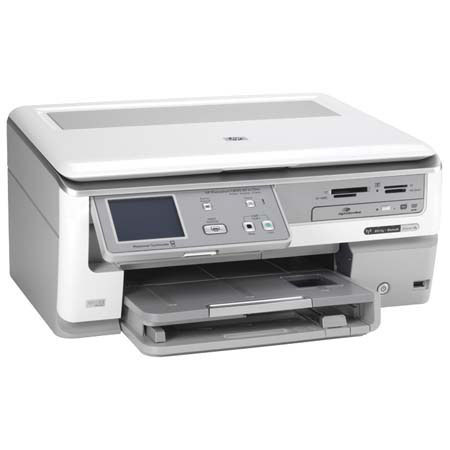
Want to preserve a bunch of old photos? Photosmart C8180 All-in-One is ready to scan with industry-leading color accuracy. You can remove dust and scratches, then print, copy and archive photos to discs. Then add the finishing touch to CDs and DVDs: personalized, professional-looking labels made with LightScribe.
Join VIP PRO
Earn 2X Points + Exclusive Perks!
Request a Callback
Chat one-on-one with an expert
Sell or Trade your Gear
Get started in 3 easy steps