


This item is no longer available.
Review Summary
2010-03-10T19:00:00
So just 79 days out of warranty, this printer came up with the Ink Failure error. Now, you must know I am tech savvy as I am an employee, however this just isnt acceptable. First the 564 cartridges didn't even come close to giving me the volume stated. It's an indication when you are afraid to use your printer and instead have printing done on an internet site or at a Wal-Mart. If you decide to go ahead with the purchase and don't get a warranty, consider yourself warned.
HPemployyee

2010-03-09T19:00:00
My D7560 has printed excellent documents and beautiful photos so far. The only drawback I've experienced is the inability to keep 4x6 photo paper indexed for pick-up when printing a que of photoes. Previous models had a sliding stop to keep the paper in position. Sadly, this feature is lacking on the D7560.
rssw68
2010-02-19T19:00:00
I just got this printer 2 days ago so far all is well the prints are good I am really concerned the cost of the ink but over all I would tell a friend about this.
deroz
2010-02-05T19:00:00
This printer can print awesome pictures on the photo paper, but there are several problems with the software: (1) interferes with the computer's ability to go into sleep mode (even after uninstalling and re-installing the software) (2) everytime you queue something up to print, the lights on the printer start going haywire and it has to be plugged and unplugged 3 or 4 times before it will actually print something. WHAT A PAIN !! I would never get this printer again, no matter how good the pictures come out because it isn't worth the hassle that the software causes with my computer and having to continually plug and unplug it to get it to print !!!!
Shell669
2010-01-04T19:00:00
Very crisp, clear photos. I use it heavily, this is my third for the year. Problem is, no one carries a printer head. not even the major retailers recommended repair shop(to their disbelief). Don't purchase the warranty, the print head is consumer expendable and not covered.
JockL
2010-01-01T19:00:00
I was looking to get a Photosmart printer and this was my choice. I am very satisfied with the D7560 printer. I love the features and the affordable price. I will tell all my friends about this great buy.
mikekendrick60
2009-12-31T19:00:00
Print Quality is good as are the features ... all reasons for choosing this printer. However, the performance leaves a lot to be desired: - Occasional printing is painful. The "warm up" time is beyond belief. I have a 6 year old HP printer that runs circles around this model. - The ink consumption is the worst I've every seen. We decided to print our recent Xmas cards & letter on this printer (HP Brochure paper) ... what a mistake! We were averaging about 16-18 8.5x11 prints per cartridge set (B,C,Y,M). Based on current ink & paper costs, that's nearly $2/page! - During our Xmas card printing, it stopped feeding paper. I've never been a fan of HP's 180 degree print feeding - esp. with varying types of paper. With all the problems encountered with this printer I'll never buy another. There are better options. As a side note, I'm really disappointed with HP as well as most printer manufacturers. The current trend is to "give away" the printer - planning to recoup the cost in replacement ink & paper. How wasteful!
rbull
2009-12-01T19:00:00
i haVE HAD computers since win 95 all hp this printer 7560 will not work or run on my computer. have a wireless 6450 that works fine on this computer. whats with HP even tried downloading drivers from web site no good help!!!!!!!!!!!!!!!!!!!
captbob99
2009-11-04T19:00:00
I had a D7460. Worst printer I ever had. Trying to solve the software problem, along with the thirst for ink from this printer drove me crazy. I saw the D7560 and like an idiot bought it. Now I have to carry 2 printers out to the garbage can. If you buy this series of printers, order the ink by the gallon and get ready to fight software problems. I had years of good quality service with my Deskjet 970 CXI. If I could get another new one I would.
Fred293
2009-10-08T20:00:00
Although I am able to print Photos I am not able to install this printer to my PC (Slimline 3700). All in all it produces beauitful photos. I would recommend it to friends.
Violaadora
2009-10-07T20:00:00
My HP 8200 died dead and had to replace it. I had seen CDs and DVDs other people gave out and was sure they were printing on them. Went into a store and asked and they suggested the HP D7560 so I purchased it. I only print on my CDs and DVDs now; no more lightscribe. I love it and use it a lot. I just wish they offered more templates like for sports etc; also when typing in the template be able to use a white back ground, different color fonts, and be able to work with it a little better. It prints beautiful photos and I print lots of photos but right now printing on CDs and DVDs is about 60% of its use. Only other thing I wish they would change is how often it has to service itself as it waste soo much ink. I have started using the XL ink cartridges and love it.
Slick66
2009-10-01T20:00:00
I had to buy this printer when my D7460, which had been chugging along like a trooper for eighteen months, suddenly bit the dust. I am not sure what the problem was, but I couldn't get it to work again and was not willing to pay someone more than the printer cost new to fix it. So I ordered the D7560, only this time I was smart and bought an extended warranty. This printer is actually much easier to set up than its predecessor was, and I like the fact that the ink cartridges are so much smaller. Print quality is fantastic, at least for my needs. My digital camera and scanner are also HP, and I'm extremely happy with them, which is why I elected to go with another HP printer. As long as this one doesn't wimp out on me, I think I will be very happy with it.
Tuxie
2009-09-28T20:00:00
My complaint stems from the directions; Step #3 a. Remove all tape from the device. Remove the protective film from the display. Problem: Removed clear brown tape covering the printer head, thinking that it was some kind of packing tape to protect the printer head. I followed the instructions to the word,(remove all tape from the device), unfortunately that brown tape is an essential part of the printer head. After spending 3 hours on the computer, I have come no where near tracking a new head. So here I am stuck with a brand new printer that can't even be used.
Dar
2009-09-18T20:00:00
This printer is amazing, it's fast, it prints exceptional photos and the print to CD/DVD feature is outstanding. Although you do have to go through the HP software to print, it's easy to create a fully custom label, by choosing the "general" label option and adding any picture or composition stored in your My Pictures folder. Don't panic either when it doesn't look as though it's printing the complete surface of the CD/DVD.....click print and the option to "print to hub" is on the next screen. I create slide show presentations and do photo archiving and I couldn't be happier with this printer.
PJH
2009-09-01T20:00:00
I have tried every imaginable trick to get this printer to print on a #10 envelope and it can't get the job done except by miracle about every 10 tries. Paper jams...message to load tray. I have other printers and bought this specifically for my desk to be able to customize outgoing envelopes. What a waste.
zman4525
2009-08-03T20:00:00
There is a big deviation on printing light red color, compared with photosmart 8250. The 8250 gave a correct color. In photoshop, create a JPG file with color code A39292. Print it with 8250 and D7560, I can see a big difference, and the one printed from 8250 is close to the real color, but the one printed from D7560 is too red.
Wayne09
2009-07-20T20:00:00
I bought this printer exclusively to print photos for framing/display. I'm entirely satisfied with the end product. The auto-paper sensing feature is very handy, as it eliminates the need to set the type of paper being used. The printer was easy to set up. The software is not quite so user-friendly. It is easy if you want to print in accordance with one of the "canned" options, but if you want to do something a little different, it's not convenient. Still, the images produced by the printer are stunning, and that's what I was after.
bmcdermott
2009-07-11T20:00:00
Very good image quality. Photo printing drain ink incredible fast. Regular ink print much less photo than the described 150 photos. Photo paper feeder sucks. Load photo paper to near max. level. and print more than 1 photo at a time. 1st print come out fine. Start from 2nd photo, location shift and leave a white band. Waste a lot of photo paper. It works fine unless you make every 2nd print after 1st print came out and this waste time. When photo paper level turns low. Feeder cannot eat and require to load more paper.
TrueUser
2009-07-06T20:00:00
This printer produces excellent quality print, both on photo quality paper and on CD/DVDs. I bought this printer to print labels on CD/DVDs. But using the printer to print on CD/DVDs is a royal pain. 1. The firmware insists that it show you the "how to" animation every time the CD/DVD door is opened. I could find no way to turn it off. I have to press the continue button every time to skip it. 1a. Besides insisting on playing the animation, it automatically launches the included labeling software, which I have to close manually. 1b. The firmware also insists that you close the CD door after each disk is printed, even though you might want to print another. 2. The supplied CD labeling software is so limited as to be useless to me. I bought SureThing which does an excellent job. Even with the above frustrations, this is an excellent printer, just not as pleasant to use as it would be with better firmware & software.
ddc834
2009-06-19T20:00:00
very good quality printer number 1 and i will be ordering your product from your business store very soon thank you
texxaco044
2009-04-05T20:00:00
I love this printer. Yes, it would be great it the CD printing software had more features, but this is simple to get around this by doing the whole design in a program like PhotoShop then using that on the simple template provided. The print quality is great, and the CD printing (which I bought it for) is outstanding. I would recommend this to anyone, especially when it's on sale.
Shadowkins
2009-03-23T20:00:00
Printer does great as far as print quality goes, but ink cost is too expensive. The printer takes too much time adjusting itself. The ink head leaks black ink and has to be cleaned almost weekly. I would not suggest anyone but this printer.
james1108
2009-03-11T20:00:00
I find this printer to marginal at best. It is noisy and the photo print quality is such that it appears to be grainy. ~Curtis~
CurtsAE1
2009-02-11T19:00:00
A great printer for the price. Photos are accurate and text is very good. I was able to adjust the colors via my favorite 3rd party photo editor to match my screen image without much trouble. The CD/DVD printing has preformed well with the included software. It works even better (more features) with the label software included with an older HP printer I have, but to be fair I had upgraded it to the current retail version of roxio/surething from the basic OEM version of roxio provided by HP.
BuckSnort
2009-02-08T19:00:00
The print quality is beautiful, BUT there is no setting in 'printer preferences' to allow the application to control color management. Nowhere, in any review, did I read about this drawback. I have 14 days to decide whether or not to keep this printer, and this is a hugh stumbling block for me. It also may impact my choice of a wide-format printer in the near future. Giving credit where it is due, even with it's 'my way or the highway' limitation, the prints are better than any from my older HP All-in-one printers. I just didn't expect to hit this wall. Is this the future for HP photo printers? I haven't tried printing on a DVD yet, but assume I can use the print software that came with my HP C5200 series printer to avoid the quality problems mentioned by other reviews. I will update this review after I have tried that function. Again, the print quality is beautiful.
Caroleena
2008-12-29T19:00:00
I really love this printer, the photo quality is outstanding and fast, for the price you can't beat it. I really bought this versus another model for its CD/DVD print capability and have not been disappointed. The DVD print software is not the best and takes some getting used to, but works flawlessly once you figure it out. One reviewer knocked this printer because it didn't have wifi or Ethernet networking?? Just set it up to be shared on your network and plug it in usb, whats the big deal? I share this printer with 4 other PC's on my network. Unless you need to locate the printer in a remote area, you don't need wifi, and if your plugging in Ethernet, why not just share it anyway? The touchscreen is easy to use and a very nice feature for a printer this price. Ink usage is pretty average, if not a little high, but I can't argue with the quality, it's very good. My OS is Vista 32 and have had no problems stand alone or networking it.
AllenJ
2008-12-26T19:00:00
I received this printer as a Christmas gift. As far as printing pictures it does a very good job. Picture quality is better than if you take it to a drug store or those big chain warehouses. It prints pretty fast under 30 secs. or so. The only reason that I gave it a four on overall rating is because I have not used the cd/dvd printouts to make a judgement. However; if you are looking to print photos this is a very good printer. I only wish that it would come with a scanner combo. And as far as setting it up it is pretty simple and fast . I have a mac computer OS X Tiger, and no problem with the set up.
lilab
2008-12-20T19:00:00
Just purchased ths printer on Cyber Monday. Easy to use and the print quality is exceptional. The touch screen and the size of the screen are great unexpected features. (I did not know about touch screens) i really love this printer.
lovestostamp
2008-12-01T19:00:00
This is a great printer. The photo quality is the best I have seen for the price. The ink is more than afordable. Pictures are crisp, and colorful on any paper that you use. I would recommend this printer. I have heard that it does not do well on cd's but for me that is not a problem. Great job HP.
billybob
2008-11-27T19:00:00
I misread the add, foolishly thinking the D7560 was a improved replacement for the hard to find D7460. The D7460 has WiFi and ethernet Networking builtin. The D7560 does not. The D7460 is a great printer. A close friend ordered one on my suggestion. We were both very disapointed. It was my reading error, but the numbering sytem was misleading. A non networking printer is a mistake in late 2008 and 2009.
DavidNetwork
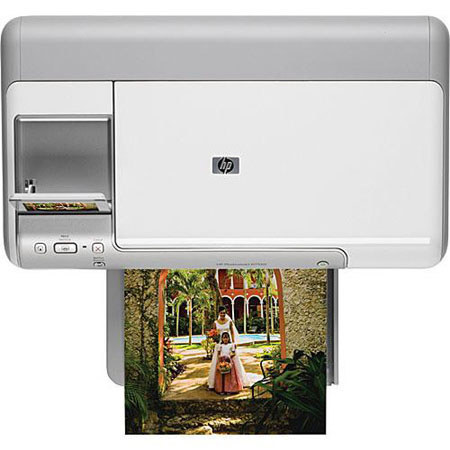
Enjoy lab-quality photos, laser-quality documents and vivid colors from this reliable inkjet printer that uses five individual HP Vivera inks. Easily navigate menus and view, edit and organize photos using the large 3.5-inch touchscreen.
Join VIP PRO
Earn 2X Points + Exclusive Perks!
Request a Callback
Chat one-on-one with an expert
Sell or Trade your Gear
Get started in 3 easy steps