


This item is no longer available.
Review Summary
2011-03-18T21:00:00
This product works great for a home printer. A little noisy. Set up was easy for the most part. Connection to the network was great for the 3 PCs in the house. Of all things it had a problem installing on one of the three HP laptops. however, technical support was fantastic and worked through getting it working.
Sunkey1
2010-12-28T19:00:00
worst product ever! The main issue is the printhead which made me crazy! If something gets wrong with its printhead, YOU HAVE TO send the printer back for a new printer! It's very hard to fix this issue!
1111111

2010-12-27T19:00:00
I purchased this printer because of the value for the price. I also liked the fact the ink cartridges were much less expensive than those of my last printer. Now I know why. The ink runs out as if there were a hole in the bottom of the cartridge letting it drain away on the floor because they are so small. I love the printer but really question my choice because of the short cartridge life. Also, I still can't get it to link wirelessly with my laptop which was another big reason I purchased this particular model. I would recommend this printer as long as the purchaser is aware of its shortcomings.
maizyblue
2010-11-01T20:00:00
be careful, this printer does not use the 564 photo black cartridge, even though it is labelled 564....
Piet
2010-10-31T20:00:00
I purchased this printer a few months ago to replace my old HP printer (which I had for yrs). I was excited about the printer and its quality, until I realized that I would have to replace the ink at a ridiculous rate. Im a student and need to print many documents and the money I spend on ink is killing me. On top of that, the printer is now not printing anything with blue in it. After MANY MANY MANY cartridge cleanings, printerhead cleanings, alignments, etc, it still refuses to work correctly..... SOOOOO frustrated, especially since I just bought 100 in ink for this printer and really really dont want to buy the same terrible printer in order to use the ink.
sbustudent
2010-10-29T20:00:00
Purchased for occasional printing of photos. Faces come out red. Printed same picture at Walgreens and skin tones were accurate. Speed of printer is OK and black text is ok. One would expect a "photosmart" printer to accurately print photo's. Pictures were printed on HP photo paper at best quality. HP should privide help (online or otherwise) for printing photos. If someone from HP reads this please contact me. If you can help with printing photos I will gladly retract my review. Have not tried the scanner.
Shab
2010-10-22T20:00:00
I've had my Photosmart Plus for nearly a year. It prints beautifly and quickly. But I've been frustrated because the cord linking it to my laptop is so short--38 inches--that it limits the placement of components on my desk. So I've been reading the reviews from other users, and they've been talking about the WIRELESSNESS of this printer. What does that mean? Wireless? Just now I disconnected the cable to see if it prints that way. It doesn't. Apparently there is much I don't know. What did I miss? Does anybody know where I can I get a connection (cable) that is sixty plus inches long? Perplexed.
HLHL
2010-10-17T20:00:00
-Terrible User Interface -Not a "One step" wifi connection -constantly have problems with it -flash drive only can be used to print photos
Ashley0830
2010-10-09T20:00:00
I bought this HP Photosmart Plus 209a AIO printer (HP 564 Ink) to replace a HP Photosmart C 5180 AIO. Mostly trouble free installation and performance using with Windows 7 64 bit PC. Stops responding while scanning at times. Freezes up and necessitates unplugging from power source and computer restart. Below average photo printing and uses too much ink. My old HP Photosmart C 5180 and 8250 (HP 02 Ink) both do a much better job printing photos and use less ink than this model. Used for printing text documents only. I do not use the wireless feature at all. I have had several HP printers, one Canon printer and two Epson printers. This one and the Epson printers are least satisfactory of all.
rfb37
2010-10-05T20:00:00
This is my second HP printer, bought it because it was wireless. Was looking for a good printer to print photos. While the print quality is good, it uses ink very quickly. Price for the printer was excellent but you will make up for that in the ink you have to buy. Not the best choice if you print a lot of photos. And the black versus photo black cartridges is not explained very well. You would think that if you need 564 color print cartridges, that a 564 black cartridge would work. But buy the wrong one, try to install and it will not fit. Then you cannot return it. I wasted money for nothing and then had to go back and get the regular black (not photo black). Now, the real problems: Constantly have to turn it off and turn it back on and reboot computer so that it finds the printer. Cannot get the scanner to find the computer, nor the computer to find the scanner. Scanner will only recognize a USB Jump drive. So in order to scan anything to the computer, I have to scan it to the USB jump drive and take the drive to the computer to download the scans. Can't print directly from my camera card either, have to download from the camera card to the computer and then print from the computer. I have tried downloading updated drivers, which did not solve my problems. I have to admit I have not conacted HP about my issues yet. I have found work arounds for all the issues, but should you really have to? Don't you buy an all in one so that you can use all of it's features. I really think I am going to give this one away and get something that does not use up so much ink when printing photos.
cherieblick
2010-09-28T20:00:00
Since Im a college student, I constantly need to be printing papers and other things and this a great printer. It surpasses the two my parents had back home. And the price I got it for at the school store was amazing: $50! I am so glad I got this printer because it will make my life so much easier so I dont have to go asking around to use someones printer.
AP831
2010-09-27T20:00:00
This printer prints good pictures. The printer seems to run or shift a lot delaying the print your waiting on. The biggest concern I have is ink usage. It uses a ton of ink.
mable
2010-09-19T20:00:00
Overall waste of money. This printer was very time consuming to install. After following the instructions step by step to set up wireless printing with the included CD was able to print the test page, but could not do any printing afterwards. Had to then install the USB wired setup to print. Tried to return the printer, but HP support insisted on trying to trouble shoot. Again got the printer to print a test page, but cannot get through one regular print job without the printer hanging up and having to restart job several times. Very disappointed in HP.
BinNJ
2010-09-18T20:00:00
I bought this printer to replace my first HP photo printer when it died. I read the reviews which seemed pretty good (didn't read far enough). This printer does NOT print good quality pictures. The colors are dull and not the true colors of the subject photoed. It guzzles ink like crazy. No way does a cartridge last for even half the pages HP says you can get from a cartridge. I also get a message that the photo paper is out when it is not. Another time waster wehen you have to remove the tray and reinsert it to get it to print. Instead of enjoying my hobby of printing pictures, I now dread printing them. Can't afford another printer right now and buying the ink cartridges for this one keeps me from printing the pics I want. An overall disappointing purchase.. I can say that the installation was easy. The ONLY good thing about this printer.
Rocks52
2010-09-10T20:00:00
Ordered this printer due to the good reviews and great capabilities. Tried for 3 hours on our own and then 3 hours on the phone with customer service. "Fatal error" on installation. Unable to work with our brand new computer. Do not order if you do not have a HP computer.
AB12
2010-09-08T20:00:00
Always says out of paper, cleaned no help
feeler
2010-09-04T20:00:00
I had an old HP 4180, and it made this printer look sick. If my 4180 was wireless, I would never have traded it in. The print quality is not good, in my opinion. Scanning quality is horrible, and nothing but problems. WOULD NOT RECOMMEND.
NotVeryHappy
2010-09-01T20:00:00
About a month after I bought this printer I encountered an Ink System Failure to wit after cleaning the printer head cartridge and replacing the ink cartridges (the old ones still had lots of ink in them), I got the printer to work again. Last night the same think happened after printing 4 pages, (strictly documents) and have been unable to resolve the failure since. This is probably my tenth or twelveth HP printer and it is by far the worse when it comes to performance. The truly sad part about it is that it turns a year old this month. Citizens, don't buy this printer.
TJburks
2010-08-20T20:00:00
i tried to get the printer up & running---failed, had a geek come out tried it too it failed talk to support, no help---- i returned the printer wont buy another hp printer
jpk3
2010-08-09T20:00:00
i got this with a ecode to take over my c4780 with lighter issues i got this to find it leaked in a few weeks
irulethe70s
2010-08-09T20:00:00
We may just have had a defective machine but our experience was not good. We had to attermpt installation multiple times, and when we finally got it installed it made a terrible noise and would not make copies. HP is replacing it but I will not accept the same model.
oregon
2010-08-08T20:00:00
I have had this printer now for 1 mo, its great to have it and working well. The only one thing that I wish it had compaired to my previous HP printer was the slot for my size camera card it doesn't have the size i need were the other one did, but still can upload the pictures from the camera. The other thing I ordered the extra ink, its good that i did cause the ink that came with the machie is low grade to say that it doesn't print very many pictures before its gone. I would recommend this printer to anyone who is scanning and printing pictures for a family album the pictures come out great and the soft ware that comes with this is just as good as photoshop for croping and allignment....I made a good choice for the product and the money.
trackersea
2010-08-07T20:00:00
It was easy to install. Pictures and text are really very good. I like the fact that this printer uses individual color ink cartridges.
Salvatore
2010-08-07T20:00:00
very unhappy with the ink consumpion on this printer, constantly changing ink cartridges, and i'm not doing pictures or anything requiring alot of ink
oldssedan
2010-08-03T20:00:00
Thus far, this printer has worked very well. Have not yet tried ALL the features. Replaced two HP printers that I had for 10 years with this one. I hope it lives up to its predecessors. One thing I was incredibly disappointed in was the sample HP Advanced Photo Paper that came with this printer. I am SURE it costs a lot. However, when I tried it out with two photos of people that I had not touched up with any program, the photo was so vivid that it eliminated many facial details. I printed these photos both on the sample photo paper and then on plain paper. The plain paper had a much better image that included all the facial features clearly; the photo paper washed it all out with it's vivid color image. I don't recommend this paper. Am looking forward to using all the features of this printer. I am very happy with the results so far.
Tricia4210
2010-07-23T20:00:00
I like many of the features of this printer, but potential customers should know that you cannot scan multiple pages to a file without being at the computer. So, if you are set up wirelessly and have the printer/scanner in another room, you must walk back and forth or it becomes a two person job.
Eric9
2010-07-19T20:00:00
My C5180 died (loved it) so decided to get another HP and choose the B209 as it was similiar. I installed it successfully, time consuming but easy with the installation CD however my printer would not print from my computer (another HP product). A tech took remote access to my computer and after 3 plus hours she uninstalled the B209 and the C5180 which she said was the problem (why couldn't the installation CD for the B209 unintall all the old printer installations automatically or just update those files so that the B209 could function in its place)Anyway it works now. If I hate it and it doesn't perform-I will update this review. Seems great now.
homeschooler101
2010-07-13T20:00:00
This printer was easy to install as I have two laptops. ( one personal and one for business). I scanned tons of old pictures and they look better than ever. Wireless is the way to go. I can be doing work on the first floor and send a print job from my laptop and there it is sitting and waiting for me when I go to my office on the second floor. I really do not feel the unit is overly noisy as I have read in other reviews. I have friends marching up to my office to see it so they can purchase one too. This printer has exeeded my expectations.
cscott
2010-07-12T20:00:00
I am so disappointed with this printer. Nothing but problems since purchase (1/15/2010). Keep getting ink system failure error. Now, they say the problem is the ink head...which was cleaned. They wanted to send me a replacement but wouldn't receive it til 5-7 days later. This printer drinks so much ink, its unreal and I only print papers for school. I also do not agree with the amount of pages printed per ink cartridge. I would not buy again!! I am also not happy with HP's customer service. Some of their customer service agents do not understand my questions.
transoff
2010-07-08T20:00:00
In short I received this printer about 9 days ago. The wireless installation was pretty easy much better than a previous HP printer which I returned. The reviews were very helpful. The photo print quality is HORRIBLE I spent hours on end with Tech Support trouble shooting, I used 3 different types of photo paper and the prints were still grainy and distorted. The previous reviews about "great" print quality didn’t prove true for me. I would say STAY away from this product HP gets thumbs down on this one! Its going BACK!!! And the ink can actually end up being pricier as its $26.99 for a color combo pack and $11.99 for black which is sold separately!! Dont waist your time!!!
JazieMo
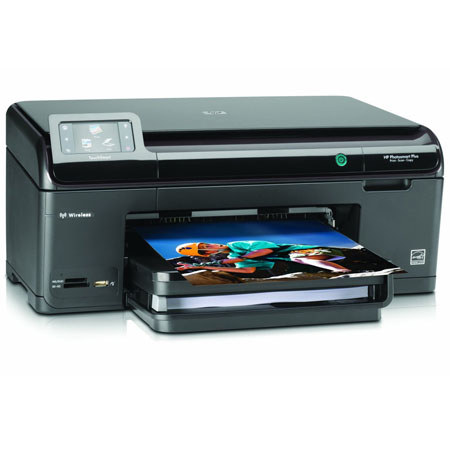
Print photos, copy and scan directly from this wireless all in one convenient touchscreen with the HP Photosmart Plus B209A All-in-One Inkjet. Take the guess work out of photo printing with easy photo enhancement features. Plus, get high quality results for your everyday documents.
Join VIP PRO
Earn 2X Points + Exclusive Perks!
Request a Callback
Chat one-on-one with an expert
Sell or Trade your Gear
Get started in 3 easy steps