About Samsung 16-50/3.5-5.6 Mirrorless
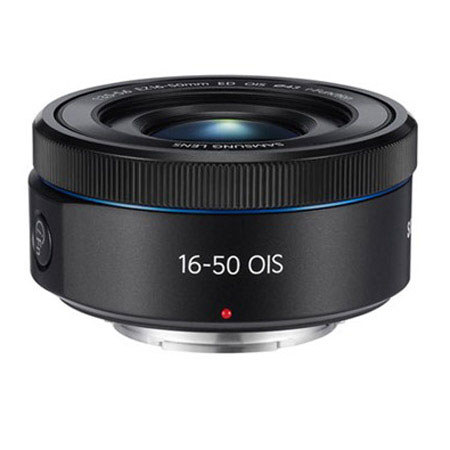
The Samsung 16-50mm f/3.5-5.6 S ED OIS Power Zoom Lens (Black) features the NX mount and offers a 35mm-equivalent focal length range of 24.6-77mm, covering wide-angle to portrait-length perspectives. It offers a maximum aperture range of f/3.5-5.6 and can be stopped down to f/22. The 7-blade circular aperture diaphragm creates a pleasing blur in the out-of-focus regions of your images.
The lens consists of 9 elements in 8 groups, including 1 extra-low dispersion (ED) and 4 aspherical elements for exceptional clarity, detail and sharpness. Additionally, optical image stabilization counteracts motion blur for clear shots. The Ultra-Precise Stepping Motor (UPSM) improves upon the conventional Stepping Motor (SM), offering three times the precision in its ability to focus on subjects. The lens also features Silent Auto Focusing and quiet zooming, which are ideal for video capture.
The Electro zoom function with a rocker-type button affords quick control, allowing you to simply click to zoom and take a photo from any angle. In making the lens, Samsung adopted the smooth zooming operation of high-end camcorders. With i-Scene Mode, your camera will automatically recognize the type of lens that has been attached and suggest scene types best-suited to that lens. Just press the i-Function button and select the scene type you want.
Samsung 16-50/3.5-5.6 Mirrorless Features
Configured with Samsung NX Mount
Has a 35mm-equivalent focal length range of 24.6-77mm, covering wide-angle to portrait-length perspectives
Offers a maximum aperture range of f/3.5-5.6 and can be stopped down to f/22
The 7-blade circular aperture diaphragm creates a pleasing blur, or bokeh, in the out-of-focus regions of your images
Consists of 9 elements in 8 groups, including 1 extra-low dispersion (ED) and 4 aspherical elements for exceptional clarity, detail and sharpness. The ED element minimizes chromatic aberration, while the aspherical elements reduce and nearly eliminate spherical aberration
Optical image stabilization counteracts motion blur for clear shots
Ultra-Precise Stepping Motor (UPSM) improves upon the conventional Stepping Motor (SM), offering three times the precision in its ability to focus on subjects
Features Silent Auto Focusing and quiet zooming, which are ideal for video capture
The Electro zoom function with a rocker-type button affords quick control, allowing you to simply click to zoom and take a photo from any angle. In making the lens, Samsung adopted the smooth zooming operation of high-end camcorders
With i-Scene Mode, your camera will automatically recognize the type of lens that has been attached and suggest scene types best-suited to that lens. Press the i-Function button, select the scene type you like, and your camera will automatically be optimized to take the perfect shot