Search

Email Advantages
Get your FREE
email updates from
Adorama:
Expert tips
Special offers
New products
First Name
Email
Privacy Policy

HACKER SAFE certified sites prevent over 99.9% of hacker crime.

BBB Logo

BizRate Customer Certified (GOLD) Site

onOne

Our Price

$121.95

Quantity:

Need Help? Call Our Experts!

1-800-223-2500

Hours of operation

Item Includes Description Features Specifications

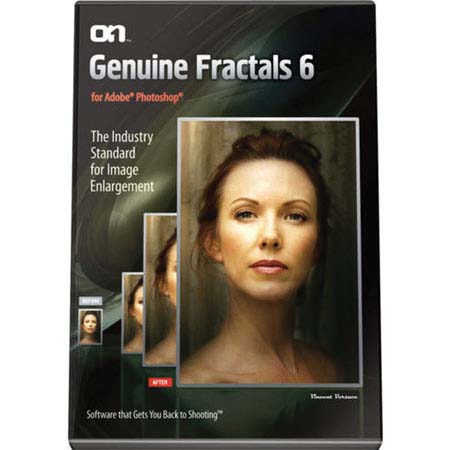
onOne Genuine Fractals 6.0, Image Resizing Plug in Software for Windows and Macintosh, Standard Edition

Mfr. Part: GFXE60011     SKU: ISWOGF6

onOne Genuine Fractals 6.0, Image Resizing Plug in Software for Windows and Macintosh, Standard Edition
enlarge image

Free Shipping view details

Product Rating Write a Review

Description

The onOne Genuine Fractals 6.0 is the industry standard for image resizing. It is renowned across the photographic and printing industries for its ability to increase image size over 1000% without the loss of sharpness or detail that you would normally expect. Its patented, fractal based interpolation algorithms work like nothing else and the results speak for themselves.

Genuine Fractals 6 allows you to crop and resize your image in a single step with no guess work. Its new Tiling feature makes it easy to get your enlargements printed just the way you want. Fire up the batch processing engine to resize an entire folder of images quickly. Genuine Fractals patented scaling algorithm is fundamentally different from bicubic or other interpolation and resizing methods found within Photoshop or in any other third-party plug-in or standalone application.

While other resizing methods sample nearby pixels one-by-one, Genuine Fractals looks for repeating patterns in an image, samples blocks of pixels of various sizes and patches them together to create a larger version of the original. Sampling and recreating blocks of pixels multiple times in this manner preserves fine details like edges, smooth areas and textures, resulting in an exceptional quality enlargement.

Features

Tiling Feature: The Tiling feature divides an enlargement into smaller pieces, preparing it for printing on a standard-sized printer. Just specify the paper size and overlap option and Genuine Fractals 6 will automatically resize the image and create individual tiles that are ready for printing
Batch Processing: This allows you to resize an entire folder of images to a consistent size and create up to two new versions of an image. You can control the size, resolution, file formats, name and location, color space and even add a watermark logo
Texture Presets: Genuine Fractals 6 now features texture presets for common image scenarios so even a novice user can get improved texture control results easily
Any Size, Made Easy: Genuine Fractals comes to the rescue with over sixty built-in document size presets that allow you to precisely crop and resize your image in one simple step
STN File Format: By saving your image in the STN file format that comes with Genuine Fractals, you can store your image in half the space it would normally occupy. And when you open this file you can specify the image size in which it will open
New Scaling Algorithm: Patented scaling algorithm works differently than Photoshop by recognizing edges and detail and maintaining them
Multi-Processor Support: Leverages the power or your multi-processor computer for faster performance
Document Presets: Built-in document size presets allow you to crop and resize in one step. Includes all the most common photographic, paper and video sizes. Getting your image on the right size print couldn't be easier
Fine Tune Your Results: You control the algorithm variables including texture control, sharpening and film grain
Multi-Layer Support: Enlarge your layered .PSD files and maintain your layer structure without flattening
Resize images up to 1000%
Maintain sharp edges and minute detail
Control texture for maximum quality with different image types
Apply sharpening based on luminosity only
Add simulated film grain for perceptual sharpening
Includes document size presets for common photo and paper sizes
Supports cropping and resizing in one step
Supports resizing RGB images
Supports resizing grayscale images
Supports LAB images
Supports layered Photoshop files

Specifications

System Requirements WindowsWindows XP SP2 or Vista
Microsoft .Net 2.0 Framework or higher
32-bit operating system supported
System Requirements Mac OS XMac OS X 10.4.11 or later
Universal Binary - Supports Intel processors
System Requirements OtherPhotoshop CS2(v9.0.2), CS3, CS4
Photoshop Elements 4 or later
512MB of RAM
25MB of disk space
Adobe Flash Player 9
Internet Connection for update checking & tutorial movies
Available LanguagesEnglish
Foreign language versions of Adobe Photoshop are not supported
WarrantyonOne warranty
  
 
Home · Shopping Cart · Account Info · Contact Us · New Products · Specials · Links · FAQ · Site Map · Closeouts · Cameras/Lenses · Flash/Lighting · Filters · Photo Essentials · Digital · Tripods · Binoculars/Scopes · Filing/Storage · Video · Audio Visual · Film · Darkroom · Underwater · Bags/Cases · Digital Prints · Used Equip. · Digital Cameras · Rental Department

Adorama Camera, Inc. 42 West 18th Street New York, NY 10011  Any problems with this site please contact Webmaster