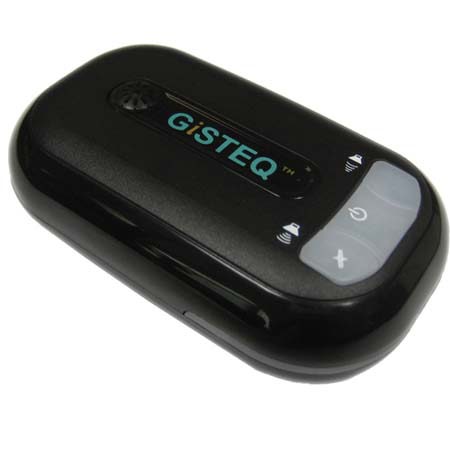
GiSTEQ CD111PRO PhotoTracker Device with Windows Software - Compatible with Adobe (MAC COMPATIBLE" Refer to Manufacturers Website )
SKU: ISWPTCD111P
This item is no longer available.
Share:
Overview
Compare
Learn
Specs
Protection
Reviews about this item
Review Summary
2011-08-21T21:00:00
Rated 2 out of 5
good idea but poor user interface
The GPS phototracker works reasonable well, its GPS position is accurate within a few meters and it seems to acquire a signal even under a few trees. I also like that it works with any camera and does not drain the camera's battery. So I had high hopes. Unfortunately, the operation is awkward and annoying. The device lights up like a Christmas tree with lots of colorful LED's flashing. Supposedly there is some reasoning behind the blue, green and red LED's, but I forgot. It seems like a throwback into 80's VCR interfaces. To make maters worse, it loudly announces lost satellite connections, regained satellite connections and what not. Try going into a church and having this thing announce to everybody who does not want to hear it that your GPS lost its satellite connection - awkward at best. As a result the thing is far less useful than it could be. I had hoped to turn it on in the morning, throw it into the top pocket of my day pack, forget about it all day, just keep shooting and match the GPS logs in the evening. Well, that worked for the test trips I took. In real life one turns the sound way down, tapes over the Christmas lights and does not notice that the device turned itself off a few hours ago. Finally, the software is clumsy, needs to be updated before it even installs and is flagged as spyware by my virus software. So, it's a good idea, but poorly executed.
CHRISTOPH G.
2011-06-28T21:00:00
Rated 2 out of 5
Stay away
I have used this to geo-tag photos for Google Earth etc. I picked Gisteq because there was very little else to choose from if you want to geo-tag photos with your Canon 5D mark II. I have had problems with this Gisteq unit from day one. 1. Initially the software display of the mapping of my GPS tracks didn't work. 2. The unit rattled and was unreliable. I had to take it apart and secure a loose part inside the unit. 3. The unit is of poor mechanical design. The on-off button is too large and unprotected. You have to put it in a protective can to avoid accidental on-off 4. When you download your GPS data to your computer and recharge the unit it randomly starts collecting GPS data again. This is very irritating as it messes up the beginning of your next trip. 5. The GPS time offset for your time zone does not work reliably. I have had to set my computer and cameras to GPS time (London time +15 seconds). The Gisteq can not reliably handle the offset. 6. After a year of hit and miss use I have had to reload the Gisteq software on my computer. I have tried both downloading from their website with my earlier key, and loading from the original CD. Neither has worked and keeps asking me to register the product again. After I do this it asks med to register the product again. SUMMARY: The hardware is poor. The software is worse.
Bengt N.
2010-08-15T21:00:00
Rated 1 out of 5
Terrible Software
I purchased tis ater careful reiew of options for Canon. The GPS unit is well made with good battery life and can record GPS data as advertised. However, the integration of the GPS data into the metadata of the photos on your computer later is just awful. The software is such a dissappointment on its installation (no suppor for 64 bit OS in Vista) and the painfully random integration of the GPS data to the date and time matched photos. Run away from this, definatkey a do-not buy
Brian M.
2010-07-27T21:00:00
Rated 1 out of 5
very difficult to use
Cannot tell if its working or not while in the field. Provided manual not user friendly.
ELMER P.
2009-07-12T21:00:00
Rated 3 out of 5
Really useful but with flaws
Before getting a geotagger I did as much research as I could. This unit seemed to be able to do everything I needed and, for the most part, it does. I've been using it for a few weeks now and have had no problems with accuracy and reliability. It's simple and easy to use in the field. The problem for me lies in the software. Most annoying is the inability to simply print or export a pdf (or something) of any given route that I've taken. For what I use it for that would be really useful and it simply does not do it. What's the point of tracking my routes if I can't send a map to someone else? There is no problem getting the GPS data into the photos but there is a problem with how the addition of the geotagging software modifies the metadata on the photos. Most of the time and date information is changed so that it is no longer available to read in Lightroom. This may seem like an issue with Lightroom but the metadata has been permanently changed. Other than software that could be a whole lot more useful, the photo tracker does do what I bought it for. Considering that this technology is really in it's infancy, what this does is pretty darn neat.
Jeff
2009-05-25T21:00:00
Rated 3 out of 5
It works for me
I use it with a Nikon 300. It does exactly what I want. I get a thumbnail image on Google Map or Earth, and if I want to find where I took the picture, it tells me. Two problems I have. One, raw images show up as black rectangles. Therefore I have to convert them all to jpeg. This requires a tiresome workflow. But it does tag the raw images. Second, I can't read the geodata in Photoshop Bridge. I can read it in Geoseter, For its price, it is a gem
rhb007
2009-01-22T19:00:00
Rated 5 out of 5
Cool gps for photos
I use this gps to catalog in my photos, it works great to lock in the place were I shot the photo. The software that came with it is easy to use and easy to set up. The gps is a simple device and easy to use. Getting logged into google maps to work with the software was a bit tricky but after that it works great with adobe lightroom, and photoshop to lock in the locations. Will write the location to info file of photo.
Dan
2009-01-14T19:00:00
Rated 1 out of 5
GPS works great, software just terrible.
Although the GPS unit itself is quite simple to use, the software bundled with this unit can only be described as absymal. I bought the Pro version because it was supposed to "work seamlessly with Adobe Bridge". However, if there's a way to "integrate into the RAW photo processing flow" GiSTEQ is keeping it a secret. The documentation for the software is, quite simply, embarrasing. Installation was quirky and confusing on my XP machine, with random windows popping up during the process, as if the installation was attempting to install two different programs at the same time. Once the desktop installation hurdle was cleared, I attempted to install it on my laptop (you're allowed three installations). After installing and then uninstalling the program twice without being able to activate it, I visited GiSTEQ's web site for help. After finding some answers in their online forum, downloading another copy of the installation files, and making two more attempts, I apparently hit some secret combination of keystrokes that allowed the program to install on my laptop. Horray! But, once I started to use the software, I found that it just doesn't work all that well. For example, for some reason it imports only selected photos from a given directory, randomly refusing to import others. I simply would not recommend this unit to anybody because of the deficient software documentation, and just plain frustrating program experience. If I could return this unit, I would do it in a heartbeat.
Mark
GiSTEQ CD111PRO PhotoTracker Device, Adobe Compati Specifications
Related Articles & Videos
About GiSTEQ CD111PRO PhotoTracker Device, Adobe Compati
The GiSTEQ PhotoTrackr Pro version is designed for professionals or anyone who shoots photos in RAW formats. With its enhanced support for over 100 RAW formats, user could import RAW photos directly into PhotoTrackr software without any format conversion.
The software also provides all the geotagging function for the RAW images and it works seamlessly with Adobe PhotoShop, Adobe Lightroom, and Adobe Bridge, etc which can be integrated into the RAW photo processing flow (GPS info will be written in XMP sidecar file). GiSTEQ PhotoTrackr Pro is an ideal solution for photographic enthusiasts. The PhotoTrackr Pro version works with any hardware model.