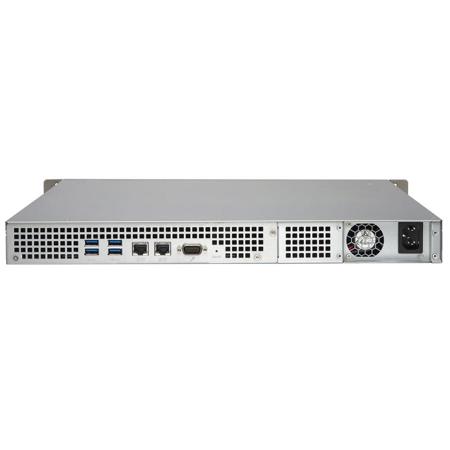
QNAP TS-431U 4-Bay 1U Rack Mountable SMB NAS Server, Freescale ARM Cortex-A9 1.2GHz, 1GB RAM, 3.5 or 2.5 Drive, QTS 4.1 Embedded Linux

SKU: QNTS431U

This item is no longer available.

Recommended Alternatives
Overview
Compare
Specs
Protection

Reviews about this item

Review Summary

2016-10-13T08:14:02

Rated 5 out of 5

Works as advertised

Works as advertised, setup is pretty straightforward

Joseph M.

QNAP TS-431U Specifications

  • Hardware: CPU

    Freescale ARM Cortex-A9 dual-core 1.2GHz processor with hardware encryption engine

  • Hardware: Floating Point Unit

    Yes

  • Hardware: Hardware Encryption Engine

    Yes

  • Hardware: DRAM

    1GB DDR3 RAM

  • Hardware: Flash Memory

    512MB

  • Hardware: Hard Disk Drive

    4x 3.5" or 2.5" SATA 6Gb/s, SATA 3Gb/s HDD or SSD

  • Hardware: Hard Disk Tray

    4 Hot-swappable and lockable trays

  • Hardware: LAN Port

    2 Gigabit RJ-45 Ethernet ports with porting trunking support

  • Hardware: LED Indicators

    Status, LAN, USB, HDD 1-4

  • Hardware: USB

    4x USB 3.0 ports (rear)
    1x USB 2.0 port (front)
    Support USB printer, pen drive, and USB UPS etc.

  • Hardware: Buttons

    Power, USB One-Touch-Copy, reset

  • Hardware: Alarm Buzzer

    System warning

  • Hardware: Form Factor

    1U, rack mountable

  • Hardware: Power Consumption (W)

    HDD standby: 19.3W
    Typical operation: 34.9W
    (with 4x 2TB HDDs installed)

  • Hardware: Operating Temperature

    0 to 40 deg. C / 32 to 104 deg. F

  • Hardware: Humidity

    5 - 95% RH non-condensing, wet bulb: 27 deg.C

  • Hardware: Power Supply

    Input: 100-240V AC, 50/60Hz; Output: 250W

  • Hardware: Fan

    1x quiet cooling fan (12cm, 12V DC)

  • Software: Operating System

    QTS 4.1 (embedded Linux)

  • Software: Supported Clients

    Windows 7 and Windows Server 2003 onward, Apple Mac OS X onward, Linux & UNIX

  • Software: Supported Browsers

    Google Chrome
    Microsoft Internet Explorer 10+
    Mozilla Firefox
    Apple Safari

  • Software: Multilingual Support

    Chinese (Traditional & Simplified), Czech, Danish, Dutch, English, Finnish, French, German, Greek, Hungarian, Italian, Japanese, Korean, Norwegian, Polish, Portuguese (Brazil), Romanian, Russian, Spanish, Swedish, Thai, Turkish

  • Software: File System

    Internal hard drive: EXT4
    External hard drive: EXT4, EXT3, NTFS, FAT32, HFS+

  • Software: Networking

    TCP/IP: IPv4 & IPv6
    Dual Gigabit NICs (failover, multi-IP settings, port trunking/NIC teaming )
    Service binding based on network interfaces
    Proxy client, proxy server
    DHCP client, DHCP server
    NTP server
    Protocols: CIFS/SMB, AFP(v3.3), NFS(v3), FTP, FTPS, SFTP, TFTP, HTTP(S), Telnet, SSH, iSCSI, SNMP, SMTP, and SMSC
    UPnP & Bonjour discovery
    Wi-Fi 802.11 ac/a/b/g/n USB adapter support

  • Software: Security

    Network access protection with auto-blocking: SSH, Telnet, HTTP(S), FTP, CIFS/SMB, AFP
    CIFS host access control for shared folders
    AES 256-bit volume-based data encryption
    AES 256-bit external drive encryption
    Importable SSL certificate
    Instant alert via E-mail, SMS and beep
    Antivirus protection

  • Software: Storage Management

    Single Disk
    Bad block scan and hard drive S.M.A.R.T.
    Bad block recovery

  • Software: Power Management

    Wake on LAN
    Internal hard drive standby mode
    Scheduled power on/off
    Automatic power on after power recovery
    USB and network UPS support with SNMP management

  • Software: Access Right Management

    Import/export users
    User quota management
    Local user access control for CIFS, AFP, FTP and WebDAV
    Application access control for Photo Station, Music Station and Video Station
    Subfolder permissions support for CIFS/SMB, AFP, FTP and File Station

  • Software: myQNAPcloud Service

    Private cloud storage and sharing with myQNAPcloud id (QID)
    Free host name registration (DDNS)
    Auto router (via UPnP) configuration
    Web-based file manager with HTTPS 2048-bit encryption
    Cloudlink for remote access without complicated router setup
    myQNAPcloud connect for easy VPN connection (Windows VPN utility)

  • Software: Qsync

    Syncs files among multiple devices with SSL support
    Selective synchronization for syncing specific folders only
    Share team folder as a file center for team collaboration
    Shares files by links via e-mail
    Policy settings for conflicted files and file type filter support
    Incremental synchronization for HDD space saving
    Supports Windows & Mac OS

  • Software: Web Administration

    Personalized desktop
    Smart toolbar and dashboard for system status: Dynamic DNS (DDNS), SNMP (v2 & v3), Resource monitor
    Network recycle bin for file deletion via CIFS/SMB, AFP and File Station: Automatic cleanup, File type filter
    Comprehensive logs (events & connection)
    Syslog client/server
    Mobile app: Qmanager for remote system monitoring & management

  • Software: File Server

    File Sharing across Windows, Mac, and Linux/UNIX
    Windows ACL
    Advanced folder permission for CIFS/SMB, AFP, FTP
    Shared folder aggregation (CIFS/SMB)

  • Software: FTP Server

    FTP over SSL/TLS (Explicit)
    FXP supported

  • Software: File Station

    Supports ISO Mounting (Up to 256 ISO Files)
    Support thumbnail display of multimedia files
    Support share download link and upload link
    Drag-n-drop Files via Chrome and Firefox Browsers
    Photo, music and video preview and playback
    File Compression and decompression (ZIP and 7z)

  • Software: Backup Station

    Remote replication server (over rsync)
    Real-time remote replication (RTRR) to another QNAP NAS or FTP server
    Works as both RTRR server & client with bandwidth control
    Real-time & scheduled backup
    Encryption, compression, file filter and transfer rate limitation
    Encrypted replication between QNAP NAS servers

  • Software: Backup Station 1

    Desktop backup with QNAP NetBak Replicator for Windows
    Apple Time Machine backup support
    Data backup to multiple external storage devices
    Third party backup software support: Veeam backup & replication, Acronis True Image, Arcserve backup, EMC retrospect, Symantec Backup Exec, etc.

  • Software: Photo Station

    Show photos in thumbnails, list, timeline or folder view
    Supports virtual/smart album
    Tags photos with text, color and rating
    Slideshows with background music and different transition effects
    Animated thumbnails for videos
    Geotags photos and display them on Google maps
    Shares slideshows link to social websites or through email
    Supports Facebook friends login

  • Software: Music Station

    Plays or Shares Music Collections with Web Browser
    Automatic Classification via Media Library
    Supported audio format: AIFF, APE, FLAC, M4A, M4A Apple Lossless (ALAC), MP3, Ogg Vorbis, WAV (PCM, LPCM),WMA, WMA PRO, WMA VBR
    Internet Radio (MP3)
    Up to 8 Music Alarms

  • Software: iTunes Server

    Audio and Video Sharing for Windows & Mac iTunes

  • Software: Video Station

    Show photos in thumbnails, list, timeline or folder view
    Tags videos with text, color and rating
    Animated thumbnails for videos
    Shares video collection link to social websites or through email
    Display movie information from IMDB

  • Software: DLNA Server

    Supports DLNA/UPnP TVs and Players such as PlayStation 3 and Xbox 360
    Supported audio format: AIFF, APE, DSD (DSF, DFF), FLAC, M4A, M4A Apple Lossless (ALAC), MP3, Ogg Vorbis, WAV (PCM, LPCM), WMA, WMA PRO, WMA VBR
    Support CUE indexing file for APE, FLAC audio format
    Video and Audio On-the-fly Transcoding

  • Software: Transcode Management

    Offline video transcoding: 240p, 360p, 480p, 720p and 1080p resolution
    Automatic video transcoding for watched folders

  • Software: AirPlay

    Streams videos, photos and music from NAS to Apple TV via Qfile or QAirPlay's web-based controller

  • Software: Digital TV Station

    DVB-T Digital TV Live View, Recording, and Playback
    Electronic Programming Guide (EPG) with Scheduled Recording

  • Software: Download Station

    PC-less BT, FTP/FTPS and HTTP/HTTPS download (up to 500 Tasks)
    BT download with Magnet Link and PT support
    Scheduled download and bandwidth control
    RSS subscription and download (broad catching)
    Bulk download with wildcard settings
    BT search
    Proxy support for BT download
    PC utility: Qget for downloads browsing and management
    Mobile app: Android Qget for downloads browsing and management

  • Software: Cloud Storage Backup

    Amazon S3
    Amazon Glacier
    WebDAV-based cloud storage
    Microsoft Azure
    Open Stack
    Google Cloud Storage

  • Software: Print Server

    Max number of printers: 3
    Print job display and management
    IP-based and domain name-based privilege control

  • Software: Surveillance Station

    Supports over 2,700 IP cameras
    Includes 2 free camera licenses, up to 8 camera channels via additional license purchase
    Instant playback to check the recent event
    Visual aid by e-map
    Playback and speed control by shuttle bar
    Video preview on playback timeline
    Intelligent video analytics (IVA) for advanced video search
    Surveillance client for Mac
    Mobile surveillance app: vmobile (iOS and Android)
    Mobile recording app: vcam (iOS and Android)

  • Software: Notes Station

    Graphical web-based editor for taking notes
    Integrate with NAS file system: insert attachment or image from NAS file system
    Event calendar and to-do list
    Image editor
    Provide Chrome Extension: Notes Station Clipper
    Clip web page content to your note
    Mobile app: Qnotes

  • Software: Signage Station

    Support dynamic content includes video, image, music and text message
    Multi-user collaboration
    Support email and social network sharing
    Support design software - iArtist Lite for Windows
    Support various browser playback (Chrome, Firefox, IE, Safari)

  • Software: iSCSI (IP SAN)

    iSCSI Target
    Multi-LUNs per Target
    Up to 256 Targets/LUNs Combined
    Supports LUN Mapping & Masking
    File-based LUN
    Online LUN Capacity Expansion
    iSCSI LUN Backup, One-time Snapshot and Restore
    iSCSI Connection and Management by QNAP Finder (Windows)
    Virtual Disk Drive (via iSCSI Initiator)
    Max No.of Virtual Disk Drives: 8

  • Software: VPN Server

    Secure remote access: PPTP &OpenVPN VPN services
    Max number of clients: 15 for PPTP & 15 for OpenVPN

  • Software: Authentication Integration

    Microsoft Active Directory (AD)
    Domain controller
    LDAP server, LDAP client
    Domain users login via CIFS/SMB, AFP, FTP and File Station

  • Software: App Center

    More than 100 official and community software add-ons

  • Software: Mobile Apps

    Qfile: iOS, Android Phone, window phone
    Qfile HD: iPad version
    Qmanager: iOS, Android Phone
    Qmusic: iOS, Android Phone
    Qremote: iOS, Android Phone
    Qget: Android Phone
    Vmobile: iOS, iPad, Android Phone

  • Dimensions (H x W x D)

    1.73 x 17.28 x 19.65" / 4.39 x 43.89 x 49.91cm

  • Weight

    16.82lbs / 7.63kg

  • UPC Code

    885022008636

About QNAP TS-431U

FEATURED REVIEWS

Works as advertised

By Joseph M.

Works as advertised, setup is pretty straightforward

The 4-bay TS-431U offers the optimal price/performance in a compact 1U chassis network storage server for file sharing, backup, synchronization, remote access and more. Powered by an advanced ARM Cortex-A9 dual-core processor and 1GB RAM, the TS-431U delivers outstanding multitasking performance as a business NAS featuring four USB 3.0 and dual Gigabit LAN ports while maintaining low power consumption for 24/7 always-on usage. See how the TS-431U can enhance your working productivity & offers a private cloud for accessing data easily and securely.

• Organize & manage files and backup tasks in one centralized location
• Full NAS encryption by volume-based technology and hardware acceleration
• Synchronize files between computers, laptops and mobile devices
• Create a 24/7 surveillance center for business environment
• Build a private cloud-based notebook to share with group members with the Notes Station and Qnotes mobile app
• Stream multimedia library via DLNA, AirPlay & Chromecast and watch on TV

Dual-core processor delivers high performance
Equipped with powerful yet energy-efficient ARM Cortex-A9 dual-core 1.2GHz processor and 1GB DDR3 RAM, the TS-431U is a high-performance NAS for small and home offices, providing high performance of up to 148 MB/s read & 119 MB/s write throughput. The TS-431U's enhanced hardware-based encryption and decryption engine provides transfer speeds of over 33 MB/s with AES-256 bit full NAS volume encryption, boosting system performance & security while ensuring the safety of sensitive personal data stored in the TS-431U.

High efficiency with dual LAN support
The TS-431U supports multiple port-trunking modes, enabling IT administrators to set up link aggregation to increase total data transmission capability. Failover and dual IP are also supported to ensure continuous system operations. The supported port-trunking modes include: Balance-rr (Round-Robin), Active Backup, Balance XOR, Broadcast, IEEE 802.3ad, Balance-tlb (Adaptive Transmit Load Balancing) and Balance-alb (Adaptive Load Balancing).

QTS - Simple and efficient
Thanks to QTS intuitive user interface, system operations of the TS-431U are smooth and handy. Its intelligent desktop allows you to find desired functions quickly, create desktop shortcuts or group shortcuts, monitor important system information on a real-time basis and open multiple application windows to run multiple tasks concurrently, bringing greater operating efficiency.

Enhance productivity with multiple USB 3.0 ports
Equipped with four SuperSpeed USB 3.0 ports, the TS-431U allows you to flexibly arrange tasks with a wide range of external devices without interrupting your current workflow. You can back up files to USB drives, access data stored on SD cards via USB card readers, share up to 3 printers via network and connect to a UPS to ensure a continual power supply.

Well-rounded backup solutions to secure data
QNAP's NetBak Replicator supports real-time and scheduled data backup for Windows (including Outlook email archiving) and Mac OS X users can use Time Machine to effortlessly back up data to the TS-431U. The front panel USB port features a one-touch-copy function for you to instantly back up data on external drives to the TS-431U or alternatively to back up data from the TS-431U to external drives. A wide range of third-party backup software such as Acronis True Image and Symantec Backup Exec are also supported.

Disaster recovery solutions brings peace of mind
The TS-431U offers various data recovery options. RTRR (Real-Time Remote Replication) supports real time or scheduled data backup to a remote QNAP NAS or FTP server and synchronizes files to a remote folder from a local folder with better backup efficiency and reduced backup time. The TS-431U also supports rsync protocol to back up data to another remote server on scheduled basis. Data can also be backed up to and restored from a range of cloud storage services, including Amazon S3, Amazon Glacier, Microsoft Azure, ElephantDrive, Dropbox and Google Cloud Storage.

Comprehensive security options
In open network environments, business data may be exposed in a potential hack. The TS-431U provides numerous security options, such as encrypted access, IP blocking and more. IT administrators can also control the access rights of each user to different folders, preventing unauthorized access to important files. The TS-431U supports AES 256-bit encryption, preventing sensitive business data from unauthorized access and breach even if the hard drives or the entire system were stolen.

Cross-platform file sharing, centralized data storage
The TS-431U supports SMB/CIFS, NFS and AFP protocols for file sharing across Windows, Mac and Linux/UNIX. Data, logs and ISO image of CDs and DVDs can be centrally stored in the TS-431U and protected by an integrated antivirus solution.

Manage your files via the Internet
The File Station brings conventional desktop-style file operations to web browsers, allowing you to upload, download and manage files on your TS-431U wherever there is an Internet connection. Supporting file extraction, folder creation and smart search for files and folders, File Station also allows you to easily share files with colleagues and workgroups via unique URLs. With reliable security features, SSL and password options, managing & sharing your files is simple and safe with the File Station.

A private cloud without constraints
In contrast to the limited storage space and potential security concerns of public cloud services, the TS-431U is advantageous for establishing a secure and large-capacity private cloud. The myQNAPcloud service allows remote access to files stored on the TS-431U, allowing you to play & share media files or large-sized files from the TS-431U or to conveniently check the system status from anywhere.

Dropbox-like file synchronization across computers and mobile devices
With Qsync, your TS-431U is turned into a safe data center for file synchronization. Any file uploaded to the TS-431U will be made available for all linked devices, such as computers, laptops and mobile devices. Qsync is especially useful for frequent travelers in managing files and ensuring that different devices have the most up-to-date files. Qsync provides multiple ways for file synchronization and group file sharing, greatly enhancing the flexibility of team projects and collaboration.

Create digital notes on your private cloud
The Notes Station provides a private & secure way to share and collaborate on digital notes. With just a few steps you can create and edit notes with the intuitive web-based editor and take screenshots for quick note-taking with Qsnap or the Notes Station Clipper extension for Chrome. You can also easily leverage the rich media contents stored on the TS-431U to enhance your notes and access them on your mobile phones or tablet devices by using Qnotes mobile app anytime, anywhere.

The Notes Station supports PDF file import/export, RSS live feeds, snapshots for version control, online preview for attached multimedia files, AES 256-bit encryption for notes and the ability to back up & modify Evernote notes. It also allows inviting other users to read or edit notes for productive communication and teamwork and supports organizing calendars and to-do's from each note in one place for easy access. You can enjoy a better note-taking experience and write & organize your notes with greater efficiency for work and life tasks.

Signage Station - Creatively present your animated content and ads
With the Signage Station, it is easy to create content for a wide range of materials such as menu boards, advertisements, posters and business profiles. The Signage Station is a great tool to invigorate your advertisements or animated materials for promoting your services and to update contents in a timely manner.

Supports DLNA, AirPlay & Chromecast for media streaming
You can use DLNA-compatible devices such as Smart TVs, Sony PS3, Microsoft Xbox 360 and media players to watch HD quality videos stored on the TS-431U. You can also use the Qfile app on an iOS device to browse videos and photos stored on the TS-431U and play on the TV via Apple TV. By installing the QAirplay&Chromecast app from the QTS App Center, you can stream your media content directly on a TV via Apple TV or Chromecast. The TS-431U's support for Plex Media Server organizes all of your media with rich information and transforms the TS-431U into a powerful & easy to use streaming machine with DLNA, Roku, Amazon Fire TV and Google TV support.

Access, use and sync with your tablets and smartphones
The TS-431U is your private cloud storage that virtually enlarges the capacity of your mobile devices. Qfile allows you to access, upload, download, manage and share stored files easily as if you are all of your files in your pocket. If Qfile is installed on an iOS device, users can also browse videos & photos stored on the TS-431U and play via Apple TV. Qmanager lets you monitor & manage the TS-431U remotely and efficiently without turning on your PC and you can enjoy and share music, photos and videos on the TS-431U anywhere and anytime with Qmusic, Qphoto and Qvideo apps.

Install-on-demand apps to extend NAS functionality
The TS-431U has a built-in App Center that provides various install-on-demand apps developed by QNAP and third-party developers, including tools for backup/sync, business, content management, communications, download, entertainment and much more.

What's in the box:

  • Qnap TS-431U 4-Bay 1U Rack Mountable SMB NAS Server
  • 2x Ethernet Cable
  • 16x Flat Head Screw (for 3.5" HDD)
  • 12x Flat Head Screw (for 2.5" HDD)
  • Power Cord
  • Hard Disk Tray Key
  • Qnap 2 Year Limited Warranty